
specrender


Render spectrogram images from audio files, or interactive HTML players that play the audio over its spectrogram. Images come out at exactly the pixel size you ask for, in any palette, as PNG, JPG, WebP, BMP, TIFF or GIF. Hour-long recordings render without loading the whole spectrogram into memory.
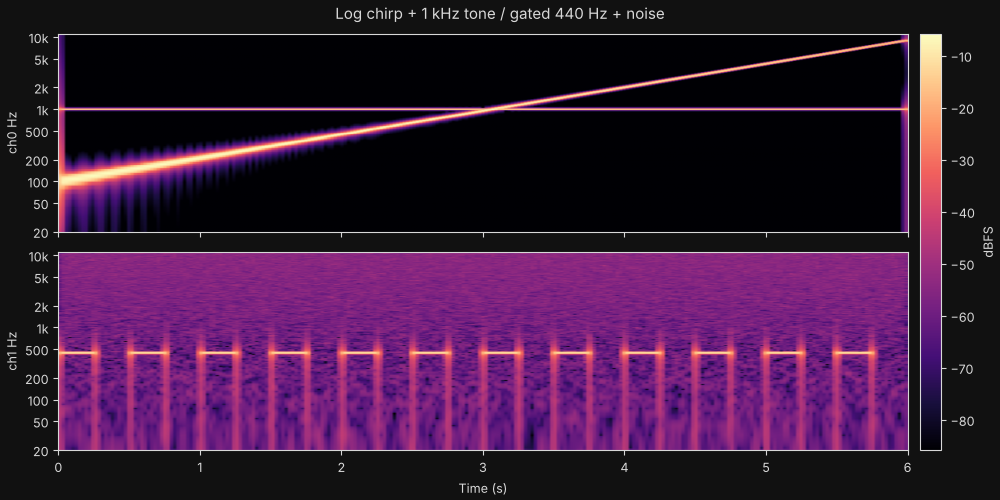
- Exact output size.
width×heightis what you get, including stereo channels stacked with a gap between them. - Any palette. 11 built-in palettes that need no matplotlib, any matplotlib colormap name, or your own colors.
- Linear, log or mel frequency axis, with
fmin/fmaxlimits andstart/endtime cropping. - Comparable levels. Levels are measured in dBFS, so a fixed
db_rangeputs many files on the same brightness scale. - Short events stay visible when you scale down. Max-pooling keeps a 1 ms click in a 10-minute file on screen.
- Most audio formats. WAV needs nothing extra. FLAC, OGG and AIFF use
soundfile. MP3, M4A, Opus and video files useffmpeg. Numpy arrays also work as input. - Interactive player. A single HTML file with play/pause, volume and speed controls. Click to jump, drag the playhead to scrub, and drag across the spectrogram to select a region and loop it.
- Library and CLI. Use
sr.render(...)from Python, or runspecrender *.wav -d out/.
Install
pip install "specrender[all]"
The core install needs only numpy, scipy and Pillow. The extras add more:
| Extra | Adds | For |
|---|---|---|
annotate |
matplotlib | annotate=True (axes, labels, colorbar) and matplotlib colormap names |
formats |
soundfile | FLAC, OGG and AIFF without ffmpeg |
all |
both |
For MP3, M4A and similar formats, install ffmpeg and make sure it's on your PATH.
Quick start
import specrender as sr

# Load, analyse, render and save in one call
sr.render("recording.mp3", "recording.png", width=1200, height=400, palette="magma")

# Speech: mel scale up to 8 kHz, saved as JPEG
sr.render("voice.wav", "voice.jpg", width=800, height=300,
          scale="mel", fmax=8000, palette="viridis", quality=90)

# Labeled axes, title and dB colorbar
sr.render("chirp.flac", "chirp.png", width=1200, height=600,
          scale="log", annotate=True, title="Test chirp")
Compute once, then render as many ways as you like:
spec = sr.compute("track.wav", scale="log", width=1600, height=500)

spec.save("dark.png",  palette="inferno")
spec.save("print.jpg", palette="gray_r", dynamic_range=60)
png = spec.to_bytes("PNG", palette="waterfall")   # bytes, e.g. for a web response
img = spec.to_image(palette="cividis")            # a PIL.Image you can compose further

spec.db      # (channels, rows, cols) in dBFS; row 0 is the lowest frequency
spec.freqs   # Hz at each row
spec.times   # seconds at each column
Numpy arrays from an SDR, a microphone or generated signals work too:
sr.render(samples, "iq_audio.png", sample_rate=48000, width=1000, height=300)
To render a folder of clips on a shared brightness scale:
from pathlib import Path
sr.render_batch(sorted(Path("clips").glob("*.wav")), "out/", format="webp",
                width=600, height=200, shared_levels=True)
Interactive player
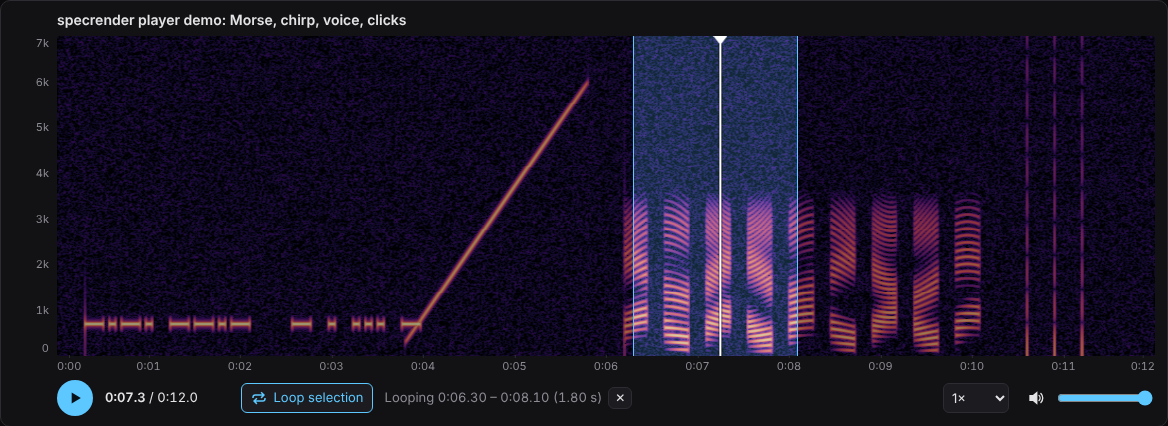
sr.player("recording.mp3", "recording.html", scale="mel", fmax=8000, palette="magma")
specrender recording.mp3 -o recording.html
This writes one self-contained HTML file, with the spectrogram, the audio and the player script all inside it. Open it in any browser; no server or internet connection is needed.
| Do this | To |
|---|---|
| Click | Jump to that point |
| Drag the white playhead | Scrub |
| Drag across the spectrogram | Select a region. Playback loops inside it |
| Drag a selection edge | Resize the selection |
| Double-click or Esc | Clear the selection |
| Space · ←/→ (Shift = 5 s) · L | Play/pause · seek · toggle loop |
Hover over the spectrogram to read the time and frequency under the cursor. There are also a volume slider, a mute button and a playback-speed menu.
On your own website, write separate files and use the <spectro-player> tag:
sr.export_player("talk.mp3", "site/players/") # specrender-player.js, talk.png, talk.json, talk.mp3
<script src="players/specrender-player.js" defer></script>
<spectro-player meta="players/talk.json"></spectro-player>
Large files can stay where they're hosted: pass audio_url="https://…/talk.mp3"
and only the image and settings are generated. Try
docs/player-demo.html
(download it, then open it), or see the
player guide.
Command line
specrender talk.mp3 -o talk.png -W 1600 -H 500 -p inferno -s mel --fmax 8000
specrender *.wav -d thumbs/ -f webp -W 400 -H 120 --db-range -90:0
specrender capture.flac -o annotated.png -a --title "{name}" -s log
specrender session.flac -o session.html -s log      # interactive player
specrender --list-palettes
Palettes
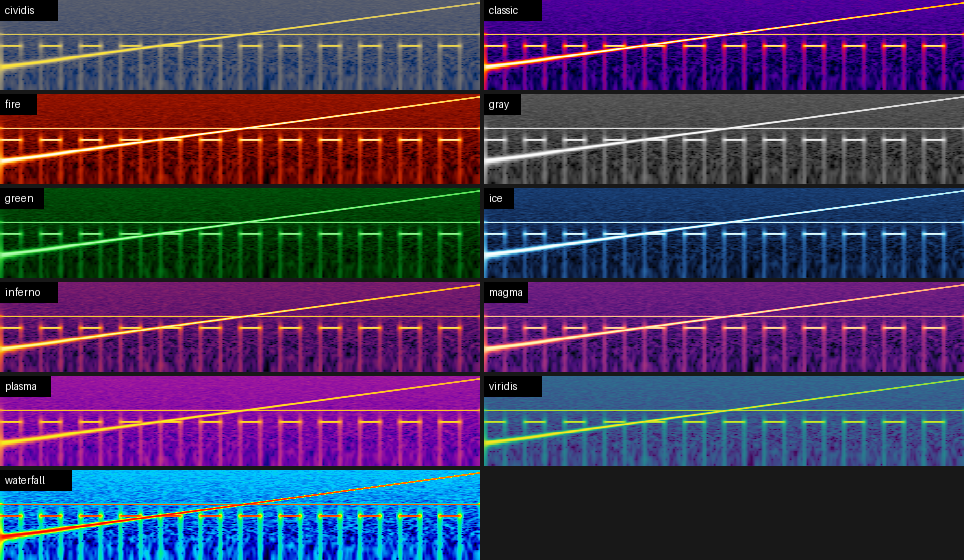
Add _r to any palette name to reverse it ("gray_r" gives dark-on-light for print).
To register your own palette:
sr.register_palette("brand", ["#0b0b2b", "#3355ff", "#ffffff"])
Documentation
- User guide: choosing FFT size, frequency scales, dynamic range, channels, long files, and recipes for speech, music and radio.
- API reference: every function, method and parameter.
- CLI reference: every flag, with examples.
- Changelog
Development
git clone https://github.com/kk4cnm/specrender && cd specrender
pip install -e ".[dev]"
pytest
python examples/make_gallery.py   # regenerates docs/images/
See CONTRIBUTING.md for details.
License
MIT. See LICENSE.
1 maintainer

Metadata
1 maintainer
Release files for specrender 0.2.0
For a detailed explanation of source distributions (sdists) and built distributions (wheels), please see the package formats documentation.
Source distribution (sdist)
| File | Size | Uploaded | Provenance | Actions |
|---|---|---|---|---|
| specrender-0.2.0.tar.gz | 43.5 kB | Without provenance | Details for specrender-0.2.0.tar.gz |
Built distribution (wheel)
| File | Interpreter | ABI | Platform | Actions Reset |
|---|---|---|---|---|
| specrender-0.2.0-py3-none-any.whl | Python 3 | none | any | Details for specrender-0.2.0-py3-none-any.whl |
Total release size: 82.8 kB
Release files / specrender-0.2.0.tar.gz
| Download URL | specrender-0.2.0.tar.gz |
|---|---|
| Size | 43.5 kB |
| Tags | Source |
|
SHA-256 checksum How to use checksums |
6875dae06a0a926c17770f6b2eed0e0f3afbbf70e844d8da46bdd901ac136f7e
|
|
BLAKE2b-256 checksum How to use checksums |
a3d57bed5e92adea3101aac8fe3c89e4f7d72ccdf1e162e3705394eb6b0f4e1f
|
| Upload date | |
|
Uploaded using Trusted Publishing? What is trusted publishing? |
No |
| Uploaded via |
twine/7.0.0 CPython/3.10.14
|
Release files / specrender-0.2.0-py3-none-any.whl
| Download URL | specrender-0.2.0-py3-none-any.whl |
|---|---|
| Size | 39.3 kB |
| Tags | Python 3 |
|
SHA-256 checksum How to use checksums |
03e35864568580addb47e6c33c2bb562dc5226f8f67b11ff3f57c27219743ef9
|
|
BLAKE2b-256 checksum How to use checksums |
30fd2a9b933a8c116a19233f5a26017e7f5e4f186b80539cb9b21a6032a2b0b7
|
| Upload date | |
|
Uploaded using Trusted Publishing? What is trusted publishing? |
No |
| Uploaded via |
twine/7.0.0 CPython/3.10.14
|
Security for specrender 0.2.0
Provenance
Provenance describes where a file came from. On PyPI, provenance is shared via attestations, which provide a verifiable record of the build or publishing details. View details, limitations and caveats.
No provenance found
None of the files in this release were uploaded with provenance metadata.
A note on package security
PyPI is a repository for distributing packages, not a service for auditing them. While third-party security researchers and our staff do their best to detect and remove malicious packages, PyPI cannot guarantee the quality, security or suitability of any given package.
To learn more about protecting yourself from malicious actors, visit our package security documentation.













