
Specrun
Blueprints and skills for the AI you already code with.
A blueprint records how a project builds a particular kind of thing — the shape, the contracts, the failure modes, and why each choice was made. Specrun installs a small set of them into your project, together with a router skill whose job is to notice when one of them applies. You keep working in chat as before; when the task matches a blueprint, your agent reads it first and builds along lines you have already settled instead of designing them again.
It also brings skills that stand on their own: two that run the mechanism — one writes a new blueprint out of work you have just finished, one draws the project's architecture as a single HTML file — and eight that do a job on request, from building an agent loop to auditing one for injection risk.
Everything is plain markdown in your repository. Nothing calls a model except your agent, in your chat, on your account.
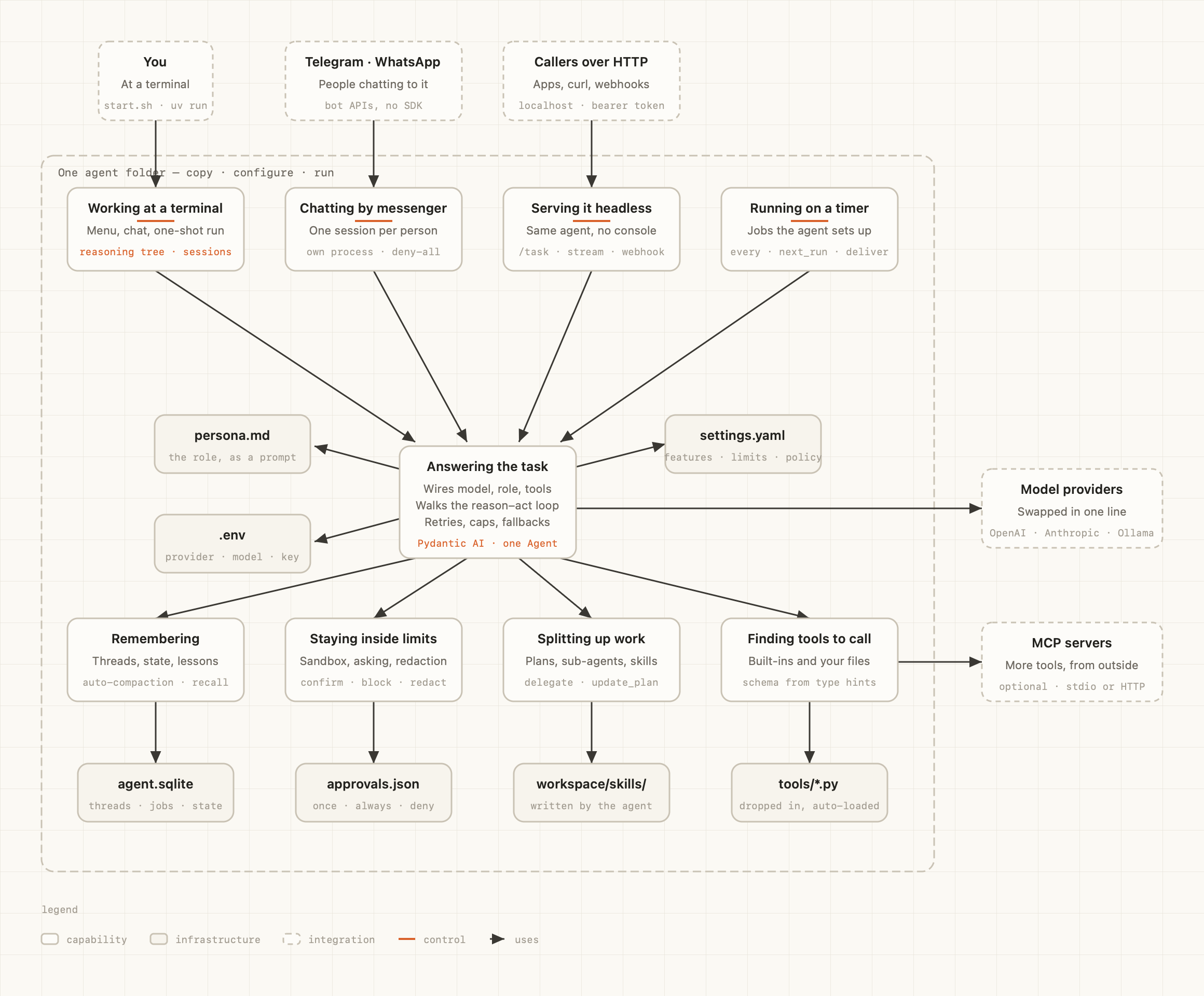
The map skill on another project: blocks named after the jobs the system does, not after its
directories. One self-contained HTML file, no network.
Install
There are two channels, and they are independent — the marketplace is useful with no CLI at all.
As a Claude Code plugin — the blueprints and skills, nothing else:
/plugin marketplace add ysz7/specrun
/plugin install specrun@specrun
As a CLI — the same content, plus installation into one project, a lock file that protects
your edits, and specrun scan:
uv tool install specrun
cd your-project
specrun init
init writes the router and the blueprints into .claude/skills/, records what it wrote in
.specrun/lock.json, and adds the generated map to your .gitignore. Commit the rest: what your
agent reads is worth reviewing, and a teammate who clones the repository gets the same answers
without installing anything.
Install one or the other. With both, the same skills arrive twice under slightly different names, and the duplicates compete for the same requests.
Updating
The plugin, from inside Claude Code — the first line refreshes the catalog, the second installs what it found:
/plugin marketplace update specrun
/plugin update specrun@specrun
The CLI, once per machine and then once per project:
uv tool upgrade specrun
cd your-project
specrun sync
sync rewrites the blueprints and skills it installed and leaves every file you have edited by
hand exactly as it is, listing them at the end. Your own blueprints in .specrun/local/ are never
touched. Nothing is upgraded behind your back: without sync, a project keeps the content it was
given, and specrun status is what tells you a newer set is available.
What you get
Skills
Three of them run the mechanism itself:
| Skill | |
|---|---|
blueprints |
the router: reads the task, picks a blueprint or says there is none |
blueprint-author |
writes a new blueprint, or your project's own version of a bundled one |
map |
draws the architecture as one self-contained HTML file |
The rest do a job when you ask for it — in chat by describing the task, or directly as /name:
| Skill | When |
|---|---|
build-agent-loop |
building an agent from scratch: tool dispatch, step budgets, traces |
design-agent-tools |
the agent picks the wrong tool, passes bad arguments, or drowns in tool output |
write-system-prompt |
writing or reworking a production system prompt |
build-rag-pipeline |
setting up retrieval over your own documents |
diagnose-rag-failure |
a RAG answer is wrong and it is unclear which stage failed |
build-eval-set |
a labelled eval set and scorers, so a change can be shown to have helped |
write-agent-tests |
tests for an agent: mocked tools, trajectories, adversarial cases |
audit-agent-security |
reviewing an agent for injection reaching real actions, over-scoped credentials, ungated tools |
Installed as a plugin, skills carry the plugin's namespace: /specrun:map rather than /map.
Blueprints
Fifty-two of them ship today. You never pick one from this list in normal use — the router does, from the same table, when the task matches. It is here so you know what your agent has to hand.
Agent core
| Blueprint | When it applies |
|---|---|
| Agent loop | Building the loop that calls a model, runs the tools it asks for and repeats until it stops; or an agent runs away, loops, or will not stop on its own |
| Context engineering | Deciding what occupies the model's context on a long run: the agent forgets what was said early on, quality falls off as the run grows, or cost is dominated by re-sending history |
| Framework selection | Choosing what an agent runs on — a plain loop, a graph framework, a provider SDK or a managed platform — at the start of a project, or revisiting that choice |
| Human in the loop | An agent can spend money, message people, delete data or write to production, and some actions need an approval gate, a sandbox or a dry run before they execute |
| Memory architecture | The agent has to remember across sessions: facts learned in one run applying to the next, user preferences that persist, or any store of knowledge outside the context window |
| Progressive tool discovery | The agent has more than about fifteen tools, tool schemas dominate the prompt, or accuracy drops with every tool added |
| Skill engineering | Writing the markdown procedures an agent loads on demand — skills, playbooks, the instructions that keep being pasted into chat by hand |
| State machine and reducer | State changes have to be deterministic and auditable while the model only decides; the agent loses the thread because its state lives in the conversation |
| Tool design | An agent has more than one tool and picks the wrong one, sends malformed arguments, or misreads what a tool returned; tool schemas, descriptions and return shapes are being written or reworked |
Agent workflows
| Blueprint | When it applies |
|---|---|
| Evaluator and optimizer | First drafts are reliably mediocre and the quality criteria can be stated, so a critic scores each attempt and the generator revises until it clears a bar |
| Orchestrator and workers | A lead model has to split a task into subtasks at runtime and dispatch them to workers with their own context windows; multi-agent, search-heavy work |
| Parallelization | Running model calls concurrently — independent sections merged at the end, or the same task sampled several times and voted on to raise reliability |
| Prompt chaining | The steps are known in advance and always the same, and each one can be checked before the next runs — a fixed pipeline of model calls rather than an agent |
| Routing | Inputs fall into distinct families needing different prompts, models or tools, and one prompt for all of them degrades every case; classifying an input before handling it |
Retrieval
| Blueprint | When it applies |
|---|---|
| Agentic RAG | One retrieval pass is not enough: the agent has to search, judge what came back and search again, across several sources or several steps |
| Chunking strategies | Deciding how documents are split before indexing; retrieved chunks are truncated, mix several topics, or lose the structure of the source |
| Contextual retrieval | Retrieved chunks are relevant but unusable on their own — pronouns without antecedents, numbers without units, sections without a subject |
| GraphRAG | Questions are about relationships between entities, or need aggregating across the whole corpus, which independent chunk retrieval structurally cannot answer |
| Hybrid search with RRF | Search misses exact strings — error codes, SKUs, function names, proper nouns — or recall is short with embeddings alone, so lexical and dense results have to be fused |
| Query transformation | Questions are conversational, vague or multi-part, or worded nothing like the corpus, so the query has to be rewritten, expanded or decomposed before it reaches the index |
| RAG baseline | Answers have to come from a document corpus the model was not trained on, the corpus changes, or answers must cite their sources; retrieval is being set up, or the model hallucinates and cannot attribute what it says |
| RAG evaluation | Measuring a RAG system so a regression points at retrieval or at generation, instead of tuning chunk size, k and the prompt by feel |
| Reranking | The right chunk is retrieved but ranked far down: recall is high and precision in the top few is low, or k must be cut before the prompt without losing the answer |
| Vector store selection | Choosing where embeddings live and which index and metadata filtering they use; or the store's recall, p95 latency or cost has become the constraint |
Prompting
| Blueprint | When it applies |
|---|---|
| Few-shot examples and reasoning | Output format is inconsistent, or the task needs multi-step derivation, and it is unclear whether to add examples or a reasoning scaffold |
| Guardrails and injection defence | The system reads content it did not author — user text, web pages, email, uploaded files, third-party tool results — and a model follows instructions hidden inside it |
| Prompt caching | The same prefix goes out on every call and should be billed once; or caching is configured and the hit rate is near zero |
| Prompt structure | Writing or reworking a production prompt: what belongs in the system block, in what order, how the sections are delimited, and which parts have to stay byte-stable |
| Structured output | The model's output feeds code and has to parse every time: JSON that keeps failing, schema-constrained decoding, tool-call schemas, validation and repair |
Evaluation
| Blueprint | When it applies |
|---|---|
| Agent trajectory evaluation | Grading the path a multi-step agent took — which tools it chose, in what order, how it recovered from errors and what it cost — not only its final answer |
| Eval harness design | Turning 'this seems better' into a number: the dataset, the scorers and the runner, before the second change to any LLM system |
| LLM as judge | Quality is genuinely subjective and no deterministic check exists, so a model scores the output; or the judge's scores disagree with human raters |
| Regression and CI evals | Wiring evals into the development loop so a quality regression blocks a merge instead of reaching users |
| Simulated users | Evaluating a multi-turn or conversational agent, or offline scores look good while production behaviour does not match them |
Data pipelines
| Blueprint | When it applies |
|---|---|
| Data quality and PII | Validating what enters the index, and detecting, redacting or gating personal data before it is irreversibly embedded, logged and retrievable |
| Document parsing | Inputs are PDFs, Office files, HTML or scans and have to become clean text that keeps headings, tables, reading order and page provenance |
| Embedding pipeline | Embedding text at scale: batching, rate limits, caching, retries, and the migration path for the day the embedding model changes |
| Incremental sync and CDC | Keeping a derived index current by processing only what changed; a full re-run is too slow or too costly, or the index has drifted from its source |
| Ingestion pipeline | Documents or records have to be loaded continuously into an index or store, with idempotency, incremental runs, and one bad document not stopping the batch |
Agent protocols
| Blueprint | When it applies |
|---|---|
| Agent-to-agent (A2A) | Handing an outcome to an autonomous agent you do not own — another team's or another company's — by specifying the goal rather than the call |
| AG-UI frontend streaming | The interface has to show what the agent is doing while it works: tokens, tool calls, thinking traces, interruptions |
| Agent protocols overview | Choosing which wire protocol fits — tools, agent-to-agent delegation, frontend streaming — when an agent has to talk to something outside its own process |
LLM infrastructure
| Blueprint | When it applies |
|---|---|
| Cost and rate limits | Token spend is unpredictable or unattributable, the bill grows faster than usage, or provider 429s are reaching users |
| LLM gateway | More than one service or provider is being called, and keys, retries, fallbacks, caching, quotas and cost attribution should sit in one place in front of them |
| Observability and tracing | A production run cannot be reconstructed: no traces of LLM calls and agent steps with inputs, outputs, tokens, cost and outcome, and a user's complaint cannot be reproduced |
| Security and secrets | Credential scoping, storage and rotation for a system where a model can call tools, read external content, or serve more than one tenant |
| Small models and distillation | One task type dominates the token bill or the latency budget and should move to a smaller model, a fine-tune or a distilled student |
MCP servers
| Blueprint | When it applies |
|---|---|
| MCP authorization | A remote or multi-user MCP server has to establish who is calling and what they may do: OAuth 2.1, issuer validation, and scoping that survives prompt injection |
| MCP protocol overview | A capability has to be reachable from more than one AI application or owned by another team, and MCP is the candidate; understanding the protocol before building on it |
| MCP server design | Building an MCP server someone else will use: what it exposes, which primitive each capability should be, state and errors across a stateless boundary, versioning |
| MCP tool design | Designing the tool surface of an MCP server for consumers you will never meet, running models you did not choose, in contexts you cannot see |
| MCP transports | Deciding between stdio and Streamable HTTP for shipping a server, or migrating one written before the 2026-07-28 revision |
These are the starting set, not the point — the point is the mechanism, and much of the value shows up in the blueprints you write for your own project.
Commands
specrun init       install the blueprints and skills into this project
specrun sync       regenerate them, keeping anything you edited by hand
specrun status     what is installed, what is stale, what you have edited
specrun scan       read facts about this repository (--json feeds the map skill)
specrun --version
--cwd PATH acts on another directory, --json prints machine-readable output, --quiet prints
only what needs attention. init and sync take --force to overwrite files you have edited.
Who owns which file
Specrun writes into .claude/skills/ and records the hash of every file it wrote. Before writing
again it compares: if a file still matches its recorded hash it is regenerated, and if it does not
— you edited it — it is left exactly as it is and reported. --force overrides that, and nothing
else does.
.specrun/local/ is yours and is never written to. Upgrading the package does not touch it.
.claude/skills/          generated; yours the moment you edit one
.specrun/local/          yours; blueprints you wrote
.specrun/lock.json       what Specrun wrote, and the hash it wrote
.specrun/map.html        a generated report, gitignored
specrun status says when the package carries content newer than what is installed — the signal
to run specrun sync, as above.
Your own blueprints
Put a markdown file in .specrun/local/blueprints/ and run specrun sync. That is the whole
mechanism — it will be in the router's table, and your agent will choose it exactly as it chooses
a bundled one.
+++
id = "background-jobs"
title = "Background jobs"
use_when = "adding or changing a background job, a worker, or a scheduled task"
+++

# Background jobs

Everything queued goes through one queue and one worker pool. Retries are the queue's job,
not the handler's...
Three fields in the header, and the fence is +++ because the header is TOML. Below it, write
whatever your project needs to say.
use_when is the line that matters. It is what your agent reads when deciding whether this
blueprint fits the task in hand; the title and the body are only read after it has decided. Write
it the way a developer would describe the task in chat — "the search results are wrong and I am
reworking retrieval" — rather than the way the pattern is named. A blueprint nobody's phrasing
ever matches is a file that is never opened.
Your blueprints join one shared choice. The agent picks from all of them at once, yours and
the bundled ones together, so a vague use_when — "improvements", "best practices", "when working
on this project" — does not merely fail to attract its own blueprint. It makes the neighbouring
rows harder to tell apart, and the agent starts picking the wrong one for tasks that used to work.
Before adding a blueprint, run specrun status and read your new line against the ones already
there. If you cannot tell two of them apart at a glance, neither can the agent.
specrun status is also where you find out whether a file was picked up at all: a blueprint with
a broken header is reported by name and reason, and everything else carries on working.
A local blueprint whose id matches a bundled one replaces it. That is deliberate — it is how a
project says it has decided otherwise — and status marks the line so nobody has to guess why the
original stopped being followed. The blueprint-author skill writes these for you: ask it in chat
to write your own version of a blueprint, and it records what differs and why.
Reference — all header fields:
| Field | |
|---|---|
id |
required; also the file name of the installed copy |
title |
required; shown in the router's table |
use_when |
required; what the agent matches the task against |
pack |
optional; which family of blueprints this belongs to |
verified_at |
optional; a date, e.g. 2026-08-12 |
stale_after |
optional; 90d, 12w, 6m, 1y — counted from verified_at |
verified_against |
optional; a table of versions, e.g. { "anthropic-sdk" = "0.40.x" } |
based_on |
optional; the bundled blueprint this one was written against |
A blueprint that says nothing about freshness never goes stale: silence means no promise was made,
not that a promise ran out. Fill in verified_at and stale_after when you want to be reminded
to re-check it, and leave them out otherwise.
Your own skills
Ordinary Claude Code skills go in .claude/skills/<name>/SKILL.md and work immediately. Specrun
is not involved, and there is nothing to register or sync — it only owns the folders listed in
.specrun/lock.json.
See the Claude Code skills documentation for the format.
The map
Ask for it in chat — "draw the architecture of this repo" — or call the skill directly with
/specrun:map. It runs specrun scan --json for the facts, reads enough of the code to say what
each part is for, and writes .specrun/map.html: one file, no network, opens on a double click.
The map is named after the jobs the system does, not after its directories, and it is capped at nine blocks across the top level. A picture of thirty boxes is a picture nobody reads.
specrun scan on its own prints the same facts as text — the tree with file counts, modules and
the imports between them, entry points, dependencies and infrastructure — which is worth a look
before you ask for a map, since it is everything the map is built from.
Requirements
Python 3.11 or newer, and no dependencies beyond the standard library. Claude Code is the agent supported today; the emitter that writes the skill files is deliberately the only part that knows that, so other targets are a matter of adding one.
Licence
MIT © 2026 Denys Zhodik.
The map's rendering approach is based on
Cocoon-AI/architecture-diagram-generator
by Cocoon AI, MIT — see plugins/specrun/skills/map/THIRD_PARTY_LICENSES. The visual design is
this project's own.
1 maintainer

Download files
Download the file for your platform. If you're not sure which to choose, learn more about installing packages.
Source Distribution
Built Distribution
Filter files by name, interpreter, ABI, and platform.
If you're not sure about the file name format, learn more about wheel file names.
Copy a direct link to the current filters
File details
Details for the file specrun-0.3.1.tar.gz.
File metadata
- Download URL: specrun-0.3.1.tar.gz
- Upload date:
- Size: 341.1 kB
- Tags: Source
- Uploaded using Trusted Publishing? Yes
- Uploaded via: twine/7.0.0 CPython/3.13.14
File hashes
| Algorithm | Hash digest | |
|---|---|---|
| SHA256 |
9677673b2d8e78400c759168ec78d40c8481ac6d37aa01831b36d1e06086b469
|
|
| MD5 |
8d5ddd04648f5b4658f39ff4d40e25ec
|
|
| BLAKE2b-256 |
13f0451bc5c0afe519397e0950dc97c8cdb07d7b4ae44ad571805f35c43b8090
|
Provenance
The following attestation bundles were made for specrun-0.3.1.tar.gz:
Publisher:
release.yml on ysz7/specrun
-
Statement:
-
Statement type:
https://in-toto.io/Statement/v1 -
Predicate type:
https://docs.pypi.org/attestations/publish/v1 -
Subject name:
specrun-0.3.1.tar.gz -
Subject digest:
9677673b2d8e78400c759168ec78d40c8481ac6d37aa01831b36d1e06086b469 - Sigstore transparency entry: 2492274636
- Sigstore integration time:
-
Permalink:
ysz7/specrun@6cd5947eec962a5daac734b529c69ba1a0913577 -
Branch / Tag:
refs/tags/v0.3.1 - Owner: https://github.com/ysz7
-
Access:
public
-
Token Issuer:
https://token.actions.githubusercontent.com -
Runner Environment:
github-hosted -
Publication workflow:
release.yml@6cd5947eec962a5daac734b529c69ba1a0913577 -
Trigger Event:
push
-
Statement type:
File details
Details for the file specrun-0.3.1-py3-none-any.whl.
File metadata
- Download URL: specrun-0.3.1-py3-none-any.whl
- Upload date:
- Size: 407.7 kB
- Tags: Python 3
- Uploaded using Trusted Publishing? Yes
- Uploaded via: twine/7.0.0 CPython/3.13.14
File hashes
| Algorithm | Hash digest | |
|---|---|---|
| SHA256 |
2d40fcf83fd5172d087ca01ac5056c4a88d96d15bca614e494f1fde032253284
|
|
| MD5 |
c1a3d0f8b45eadf64a637ad4b3ebbedd
|
|
| BLAKE2b-256 |
9bc103da8f0a3e8cecac2fccd57e7c7dd01aca0c8e4b15636321b46c78247aee
|
Provenance
The following attestation bundles were made for specrun-0.3.1-py3-none-any.whl:
Publisher:
release.yml on ysz7/specrun
-
Statement:
-
Statement type:
https://in-toto.io/Statement/v1 -
Predicate type:
https://docs.pypi.org/attestations/publish/v1 -
Subject name:
specrun-0.3.1-py3-none-any.whl -
Subject digest:
2d40fcf83fd5172d087ca01ac5056c4a88d96d15bca614e494f1fde032253284 - Sigstore transparency entry: 2492274685
- Sigstore integration time:
-
Permalink:
ysz7/specrun@6cd5947eec962a5daac734b529c69ba1a0913577 -
Branch / Tag:
refs/tags/v0.3.1 - Owner: https://github.com/ysz7
-
Access:
public
-
Token Issuer:
https://token.actions.githubusercontent.com -
Runner Environment:
github-hosted -
Publication workflow:
release.yml@6cd5947eec962a5daac734b529c69ba1a0913577 -
Trigger Event:
push
-
Statement type:







