





Install · Why Spectral · How it works · Documentation · Website
AI agents shouldn't need browser automation. Mobile and web apps talk to private APIs all day — Spectral gives that same access to your AI agents.
Why Spectral
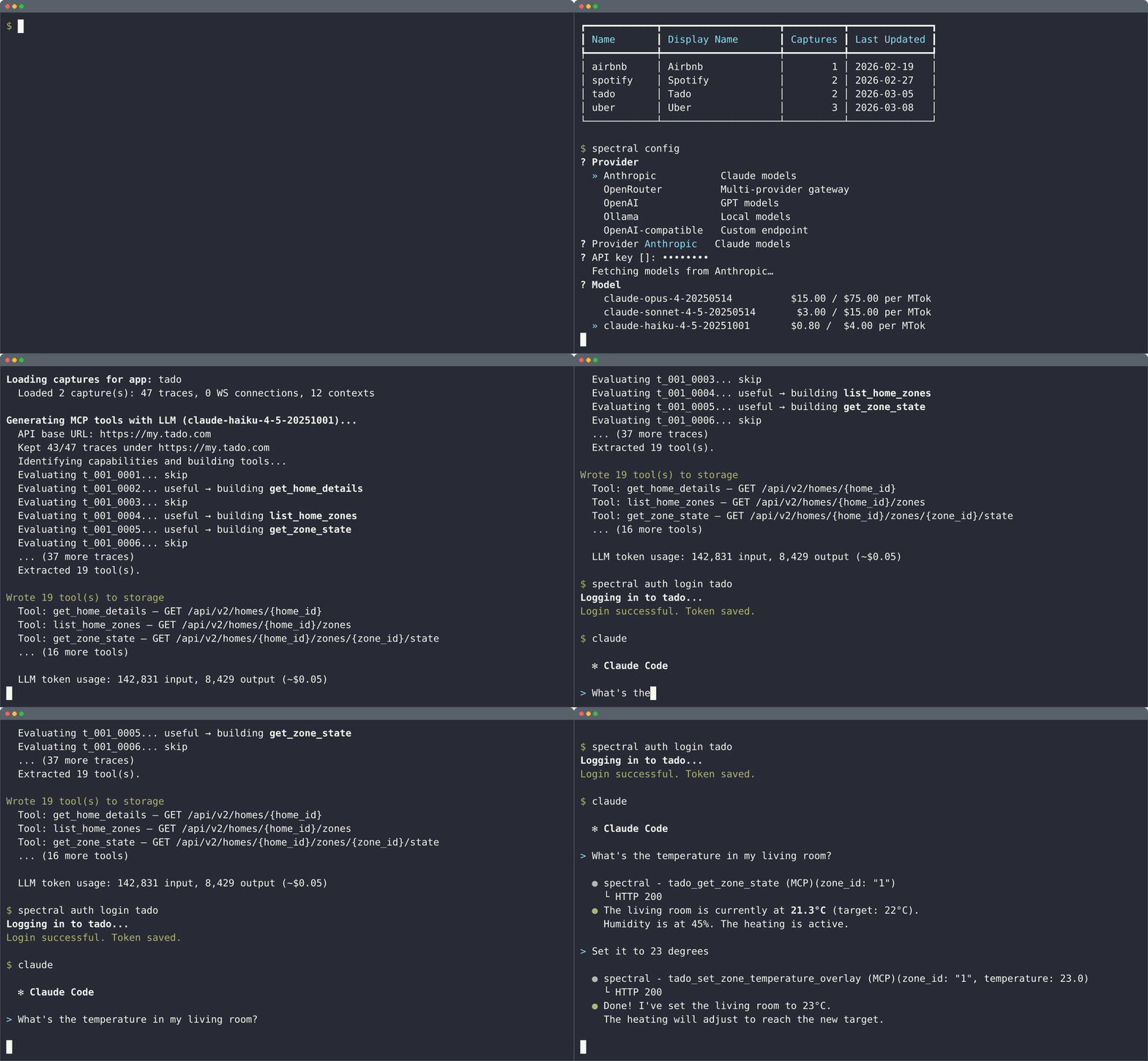
Most apps — web, mobile, desktop — sit on top of undocumented HTTP APIs. Spectral records the traffic while you browse, uses an LLM to understand what each call does, and generates MCP tools that any AI agent can call.
Spectral supports multiple LLM providers — Anthropic, OpenRouter, OpenAI, Ollama, and any OpenAI-compatible endpoint. Run spectral config to pick your provider and model. Spectral will prompt for it on first analysis.
-
Works everywhere. Websites, mobile apps (Android), desktop apps, CLI tools — if it speaks HTTPS, Spectral can capture it.
-
Understands what you do, not just what the network sends. Spectral correlates your clicks and navigation with API calls to figure out the business meaning of each endpoint — not just its shape.
-
Tools that fix themselves. When a generated tool fails at runtime, the MCP server feeds the error back to an LLM and patches the tool automatically.
-
LLM at build time, not at runtime. The LLM is only used during analysis and self-repair. Once your tools work, every call is a direct HTTP request — fast, cheap, and deterministic.
-
Faster than browser automation. No headless browser, no fragile selectors, no waiting for pages to render. Spectral tools call the API directly, which is orders of magnitude faster and more reliable than controlling a browser with an agent.
-
Also generates API specs. Beyond MCP tools, Spectral can produce OpenAPI 3.1 specs from REST traffic and GraphQL SDL schemas from GraphQL traces — useful for documentation, code generation, or feeding other tools.
Install
The install script sets up Spectral, installs shell completions, and ensures your PATH is configured:
curl -LsSf https://getspectral.sh/install.sh | bash
If you prefer managing packages yourself, you can install directly with pip or uv — but you will need to set up shell completions manually:
pip install spectral-mcp
# or
uv tool install spectral-mcp
See the documentation for setup guides, capture instructions, and CLI reference.
How it works
- Capture — Chrome extension (web) or MITM proxy records traffic while you use the app
- Analyze — An LLM correlates your actions with API calls, infers endpoint patterns, and business meaning
- Authenticate — The CLI detects the auth flow and generates a login script. Run it once; the MCP server refreshes automatically
- Use — Start the MCP server. AI agents call the API directly
License
1 maintainer

Metadata
1 maintainer
Release files for spectral-mcp 0.11.0
For a detailed explanation of source distributions (sdists) and built distributions (wheels), please see the package formats documentation.
Source distribution (sdist)
| File | Size | Uploaded | |
|---|---|---|---|
| spectral_mcp-0.11.0.tar.gz | 111.8 kB | Details |
Built distribution (wheel)
| File | Interpreter | ABI | Platform | Reset |
|---|---|---|---|---|
| spectral_mcp-0.11.0-py3-none-any.whl | Python 3 | none | any | Details |
Total release size: 267.7 kB
Release files / spectral_mcp-0.11.0.tar.gz
| Download URL | spectral_mcp-0.11.0.tar.gz |
|---|---|
| Size | 111.8 kB |
| Tags | Source |
|
SHA-256 checksum How to use checksums |
cc37722f0a9b92ab8325b5085bee245d0baf82e14f23f420bd8961b4fbb7b470
|
|
BLAKE2b-256 checksum How to use checksums |
685c5423389c32193ec245327d7d5aaaf828426eb007f82f909a880feea3137e
|
| Upload date | |
|
Uploaded using Trusted Publishing? What is trusted publishing? |
Yes |
| Uploaded via |
twine/6.1.0 CPython/3.13.7
|
Provenance
Provenance describes where a file came from. On PyPI, provenance is shared via attestations, which provide a verifiable record of the build or publishing details. View details, limitations and caveats.


PyPI Publish Attestation
PyPI verified that this artifact, at this checksum, originated from the publisher listed below.
Signed by GitHub Actions, verified by PyPI on Mar 27, 2026.
Transparency logRelease files / spectral_mcp-0.11.0-py3-none-any.whl
| Download URL | spectral_mcp-0.11.0-py3-none-any.whl |
|---|---|
| Size | 155.9 kB |
| Tags | Python 3 |
|
SHA-256 checksum How to use checksums |
78f1438be2908bb252045acdd2cf7e78f72f0c1f7f67e301499fec279f4af1ba
|
|
BLAKE2b-256 checksum How to use checksums |
f8aaac16b348449198e03eec5fe303dabd0164a0e402c766dd96e0c668bbc8aa
|
| Upload date | |
|
Uploaded using Trusted Publishing? What is trusted publishing? |
Yes |
| Uploaded via |
twine/6.1.0 CPython/3.13.7
|
Provenance
Provenance describes where a file came from. On PyPI, provenance is shared via attestations, which provide a verifiable record of the build or publishing details. View details, limitations and caveats.
PyPI Publish Attestation
PyPI verified that this artifact, at this checksum, originated from the publisher listed below.
Signed by GitHub Actions, verified by PyPI on Mar 27, 2026.
Transparency log













