
GUI to create LUTs to emulate film from spectral datasheets.
Verified details
These details have been verified by PyPIProject links
GitHub Statistics
Maintainers

Project description
Spectral Film LUT



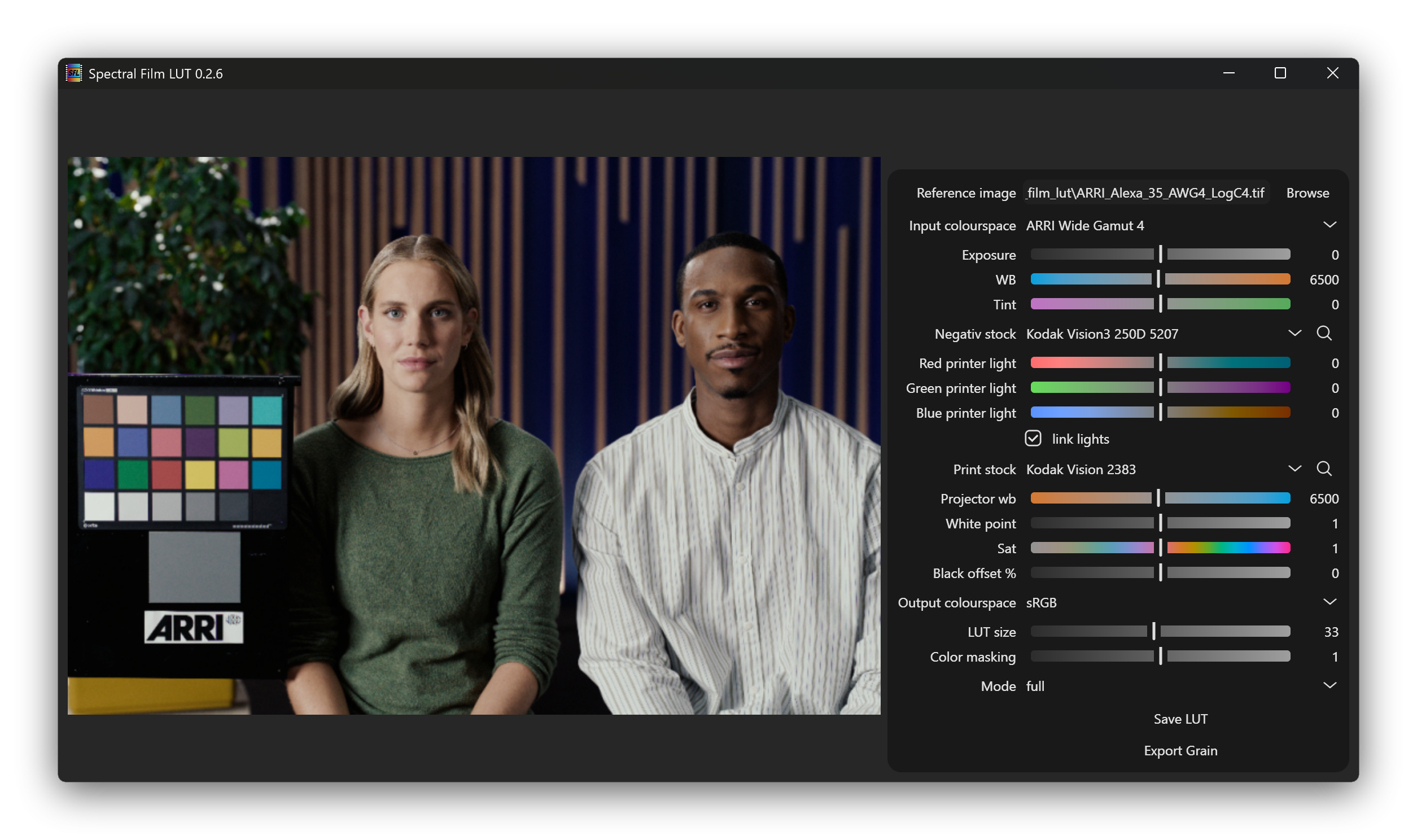
Spectral Film LUT is a GUI application made to generate LUT files for film emulation in video editing. For more details take a look at the documentation.
To emulate the look of a film stock, its datasheet was digitized and a multistep color pipeline simulates its reaction to light to the final appearance of the print material.
- A wide variety of negative, print, and slide materials are available.
- Options include still photography, motion picture, color, black and white, Kodak, Fuji, contemporary, and vintage.
- The accuracy is limited by the precision of the published data, which can be especially poor for long discontinued formats. There is also undocumented behavior like interlayer effects, for which simplified assumptions have been made.
- There is especially little data available about the interlayer interaction, e.g., how aggressive the color masking couplers in a negative film are.
Installation
Windows
Download the latest .exe from the releases page and run it.
Alternatively, install via Python (see below).
Linux
Download the .AppImage from the releases page and make it executable:
chmod +x spectral_film_lut-{version}.AppImage
./spectral_film_lut.AppImage
Alternatively, install via Python (see below).
macOS
There is currently no native binary available for macOS. Install and run the application using a Python-based method. See the Python Package section below.
Python Package
Install the application using your preferred Python package manager. We show it for the default pip. Others can be found in the full documentation.
pip install spectral_film_lut
Then just run with:
spectral_film_lut
Usage
- Select a sample image which is in the intended input colorspace.
- Adjust the preview with the parameters on the sidebar.
- Once satisfied, export the LUT.
- Hovering over a setting should explain what it does, and double clicking the label resets to the default value.
- When simulating slide film, set the print stock to None or an appropriate reversal print medium.
- You can also export the LUT in a negative and print stage. In your image processing pipeline this gives you the option to add grain to the negative, and use printer lights controls.
Resolve Node Tree
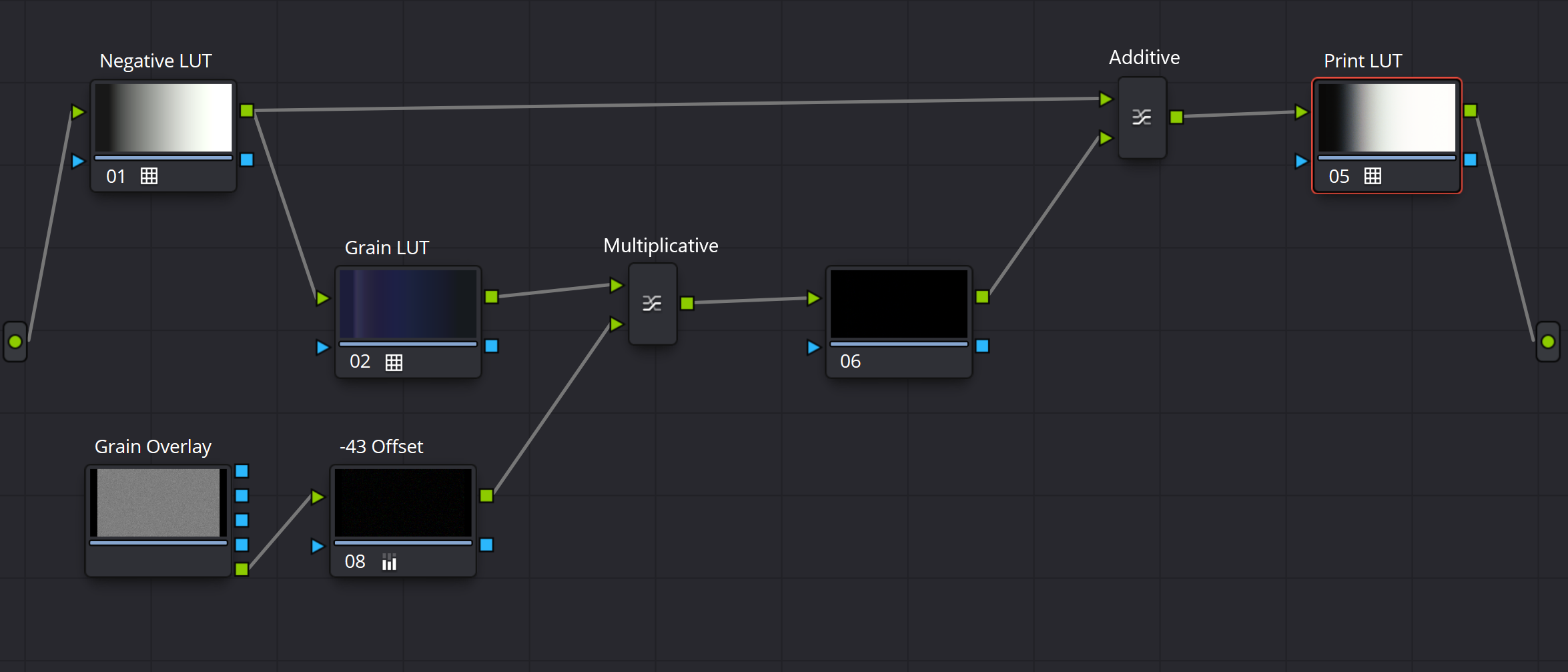
If you want to use the Grain LUT, the following node tree is recommended. It is important to set the correct offset of -43, so that the grain does not alter overall brightness. Import the grain overlay as a matte from the media pool tab.
It is important that all LUTs where exported with the same ADX d-max setting, and that the grain and print LUTs where made for that specific negative film stock. The grain overlay is generated independent of film stock selection, and only affected by the simulated frame size.
To manually alter the grain intensity, change the gain on the unlabeled node between the multiplicative and the additive layer mixers. Printer light controlls should be done after the additive mixer and before the print LUT. Halation should be added before the negative LUT.
Filmstock Selector
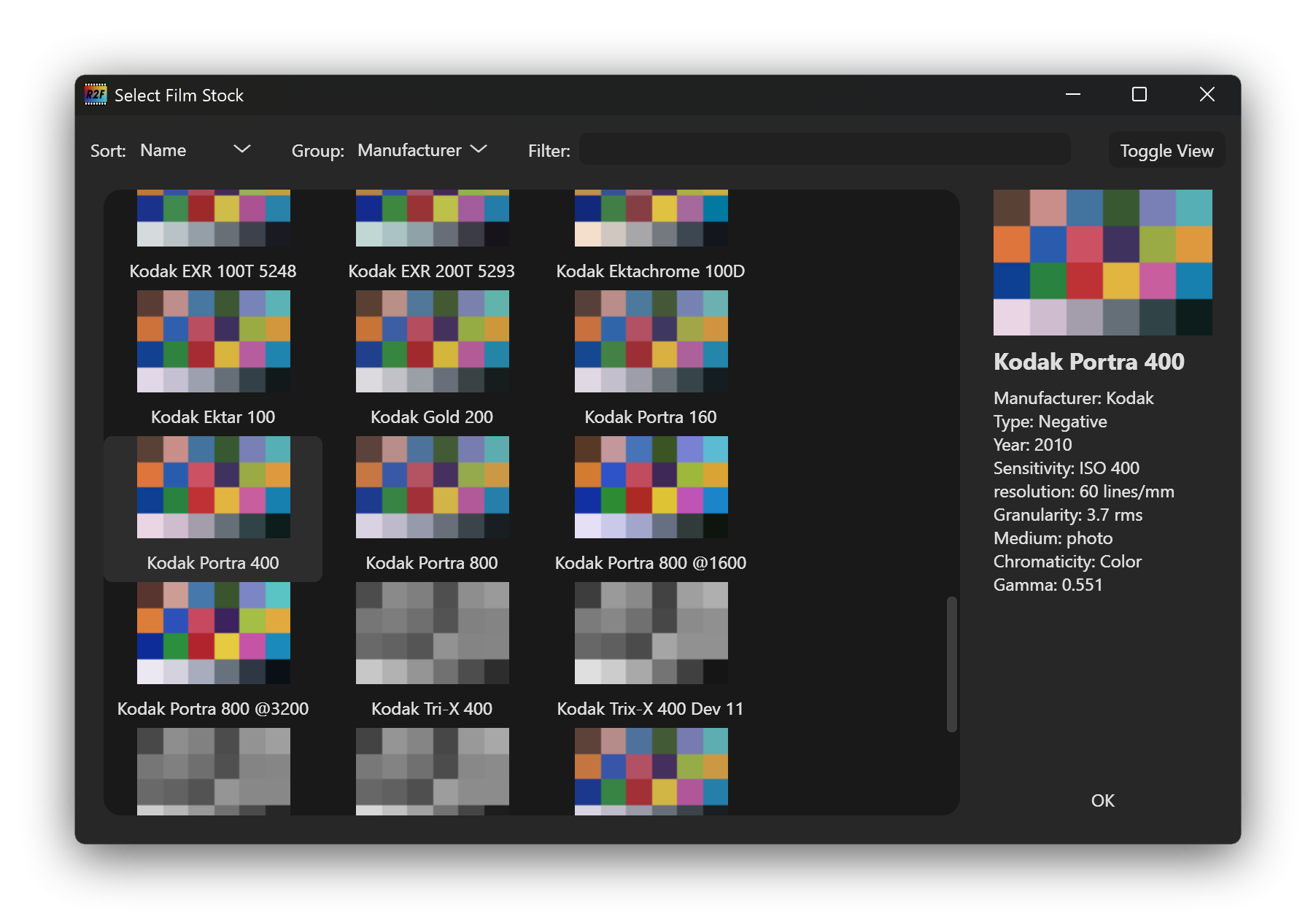
When clicking on the magnifying glass a window opens to search and browse through the
available film stocks.
Project details
Verified details
These details have been verified by PyPIProject links
GitHub Statistics
Maintainers
Release history Release notifications | RSS feed


Download files
Download the file for your platform. If you're not sure which to choose, learn more about installing packages.
Source Distribution
Built Distribution
Filter files by name, interpreter, ABI, and platform.
If you're not sure about the file name format, learn more about wheel file names.
Copy a direct link to the current filters
File details
Details for the file spectral_film_lut-0.6.2.tar.gz.
File metadata
- Download URL: spectral_film_lut-0.6.2.tar.gz
- Upload date:
- Size: 21.9 MB
- Tags: Source
- Uploaded using Trusted Publishing? Yes
- Uploaded via: uv/0.11.21 {"installer":{"name":"uv","version":"0.11.21","subcommand":["publish"]},"python":null,"implementation":{"name":null,"version":null},"distro":{"name":"Ubuntu","version":"24.04","id":"noble","libc":null},"system":{"name":null,"release":null},"cpu":null,"openssl_version":null,"setuptools_version":null,"rustc_version":null,"ci":true}
File hashes
| Algorithm | Hash digest | |
|---|---|---|
| SHA256 |
1e8c88413f4d797845f238c40c4c70611ed5cdb4c85d4b506e4844980d65fc41
|
|
| MD5 |
c0bc6f039e976db66451ee6833b13a09
|
|
| BLAKE2b-256 |
13673e3528579c0ad19282b7a9e280c32da0fb50844c2bb39e4e3307c740c640
|
File details
Details for the file spectral_film_lut-0.6.2-py3-none-any.whl.
File metadata
- Download URL: spectral_film_lut-0.6.2-py3-none-any.whl
- Upload date:
- Size: 922.3 kB
- Tags: Python 3
- Uploaded using Trusted Publishing? Yes
- Uploaded via: uv/0.11.21 {"installer":{"name":"uv","version":"0.11.21","subcommand":["publish"]},"python":null,"implementation":{"name":null,"version":null},"distro":{"name":"Ubuntu","version":"24.04","id":"noble","libc":null},"system":{"name":null,"release":null},"cpu":null,"openssl_version":null,"setuptools_version":null,"rustc_version":null,"ci":true}
File hashes
| Algorithm | Hash digest | |
|---|---|---|
| SHA256 |
6e80d2dc41218385d301f295c6176fa35e83cceebf800a89e827a31c636350f9
|
|
| MD5 |
1226fa0a43708a837f8da70e17461a79
|
|
| BLAKE2b-256 |
61157a210a1d93d5cc55b87ad4279458c67d26dd56b66d1ff437309bd3f96486
|






