
Spectran

A simple spectrum analyzer. Read a voltage signal and perform a spectral analysis.
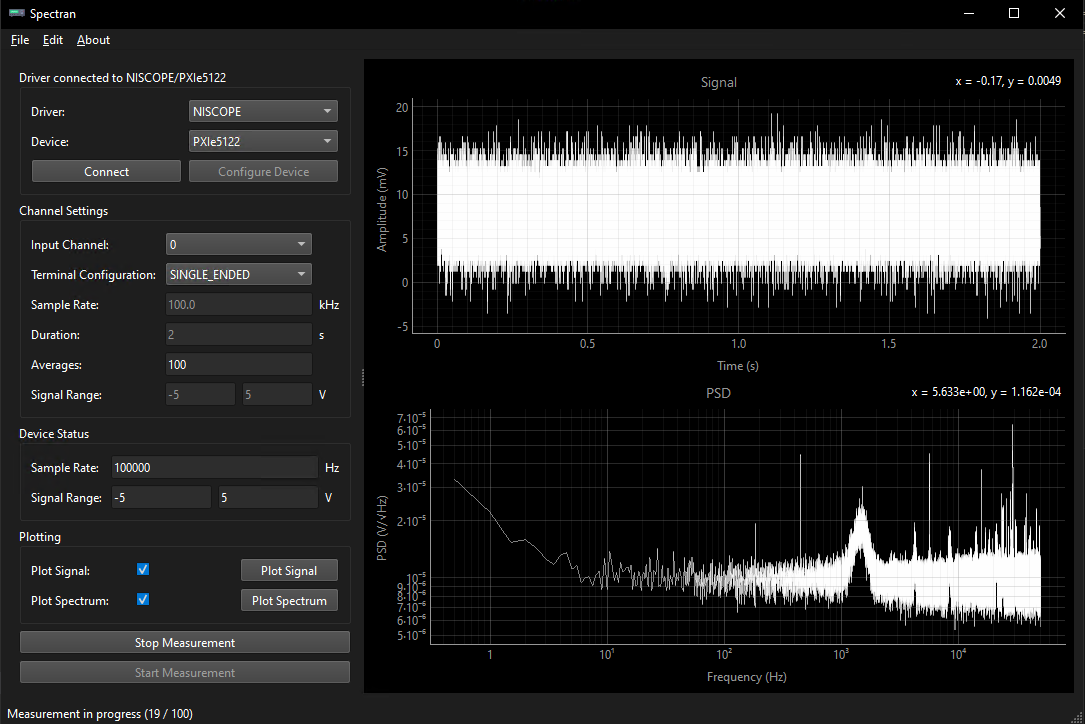
Usage
Installation and Execution
Install via
pip install spectran
Run via
import spectran
spectran.run()
or in terminal
python -m spectran
Workflow
- First, select driver and device and click connect. This connects the device.
- Then, select all other options like sample_rate, input_channel, etc.
- Finally, start the measurement by clicking on
Start Measurement.
API Connection
It is possible to remotely control most of Spectran's features via an API.
API key can be set with the environment variable API_KEY.
Default host is 127.0.0.1 on port 8111. (host should be 0.0.0.0 to access from other network devices)
You can check your connection by typing in a browser
http://<host>:<port>
A detailed example can be found in this example.
First, the connection to the API has to be set up (you might have to input your api key):
api = API_Connection()
Afterwards one can set up devices and measurements:
api.connect_device("DummyDAQ", 'Dev1')

CONFIG = {
    "input_channel": "ai0",
    "sample_rate": 50_000 * ureg.Hz,
    "duration": 0.05 * ureg.second,
    "averages": 4,
    "signal_range_min": -3 * ureg.volt,
    "signal_range_max":  3 * ureg.volt,
    "unit": "Volt",
}
api.set_config(CONFIG)

# start the measurement
api.start_measurement()
# this waits for the measurement to finish
api.wait_for_measurement()
# this saves the data to a file
api.save_file(f"data.txt")
Development
Install module into environment
pip install -e .[dev]
Extensibility
Spectran is written to provide extensive possibilities for extension. Just extend the spectran.daq.DAQ class for a new driver and implement all necessary functions.
Then add this class to list of drivers in spectran.daq.__init__
1 maintainer

Metadata
1 maintainer
Release files for spectran 0.6.0
For a detailed explanation of source distributions (sdists) and built distributions (wheels), please see the package formats documentation.
Source distribution (sdist)
| File | Size | Uploaded | |
|---|---|---|---|
| spectran-0.6.0.tar.gz | 54.9 kB | Details |
Built distribution (wheel)
| File | Interpreter | ABI | Platform | Reset |
|---|---|---|---|---|
| spectran-0.6.0-py3-none-any.whl | Python 3 | none | any | Details |
Total release size: 95.0 kB
Release files / spectran-0.6.0.tar.gz
| Download URL | spectran-0.6.0.tar.gz |
|---|---|
| Size | 54.9 kB |
| Tags | Source |
|
SHA-256 checksum How to use checksums |
55344a4313fa95050d0a0dc42a76638c451b1896563eb88db0ae746687cb0083
|
|
BLAKE2b-256 checksum How to use checksums |
81ffb8f19cd9e2db2d0a8e221ed5ef29a10fb878a428de091adb07ecf9054428
|
| Upload date | |
|
Uploaded using Trusted Publishing? What is trusted publishing? |
Yes |
| Uploaded via |
twine/6.1.0 CPython/3.12.8
|
Provenance
Provenance describes where a file came from. On PyPI, provenance is shared via attestations, which provide a verifiable record of the build or publishing details. View details, limitations and caveats.


PyPI Publish Attestation
PyPI verified that this artifact, at this checksum, originated from the publisher listed below.
Signed by GitHub Actions, verified by PyPI on Jan 28, 2025.
Transparency logRelease files / spectran-0.6.0-py3-none-any.whl
| Download URL | spectran-0.6.0-py3-none-any.whl |
|---|---|
| Size | 40.1 kB |
| Tags | Python 3 |
|
SHA-256 checksum How to use checksums |
3d7ed9a4cd66a1f5581dd01be9c3bc929db17f93635b9375a4c3b4f623307a2c
|
|
BLAKE2b-256 checksum How to use checksums |
1b93977ebab7e4196c814a2a8d5de2e88763d1a1edf578b62e97a309a1aa73c2
|
| Upload date | |
|
Uploaded using Trusted Publishing? What is trusted publishing? |
Yes |
| Uploaded via |
twine/6.1.0 CPython/3.12.8
|
Provenance
Provenance describes where a file came from. On PyPI, provenance is shared via attestations, which provide a verifiable record of the build or publishing details. View details, limitations and caveats.
PyPI Publish Attestation
PyPI verified that this artifact, at this checksum, originated from the publisher listed below.
Signed by GitHub Actions, verified by PyPI on Jan 28, 2025.
Transparency log













