
spectrorama




Log-frequency Gabor transforms, time-frequency projections, and spectrogram panoramas: videos of sound (dramas), with the sound.
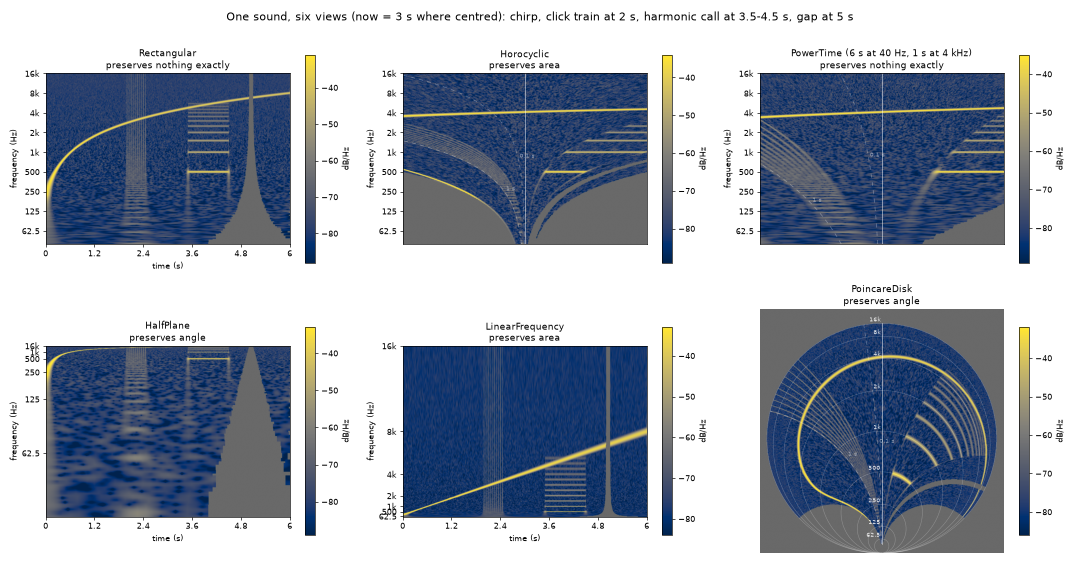
spectrorama is built in three layers. Each one is usable on its own, and each has its mathematics written down:
| Layer | What it does | Depends on | Math |
|---|---|---|---|
| 1 · Transform | Constant-Q Gabor frame; complex coefficients from one FFT, exact inversion; regions and masks for atom-wise filtering; level overviews | numpy, scipy | frame · inversion |
| 2 · Projection | Maps the time-frequency plane to a drawing plane — a catalogue classified by what it preserves, like map projections; a View (projection + rectangle + pixels) and a Lookup (pixels → atoms, with footprints) give a still at any moment in ~0.1 s |
numpy | projections |
| 3 · Stills and video | Stills: any view, any moment, from scratch (plot, picture, save_picture). Video: a Drama swept through time -- tracks computed once, exposure motion blur, burned-in annotation and clock, a mono or stereo Soundtrack played as a tape-speed change (slowed down, ultrasound becomes audible), MP4 metadata and a sidecar JSON; frames painted in parallel, x264 or a hardware encoder |
+ matplotlib, ffmpeg | stills and video |
Decisions, the measurements behind them, and the vocabulary are in the design notes; where the package stands, how it got there and what could come next in the status.
spectrorama is general: it knows samples, Hz, seconds, an optional absolute start time, a level reference and its unit. Reading recordings, choosing channels, calibration conventions, file names and branding are the caller's (for the WhaleSonic recordings: example notebooks in the whalesonic repo).
Start here: the notebooks in notebooks:
QuickStart ·
Transform ·
Projections ·
Video.
They need no data; install with pip install -e ".[docs]".
Install
pip install spectrorama           # Python >= 3.10
pip install -e ".[test]"         # from a clone, with the tests
Videos need ffmpeg on the PATH.
Quick start
import spectrorama as sr

fs = 48000
x = ...                                  # 1-D signal, NaN marks missing samples

# Layer 1: transform and exact inverse
frame = sr.LogFrequencyFrame.for_range(20, 20000, bands_per_octave=48)
coefs = sr.analyze(x, fs, frame)         # complex, ragged per band
y = sr.synthesize(coefs)                 # == x (single-precision storage: ~1e-7)

# Layer 2: views and stills
exponent = sr.PowerTime.exponent_for((20, 60), (2000, 3))   # 60 s at 20 Hz, 3 s at 2 kHz
view = sr.View.fit(sr.PowerTime(Q=frame.Q, exponent=exponent),
                   f_range=(frame.f_min, frame.f_max), seconds=(20, 60), size=(1600, 800))
sr.plot(coefs, view, now=30.0)           # a still with axes, looking from t = 30 s
levels = sr.Lookup(view, coefs).sample(now=31.0)   # (H, W) dB, ~0.1 s

# Layer 3: a video with sound, 4x slower (ultrasound transposed down 2 octaves)
spec = sr.Spec(projection='power-time', exponent=exponent, seconds=(20, 60), speed=0.25)
print(spec.describe(fs))                 # what that choice implies
drama = spec.drama(coefs, sound=sr.Soundtrack(x, fs), path='out.mp4',
                   metadata={'title': 'test', 'copyright': '...'})
drama.preview(30.0)                      # exactly the video frame at t = 30 s
drama.write()                            # out.mp4 + out.json; or sr.render(x, fs, 'out.mp4', spec)
drama.write(encoding=sr.Encoding(codec='h264_qsv'))   # GPU encoder (Intel; also h264_nvenc)
For calibrated levels pass the reference and its unit: a signal in Pa with
analyze(..., ref=1e-6, unit='µPa') gives dB re 1 µPa²/Hz. Signals whose
coefficients would exceed the memory budget (max_bytes, default 8 GB) are
rejected before any work.
Pipelines: a look file, the command line, masters
A Spec is plain data (Spec.from_dict / to_dict, unknown keys rejected),
so a look can live in a TOML file. It has two parts: the [analysis] is what
the transform computes (changing it needs new coefficients), everything else
is drawn from the same coefficients:
canvas = [1920, 1080]
projection = "power-time"
exponent = 1.21
seconds = [20, 120]          # 120 s visible at 20 Hz
[analysis]                   # f_min, f_max, bands_per_octave, support, psd
f_min = 20                   # bands from 19.7 Hz (third octaves at or below)
bands_per_octave = 48
[colour]
cmap = "inferno"
vlim = [40, 100]             # fixed: the same colours in every video of a series
[overlay]                    # the burned-in layers; `overlay = false`: bare picture
iso_ages = []
clock = true
spectrorama describe --spec look.toml --fs 48000          # what the look implies
spectrorama vlim clips/*.wav --spec look.toml             # one vlim for a series
spectrorama still clip.wav clip.png --spec look.toml --now 60 --now 90
spectrorama render clip.wav --spec look.toml --encoding preview --part 60 80
spectrorama render clip.wav master.mp4 --spec look.toml --encoding master --sound none     --ref 1e-7 --unit µPa --t0 2023-12-21T09:53:18 --title "..."
The level reference describes the data, not the look, so it comes with the
data: --ref 1e-7 --unit µPa when 1.0 in the WAV is 10 Pa (levels in dB re
1 µPa), in Python spec.analysis.analyze(x, fs, ref=1e-7, unit='µPa').
The picture always comes from one channel (--channel, default 0); the sound
has one or two (--sound 0,1, default the file's channels if at most two),
never mixed into the picture. Every video gets a sidecar <video>.json with
its parameters and its geometry: canvas, view rectangle, now-line, the
y of round frequencies, clock and colour-bar boxes, frame rate, frame count,
time range, colour limits -- everything an editor needs to composite on top.
Encoding.master() (x264 crf 12, 4:4:4 at 10 bits: SSIM 0.988 at 28 Mbit/s,
where 4:2:0 reaches 0.955) is meant for a second encoding by an editor or
upload site, not for browsers; a drama without sound gives a file without an audio
stream. In Python the same is Spec.from_dict(tomllib.load(f)),
spec.analysis.analyze(...), spec.drama(coefs, ...) (which checks that the
coefficients are of the spec's analysis), drama.geometry(), sr.series_vlim(dramas),
drama.write(encoding=sr.Encoding.master(), part=(60, 80)).
The ends of the signal. A frame at now reads the signal around it: across
the view, plus about one atom (Q / f) at each band. Near the start the low
bands fill up while their windows fill; before the start and after the end there
is no data, shown in colour.nodata (grey; nodata = "low" shows it as silence,
in the colour map's lowest colour). Cut from a longer recording? Include extra
audio around the clip and play only the part you want (render --part).
Otherwise trim the video.
The legend is a separate layer for an editor to fade in and out: a
frequency ruler on the now-line and a colour bar on one rounded, semi-opaque
box, as a transparent RGBA PNG at canvas size (render --legend writes
<video>.legend.png next to the video, spectrorama legend only the PNG; in
Python drama.legend(path)). A [legend] table sets its side, ticks, spacing,
opacity and font size; the box is in the sidecar's geometry.legend. Pixels
outside the projection's domain (around a disc) take the background colour,
not the nodata colour.
The projections
| preserves | time shift on screen | |
|---|---|---|
Rectangular |
— (classic constant-Q spectrogram) | rigid scroll |
Horocyclic |
area; exact shape on the now-line; clicks are vertical | each row scrolls at a speed proportional to f |
PowerTime(exponent) |
— ; window ∝ f^−exponent, from Rectangular (0) through Horocyclic (1) and beyond; PowerTime.exponent_for((f1, s1), (f2, s2)) from two windows |
rows scroll at speed ∝ f^exponent |
HalfPlane |
angles (atoms stay round) | rigid scroll |
LinearFrequency |
area (looks like an STFT spectrogram) | rigid scroll |
PoincareDisk |
angles, and the whole plane fits in a disc | Möbius motion |
KleinDisk |
geodesics are straight lines | projective motion |
New projections subclass Projection (implement forward and inverse) or
RowProjection (implement x_scale, y_of_f, f_of_y) to get the fast
row lookup. Projection.tissot measures distortion anywhere.
The repository
src/spectrorama/ |
the package |
tests/ |
the tests |
math/ |
the mathematics, one page per topic |
notebooks/ |
the tutorials; their videos go to notebooks/output/ (not in git), 02-Projections draws the picture above |
dev/ |
for developers: design notes (decisions, measurements, vocabulary, the contract with callers) and status (history, speed, open items) |
Development
pip install -e ".[test,docs]"
pytest                # reconstruction, frame bounds, calibration, projection properties,
                      # overview exactness, footprints, exposure, a real ffmpeg render
ruff check src tests
Conventions, for people and coding assistants alike:
- Three layers, imported bottom-up only. Keep layers 1 and 2 free of matplotlib; import it lazily where needed.
- spectrorama renders the data it is given. Reading recordings, rates, calibration, channel choice, file names and branding are the caller's job.
- Callers rely on
Spec.from_dict, the sidecar geometry,Encoding.master()and the command line: keep them stable (the contract is in the design notes). - Frozen dataclasses for configuration; plain functions or small classes for
computation. Docstrings state definitions and why; formulas match
math/. - Every mathematical claim has a numerical test.
- Vocabulary: frame is the mathematical frame only; say video frame, band, level (dB), and t / t0 / now / tau (see the design notes).
- The notebooks run without data; execute them after changes
(
jupyter nbconvert --to notebook --execute --inplace notebooks/*.ipynb). - The version is single-sourced in
src/spectrorama/__init__.py; keepdev/status.mdcurrent. - On Windows with conda, the env's
Library/binmust be onPATH, or numpy's BLAS fails to load without a message. - New files carry the header
Copyright (C) <year> J. Rychen, ETH Zürich/SPDX-License-Identifier: GPL-3.0-or-later.
License
GPL-3.0-or-later. Copyright (C) 2026 J. Rychen, ETH Zürich.
To cite spectrorama, see CITATION.cff; changes per version are in CHANGELOG.md.
The icon is a still of humpback whale song (Poincaré disk) from the WhaleSonic dataset, doi:10.3929/ethz-b-000722140, CC BY 4.0.
1 maintainer

Metadata
1 maintainer
Release files for spectrorama 1.1.0
For a detailed explanation of source distributions (sdists) and built distributions (wheels), please see the package formats documentation.
Source distribution (sdist)
| File | Size | Uploaded | Provenance | |
|---|---|---|---|---|
| spectrorama-1.1.0.tar.gz | 7.8 MB | Without provenance | Details |
Built distribution (wheel)
| File | Interpreter | ABI | Platform | Reset |
|---|---|---|---|---|
| spectrorama-1.1.0-py3-none-any.whl | Python 3 | none | any | Details |
Total release size: 7.8 MB
Release files / spectrorama-1.1.0.tar.gz
| Download URL | spectrorama-1.1.0.tar.gz |
|---|---|
| Size | 7.8 MB |
| Tags | Source |
|
SHA-256 checksum How to use checksums |
d7e72667c0397cb0a3e1d85148a08eb84b510af719d39fb90c65c4ffe873cc37
|
|
BLAKE2b-256 checksum How to use checksums |
fe534317b0cd143a1ac9b51e7ffdd715e5c341c8821b1cdfdd75ce21c735c100
|
| Upload date | |
|
Uploaded using Trusted Publishing? What is trusted publishing? |
No |
| Uploaded via |
twine/7.0.0 CPython/3.12.14
|
Release files / spectrorama-1.1.0-py3-none-any.whl
| Download URL | spectrorama-1.1.0-py3-none-any.whl |
|---|---|
| Size | 89.1 kB |
| Tags | Python 3 |
|
SHA-256 checksum How to use checksums |
0c02c1b19c02696e862967106d3c0a2e50239d3b2645f22664815d2fb0891454
|
|
BLAKE2b-256 checksum How to use checksums |
8e0b76e59698519094a1d5a039d11e23bfb248b7f194f8e2f8a802a2baa6ea0d
|
| Upload date | |
|
Uploaded using Trusted Publishing? What is trusted publishing? |
No |
| Uploaded via |
twine/7.0.0 CPython/3.12.14
|
Security for spectrorama 1.1.0
Provenance
Provenance describes where a file came from. On PyPI, provenance is shared via attestations, which provide a verifiable record of the build or publishing details. View details, limitations and caveats.
No provenance found
None of the files in this release were uploaded with provenance metadata.
A note on package security
PyPI is a repository for distributing packages, not a service for auditing them. While third-party security researchers and our staff do their best to detect and remove malicious packages, PyPI cannot guarantee the quality, security or suitability of any given package.
To learn more about protecting yourself from malicious actors, visit our package security documentation.













