
Speculos

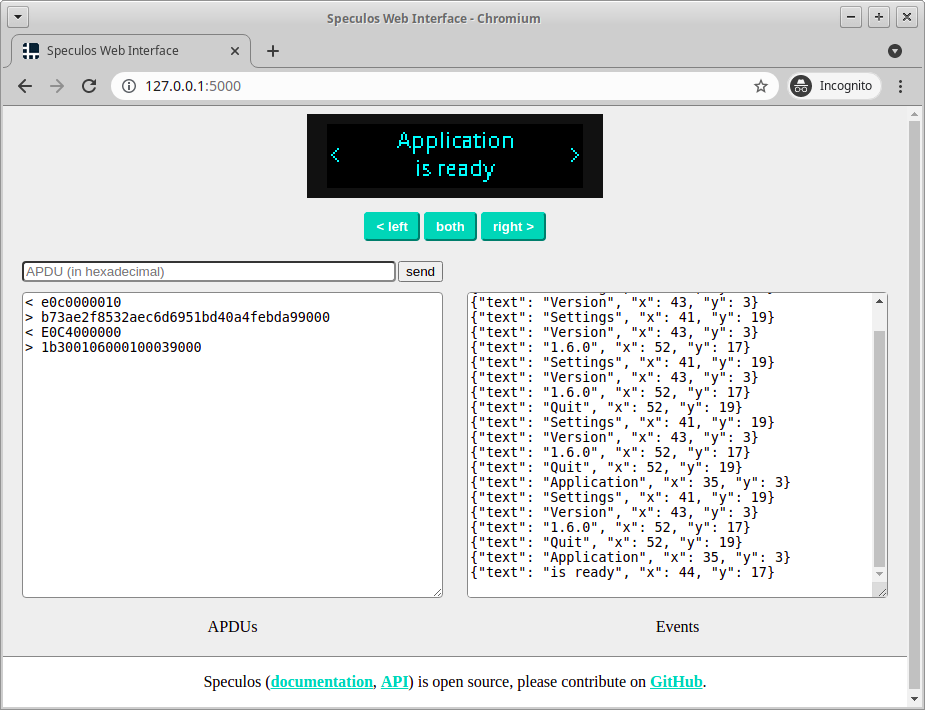
The goal of this project is to emulate Ledger Apps on standard desktop computers, without any hardware device. More information can be found here in the documentation website (or in the docs/ folder directly).
Usage example:
./speculos.py apps/boil.elf
# ... and open a browser on http://127.0.0.1:5000
New to Speculos? The Quickstart guide walks you through installation and running an app on Linux, macOS and Windows.
Installation
From Python pypi packages
The easiest, stable way to install Speculos is with pip:
pip install speculos
It is advised to use Python virtualenv, otherwise admin rights will probably be necessary.
From sources
Installing Speculos from sources is a bit heavier and, depending on the platform, complex, due to all the dependency needed for compiling the emulator.
On Debian (10 or later) or Ubuntu (18.04 or later):
sudo apt install \
    git cmake gcc-arm-linux-gnueabihf libc6-dev-armhf-cross gdb-multiarch \
    python3-pyqt6 python3-construct python3-flask-restful python3-jsonschema \
    python3-mnemonic python3-pil python3-pyelftools python3-requests \
    qemu-user-static libvncserver-dev

# from the root directory of the source repository
pip install .
Dependency management will vary on other platforms; using Docker images and/or WSL should facilitate the installation.
Bugs and contributions
Feel free to open issues and create pull requests on this GitHub repository.
The master branch is protected to disable force pushing. Contributions should
be made through pull requests, which are reviewed by @LedgerHQ members before
being merged to master:
- @LedgerHQ members can create branches directly on the repository (if member of a team with write access to the repository)
- External contributors should fork the repository
Limitations
There is absolutely no guarantee that apps will have the same behavior on hardware devices and Speculos, though the differences are limited.
Syscalls
The emulator handles only a few syscalls made by common apps. For instance, syscalls related to app install, firmware update or OS info can't be implemented.
Memory alignment
Attempts to perform unaligned accesses when not allowed (eg. dereferencing a misaligned pointer) will cause an alignment fault on a Ledger Nano S+ device but not on Speculos. Note that such unaligned accesses are supported by other Ledger devices.
Following code crashes on LNS device, but not on Speculos nor on other devices.
uint8_t buffer[20];
for (int i = 0; i < 20; i++) {
    buffer[i] = i;
}
uint32_t display_value = *((uint32_t*) (buffer + 1));
PRINTF("display_value: %d\n", display_value);
Stack overflow
The app stack sits at the top of the app RAM and grows down towards the app
globals (.bss). Speculos stops the app with an explicit message when:
- at a syscall entry, the stack pointer is below the end of the app globals
(
app_stack_canary, or_ebsswhen the app has no canary); - at a syscall entry, the
app_stack_canaryword placed just below the stack was overwritten. Speculos sets this canary itself, whatever the app build options, for the main app only (libraries share the caller RAM); - the app accesses memory below the app RAM.
These checks only run at syscall entry: an overflow that does not reach the canary and recovers before the next syscall goes unnoticed.
To find the instruction that overflows the stack, run Speculos with
--stack-guard: the main app stack is moved up so that a guard page sits right
below it, and the first access below the stack stops the app with its pc.
Reported addresses are translated back to the device ones. With this option:
- the stack no longer ends at
_stack/_estack: code reading these symbols (DEBUG_OS_STACK_CONSUMPTION, stack margin checks against&_stack) sees a stack different from the device one, and may hit the guard page; - the guard page is disabled while a library runs through
os_lib_call.
Watchdog
NanoX, Flex, Apex+ and Stax devices use an internal watchdog enforcing usage of regular
calls to io_seproxyhal_io_heartbeat();. This watchdog is not emulated on
Speculos.
Security
Apps can make arbitrary Linux system calls (and use QEMU semihosting features), thus don't run Speculos on untrusted apps.
It's worth noting that the syscall implementation (src/) doesn't expect
malicious input. By the way, in Speculos, there is no privilege separation
between the app and the syscalls. This doesn't reflect the security of the
firmware on hardware devices where app and OS isolation is enforced.
Speculos is not part of Ledger bug bounty program.
Are you developing a Nano App as an external developer?
For a smooth and quick integration:
- Follow the developers documentation on the Developer Portal and
- Go on Discord to chat with developer support and the developer community.
Metadata
Release files for speculos 0.27.7
For a detailed explanation of source distributions (sdists) and built distributions (wheels), please see the package formats documentation.
Source distribution (sdist)
| File | Size | Uploaded | Provenance | Actions |
|---|---|---|---|---|
| speculos-0.27.7.tar.gz | 15.9 MB | Without provenance | Details for speculos-0.27.7.tar.gz |
Built distribution (wheel)
| File | Interpreter | ABI | Platform | Actions Reset |
|---|---|---|---|---|
| speculos-0.27.7-py3-none-any.whl | Python 3 | none | any | Details for speculos-0.27.7-py3-none-any.whl |
Total release size: 22.5 MB
Release files / speculos-0.27.7.tar.gz
| Download URL | speculos-0.27.7.tar.gz |
|---|---|
| Size | 15.9 MB |
| Tags | Source |
|
SHA-256 checksum How to use checksums |
a56e908049e17d53544d9f6afd5d1139f4750c0d8b297876ad0134e2010f12e2
|
|
BLAKE2b-256 checksum How to use checksums |
15bc0243c2fe662cafc305d5384c4320a3cb9c4bd06f0aecb3c580bbb8b8a250
|
| Upload date | |
|
Uploaded using Trusted Publishing? What is trusted publishing? |
No |
| Uploaded via |
twine/6.2.0 CPython/3.11.14
|
Release files / speculos-0.27.7-py3-none-any.whl
| Download URL | speculos-0.27.7-py3-none-any.whl |
|---|---|
| Size | 6.6 MB |
| Tags | Python 3 |
|
SHA-256 checksum How to use checksums |
d67bcffffd709acc95becd1188fdfe5b19d213cea9ef436ca0505bc8316fb9f1
|
|
BLAKE2b-256 checksum How to use checksums |
e6819b8231b31a26cfec07ef35cf71efd1978ff7ace9584e03522af034dba9b5
|
| Upload date | |
|
Uploaded using Trusted Publishing? What is trusted publishing? |
No |
| Uploaded via |
twine/6.2.0 CPython/3.11.14
|
Security for speculos 0.27.7
Provenance
Provenance describes where a file came from. On PyPI, provenance is shared via attestations, which provide a verifiable record of the build or publishing details. View details, limitations and caveats.
No provenance found
None of the files in this release were uploaded with provenance metadata.
A note on package security
PyPI is a repository for distributing packages, not a service for auditing them. While third-party security researchers and our staff do their best to detect and remove malicious packages, PyPI cannot guarantee the quality, security or suitability of any given package.
To learn more about protecting yourself from malicious actors, visit our package security documentation.














