
SpeechLoop



One can judge from experiment, or one can blindly accept authority.
Robert A. Heinlein
A "keep it simple" collection of many speech recognition engines focusing on inference only. We take the best and most well-known models, pick sensible defaults (if they don't already exist) and make them really easy to evaluate & use.
Quick Links
Overview
We've standardized some common ASR engines to make analysis of which speech recognition engine is the best for a given speech dataset. Selecting and discovering what ASR works well for a given scenario can be complicated since it depends on many factors. The standardization this repo provides should make it easier for researchers who want to compare their SoTA models to production systems, both cloud and local, or for people curious and are just getting started looking at speech recognition.
Features
- Simple API to run an ASR, with CLI for quick testing with live mic or your chosen WAVs
- Supports a growing number of local and cloud ASRs
- Simple modular python interface using Pandas dataframes - easy to extend and change.
- Evaluation is driven by a line in the dataframe - want to evaluate more speech wavs? Add more lines.
- Automatic WER calculation with punctuation removal, word corrections (e.g. 1 -> one)
- Simple CSV output
Example
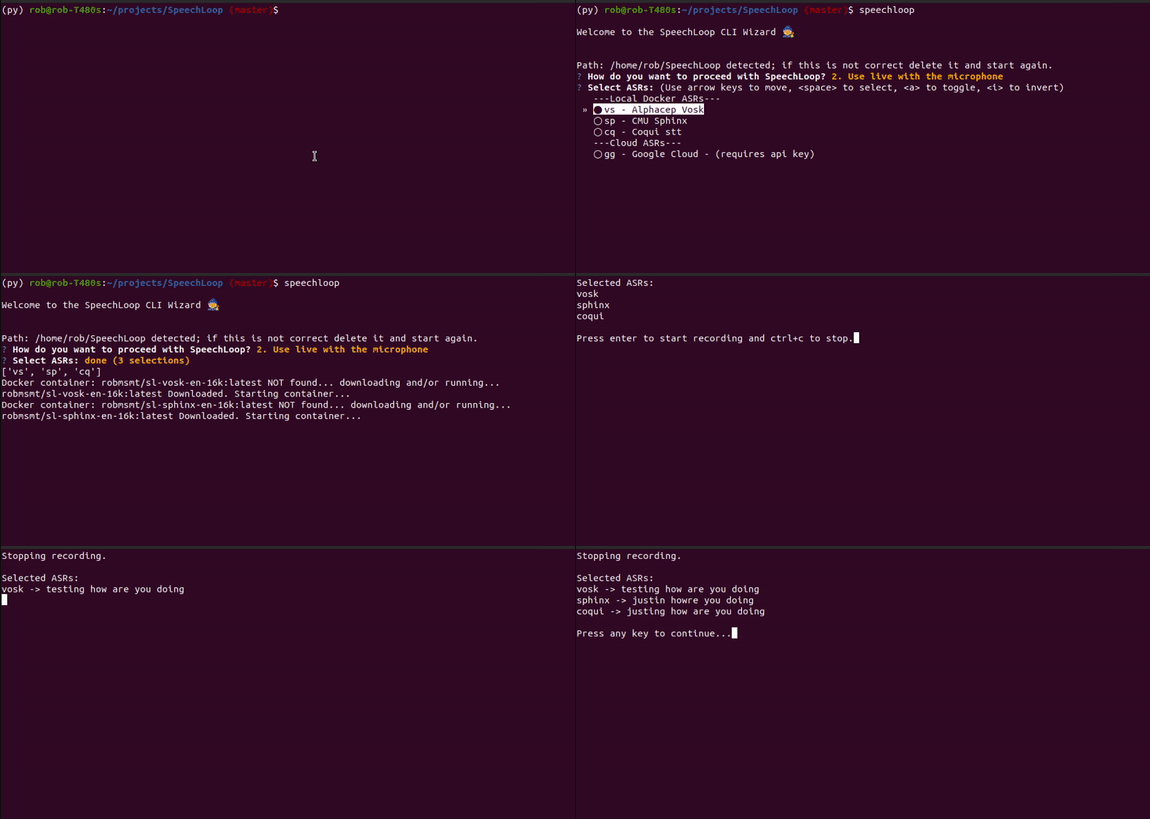
Quicklyiest Quick start
# make a virtualenv
python3 -m venv ~/venv/speechloop

# activate virtualenv
source ~/venv/speechloop/bin/activate

pip install speechloop
# cd to a directory with WAVs or use the examples!

speechloop
Want to use a specific ASR in your own script? No problem
from speechloop.asr.vosk import Vosk

raw_audio_file = open("path/to/your/mono_16k.wav", "rb").read()

vs = Vosk()
print(f"{vs.longname} -> {vs.execute_with_audio(raw_audio_file)}")
ASRs
Using all as wanted_asr parameter to main.py will attempt to start all ASRs for testing.
| Short Code | Model | Licence | Type |
|---|---|---|---|
| ✅ sp | CMU Sphinx | Open Source | Offline - docker |
| ✅ vs | Alphacep Vosk | Open Source | Offline - docker |
| ✅ cq | Coqui | Open Source | Offline - docker |
| ❌ sb | Speech Brain | Open Source | Offline - docker |
| ❌ nm | Nvidia NeMo | Open Source | Offline - docker |
| ✅ gg | Proprietary | API set env:GOOGLE_APPLICATION_CREDENTIALS |
|
| ✅ az | Microsoft Azure | Proprietary | API set env:AZURE_KEY |
| ✅ aw | Amazon | Proprietary | API set env:AWS_ACCESS_KEY_ID+ AWS_SECRET_ACCESS_KEY or aws configure |
** In general, if there's a simple python API (that requires no extra compilation steps or heavy libs) then it'll be included as-is otherwise we build a docker container
Structure
The structure loosely follows the 
├── docs
├── LICENSE
├── notebooks
│         └── eda.ipynb
├── README.md
├── requirements.txt
├── tests
└── speechloop
    ├── data
    │   ├── simple_test
    │   └── ...
    ├── output
    ├── asr.py
    ├── speechloop.py
    ├── audio.py
    ├── text.py
    └── validate.py
Requirements
- Python3.6+
- x86_64
- Recommend having approximately X GB storage space for each model
Developer - 2 Step Install
For developers - installation should be straight-forward and only take a number of minutes on most systems.
Step 1 - Dev Install SpeechLoop
git clone https://github.com/robmsmt/SpeechLoop && cd SpeechLoop
python3 -m venv venv/py3
source venv/py3/bin/activate
pip install -r requirements-dev.txt
Step 2 - Install Docker
Skip this step if it's already installed.
curl -fsSL https://get.docker.com -o get-docker.sh
sh get-docker.sh
Note it's important here that docker can run without root access. After this step has completed, you should check that you can type:
docker images and the list should be empty. If it requires that you type: sudo docker images then you should follow this step
Another good test is running: docker run hello-world
RUNNING AS A DEVELOPER
cd speechloop
python main.py --input_csv='data/simple_test/simple_test.csv' --wanted_asr=vs,sp,cq
TESTS
Run all tests with: python3 -m unittest discover .
1 maintainer

Release files for speechloop 0.0.3
For a detailed explanation of source distributions (sdists) and built distributions (wheels), please see the package formats documentation.
Source distribution (sdist)
| File | Size | Uploaded | |
|---|---|---|---|
| speechloop-0.0.3.tar.gz | 2.4 MB | Details |
Built distribution (wheel)
| File | Interpreter | ABI | Platform | Reset |
|---|---|---|---|---|
| speechloop-0.0.3-py3-none-any.whl | Python 3 | none | any | Details |
Total release size: 4.8 MB
Release files / speechloop-0.0.3.tar.gz
| Download URL | speechloop-0.0.3.tar.gz |
|---|---|
| Size | 2.4 MB |
| Tags | Source |
|
SHA-256 checksum How to use checksums |
2d7789177b825027f4b5b898fd60290dea336335f89b6ef1b8c8a0187c464b51
|
|
BLAKE2b-256 checksum How to use checksums |
f361a321195922e8d4aca926fc365d8ec25bb54dc898f186ed2198927ab62b65
|
| Upload date | |
|
Uploaded using Trusted Publishing? What is trusted publishing? |
No |
| Uploaded via |
twine/3.1.1 pkginfo/1.4.2 requests/2.23.0 setuptools/45.2.0 requests-toolbelt/0.8.0 tqdm/4.30.0 CPython/3.8.10
|
Release files / speechloop-0.0.3-py3-none-any.whl
| Download URL | speechloop-0.0.3-py3-none-any.whl |
|---|---|
| Size | 2.4 MB |
| Tags | Python 3 |
|
SHA-256 checksum How to use checksums |
c69b5f0afe3c4c0576ea72377f5bf2710c463f91a82a3c058b13b1f698d4c70c
|
|
BLAKE2b-256 checksum How to use checksums |
f49521e85348e89c3ec6ca0e6931c7143eae0be90411f13733a8dfc266fb04fd
|
| Upload date | |
|
Uploaded using Trusted Publishing? What is trusted publishing? |
No |
| Uploaded via |
twine/3.1.1 pkginfo/1.4.2 requests/2.23.0 setuptools/45.2.0 requests-toolbelt/0.8.0 tqdm/4.30.0 CPython/3.8.10
|














