
speed-the-arxiv
You know the drill. Wake up, coffee, arXiv. Same sections, same keywords, same authors — every single day. Speed-the-arxiv exists so you can do that in seconds instead of minutes, and maybe enjoy the coffee a bit more.
Define your searches in .yaml configs (or create them right from the UI), hit a button, and get a clean page of results with SciRate scores, one-click BibTeX, PDF access, notes, and favourites — no copy-pasting DOIs into twelve different tabs.
Installation
pip install speed-the-arxiv
Usage
-
Run the app:
speedthearxiv
-
A browser window opens at
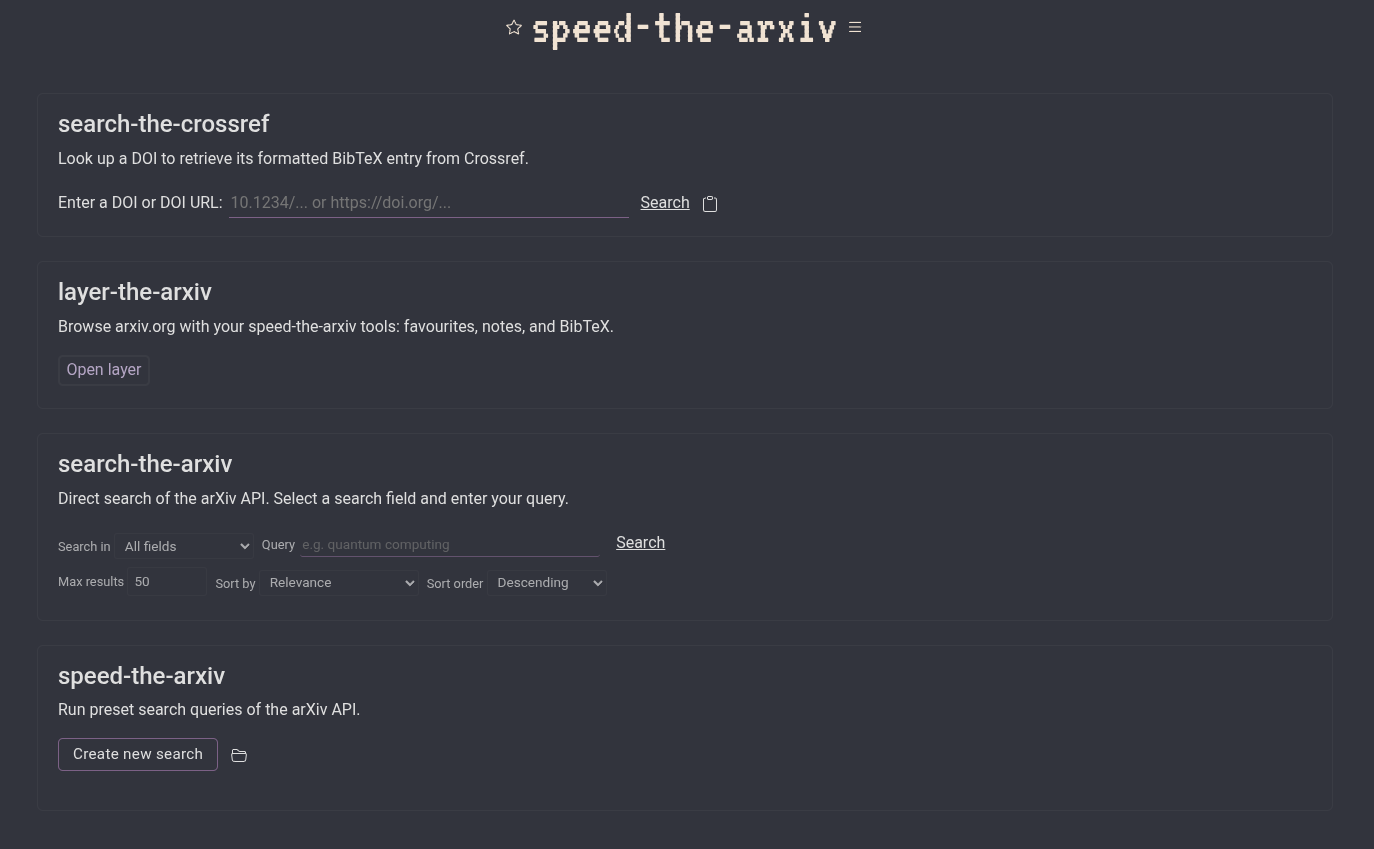
http://localhost:8080/. The home page offers four tools:- speed-the-arxiv — run your preset
.yamlsearches against the arXiv API. - search-the-arxiv — direct free-text search of the arXiv API.
- layer-the-arxiv — browse arxiv.org directly with your speed-the-arxiv tools (favourites, notes, BibTeX) overlaid on top.
- search-the-crossref — look up any DOI and get a formatted BibTeX entry instantly.
- speed-the-arxiv — run your preset
-
Edit or create search configs from the UI, or drop
.yamlfiles in thesearch/directory. Cache age is displayed next to each search so you know how fresh the results are.
Search configuration
Each .yaml file in search/ supports the following parameters:
| Parameter | Description |
|---|---|
max_results |
Maximum number of results to fetch |
past_days |
Number of days to look back from today |
literal |
Literal (exact phrase) keyword search |
run_scirate |
Fetch SciRate scores for each paper |
arxiv_sortby |
arXiv sort field (submittedDate, relevance, lastUpdatedDate) |
arxiv_sortorder |
arXiv sort order (descending, ascending) |
sortby |
Local sort keys (e.g. ['date', 'scirate']) |
sortorder_rev |
true for descending, false for ascending |
and_or_* |
Logical connectors between keys (+OR+, +AND+, +ANDNOT+) |
keys.sections |
arXiv category list (e.g. [quant-ph, cs.LG]) |
keys.keyauthors |
Author list |
keys.keywords |
Keyword list |
See search/config.yaml for a complete example.
Features
- Preset searches — define sections, keywords, authors, logical operators, and date ranges in tidy
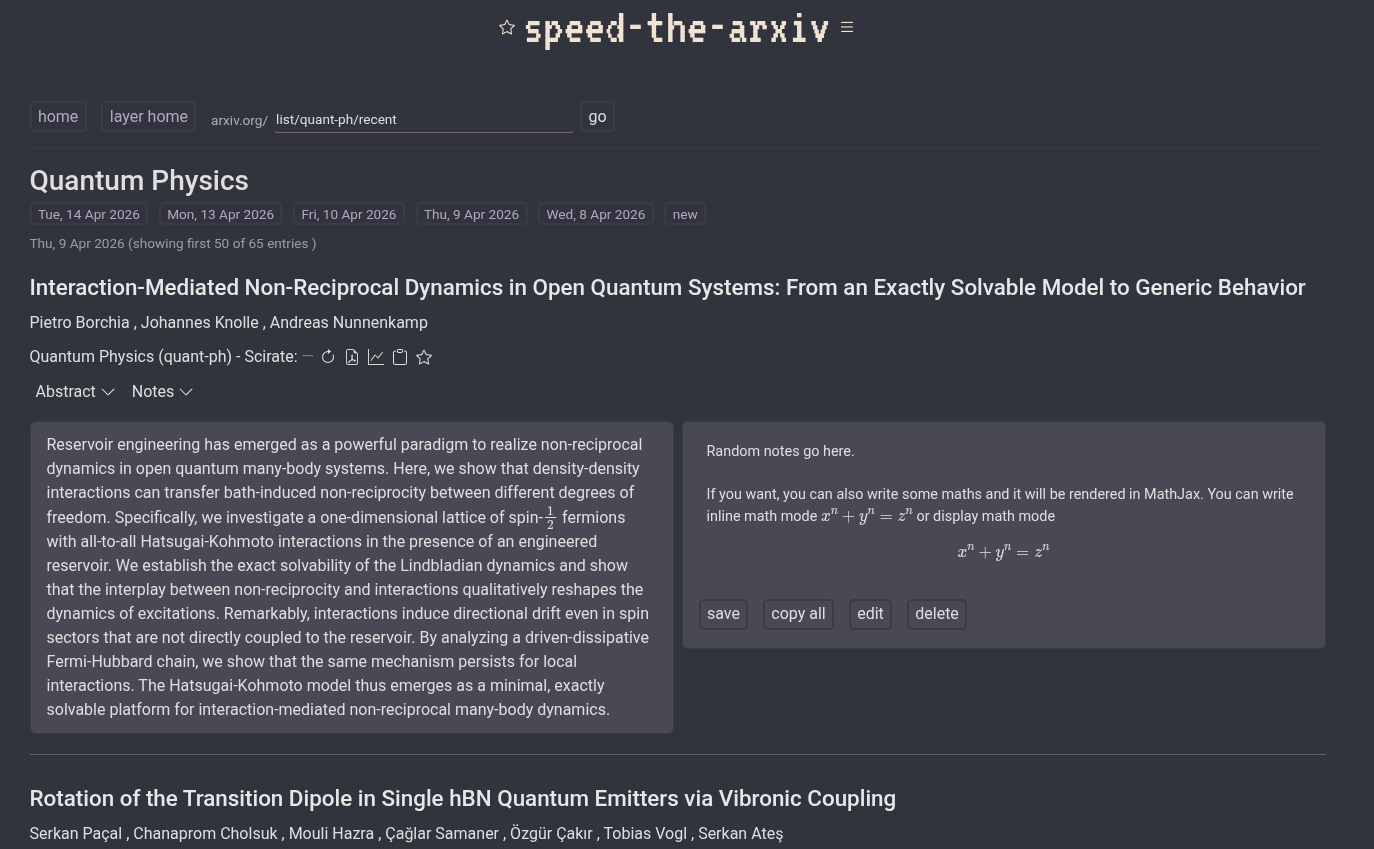
.yamlfiles you can create, edit, duplicate, and delete from the browser. - arXiv layer — browse arxiv.org natively with your tools (favourites, notes, BibTeX) injected into every paper listing.
- SciRate scores — fetched asynchronously so you see community interest at a glance without hammering the API.
- BibTeX on demand — auto-generated for every paper, copy to clipboard with one click. Crossref DOI lookup also available from the home page.
- Favourites & notes — star papers and attach personal notes, persisted across sessions.
- Keyword & author highlighting — toggle-able, so the important bits jump out at you.
- Sort, filter, paginate — sort by date, SciRate score, or title; filter results in real time.
- MathJax — LaTeX in titles and abstracts rendered properly, as nature intended.
- Dark & light theme — because not everyone wants to stare into the void (or into the sun).
- Caching — results are cached locally with a visible age indicator so you know exactly how stale your data is.
Screenshots
1 maintainer

Metadata
1 maintainer
Release files for speed-the-arxiv 0.1.1
For a detailed explanation of source distributions (sdists) and built distributions (wheels), please see the package formats documentation.
Source distribution (sdist)
| File | Size | Uploaded | Provenance | Actions |
|---|---|---|---|---|
| speed_the_arxiv-0.1.1.tar.gz | 41.3 kB | Without provenance | Details for speed_the_arxiv-0.1.1.tar.gz |
Built distribution (wheel)
| File | Interpreter | ABI | Platform | Actions Reset |
|---|---|---|---|---|
| speed_the_arxiv-0.1.1-py3-none-any.whl | Python 3 | none | any | Details for speed_the_arxiv-0.1.1-py3-none-any.whl |
Total release size: 88.2 kB
Release files / speed_the_arxiv-0.1.1.tar.gz
| Download URL | speed_the_arxiv-0.1.1.tar.gz |
|---|---|
| Size | 41.3 kB |
| Tags | Source |
|
SHA-256 checksum How to use checksums |
7463381cd82754c868e1c94ebe3c99f27ba713b77efb4370353730b9be48a5de
|
|
BLAKE2b-256 checksum How to use checksums |
0f538771dc9881a7a40c6b06092367ee62f42cd252969b217e1bca24d11a8348
|
| Upload date | |
|
Uploaded using Trusted Publishing? What is trusted publishing? |
No |
| Uploaded via |
twine/6.2.0 CPython/3.14.3
|
Release files / speed_the_arxiv-0.1.1-py3-none-any.whl
| Download URL | speed_the_arxiv-0.1.1-py3-none-any.whl |
|---|---|
| Size | 46.9 kB |
| Tags | Python 3 |
|
SHA-256 checksum How to use checksums |
65a96f9460aab7ba34093748640f063f9b1e6616aa7ddf1d323979f6ba02560d
|
|
BLAKE2b-256 checksum How to use checksums |
52b1e59ecb5cc19673b0171d9b0c1107d68e693e62a64b417afbb27bae631cfe
|
| Upload date | |
|
Uploaded using Trusted Publishing? What is trusted publishing? |
No |
| Uploaded via |
twine/6.2.0 CPython/3.14.3
|
Security for speed-the-arxiv 0.1.1
Provenance
Provenance describes where a file came from. On PyPI, provenance is shared via attestations, which provide a verifiable record of the build or publishing details. View details, limitations and caveats.
No provenance found
None of the files in this release were uploaded with provenance metadata.
A note on package security
PyPI is a repository for distributing packages, not a service for auditing them. While third-party security researchers and our staff do their best to detect and remove malicious packages, PyPI cannot guarantee the quality, security or suitability of any given package.
To learn more about protecting yourself from malicious actors, visit our package security documentation.














