
Spegel - Reflect the web through AI. A terminal browser with multiple AI-powered views.
Verified details
These details have been verified by PyPIProject links
GitHub Statistics
Maintainers

Project description
Spegel – Reflect the web through AI
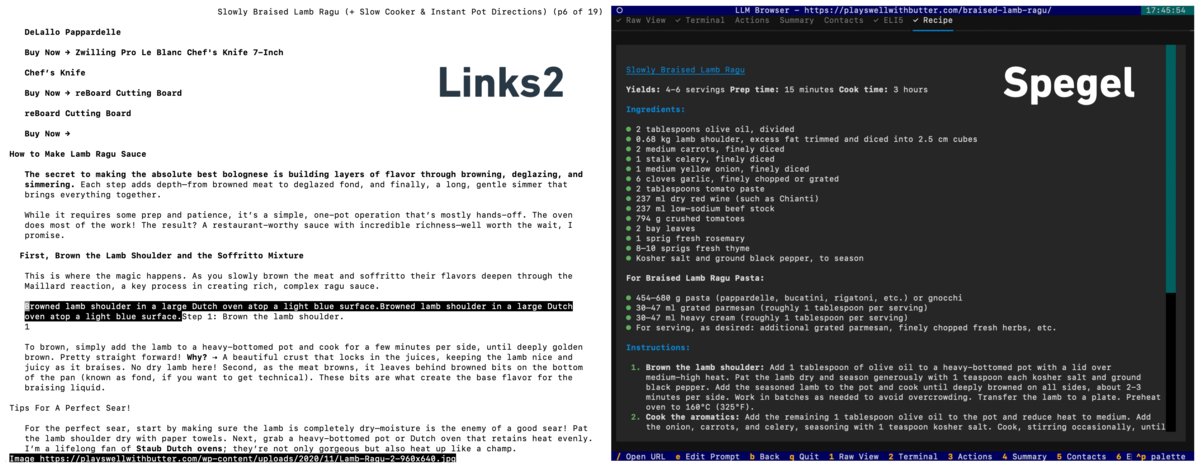
Automatically rewrites the websites into markdown optimised for viewing in the terminal. Read intro blog post here
This is a proof-of-concept, bugs are to be expected but feel free to raise an issue or pull request.
Screenshot
Sometimes you don't want to read through someone's life story just to get to a recipe
Installation
Requires Python 3.11+
pip install spegel
or clone the repo and install it editable mode
# Clone and enter the directory
$ git clone <repo-url>
$ cd spegel

# Install dependencies and the CLI
$ pip install -e .
API Keys
Spegel is currently only support Gemini 2.5 Flash, to use it you need to provide your API key in the env
GEMINI_API_KEY=...
Usage
Launch the browser
spegel                # Start with welcome screen
spegel bbc.com        # Open a URL immediately
Or, equivalently:
python -m spegel      # Start with welcome screen
python -m spegel bbc.com
Basic controls
/– Open URL inputTab/Shift+Tab– Cycle linksEnter– Open selected linke– Edit LLM prompt for current viewb– Go backq– Quit
Editing settings
Spegel loads settings from a TOML config file. You can customize views, prompts, and UI options.
Config file search order:
./.spegel.toml(current directory)~/.spegel.toml~/.config/spegel/config.toml
To edit settings:
- Copy the example config:
cp example_config.toml .spegel.toml
# or create ~/.spegel.toml
- Edit
.spegel.tomlin your favorite editor.
Example snippet:
[settings]
default_view = "terminal"
app_title = "Spegel"

[[views]]
id = "raw"
name = "Raw View"
prompt = ""

[[views]]
id = "terminal"
name = "Terminal"
prompt = "Transform this webpage into the perfect terminal browsing experience! ..."
For more, see the code or open an issue!
Project details
Verified details
These details have been verified by PyPIProject links
GitHub Statistics
Maintainers


Download files
Download the file for your platform. If you're not sure which to choose, learn more about installing packages.
Source Distribution
Built Distribution
Filter files by name, interpreter, ABI, and platform.
If you're not sure about the file name format, learn more about wheel file names.
Copy a direct link to the current filters
File details
Details for the file spegel-0.1.1.tar.gz.
File metadata
- Download URL: spegel-0.1.1.tar.gz
- Upload date:
- Size: 40.8 kB
- Tags: Source
- Uploaded using Trusted Publishing? Yes
- Uploaded via: twine/6.1.0 CPython/3.12.9
File hashes
| Algorithm | Hash digest | |
|---|---|---|
| SHA256 |
ad53cee40891690da5fe7b17e9679f861e23567e686069180819c56b5400d759
|
|
| MD5 |
b39f51b4cec083b20c0d63cb43e5bbeb
|
|
| BLAKE2b-256 |
bc56ab7cfc03adef6643a65d7d1e1b321bdc9e420b31ead952e3d6c86510f767
|
Provenance
The following attestation bundles were made for spegel-0.1.1.tar.gz:
Publisher:
publish.yml on simedw/spegel
-
Statement:
-
Statement type:
https://in-toto.io/Statement/v1 -
Predicate type:
https://docs.pypi.org/attestations/publish/v1 -
Subject name:
spegel-0.1.1.tar.gz -
Subject digest:
ad53cee40891690da5fe7b17e9679f861e23567e686069180819c56b5400d759 - Sigstore transparency entry: 257983387
- Sigstore integration time:
-
Permalink:
simedw/spegel@0af2da8fdc81c4ac121af7461e232b7e3cd3cd69 -
Branch / Tag:
refs/tags/v0.1.1 - Owner: https://github.com/simedw
-
Access:
public
-
Token Issuer:
https://token.actions.githubusercontent.com -
Runner Environment:
github-hosted -
Publication workflow:
publish.yml@0af2da8fdc81c4ac121af7461e232b7e3cd3cd69 -
Trigger Event:
release
-
Statement type:
File details
Details for the file spegel-0.1.1-py3-none-any.whl.
File metadata
- Download URL: spegel-0.1.1-py3-none-any.whl
- Upload date:
- Size: 20.2 kB
- Tags: Python 3
- Uploaded using Trusted Publishing? Yes
- Uploaded via: twine/6.1.0 CPython/3.12.9
File hashes
| Algorithm | Hash digest | |
|---|---|---|
| SHA256 |
b8c20481da320ca7da0859e87347910a90e8c1b93c9263d32f1bec4740502f8a
|
|
| MD5 |
6174e13f163a12047a9539d8e8636df2
|
|
| BLAKE2b-256 |
f4634dbeb0fc73384260e2ff9000b1c9c67e30edfadd9130a61411e05699b0d2
|
Provenance
The following attestation bundles were made for spegel-0.1.1-py3-none-any.whl:
Publisher:
publish.yml on simedw/spegel
-
Statement:
-
Statement type:
https://in-toto.io/Statement/v1 -
Predicate type:
https://docs.pypi.org/attestations/publish/v1 -
Subject name:
spegel-0.1.1-py3-none-any.whl -
Subject digest:
b8c20481da320ca7da0859e87347910a90e8c1b93c9263d32f1bec4740502f8a - Sigstore transparency entry: 257983396
- Sigstore integration time:
-
Permalink:
simedw/spegel@0af2da8fdc81c4ac121af7461e232b7e3cd3cd69 -
Branch / Tag:
refs/tags/v0.1.1 - Owner: https://github.com/simedw
-
Access:
public
-
Token Issuer:
https://token.actions.githubusercontent.com -
Runner Environment:
github-hosted -
Publication workflow:
publish.yml@0af2da8fdc81c4ac121af7461e232b7e3cd3cd69 -
Trigger Event:
release
-
Statement type:






