
logo by Roshan (RRDOJ)
spektr, a terminal spectrum analyser for whatever your speakers are doing.






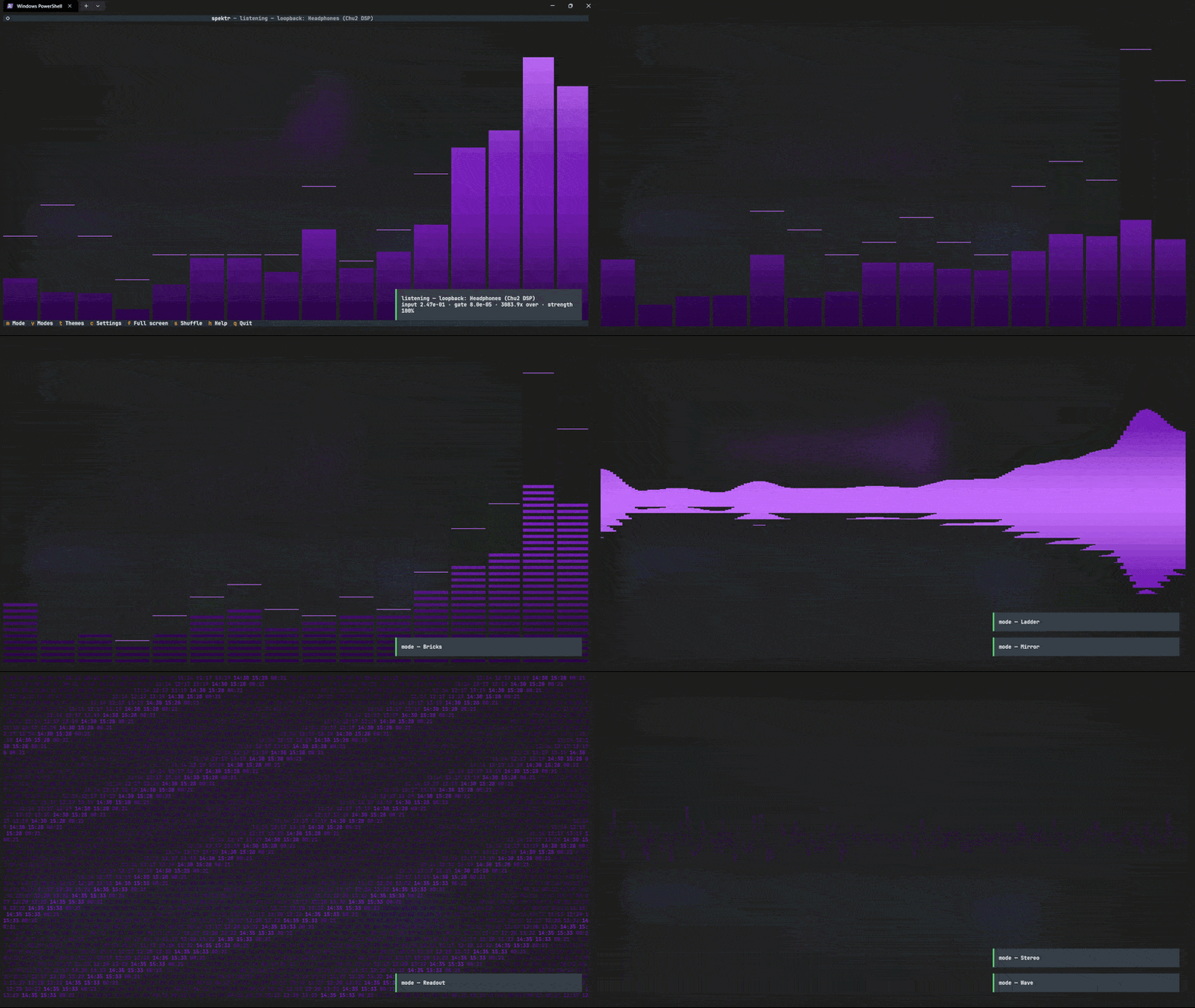
Play music anywhere, from Spotify to a browser tab to a game, and spektr draws it in your terminal. You do not point it at a file or sign in to anything. It listens to whatever your speakers are playing.
Sixty-nine render modes. Fifty-five themes. 60 fps, or your display's.
There is an Android build too: the same engine on a tablet, as an ambient display for your desk. See spektr on Android.
Install
With Python 3.10+, on Windows, Linux or macOS:
git clone https://github.com/MrEmoji27/spektr
cd spektr
pip install -e .
spektr
Or from PyPI:
pip install spektr-audio
spektr
Modes
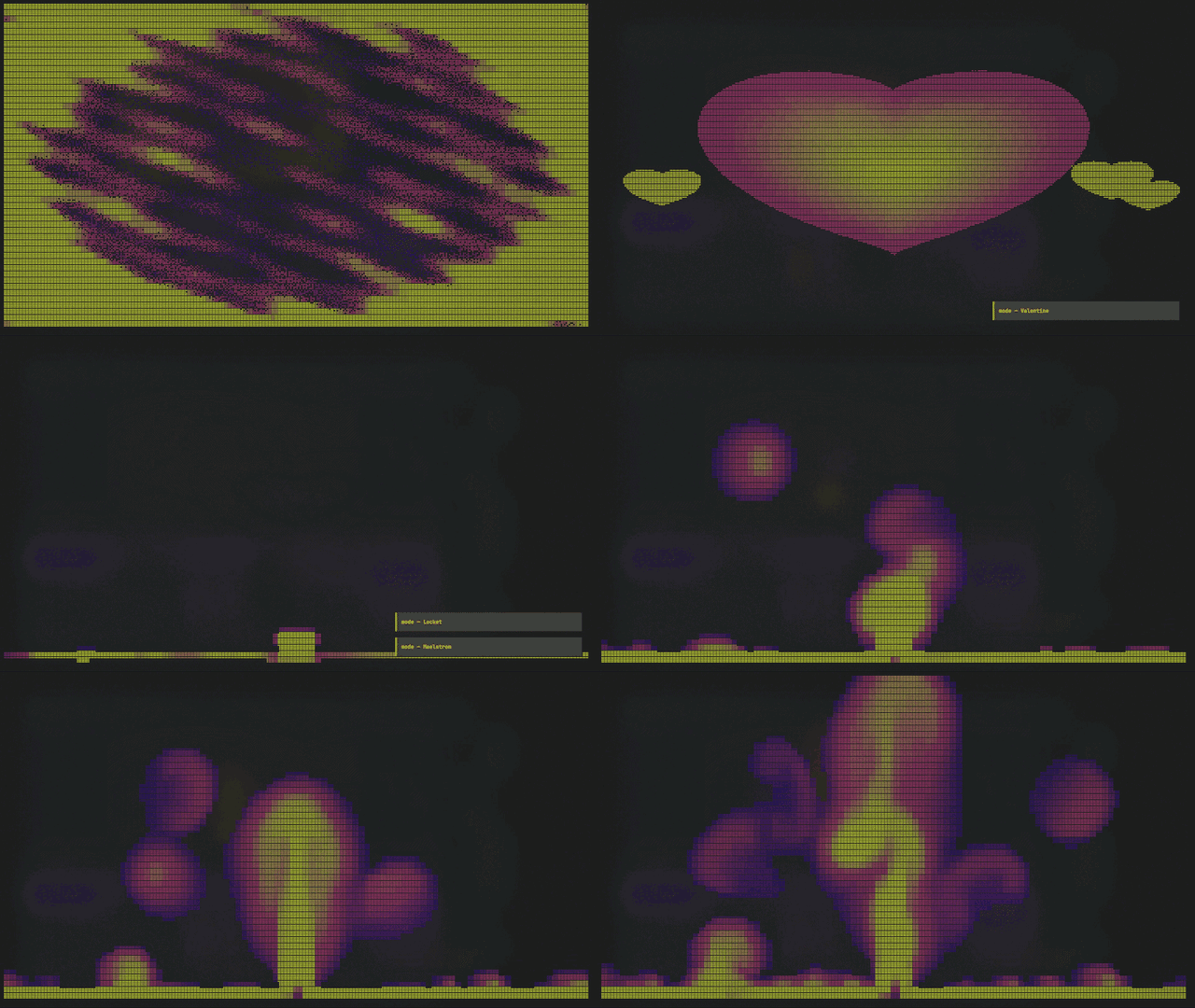
Valentine and Auroras, on the citrine ramp.
Press v for a picker that previews each mode live as you arrow through it, and / to
filter. They are listed here in the order the picker cycles them.
| Bars | the classic, bars with peak markers | Keys | a lit keyboard; struck bands scroll away as notes |
| Bricks | chunky, no partial cells | Tunnel | flying down a pipe, ribbed by the beat |
| Columns | gapless, interpolated across the full width | Tunnel In | rings thrown out of the centre on the beat, rushing past you |
| Crosscurrent | two streams in one spinning tunnel, round rings rushing out, octagons drawn in, sparking where they cross; the turn speeds up with the tempo and a busy track, and spokes strobe on the beat | ||
| Ladder | segmented LED stack | Warp | starfield, accelerating with the music |
| Mirror | grows out from the centre line | Matrix | digital rain, falling faster when it's loud |
| Readout | scrolling numeric ticker, band levels as plain digits | Boot | an old PC waking up, BIOS POST, a boot log, a blinking cursor |
| Riptide | two currents of wave lines sweeping across each other, sparking where they cross, bent by every hit | ||
| Twin Storms | two whirlpools of particles spinning opposite ways, trading streams and colliding in the middle | ||
| Arc Storm | lightning across the screen, an arc per slice of the spectrum, forking on every hit | ||
| Shatter | a pane of glass in shards that fill with the music and blow apart where a hit lands | ||
| Stereo | per-band L/R meters, mirrored from centre | Spectro | scrolling waterfall, frequency up, time across |
| Wave | smoothed waveform | Plasma | solid colour field, warped by the spectrum |
| Scope | trigger-synced oscilloscope, the trace holds still | Chladni | vibrating-plate figure that snaps between real resonances |
| ECG | scrolling trace, like a heart monitor | Chladni Flow | the same plate, melting continuously from one figure to the next |
| Strings | plucked strings, bowed by their own band | Chladni Extreme | the plate driven past its modes, morphs and escalates |
| Helix | two strands rotating, split by true L/R phase | VFD | vacuum-fluorescent bargraph with phosphor afterglow |
| Gonio | stereo phase scope with a phosphor trail | Needle | analogue VU, one sweeping needle, one red zone |
| Scatter | density sparkle, thicker where it's loud | VU | big L/R LED meters with peak hold |
| Flame | fire, licking upward from each band | Kaleidoscope | radial mirror symmetry, the wedge count follows the spectrum |
| Pulse | radial pulse with shockwaves | Dither | the spectrum printed as a newspaper halftone |
| Arcs | hollow rings, one per band, pushed out by level | Dither Storm | the same crosshatch, but moving, each band drives its own wave, and beats throw rings through it |
| Bubbles | bubbles from the low end, popping at the top | Dither Storm Extreme | Dither Storm with nothing holding it back, hits pile up and a dense passage blows the field to white |
| Radial | the spectrum wrapped into a circle | Valentine | a heart that beats with the track, trailing smaller ones upward |
| Sonar | one sweep, not the whole spectrum, returns fade like a scope | Locket | an outlined heart, pulsing rings of hearts outward on the beat |
| Orbit | bodies on real elliptical orbits; loud bands swing out | Shooting Star | a night sky, with meteors thrown from a drifting radiant on the beat |
| Constellations | beats draw lines between fixed stars; the figures fade like film | Star Trails | a long exposure: the sky turns and leaves its arcs behind |
| Supernova | a mostly dark sky, waiting for the one hit worth a catastrophe | Locket Beat | the locket heart, sending out a steady stream of rings, bright on every beat |
| Swell | an open sea, bass drives the swell, hits land ripples | ||
| Fireworks | beat-triggered launches, bursts, and fall | Maelstrom | a real fluid sim, stirred by the music |
| Dune | sand piles up by band, avalanching past a threshold | Vinyl | a record whose grooves light up as a radial spectrum |
| Murmuration | a flock wheeling and scattering with the beat | Rain | rain on the glass, falling harder when it's loud |
| Retro | sunset grid, with the spectrum as the horizon | Ember | a coal bed burning by band, sparks off the hot spots |
| Auroras | a light ribbon whose lower rim rides the spectrum | Snow | snowfall in three planes, gusting and lying in drifts |
| JP Bars | a segmented LED meter whose crest peels off and rises, with peak lamps that hold and drop | JP Drift | the meter shedding bulbs: they break off and fall, landing on the bars in a cap that melts |
| JP Pulse | the meter bent into a ring, a spoke of bulbs per band, flashing and chased on the beat | JP Sequencer | a grid of light-up pads: every drum plays its own light show across it |
| JP Chords | a synth's chord display: the chord it hears in big letters, lit on a keyboard, and the ones before it | JP Panel | a drum machine's front panel: sixteen pads, a running light, and the drums lighting the pads they land on |
| JP Tracker | the song scrolling past like a tracker: the notes on top, the drums in their lanes, the beats marked |
The seven JP modes are inspired by Japanese audio hardware. The first three are the LED level meters on in-dash head units and equalisers: the same meter, with the unlit bulbs showing as faint dots, and each adds one idea from another mode: Keys' note roll, Rain's falling drops, Radial's circle. They light in three colour zones, low, middle and top, the way car stereo meters are printed.
The other four are music machines the song plays. JP Sequencer is a pad grid where each drum draws its own light show: a kick rings out from the centre, a snare throws a cross, a hat blinks a few pads. JP Chords names the chord it hears on a synth's display. JP Panel lights a drum machine's pads where each drum lands, and JP Tracker scrolls the notes and drums past like a tracker. They read the drums, the bar and the harmony the analyser now hears, and when they are not sure, of the bar or the chord, they say so rather than guess.
Shooting Star opens a cosmos group, and it is built on a different bargain from everything above it: the picture is mostly empty and mostly still, and the music arrives as events rather than as a level being redrawn. The meteors come from a drifting radiant, the point a real shower appears to diverge from, and a harder onset throws a brighter, longer, faster one. It has company now: Constellations grows figures by drawing one line per beat, Star Trails spins up with percussion while arcs accumulate around a fixed pole, and Supernova spends its whole budget on rare, hard hits , a shell that expands for five seconds and a core that glows on after it.
Riptide, Twin Storms, Arc Storm and Shatter are the wild group: as wild as Crosscurrent, without the tunnel. Each one runs two things against each other and lets the music collide them: two currents of lines, two storms, lightning across the whole screen, glass that breaks where a hit lands.
Vinyl, Rain, Snow and Ember are the lofi group, a shared look (warm objects, soft edges, nothing strobing) rather than a shared reactivity budget. Each one maps real band data into its geometry, so what the music changes is what the object is doing, not just how bright the picture is.
A seventieth entry, None, is registered as the off switch, it draws nothing. That is why the test output counts 70 against the sixty-nine listed here, and 82 in total, because the twelve subcell variants below are registered whether or not the setting that offers them is on.
Subcell variants: (o) and (q)
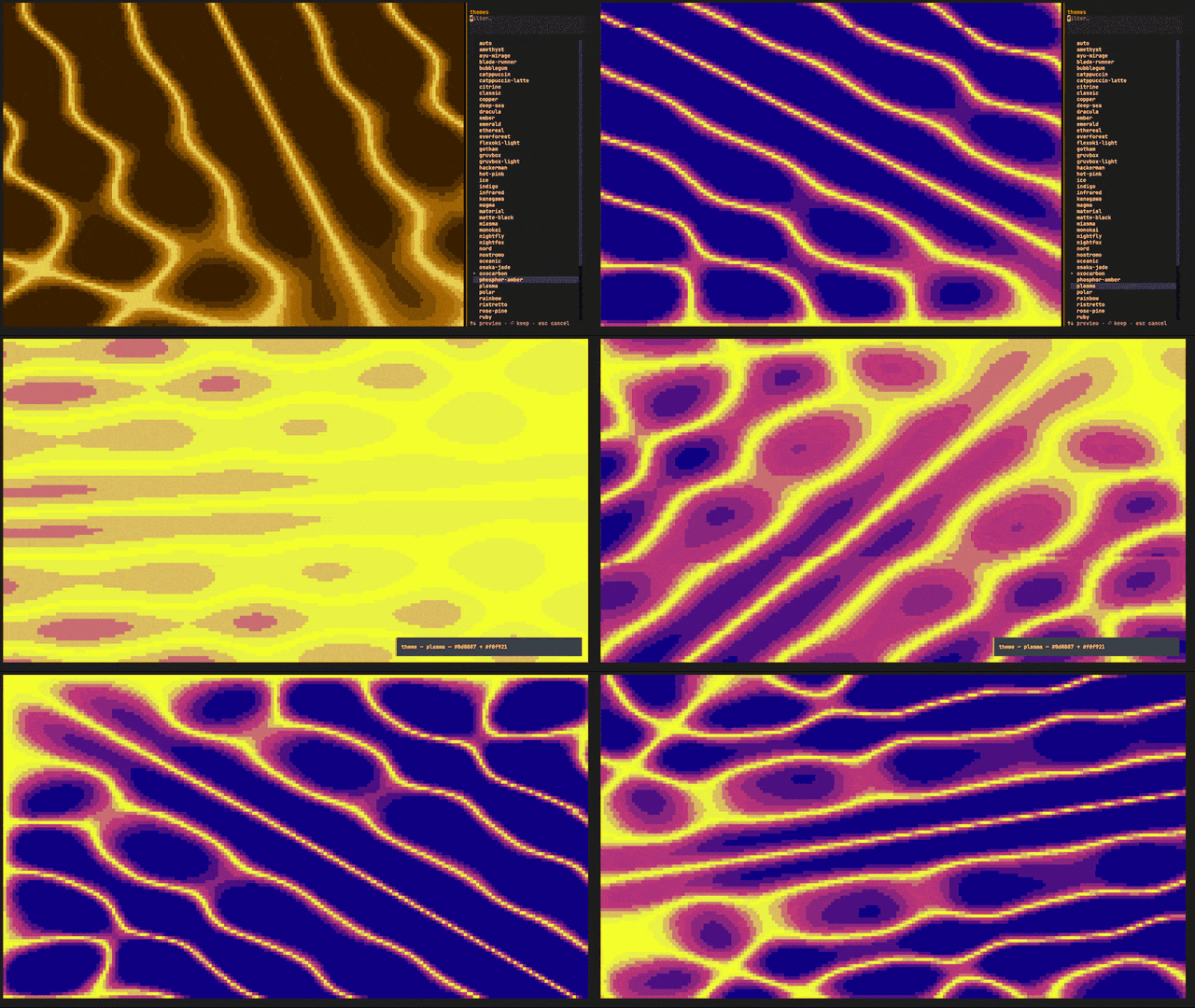
Chladni Extreme with the theme picker open.
Twelve modes have a second version drawn with subcell glyphs, which split one text cell into eight or four pieces instead of treating it as one block. A curve then lands inside a cell rather than on its edge, which is the difference between a curve and a staircase.
They are off by default, because they need a font with Unicode 16 octants. Open settings
with c and turn on subcell modes to add them to the v picker. spektr --glyph-test
shows in two seconds whether your terminal can draw them.
| variant | what the extra resolution buys |
|---|---|
| Scope (o), ECG (o), Sonar (o), Radial (o) | the trace becomes a continuous stroke instead of separated dots |
| Plasma (o), Chladni (o), Chladni Flow (o), Chladni Extreme (o) | nodal lines and gradients resolve between cells rather than on them |
| Kaleidoscope (o), Kaleidoscope Ultra (o) | mirror seams stop landing on cell edges |
| Valentine (o), Maelstrom (o) | the rim of the shape gets four times the vertical resolution |
The suffix says which glyphs the mode is drawing with, and that is a setting rather than a property of the mode, the subcell shape row in Settings switches all of them at once:
(o), octants. 2x4 pieces per cell, from Unicode 16. The default, and what the modes are designed around. Needs a font that has them; runspektr --glyph-testand you will know in two seconds.(q), quadrants. 2x2 pieces, from Block Elements, which every terminal font has had for decades. The fallback that always works.
So the same mode shows as Chladni (o) or Chladni (q) depending on that
setting, and both spellings are accepted anywhere a mode is named. Quadrants
are not a downgrade in speed, they are faster on the smooth field modes
and slower on the silhouette ones. Pick by what your font can draw.
At a normal terminal size the variants cost about what the originals do. Only at a maximised window on a large screen does the difference show, and the heaviest of them is Chladni Extreme.
Still frames of a few of them, straight from the render path: docs/gallery.md.
Themes
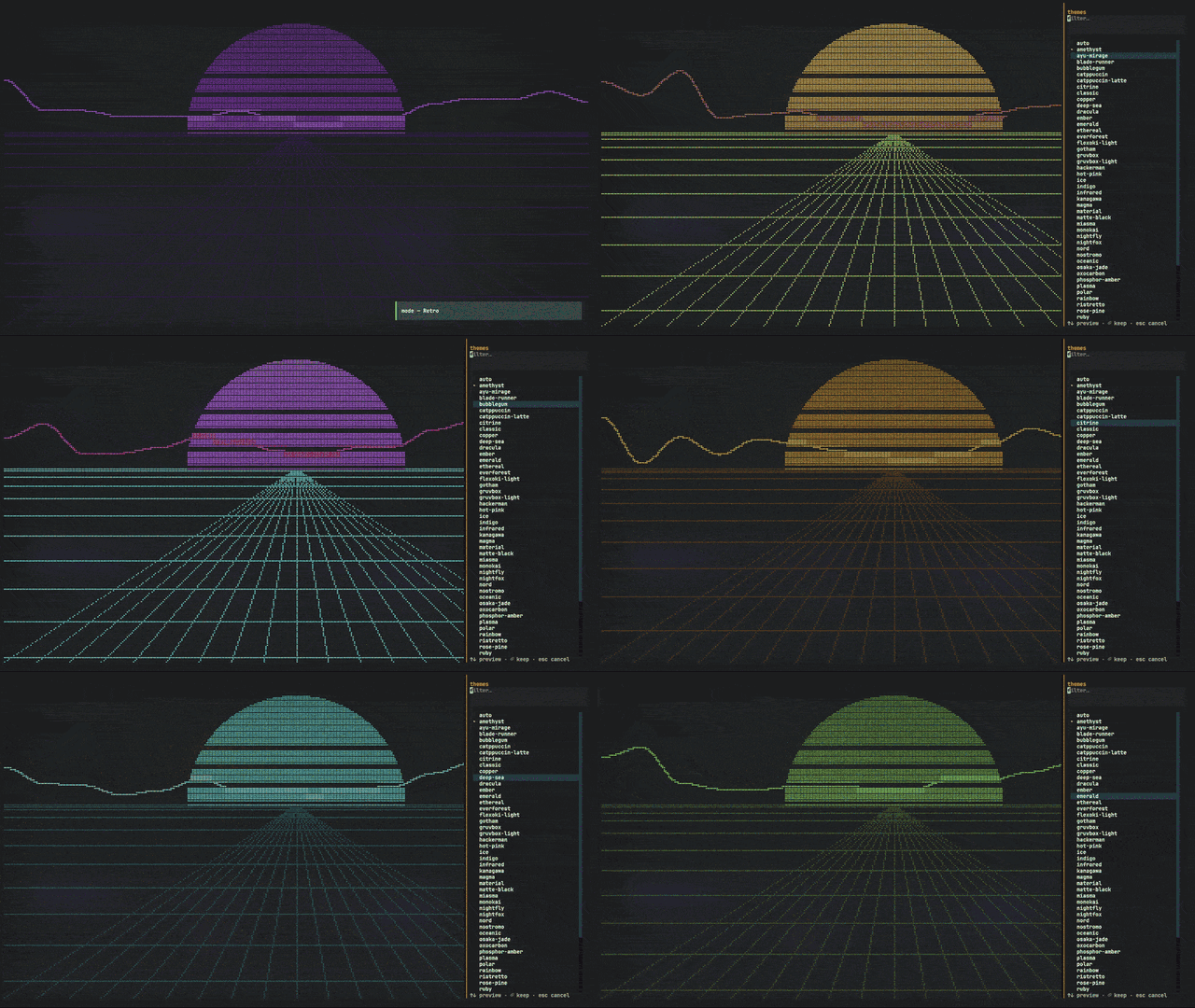
The t picker recolours the running picture as you arrow through it.
Fifty-five themes are built in and preview live from the t picker: classic, gruvbox,
catppuccin (+-latte), dracula, nord, tokyo-night (+-day), rose-pine,
everforest, kanagawa, ayu-mirage, monokai, solarized, nightfox, oxocarbon,
miasma, osaka-jade, ristretto, flexoki-light, nightfly, material, gotham,
oceanic, gruvbox-light, hackerman, ember, ethereal, synthwave, blade-runner,
nostromo, plasma, viridis, ice, vaporwave, infrared, deep-sea, magma,
matte-black, vantablack, rainbow, phosphor-amber, sakura, toxic, copper,
polar, bubblegum, hot-pink, ruby, emerald, sapphire, amethyst, citrine,
tangerine, indigo, plus auto, which builds a ramp from whatever Textual theme your
terminal is wearing.
rainbow is animated. Its colours drift across the bands instead of sitting still, and the
loop closes on itself so there is no seam to jump at.
Two details matter more than they sound. Gradients are blended in linear light instead of straight sRGB, so the middle of a ramp does not go muddy. And the background is painted with the theme's own colour, so a dark theme is dark whatever your terminal is set to.
Custom themes
Drop a TOML file in ~/.config/spektr/themes/, or %APPDATA%\spektr\themes\ on Windows.
The filename becomes the theme name. Press r to reload without restarting.
# ~/.config/spektr/themes/solarized.toml
low    = "#859900"   # bottom of the spectrum ramp
mid    = "#b58900"
high   = "#dc322f"   # top
bg     = "#002b36"
fg     = "#839496"
accent = "#268bd2"
cliamp's green, yellow, red and bright_fg names work as aliases, so its themes port
across unchanged.
Plugins
Write your own visualiser and drop it in ~/.config/spektr/plugins/. It appears in the v
picker beside the built-in ones, because it uses the same decorator and the same contract.
# ~/.config/spektr/plugins/nightrider.py
import numpy as np
from spektr.api import mode, pack_braille, cell_max

@mode("Nightrider", blurb="scanning eye, swept by the beat")
def nightrider(ctx):
    speed = 0.5 + ctx.range(0.0, 0.15) * 2.5      # lunges on the kick
    pos = (np.sin(ctx.t * speed) * 0.5 + 0.5) * (ctx.dot_cols - 1)
    x = np.arange(ctx.dot_cols)[None, :]
    y = np.arange(ctx.dot_rows)[:, None]
    band = np.abs(y - (ctx.dot_rows - 1) / 2) < ctx.dot_rows * (0.12 + ctx.energy * 0.25)
    glow = np.clip(1.0 - np.abs(x - pos) / (ctx.dot_cols * 0.18), 0.0, 1.0)
    field = np.where(band, glow ** 1.6, 0.0)
    return pack_braille(field > 0.10), ctx.ramp(cell_max(field))
You return codepoints and heat, never colours, so every plugin works with all fifty-five themes for free.
Manage them with spektr plugins list, spektr plugins trust <name> and
spektr plugins untrust <name>. The full contract, including what a mode is given each
frame and the mistakes that are easy to make: docs/plugins.md.
Keys
| Key | Action | Key | Action | |
|---|---|---|---|---|
v |
Visualizer picker, live preview, / filter |
d / D |
Next audio source / back to the default | |
l |
Loadout, which modes are offered at all | s |
Shuffle on/off, set what it cycles in c |
|
t |
Theme picker, live preview, / filter |
[ ] |
Sensitivity down / up | |
c |
Settings, frame rate, bands, sensitivity, gate, source | g G |
Noise gate down / up | |
m / space |
Next mode (M for previous) |
r |
Reload themes and plugins from disk | |
T |
Next theme | p |
Frame time and FPS | |
f |
Hide header and footer, full-screen visual | h / ? |
Help, every key, and what each thing means | |
q |
Quit |
Mode, theme, frame rate, band count, sensitivity, gate, shuffle with its scope, and the loadout are all remembered between runs.
Changing mode fades one picture into the other rather than cutting. Within a family the outgoing picture keeps moving to the music while it changes shape. Between families the change is slower and more deliberate.
Command line
spektr --diagnose       probe every source: is audio arriving, and how loud?
spektr --devices        list every audio device
spektr --device 7       force a capture device by index
spektr --mode Retro     start in a given visualiser
spektr --theme gruvbox  start with a given theme
spektr --fps 30         cap the frame rate (15-240)
spektr --fps unlimited  run at the detected display rate (experimental)
spektr --motion glide   snappy or glide: reactive or smooth bars
spektr --morph classic  clean or classic: how one mode changes into the next
spektr --bands 24       how many bars, 8 to 64, or 0 to fit the terminal
spektr --eco on         30 fps, fewer bars, shuffle skips the heavy modes
spektr --shuffle modes  modes, themes, both, or off
spektr --mic            allow the microphone as an automatic source
spektr --list-modes     print visualiser names (including the opt-in ones)
spektr --list-themes    print theme names
spektr --glyph-test     can this terminal draw the (o) subcell modes?
spektr --cells quadrant draw the subcell modes as (q), block elements only
spektr --background terminal
                        let the terminal's opacity show through the visualizer
                        (--background theme is the solid default; saved)
spektr --monitor        run the capture path headlessly, when --diagnose looks fine
                        but the picture will not move
spektr --no-plugins     skip loading plugins this run
spektr --version        print version

spektr plugins list     what's installed, and whether it's trusted
spektr plugins trust    review and approve a plugin
spektr plugins doctor   why isn't mine loading?
spektr plugins path     print the plugins folder
The settings flags are saved, so set them once. Names are matched whatever
their case, and a mistyped flag or name is refused with a suggestion rather
than ignored. If spektr is not on your path, python -m spektr does the same.
How it captures audio
spektr listens to your output device through loopback, so it draws whatever is already playing. It never needs a file, a stream or an account. Stereo is kept all the way through, which is what the Stereo, VU, Needle and Gonio modes read.
| Platform | Status |
|---|---|
| Windows | WASAPI loopback through soundcard. Works out of the box. |
| Linux | PulseAudio or PipeWire monitor through soundcard, or a monitor input. |
| macOS | Needs a loopback device such as BlackHole or Soundflower. |
It taps whatever your system calls the default output and stays there. It will never pick
your microphone on its own. If the picture is flat, run spektr --diagnose: it opens every
candidate in turn and prints what it measured, which usually settles it.
Why loopback needs soundcard rather than sounddevice, and how to read --diagnose:
docs/audio-capture.md.
spektr on Android
An ambient display for a tablet you already own. Same engine, same modes, same themes. Click to expand.
 |
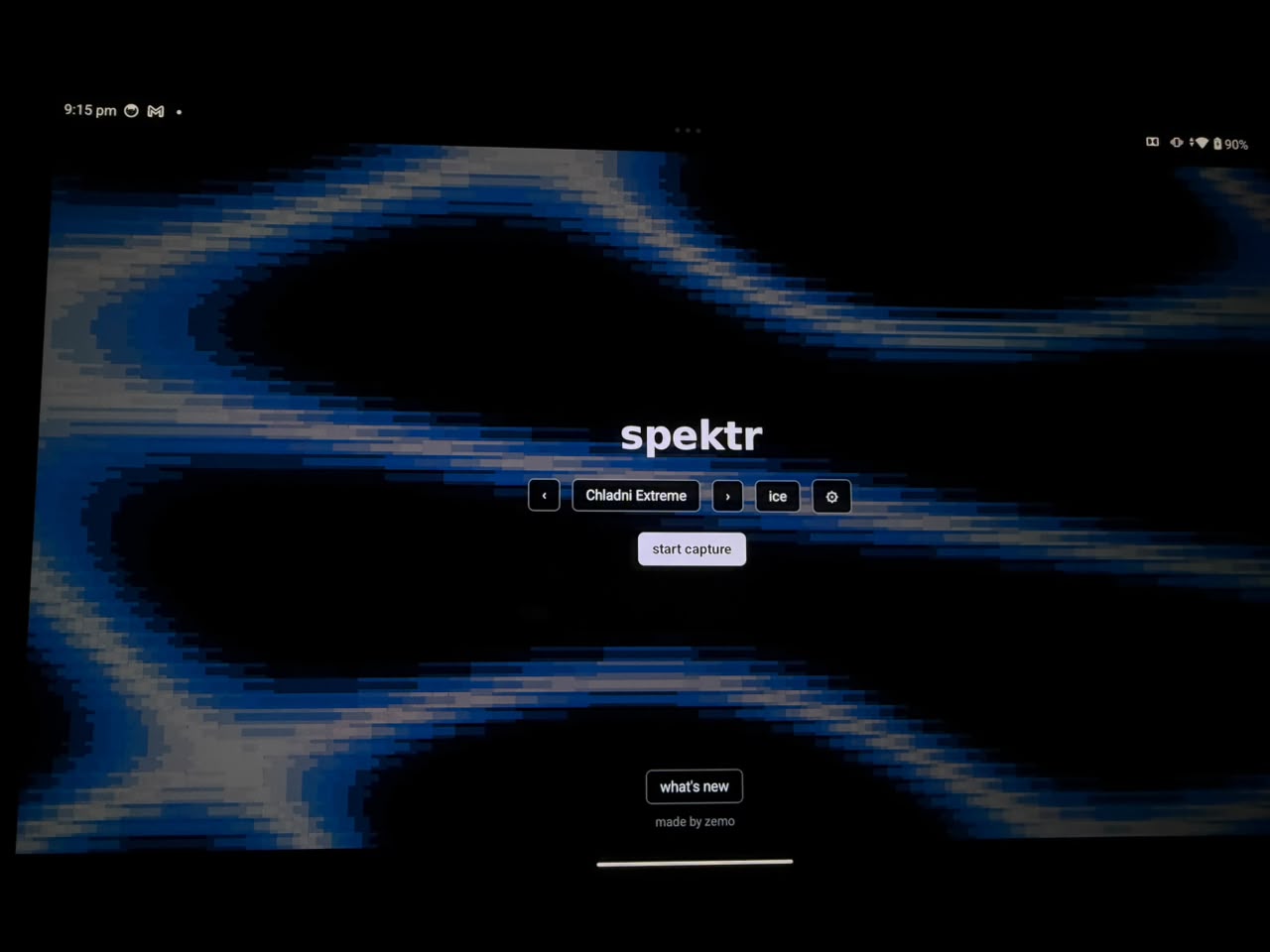 |
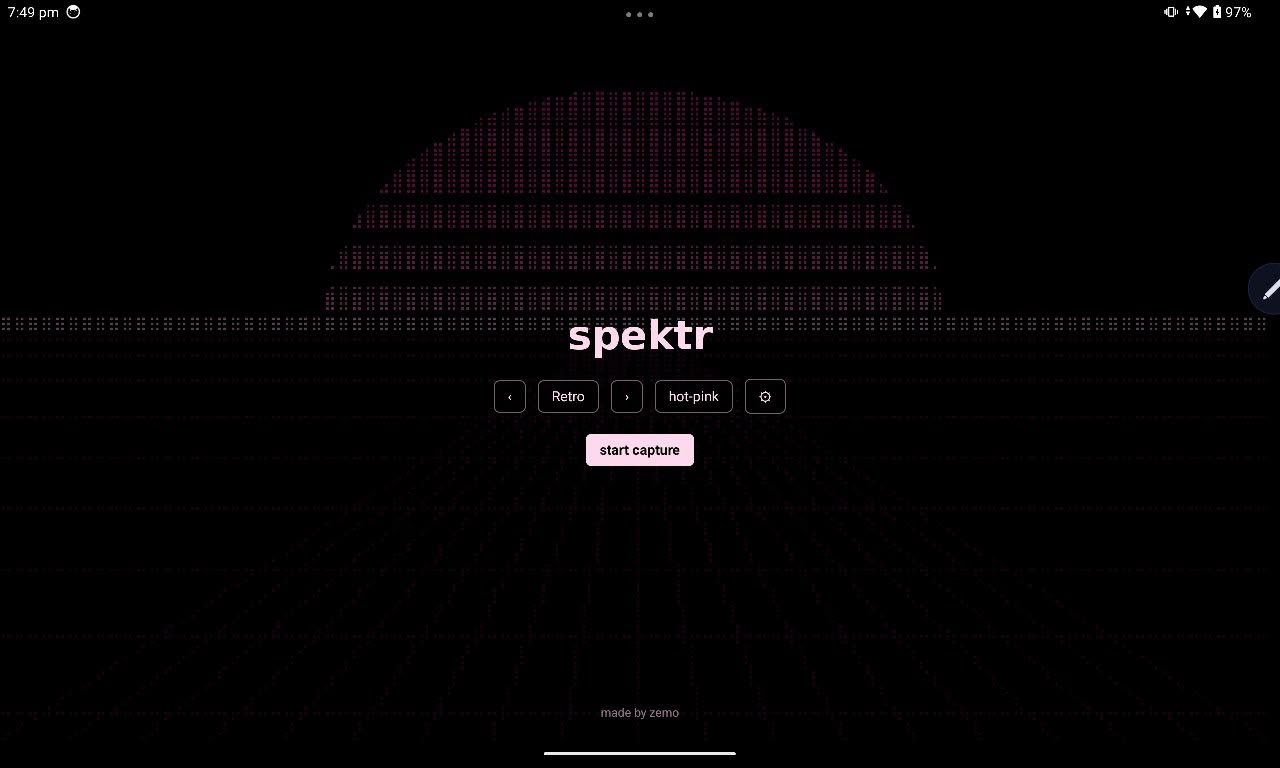
| The home screen. The preview behind the pickers is the real engine. | On the tablet it is meant for: Chladni Extreme, ice. |
What it is for. A spare screen that draws your music. It is best on a big one: a tablet propped on the desk, an old phone in a stand, anything you look at rather than hold. This is decoration and it is meant to be. There is nothing here you cannot do better on the desktop.
What it captures. Whatever that device is playing. Android gives no app a way to read another device's audio, so the tablet draws the tablet. Put the music on it and let the desktop get on with work.
The permission prompt asks to record the screen. That is Android's design, not ours: audio capture is part of the screen-recording API and there is no audio-only permission to ask for. Nothing is recorded and nothing leaves the device.
How it works. The engine is the same Python described above, running unmodified through Chaquopy. CPython and numpy load in about half a second, and one call per frame hands Kotlin a packed grid of codepoints and colours. Kotlin owns the audio and the screen. Everything between them is this repository, so a mode written for the terminal works on the phone the day it is written.
Where it differs.
| desktop | Android | |
|---|---|---|
| modes | 60 | the subcell variants are missing, because no Android font has Unicode 16 octants yet |
| themes | 55 | 55 |
| frame rate | 60 | 30, and it is watched from across a room |
| rendering | terminal cells | cells, or smooth, where the field is drawn as a picture instead of typeset as glyphs |
Smooth is the one thing a phone can do that a terminal cannot. A cell is not a pixel: in the terminal, Chladni computes a continuous field and then picks one block to stand for each cell. Android has a canvas and no such limit, so it draws the field it actually computed. Curves instead of staircases.
Getting it. Download spektr-android-*-arm64-v8a.apk from the
releases page. It needs Android 10 or newer
and 64-bit ARM. Sideload it, allowing installs from your browser the first time.
The APK carries its own version number, which is not the one on the release. The port has
had fewer versions than the desktop app. CHANGELOG.md lists them separately, and the app
shows that file under what's new.
Build it yourself with cd android && ./gradlew :app:assembleDebug. Design notes:
docs/android-port.md.
How it works
Analysis runs on its own clock rather than off the frame timer. The bands use cava's two-window distribution. Motion is timed in seconds, so it looks the same at 15 fps and at 240. Modes return arrays of codepoints and palette indices, never strings and never a Rich render.
Why each of those, and what breaks without them: docs/how-it-works.md.
Development
python -m pytest tests/ -q   # the whole suite
python tests/bench.py        # shape checks, per-mode benchmark, cost gate
python tests/onset_score.py  # scores the beat detector against its corpus
python tests/test_audit.py   # mutation, animation, reactivity, leaks
tests/test_golden_modes.py checks that every built-in mode draws exactly what it drew
when tests/golden/modes.json was recorded. A change meant to alter a picture regenerates
that file with python tests/golden.py --update and says so in its commit message.
What each gate covers and where it stands: docs/development.md. Building the Windows exe and installer: packaging/README.md.
Why it exists
It started as the visualiser inside a terminal music player. It turned out to be the most interesting part of that project, and the only part that did not depend on anyone's API, so it moved out and got its own name.
Inspired by
Two terminal visualisers got there first, so their ideas are credited here.
-
cava, the console audio visualizer that solved the hard parts of the spectrum first. spektr takes its band distribution, its overshoot-based automatic sensitivity, and its capture rule: tap the default output and do not audition devices for signal.
-
cliamp, the terminal music player spektr began inside. The mode registry, the theme system and the plugin contract all carry its shape. cliamp theme files port over unchanged, and its plugin model, code with a decorator in a folder checked by hash, is the same idea in another language.
Use of AI in this project
Parts of spektr were built with AI. Opus 5, Opus 5.5, GPT-5.6 Luna and DeepSeek v4 Flash helped build, debug and fix it. That is said here rather than left to be worked out from the commit history.
They worked under direction and within limits. No model decided where the project was going, and no output was accepted because it looked finished. Every change had to be measured, rendered, or otherwise shown to do what it claimed.
That rule is not ceremony. Generated code fails in a specific way: it is fluent, coherent and confidently documented, and it can be all of that while being wrong. A mode can return arrays of the right shape, carry a convincing docstring, and still draw the wrong picture. Reading such code is not enough, because reading is the check it passes best.
This is why the tests here check behaviour rather than structure: that a mode reacts when the audio changes and holds still when it does not, that it uses the colour ramp it was given, that a comment still matches the code beside it, that the Android copy of the engine matches the original, that every glyph a mode emits exists in the font shipped with it. Most of those were added after something passed a weaker check and turned out wrong anyway.
A note for anyone doing the same
The risk to plan for is not bad output. It is plausible output. Code nobody has read, run and tested is a liability whoever wrote it, and accepting a model's work because it looks reasonable is a reliable way to ship a bug you cannot explain later.
Treat generated code as a proposal, not a result. Decide how a change will be checked before you accept it. Prefer checks that watch behaviour over checks that inspect form. Keep a person accountable for every decision. On those terms these tools are genuinely useful. Without them they move risk quietly into your codebase, which is the worst place for it.
Credits
zemo, author and maintainer. Roshan (RRDOJ), the logo: a terminal prompt built out of spectrum bars.
Assisted work, on the terms above:
- Opus 5, most of it, up to 0.5.5.
- Opus 5.5, most of 0.6.0: the music analysis, the new modes and the reworks.
- GPT-5.6 Luna, individual modes.
- DeepSeek v4 Flash, debugging and second opinions.
License
MIT, © zemo. See LICENSE.
1 maintainer

Release files for spektr-audio 0.6.0
For a detailed explanation of source distributions (sdists) and built distributions (wheels), please see the package formats documentation.
Source distribution (sdist)
| File | Size | Uploaded | |
|---|---|---|---|
| spektr_audio-0.6.0.tar.gz | 608.2 kB | Details |
Built distribution (wheel)
| File | Interpreter | ABI | Platform | Reset |
|---|---|---|---|---|
| spektr_audio-0.6.0-py3-none-any.whl | Python 3 | none | any | Details |
Total release size: 1.1 MB
Release files / spektr_audio-0.6.0.tar.gz
| Download URL | spektr_audio-0.6.0.tar.gz |
|---|---|
| Size | 608.2 kB |
| Tags | Source |
|
SHA-256 checksum How to use checksums |
ced30640e0b1ad6f3ce93435d652adc82b01d473cb1cf4b0d44adab956713c83
|
|
BLAKE2b-256 checksum How to use checksums |
8d0b614d8969c9ca8f9e0f0c3bfaf4bb2454c5912219c19201760326120da29a
|
| Upload date | |
|
Uploaded using Trusted Publishing? What is trusted publishing? |
Yes |
| Uploaded via |
twine/7.0.0 CPython/3.13.14
|
Provenance
Provenance describes where a file came from. On PyPI, provenance is shared via attestations, which provide a verifiable record of the build or publishing details. View details, limitations and caveats.


PyPI Publish Attestation
PyPI verified that this artifact, at this checksum, originated from the publisher listed below.
Signed by GitHub Actions, verified by PyPI on Sep 25, 2026.
Transparency logRelease files / spektr_audio-0.6.0-py3-none-any.whl
| Download URL | spektr_audio-0.6.0-py3-none-any.whl |
|---|---|
| Size | 449.2 kB |
| Tags | Python 3 |
|
SHA-256 checksum How to use checksums |
d5d10c1005729ee71b2f29ead31e703aabf7fd471ab14d0922d3b98c2c88cb8a
|
|
BLAKE2b-256 checksum How to use checksums |
2b3707f339b56f1c35d6fc79df072ae28bcdcb25c374a7bdf975e8ee19f8907f
|
| Upload date | |
|
Uploaded using Trusted Publishing? What is trusted publishing? |
Yes |
| Uploaded via |
twine/7.0.0 CPython/3.13.14
|
Provenance
Provenance describes where a file came from. On PyPI, provenance is shared via attestations, which provide a verifiable record of the build or publishing details. View details, limitations and caveats.
PyPI Publish Attestation
PyPI verified that this artifact, at this checksum, originated from the publisher listed below.
Signed by GitHub Actions, verified by PyPI on Sep 25, 2026.
Transparency log












