
The Discord bot for SpellTable

Project description

SpellBot











The Discord bot for SpellTable.


🤖 Using SpellBot
Once you've connected the bot to your server, you can interact with it over Discord via the following commands in any of the authorized channels. Keep in mind that sometimes SpellBot will respond to you via Direct Message to avoid being too spammy in text channels.
!help: Provides detailed help about all of the following commands.!about: Get information about SpellBot and its creators.
Note: To use the commands for event runners and commands for admins, you will need to create a role on your server called
SpellBot Admin(capitalization matters). Only users with that role will be able to use those commands.
✋ Commands for Players
Just looking to play some games of Magic? These commands are for you!
!lfg: Sign up to play Magic: The Gathering!!find: Look for a game to join, but don't create a new one.!leave: Leave any games that you've signed up for.!power: Set your current power level.!report: Report the results of the game you just played.!team: Join one of the teams available on your server.!points: Find out how many points you currently have.
When you run the !lfg command, SpellBot will post a message for sign ups.
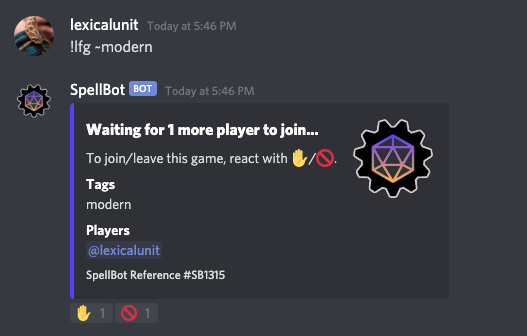
Other users can react to it with the ✋ emoji to be added to the game. When the game is ready, SpellBot will update the message with your SpellTable details.
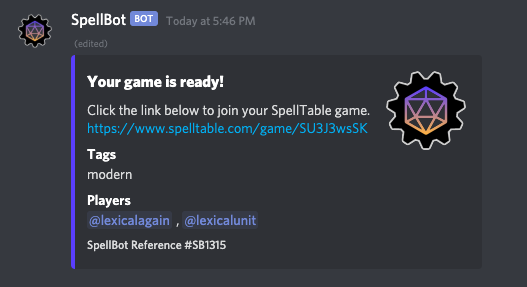
Users can also use the 🚫 emoji reaction to leave the game.
🎟️ Commands for Event Runners
These commands are intended to be run by SpellBot Admins and help facilitate online events.
!game: Directly create games for the mentioned users.!event: Create a bunch of games all at once based on some uploaded data.!begin: Start an event that you previously created with!event.!export: Export historical game data for your server.
👑 Commands for Admins
These commands will help you configure SpellBot for your server.
!spellbot: This command allows admins to configure SpellBot for their server. It supports the following subcommands:config: Just show the current configuration for this server.channels: Set the channels SpellBot is allowed to operate within.prefix: Set the command prefix for SpellBot in text channels.links: Set the privacy level for generated SpellTable links.expire: Set how many minutes before games are expired due to inactivity.teams: Sets the teams available on this server.power: Turns the power command on or off for this server.voice: When on, SpellBot will automatically create voice channels.tags: Turn on or off the ability to use tags on your server.help: Get detailed usage help for SpellBot.
🛋️ Ergonomics
SpellBot will always try and assume useful defaults or try to do the right thing
when you give it a command. For example if you use the tag ~modern
or other format names when creating a game, it will automatically assume the
correct number of players for you. Hopefully these features are intuitive and
helpful 🤞 — and if not, please report bugs and request features
to your heart's content.
🎤 Feedback
Thoughts and suggestions? Come join us on the SpellTable Discord server! Please also feel free to directly report any bugs that you encounter.
🙌 Support Me
I'm keeping SpellBot running using my own money but if you like the bot and want to help me out, please consider donating to my Ko-fi.
❤️ Contributing
If you'd like to become a part of the SpellBot development community please first know that we have a documented code of conduct and then see our documentation on how to contribute for details on how to get started.
🔧 Running SpellBot Yourself
First install spellbot using pip:
pip install spellbot
Provide your Discord bot token with the environment variable SPELLBOT_TOKEN.
As well as your SpellTable API authorization token via SPELLTABLE_AUTH.
You can get your bot token from Discord. Your bot will need the following permissions enabled:
- Manage Channels
- Create Instant Invite
- View Channels
- Send Messages
- Manage Messages
- Embed Links
- Read Message History
- Add Reactions
As for the SpellTable API authorization token, you'll have to talk to the SpellTable developers. Come join us on the SpellTable Discord server.
By default SpellBot will use sqlite3 as its database. You can however choose to
use another database by providing a SQLAlchemy Connection URL. This
can be done via the --database-url command line option or the environment
variable SPELLBOT_DB_URL. Note that, at the time of this writing, SpellBot is
only tested against sqlite3 and PostgreSQL.
More usage help can be found by running spellbot --help.
🐳 Docker Support
You can also run SpellBot via docker. Our image is published to lexicalunit/spellbot. See our documentation on Docker Support for help with installing and using it.
MIT © amy@lexicalunit et al
Release history Release notifications | RSS feed


Download files
Download the file for your platform. If you're not sure which to choose, learn more about installing packages.
Source Distribution
Built Distribution
Filter files by name, interpreter, ABI, and platform.
If you're not sure about the file name format, learn more about wheel file names.
Copy a direct link to the current filters
File details
Details for the file spellbot-4.7.2.tar.gz.
File metadata
- Download URL: spellbot-4.7.2.tar.gz
- Upload date:
- Size: 45.2 kB
- Tags: Source
- Uploaded using Trusted Publishing? No
- Uploaded via: poetry/1.0.5 CPython/3.7.7 Darwin/19.6.0
File hashes
| Algorithm | Hash digest | |
|---|---|---|
| SHA256 |
0bec9010a29e411b7381b36769e66345d39a4f590f26ec6e6f6b27f766a534e0
|
|
| MD5 |
3a66532802c5f4a7d318acf92084af59
|
|
| BLAKE2b-256 |
2b8352e836ac8c22cc8a377907133cc0a8bdb0b986f004021bdd72fdb4d72d84
|
File details
Details for the file spellbot-4.7.2-py3-none-any.whl.
File metadata
- Download URL: spellbot-4.7.2-py3-none-any.whl
- Upload date:
- Size: 57.6 kB
- Tags: Python 3
- Uploaded using Trusted Publishing? No
- Uploaded via: poetry/1.0.5 CPython/3.7.7 Darwin/19.6.0
File hashes
| Algorithm | Hash digest | |
|---|---|---|
| SHA256 |
f7fbe5b169fa3d1993f78e1e176c2ee9604edd65fd7df2afb8b6e67d260ff1e1
|
|
| MD5 |
1a384c61f01f1ed2f373cddec40c189e
|
|
| BLAKE2b-256 |
221df795396b4d68da8a212ceeb35844a98071bddc1774f469eae4cc67a69be5
|






