
💰 SpendShield — the authorization layer between AI agents and money
Payment networks move money. SpendShield decides whether it should move at all.
What it is — a channel-agnostic financial authorization runtime for AI agents.
What it does — evaluates every spending action against policy before money moves: ALLOW / APPROVAL (human) / DENY, with a structured reason an LLM can consume.
What makes it different — Policy · Approval · Security · Lifecycle · Explainability · Tamper-evident Audit. Not just can it pay — is it authorized to?
What it is NOT — not a wallet, not a payment rail, not a payment processor. Stripe, x402, wallets stay downstream; SpendShield never holds your money.




Agent wants to spend $75:
AGENT ──► SpendShield ──► Policy: max $50
              │
              ▼
        ❌ DENY — transaction $75.00 exceeds the $50.00 limit
              │
              └── MAX_TRANSACTION_EXCEEDED · audited · policy v2.0.0
One YAML policy. One authorize() call. Every payment decided, explained, audited — with a reason an LLM can consume, and a tamper-evident audit chain.
▶ 30-second interactive demo — watch an AI agent get stopped.
🎬 Watch it happen — 60-second real run
A real Claude session asked to spend on McDonald's. It got its $25 order… then the gate said no to $75… then said no again when it tried to push $125 through a $100 daily budget. No retries, no splitting, no second path — the recording is unedited.
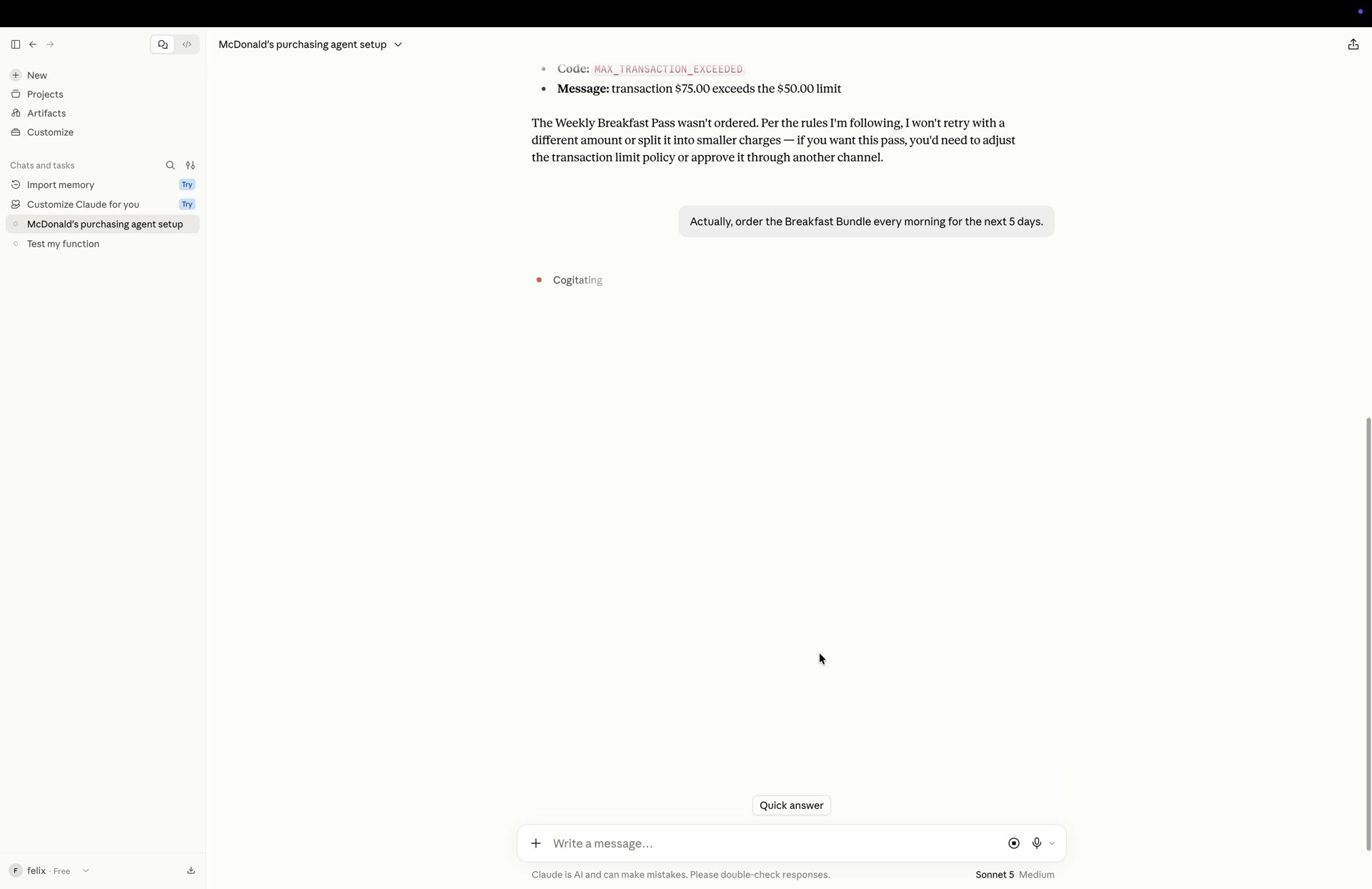
▶ Play it inline on the demo page · direct mp4
🔒 One gate. No second path.
        propose spend              decide               move money?
   ┌─────────────┐  authorize_payment  ┌──────────────┐   ALLOW only   ┌──────────────┐
   │  AI Agent   │ ──────────────────► │  SpendShield │ ─────────────► │ Payment rail │
   │ (Claude,    │                     │ policy rules │                │ (Stripe,     │
   │  scripts)   │ ◄────────────────── │ + human      │ ◄───────────── │  x402,       │
   └─────────────┘  decision + reason  │ approval     │    never       │  wallet)     │
                                       └──────────────┘                └──────────────┘
                                               │
                            DENY / APPROVAL — money does NOT move
The agent holds no payment credentials and has no payment tool. authorize_payment is the only path money can take — the decision is ALLOW / APPROVAL / DENY, the reason is structured for an LLM, and every attempt lands in the audit chain.
🏗️ The runtime — four layers
┌────────────────────────────────┐
│ GOVERNANCE   review · apply · version · rollback   │
├────────────────────────────────┤
│ AUTHORIZATION  policy · ALLOW / APPROVAL / DENY · reason codes │
├────────────────────────────────┤
│ SECURITY      scan · fuzz · 8 invariants           │
├────────────────────────────────┤
│ EVIDENCE      explainability · tamper-evident audit chain │
└────────────────────────────────┘
        ↓ Stripe / x402 / Wallet (channel-agnostic)
Not a demo — a working baseline. Every result in the demo is real engine output.
⚡ See it block a transaction in 60 seconds
No config. No YAML. No account.
pip install spendshield
from spendshield import SpendShield

shield = SpendShield(budget=100, max_amount=50, dry_run=False)

# Agent tries to spend $75 — policy limit is $50
result = shield.authorize("", 75, "amazon.com")
print(result.decision, "—", result.reason)
❌ DENY — transaction $75.00 exceeds the $50.00 limit
⚡ Try SpendShield in 60 Seconds — no API key required: ▶ Open in Google Colab
⚡ Quickstart — 5 minutes to running
pip install spendshield
1. Write a policy (policy.yaml):
version: "2.0.0"
policy:
  budget:        { daily: 100, monthly: 1000 }   # hard ceilings
  transaction:   { max: 50 }                     # per-payment cap
  merchants:
    allowed: [amazon.com, walmart.com]           # exact domain match
    blocked: [scam-vip.com]
  approval:      { over: 30, new_merchant: true, channel: tg }  # human sign-off
agents:
  shopping-agent:
    transaction: { max: 50 }
2. Gate your payment function:
from spendshield import SpendShield

# dry_run=False: 真实执行。默认是安全干跑模式(只评估不执行) — 接入真实支付前用它调试
shield = SpendShield(dry_run=False)
shield.load_policy("policy.yaml")

@shield.protect("order", agent="shopping-agent")
def place_order(amount, to):
    return call_real_api(amount, to)   # denied / needs-approval raises before this runs
Or use the result object directly:
result = shield.authorize("shopping-agent", 2000, "scam-vip.com")
print(result.decision)   # "DENY"
print(result.reason)     # "merchant 'scam-vip.com' is blocked"
3. Watch it work (real engine output):
❌ DENY
Reason: merchant 'scam-vip.com' is blocked
  - MERCHANT_BLOCKED: merchant 'scam-vip.com' is blocked (block)
Policy version: 2.0.0
🤖 MCP Quickstart — let the agent manage itself
pip install spendshield
spendshield-mcp --policy policy.yaml     # stdio MCP server, 16 tools
Claude Code / any MCP host gets: spend_authorize, spend_approve, policy_sim, policy_apply, policy_create → policy_review → policy_lifecycle_apply, policy_rollback… An agent can ask "will this be denied?" before spending, and humans approve the big ones.
🧪 How it's tested (real money → real discipline)
- 251 tests, 14+ security suites: budget bypass, race conditions, replay, double-spend, parameter tampering, credential leaks…
- Security constitution — 8 invariants that must never break: unauthorized → no payment · over budget → no payment · approval mismatch → no payment · invalid identity → no payment · replay → at most one authorization · concurrency → never breaks budget · engine failure → deny · agent can't bypass SpendShield
- Fuzz (random-seed soak): thousands of attack combinations per run, Money Invariant must hold
- Audit hash chain: every decision is an event chained by hash — tamper with history and it's detected
- Every discovered hole → permanent regression test. Release blocked on any P0/P1 security bug. Before each release we ask: did this change give an attacker a new way to spend money?
🗺️ Roadmap
V1 prevent reckless spending ✅ → V2 Policy Engine ✅ → V2.2 Security Harness ✅
→ v0.7.2 Known-Good baseline ✅ → 0.8 Policy Lifecycle ✅ (CREATE→VALIDATE→SIMULATE→SCAN→REVIEW→APPLY→ROLLBACK)
→ Reality Test (real agents, real money, real attacks) ← we are here
→ V3 Intent Layer → V4 Risk → V5 IAM → V6 Payment Rails → 1.0
The metric that matters: real agents protected, real transactions gated, real dollars saved — not stars.
🩸 Why this exists (a real incident)
On August 9, 2026, my automation ran a test order. I sent dry: true expecting a price preview — the server only honored ?dry=1. 4 orders of ¥99 were charged for real. The money was gone. When AI starts spending real money, who puts a gate in front of it? I turned my scar into a library.
🏴 Break the Gate — Security Challenge
SpendShield guards real money. Try to break it.
The challenge: make an unauthorized transaction get ALLOW — bypass the policy, forge an approval, race the budget, replay a payment, tamper with history. Anything.
Rules:
- 🧪 Sandbox only — use
dry_run=True/ test keys. Never point attacks at real payment systems. - 🐛 Found a bypass? Open an issue with a minimal reproduction.
- 🏅 First valid bypass per attack class gets credited in the Security Hall of Fame.
- 🔒 Every valid finding becomes a permanent regression test — this is how the gate gets stronger.
Current status: 240 tests · 16 security suites · 11,351 adversarial authorization attempts · 0 unintended ALLOW · 0 crashes (audit) · 0 known escapes.
⚠️ Precision: this is evidence from the current test suite against the current implementation — reproducible verification, not a mathematical proof of security. New attacks are always possible; every valid finding becomes a permanent regression test (see SECURITY.md).
⚠️ Transparent threat model
- MCP has no auth — trust your host;
policy_apply/policy_revieware host-level operations - Approval IDs are 48-bit random — a library trusts its caller
- In-memory audit (append-only on the roadmap)
- We are actively seeking real-world attacks: Reality Test — challenge: make a DENY turn into APPROVE
- Deployment models & trust boundaries: SDK → MCP → Gateway — what each layer guarantees (and what it can't)
- Roadmap (demand-driven): SDK → users → Agent → enforced entry → Governance → Platform
SpendShield: the layer I wish I had before my AI spent my money.
✅ Ready to try it?
60 seconds: ▶ Run the demo in Colab — no install
5 minutes:
pip install spendshield # v0.8.0
from spendshield import SpendShield

shield = SpendShield(budget=100, max_amount=50)

@shield.protect("order")
def place_order(amount, to): ...
That's it. If it ever lets an unauthorized payment through — break the gate and get credited.
1 maintainer

Metadata
1 maintainer
Release files for spendshield 0.8.3
For a detailed explanation of source distributions (sdists) and built distributions (wheels), please see the package formats documentation.
Source distribution (sdist)
| File | Size | Uploaded | |
|---|---|---|---|
| spendshield-0.8.3.tar.gz | 70.9 kB | Details |
Built distribution (wheel)
| File | Interpreter | ABI | Platform | Reset |
|---|---|---|---|---|
| spendshield-0.8.3-py3-none-any.whl | Python 3 | none | any | Details |
Total release size: 128.5 kB
Release files / spendshield-0.8.3.tar.gz
| Download URL | spendshield-0.8.3.tar.gz |
|---|---|
| Size | 70.9 kB |
| Tags | Source |
|
SHA-256 checksum How to use checksums |
f7f640e351753e38ad58d476d837a1494ab0f9e026fbb838ac23f516c6cf08b6
|
|
BLAKE2b-256 checksum How to use checksums |
2468944e5d0c9e967432b7f2d0fd2e6fbed3196b725585341cacda6a7053cba9
|
| Upload date | |
|
Uploaded using Trusted Publishing? What is trusted publishing? |
No |
| Uploaded via |
twine/7.0.0 CPython/3.14.2
|
Release files / spendshield-0.8.3-py3-none-any.whl
| Download URL | spendshield-0.8.3-py3-none-any.whl |
|---|---|
| Size | 57.6 kB |
| Tags | Python 3 |
|
SHA-256 checksum How to use checksums |
a8f79e4aa2626c596c1c6d4073dc14a276adef62fd030d36ad5aa78f1fa900f9
|
|
BLAKE2b-256 checksum How to use checksums |
f14cc5f2c421705ba1f501789d8e04cff23360b2f65938077d067de0ee50bec2
|
| Upload date | |
|
Uploaded using Trusted Publishing? What is trusted publishing? |
No |
| Uploaded via |
twine/7.0.0 CPython/3.14.2
|














