
spent
See what your Claude Code sessions really cost.
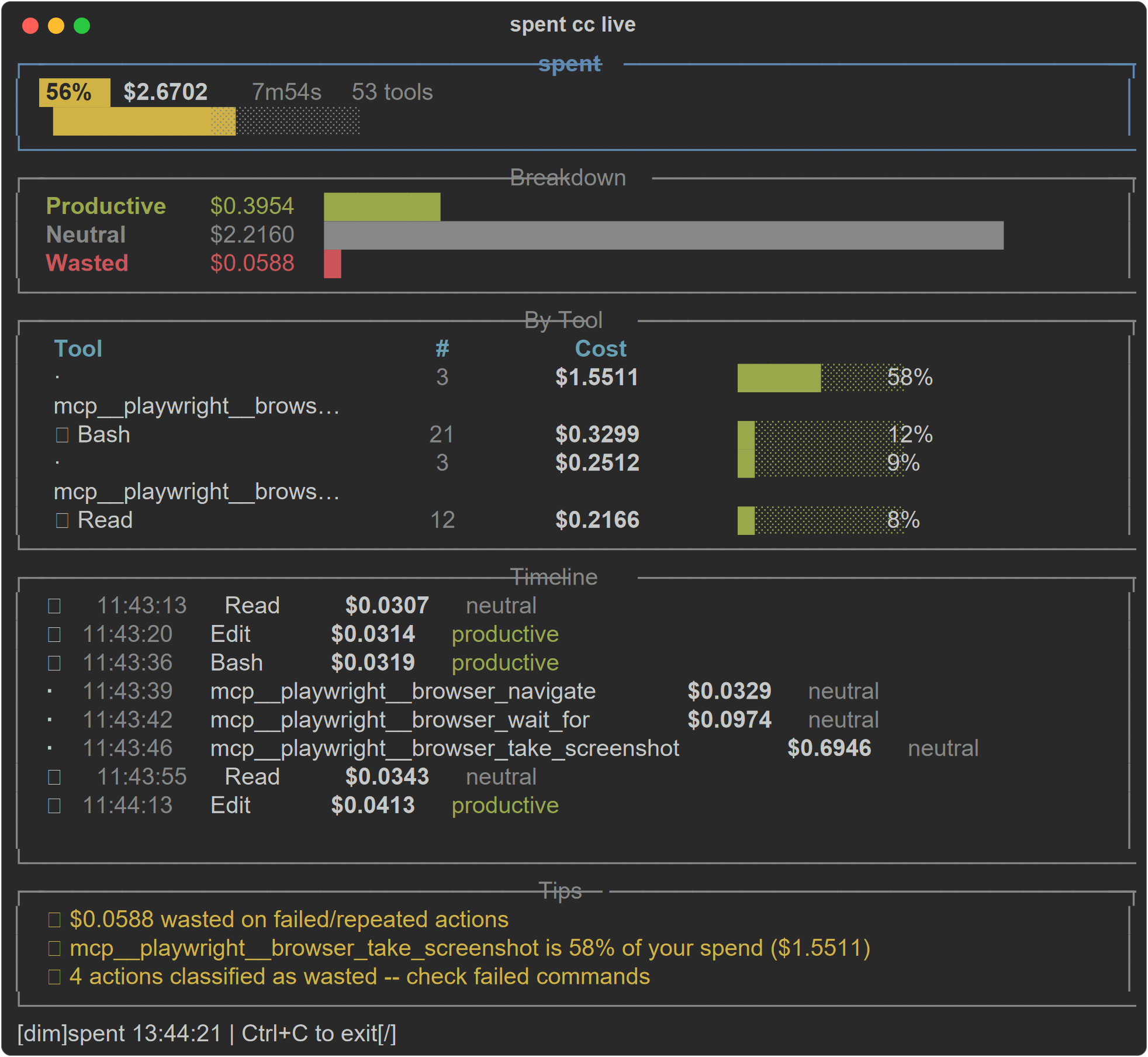
Efficiency score. Productive vs wasted breakdown. Live terminal dashboard.




You use Claude Code every day. Do you know how much each session costs? Which tool uses are productive and which are wasted?
spent tracks every tool use, classifies it as productive, neutral, or wasted, and gives you an efficiency score. No API keys. No external services. Everything runs locally from Claude Code's own hook system.
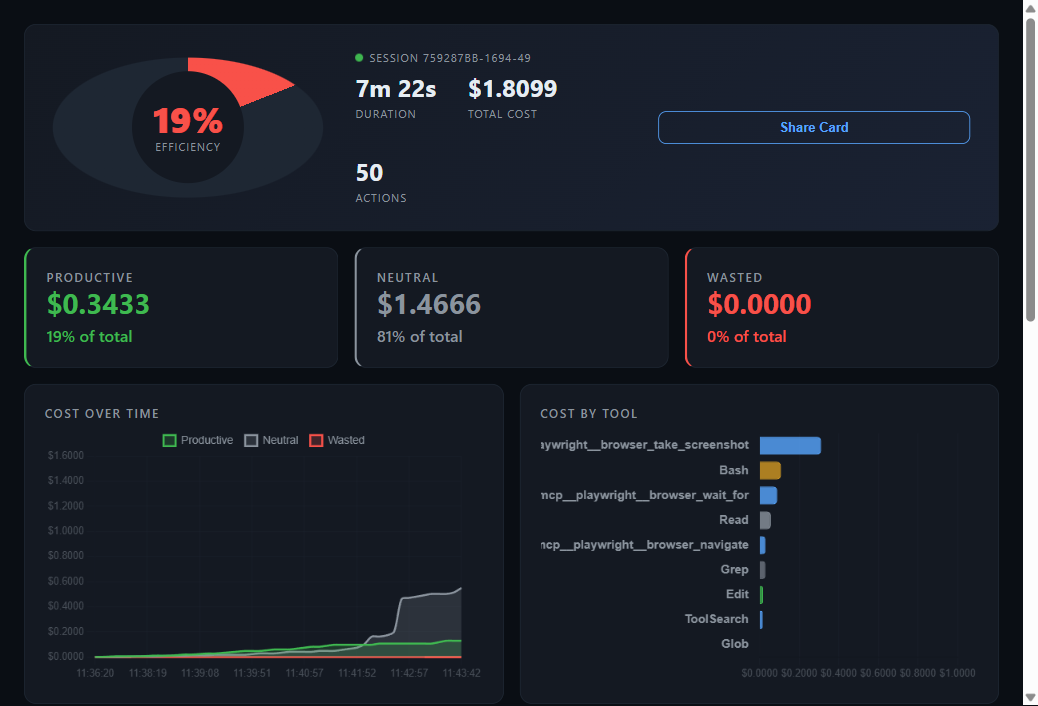
Web dashboard
Quick Start
pip install spent
spent cc setup    # install Claude Code hooks (once)
spent cc live     # open dashboard in a side terminal
That's it. spent cc setup installs three hooks into ~/.claude/settings.json:
- PostToolUse -- logs every tool invocation (Edit, Read, Bash, Grep, etc.)
- SessionStart -- marks when a session begins
- Stop -- marks session end and writes the final summary
Restart Claude Code after setup. Costs are tracked automatically from that point.
Features
| Feature | Status |
|---|---|
| Per-session cost tracking | Done |
| Efficiency score (0-100) | Done |
| Productive / neutral / wasted classification | Done |
Live terminal dashboard (spent cc live) |
Done |
| Per-tool cost breakdown | Done |
| Session history and trends | Done |
Web dashboard (spent cc dashboard) |
Done |
| Efficiency tips | Done |
Claude Code skill (/spent) |
Done |
| Statusline integration | Done |
| JSON export | Done |
| Multi-model pricing (Opus, Sonnet, Haiku) | Done |
| Cost anomaly detection | Roadmap |
| Team cost aggregation | Roadmap |
| CI usage reports | Roadmap |
How It Works
Claude Code hooks fire on every tool use. spent logs each event to a local JSONL file at ~/.spent/claude-sessions.jsonl with:
- Timestamp
- Tool name (Edit, Read, Bash, Grep, Glob, Agent, etc.)
- Input/output character counts
- Session ID
- Model identifier
From this log, spent estimates token counts (characters / 4, plus context overhead that grows with conversation length) and calculates cost using Claude model pricing:
| Model | Input (per 1M tokens) | Output (per 1M tokens) |
|---|---|---|
| Opus | $15.00 | $75.00 |
| Sonnet | $3.00 | $15.00 |
| Haiku | $0.80 | $4.00 |
No API calls. No network requests. Everything is estimated locally from hook data.
Commands
# Setup (run once)
spent cc setup          # install hooks + statusline

# Live monitoring
spent cc live           # full-screen terminal dashboard (side pane)
spent cc status         # quick panel with score + cost + breakdown
spent cc score          # one-line efficiency score

# Session history
spent cc history        # last 7 days of sessions
spent cc history -d 30  # last 30 days
spent cc tips           # efficiency tips for current session

# Web dashboard
spent cc dashboard      # open browser dashboard (localhost:5050)

# Controls
spent cc on             # enable tracking
spent cc off            # disable tracking

# Data
spent session           # current session detail
spent session --today   # all sessions from today
spent session --json    # machine-readable output
spent reset             # delete all tracked data
Efficiency Scoring
Every tool use is classified into one of three categories:
Productive
Actions that produce code or move work forward.
- Edit / Write / MultiEdit -- code written or modified
- Agent -- task delegation
- Bash -- commands that succeed (no error indicators)
Neutral
Information gathering. Necessary but not directly productive.
- Read / Grep / Glob -- searching and reading files
- TodoRead / TodoWrite -- task management
- WebSearch / WebFetch -- research
Wasted
Actions that cost tokens but didn't advance the task.
- Bash with error output -- failed commands, stack traces
- Read of the same file within 60 seconds -- redundant reads
- Edit of the same file within 30 seconds of another Edit -- rapid re-edits (usually fixing a mistake)
The efficiency score is a weighted formula:
score = ((productive * 1.0) + (neutral * 0.5) + (wasted * 0.0)) / total * 100
A score of 70+ is good. Below 40 means a lot of time is going to failed attempts and re-work.
Claude Code Skill
spent includes a /spent skill for use directly inside Claude Code sessions:
/spent # show current session costs and efficiency
The skill is automatically available if spent is installed. It reads the same JSONL log and displays a formatted summary without leaving your Claude Code session.
Privacy
- All data stays on your machine at
~/.spent/ - No external API calls, no telemetry, no network requests
- Hook scripts run locally as async shell commands
- The JSONL log contains only tool names, character counts, and timestamps -- no file contents, no prompts, no code
Roadmap
- Cost anomaly detection -- alert when a session is burning tokens faster than usual
- Team dashboards -- aggregate costs across team members
- CI usage reports -- cost per PR, cost per branch
- Session comparison -- compare efficiency across sessions
- Custom classification rules -- let users define their own productive/wasted rules
- Notification thresholds -- alert when session cost exceeds a limit
Contributing
Contributions welcome. See CONTRIBUTING.md for guidelines.
git clone https://github.com/loplop-h/spent.git
cd spent
pip install -e ".[dev]"
pytest
License
MIT
1 maintainer

Release files for spent 0.5.1
For a detailed explanation of source distributions (sdists) and built distributions (wheels), please see the package formats documentation.
Source distribution (sdist)
| File | Size | Uploaded | |
|---|---|---|---|
| spent-0.5.1.tar.gz | 76.1 kB | Details |
Built distribution (wheel)
| File | Interpreter | ABI | Platform | Reset |
|---|---|---|---|---|
| spent-0.5.1-py3-none-any.whl | Python 3 | none | any | Details |
Total release size: 147.8 kB
Release files / spent-0.5.1.tar.gz
| Download URL | spent-0.5.1.tar.gz |
|---|---|
| Size | 76.1 kB |
| Tags | Source |
|
SHA-256 checksum How to use checksums |
656f471fac74404c342b65951d9caaf39d804d2f279eebb25a13ddf2c67be69e
|
|
BLAKE2b-256 checksum How to use checksums |
539b932edda284f54fc862c4d33f2f8972ecacd1e5fc596fbddaac219fe4dc87
|
| Upload date | |
|
Uploaded using Trusted Publishing? What is trusted publishing? |
No |
| Uploaded via |
twine/6.2.0 CPython/3.12.10
|
Release files / spent-0.5.1-py3-none-any.whl
| Download URL | spent-0.5.1-py3-none-any.whl |
|---|---|
| Size | 71.7 kB |
| Tags | Python 3 |
|
SHA-256 checksum How to use checksums |
a121625008de6ad24b0d5a622038e366c4be47988a49b384205241cce0ea40e3
|
|
BLAKE2b-256 checksum How to use checksums |
40d074eb8bdcfd93c3a14e26fc75f8da47a7102242b05fd88c065d41b156f06c
|
| Upload date | |
|
Uploaded using Trusted Publishing? What is trusted publishing? |
No |
| Uploaded via |
twine/6.2.0 CPython/3.12.10
|














