
A comprehensive data pipeline for accessing, downloading, restructuring, processing, and exporting FHIR-compatible health data from cloud storage platforms including Google Firebase.

Project description
Spezi Data Pipeline


The Spezi Data Pipeline offers a comprehensive suite of tools designed to facilitate the management, analysis, and visualization of healthcare data from Firebase Firestore. By adhering to the Fast Healthcare Interoperability Resources (FHIR) standards, this platform ensures that data handling remains robust, standardized, and interoperable across different systems and software.
Overview
The Spezi Data Pipeline is engineered to improve workflows associated with data accessibility and analysis in healthcare environments. It supports 82 HKQuantityTypes and ECG data recordings and is capable of performing functions such as selection, storage, downloading, basic filtering, statistical analysis, and graphical representation of data. By facilitating the structured export of data from Firebase and incorporating FHIR standards, the pipeline enhances interoperability and streamlines data operations.
Package Structure
The Spezi Data Pipeline is organized into several directories, each serving a specific function as part of the overall application. This guide will walk you through the package structure, highlighting the key components and their usage based on your needs and challenges.
data_access/
FirebaseFHIRAccess
- Purpose: Connects to a Firebase Firestore database and fetches the data stored as FHIR resources.
- Usage: If you need to retrieve healthcare data from a Firestore database, this class provides methods to connect to the database and fetch data based on LOINC codes.
ResourceCreator
- Purpose: Creates FHIR resource objects from Firestore documents in FHIR format.
- Usage: Use this when you need to convert raw FHIR-compatible Firestore documents into structured FHIR resources.
data_flattening/
ResourceFlattener
- Purpose: Transforms nested FHIR resources objects into flat data structures suitable for analysis.
- Usage: Essential for converting complex FHIR resources into a more analyzable DataFrame format.
data_processing/
FHIRDataProcessor
- Purpose: Processes and filters flattened FHIR data.
- Usage: Ideal for performing operations like filtering outliers, selecting data by user or date, averaging data by date, and general data processing tasks.
CodeProcessor
- Purpose: Handles processing related to code mappings.
- Usage: Use this when you need to map codes to meaningful representations. This class serves as a central repository for the mappings of LOINC codes to their display names, processing functions, and default value ranges for outlier filtering.
data_exploration/
DataExplorer
- Purpose: Provides tools for visualizing and exploring FHIR data.
- Usage: Useful for generating plots and visual representations of your data to gain insights, and detect user inactivity and missing values.
ECGExplorer
- Purpose: Specialized in visualizing ECG data.
- Usage: Use this for detailed ECG data analysis and visualization.
data_export/
DataExporter
- Purpose: Exports processed and visualized data to various formats.
- Usage: When you need to save your processed data or visualizations, this class provides methods to export to CSV and save plots in JPEG/PNG.
How to Use Based on Your Needs
- Downloading Data from Firestore: Start with
FirebaseFHIRAccessto connect and fetch data. - Converting and Structuring FHIR Data: Use
ResourceCreatorand its subclasses to convert Firestore documents to FHIR resources. - Flattening Nested FHIR Data: Utilize
ResourceFlattenerand its specific implementations to transform data into flatDataFrames. - Processing Data: Apply FHIRDataProcessor for filtering, selecting, and general data processing tasks.
- Exploring and Visualizing Data: Leverage
DataExplorerandECGExplorer, andQuestionnaireResponseExplorerto create visualizations and explore your data. - Exporting Data: Use
DataExporterto save processed data and plots.
Dependencies
Required Python packages are included in the requirements.txt file and are outlined in the list below:
You can install all required external packages using pip by running the following command in your terminal:
pip install -r requirements.txt
Generate Service Account Key
To interact with Firebase services like Firestore or the Realtime Database, ensure your Firebase project is configured correctly and possesses the necessary credentials file (usually a .JSON file).
Visit the "Project settings" in your Firebase project, navigate to the "Service accounts" tab, and generate a new private key by clicking on "Generate new private key." Upon confirmation, the key will be downloaded to your system.
This .JSON file contains your service account credentials and is used to authenticate your application with Firebase.
Usage Example
Configuration
# Path to the Firebase service account key file
serviceAccountKey_file = "path/to/your/serviceAccountKey.json"

# Firebase project ID
project_id = "projectId"

# Collection details within Firebase Firestore. Replace with the collection names in your project.
collection_name = "users"
subcollection_name = "HealthKit"
[!NOTE]
- Replace "path/to/your/serviceAccountKey.json" with the actual path to the .JSON file you downloaded earlier.
- The "projectId" is your Firebase project ID, which you can find in your Firebase project settings.
Connect to Firebase
# Initialize and connect to Firebase using FHIR standards
firebase_access = FirebaseFHIRAccess(project_id, service_account_key_file)
firebase_access.connect()
Observations
Data Handling
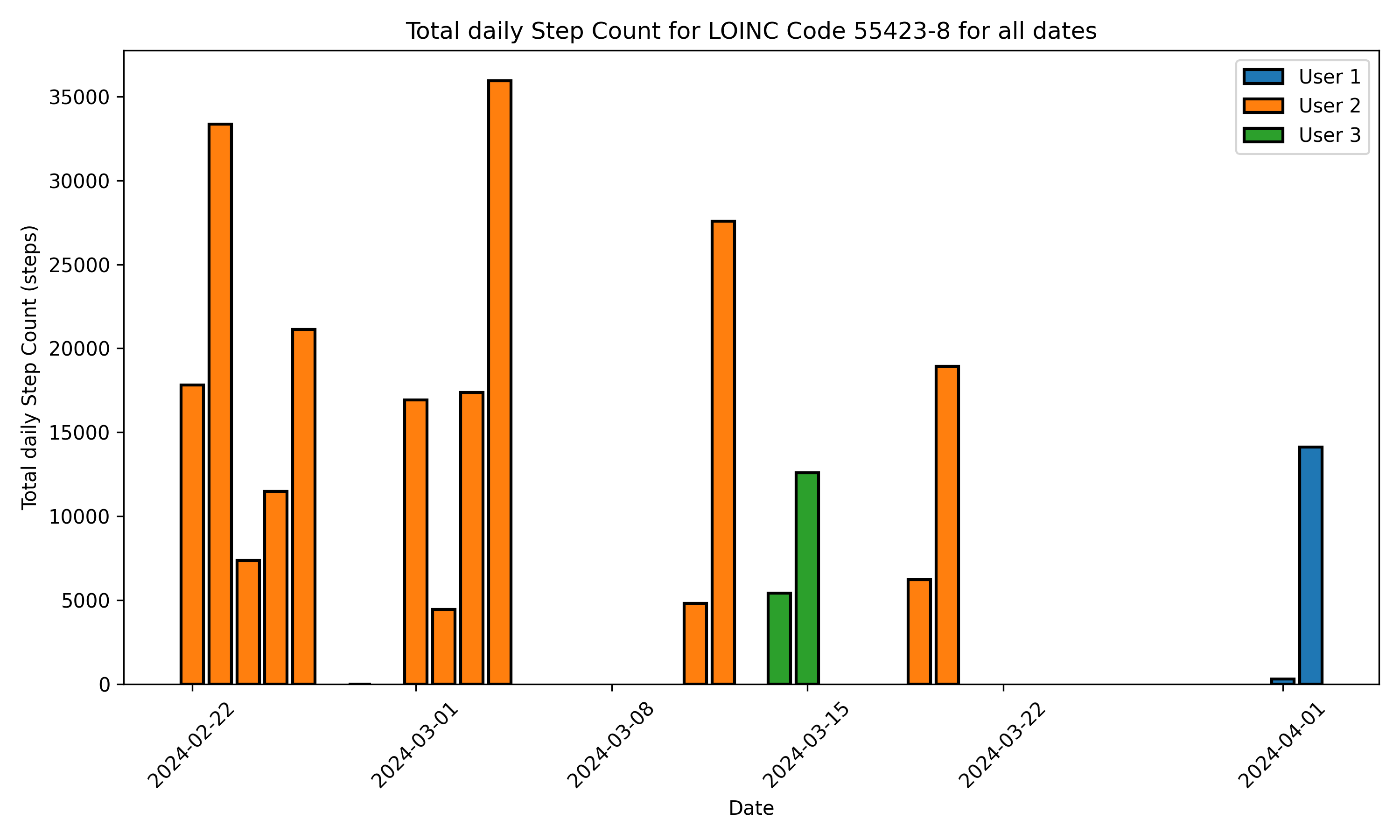
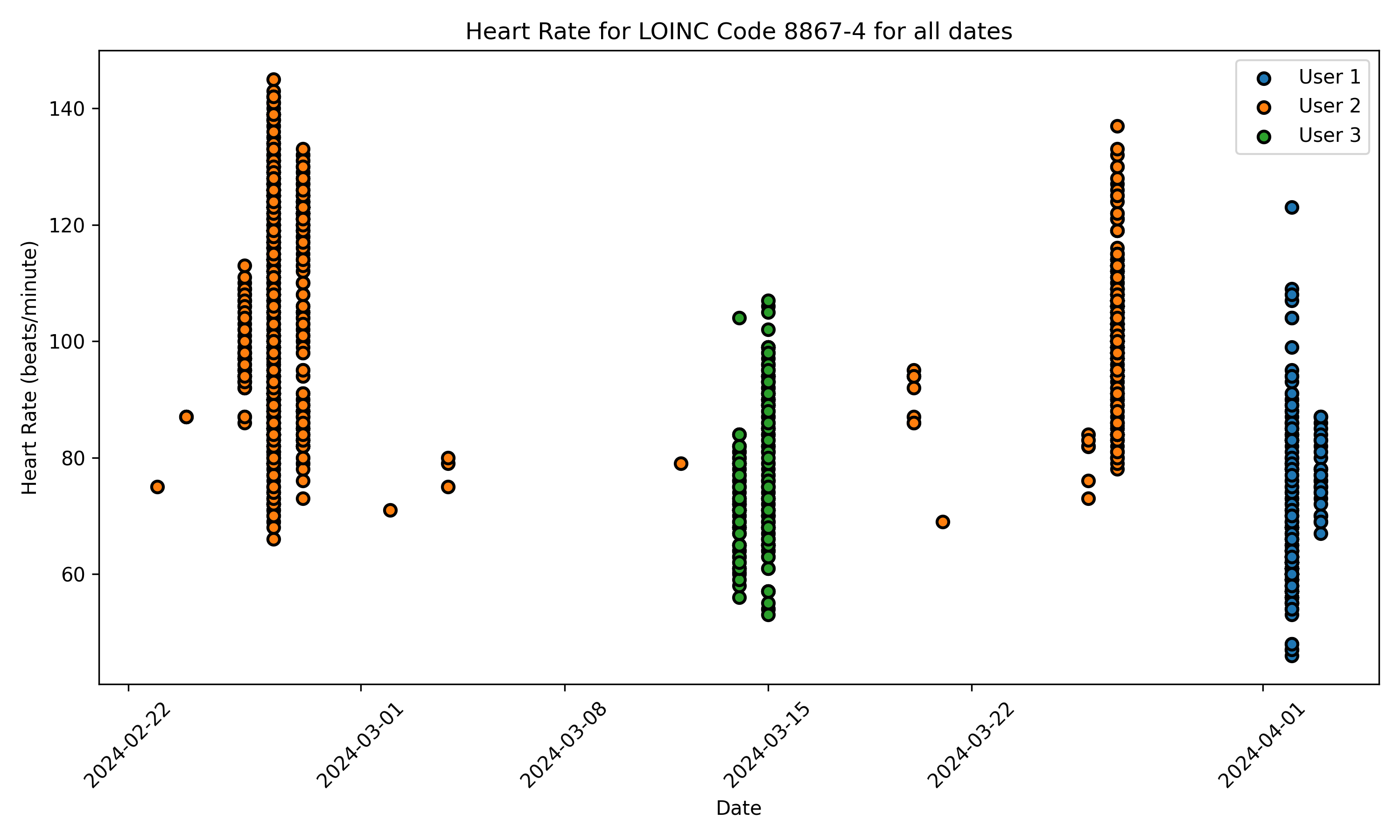
In this example, we will demonstrate how we can perform Firestore query to download step counts (LOINC code: 55423-8) and heart rate (LOINC code: 8867-4) data, and, subsequently, to flatten them in a more readable and convenient tabular format.
# Select the LOINC codes for the HealthKit quantities to perform a Firebase query
loinc_codes = ["55423-8", "8867-4"]

# Fetch and flatten FHIR data
fhir_observations = firebase_access.fetch_data(collection_name, subcollection_name, loinc_codes)
flattened_fhir_dataframe = flatten_fhir_resources(fhir_observations)
[!NOTE]
- If loinc_codes are omitted from the input arguments, FHIR resources for all stored LOINC codes are downloaded.
Using Full Path to Fetch Data
You can alternatively specify the full path to a collection in Firestore to fetch data. This ensures that you can use Spezi Data Pipeline flatteners on any location within your database.
# Fetch FHIR data from full path
collection_path = "collection/subcollection/......"
fhir_observations = firebase_access.fetch_data_path(collection_path, loinc_codes)
Firebase Index Date Filtering
If you want to fetch data from a particular date range, you can setup a Firebase index within Firestore. You can then specify a start_date and end_date to filter your data before it is streamed. This can help prevent fetching unnecessary data.
# Sort FHIR data by date and fetch from full path
collection_path = "collection/subcollection/......"
start_date = "2024-04-22"
end_date = "2024-04-24"
fhir_observations = firebase_access.fetch_data_path(collection_path, loinc_codes, start_date, end_date)
flattened_fhir_dataframe = flatten_fhir_resources(fhir_observations)
Apply basic processing for convenient data readability
Spezi Data Pipeline offers basic functions for improved data organization and readability. For example, individual step count data instances can be grouped by date using the process_fhir_data() function. If no intuitive function needs to be performed, the data remain unchanged.
processed_fhir_dataframe = FHIRDataProcessor().process_fhir_data(flattened_fhir_dataframe)
Create visual representations to explore the data
The dowloaded data can be then plotted using the following commands:
# Create a visualizer instance
visualizer = DataVisualizer()

# Set plotting configuration
selected_users = ["User1","User2", "User3"]
selected_start_date = "2022-03-01"
selected_end_date = "2024-03-13"

# Select users and dates to plot
visualizer.set_user_ids(selected_users)
visualizer.set_date_range(selected_start_date, selected_end_date)

# Generate the plot
figs = visualizer.create_static_plot(processed_fhir_dataframe)
ECG Observations
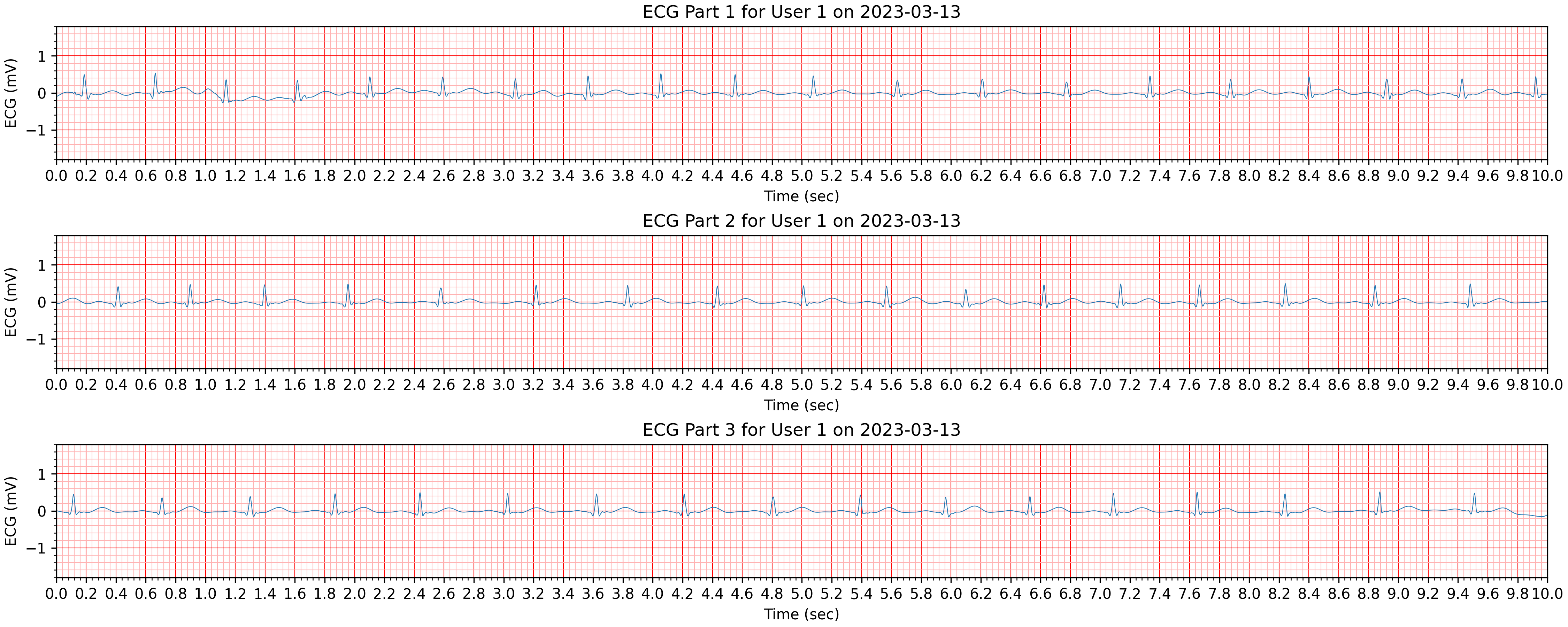
In a similar way, we can download and flatten ECG recordings (LOINC code: 131329) that are stored in Firestore.
Create visual representations to explore the data
# Create a visualizer instance
visualizer = ECGVisualizer()

# Set plotting configuration
selected_users = ["User1"]

selected_start_date = "2023-03-13"
selected_end_date = "2023-03-13"

# Select users and dates to plot
visualizer.set_user_ids(selected_users)
visualizer.set_date_range(selected_start_date, selected_end_date)

# Generate the plot
figs = visualizer.plot_ecg_subplots(processed_fhir_dataframe)
Questionnaire Responses
The Spezi Data Pipeline also handles questionnaire responses stored as FHIR resources, facilitating the collection and analysis of questionnaire data in a standardized format. In addition, it includes calculation formulas for risk scores for certain questionnaire types based on the provided questionnaire responses.
[!NOTE]
In FHIR standards, the
Questionnaireresource represents the definition of a questionnaire, including questions and possible answers, while theQuestionnaireResponseresource captures the responses to a completed questionnaire, containing the answers provided by a user or patient.
Contributing
Contributions to this project are welcome. Please make sure to read the contribution guidelines and the contributor covenant code of conduct first.
License
This project is licensed under the MIT License. See Licenses for more information.


Release history Release notifications | RSS feed


Download files
Download the file for your platform. If you're not sure which to choose, learn more about installing packages.
Source Distribution
Built Distribution
Filter files by name, interpreter, ABI, and platform.
If you're not sure about the file name format, learn more about wheel file names.
Copy a direct link to the current filters
File details
Details for the file spezi_data_pipeline-0.1.1.tar.gz.
File metadata
- Download URL: spezi_data_pipeline-0.1.1.tar.gz
- Upload date:
- Size: 1.1 MB
- Tags: Source
- Uploaded using Trusted Publishing? Yes
- Uploaded via: twine/6.1.0 CPython/3.13.7
File hashes
| Algorithm | Hash digest | |
|---|---|---|
| SHA256 |
7c43d6ba3d415f19cda6325ecb86431fe69e1149e9707e31cb19d11ede56b0a2
|
|
| MD5 |
7a23dd64de2c9e348435c440ce6b820f
|
|
| BLAKE2b-256 |
bb5f44f4f48dfe79b3a23c7d5bcb40eaaf40f3c265ae4f2b403b621fdc9a9361
|
Provenance
The following attestation bundles were made for spezi_data_pipeline-0.1.1.tar.gz:
Publisher:
publish-to-pypi.yml on StanfordSpezi/SpeziDataPipeline
-
Statement:
-
Statement type:
https://in-toto.io/Statement/v1 -
Predicate type:
https://docs.pypi.org/attestations/publish/v1 -
Subject name:
spezi_data_pipeline-0.1.1.tar.gz -
Subject digest:
7c43d6ba3d415f19cda6325ecb86431fe69e1149e9707e31cb19d11ede56b0a2 - Sigstore transparency entry: 907203161
- Sigstore integration time:
-
Permalink:
StanfordSpezi/SpeziDataPipeline@4cc9bea08dccb30c83079789ca2fd2f81d0a76bf -
Branch / Tag:
refs/tags/0.1.1 - Owner: https://github.com/StanfordSpezi
-
Access:
public
-
Token Issuer:
https://token.actions.githubusercontent.com -
Runner Environment:
github-hosted -
Publication workflow:
publish-to-pypi.yml@4cc9bea08dccb30c83079789ca2fd2f81d0a76bf -
Trigger Event:
push
-
Statement type:
File details
Details for the file spezi_data_pipeline-0.1.1-py3-none-any.whl.
File metadata
- Download URL: spezi_data_pipeline-0.1.1-py3-none-any.whl
- Upload date:
- Size: 43.7 kB
- Tags: Python 3
- Uploaded using Trusted Publishing? Yes
- Uploaded via: twine/6.1.0 CPython/3.13.7
File hashes
| Algorithm | Hash digest | |
|---|---|---|
| SHA256 |
aafacf53b6254953e074f79ca514fc48e0d16fc3a34aa7e76ce32c2c9a0e2684
|
|
| MD5 |
12cf2dee974ee54778c33185e605d33c
|
|
| BLAKE2b-256 |
7d1840c17af8495be0eaea2e4105230de2413a178ed0450e3dc078f3912d62df
|
Provenance
The following attestation bundles were made for spezi_data_pipeline-0.1.1-py3-none-any.whl:
Publisher:
publish-to-pypi.yml on StanfordSpezi/SpeziDataPipeline
-
Statement:
-
Statement type:
https://in-toto.io/Statement/v1 -
Predicate type:
https://docs.pypi.org/attestations/publish/v1 -
Subject name:
spezi_data_pipeline-0.1.1-py3-none-any.whl -
Subject digest:
aafacf53b6254953e074f79ca514fc48e0d16fc3a34aa7e76ce32c2c9a0e2684 - Sigstore transparency entry: 907203196
- Sigstore integration time:
-
Permalink:
StanfordSpezi/SpeziDataPipeline@4cc9bea08dccb30c83079789ca2fd2f81d0a76bf -
Branch / Tag:
refs/tags/0.1.1 - Owner: https://github.com/StanfordSpezi
-
Access:
public
-
Token Issuer:
https://token.actions.githubusercontent.com -
Runner Environment:
github-hosted -
Publication workflow:
publish-to-pypi.yml@4cc9bea08dccb30c83079789ca2fd2f81d0a76bf -
Trigger Event:
push
-
Statement type:






