
SpheriColor


SpheriColor is a Python implementation of the techniques introduced in the paper SpheriColor: Colormaps for Spherical Geospatial Input Topographies.
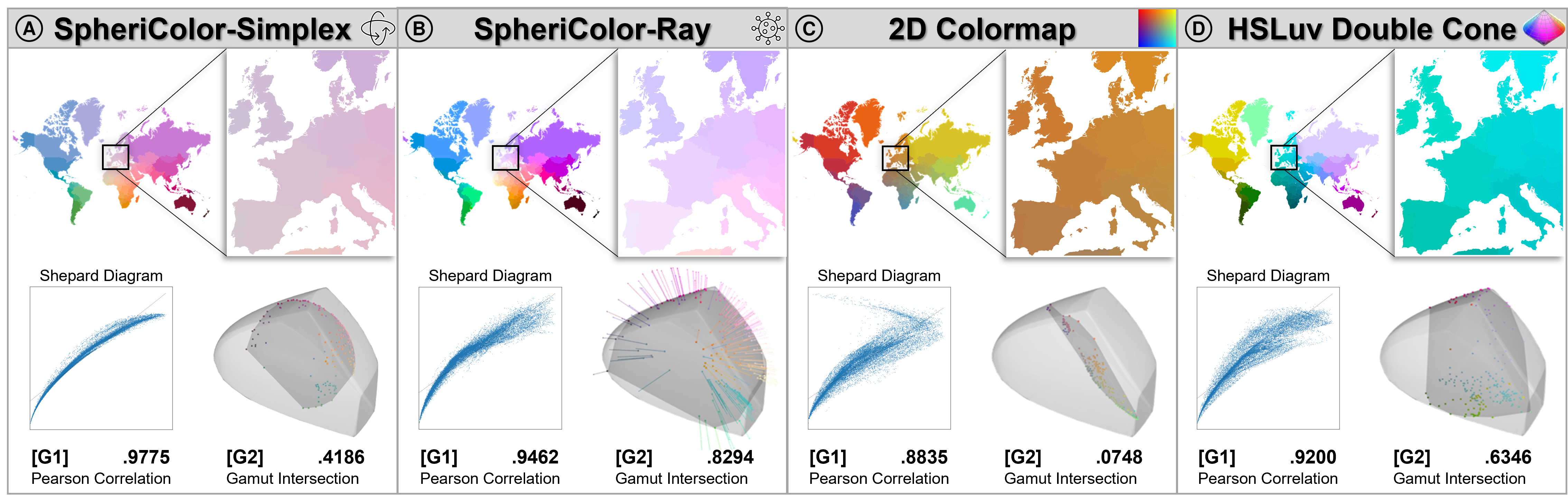
Its generation pipeline computes pairwise great-circle distances, embeds them in three dimensions with metric MDS, and maps the embedding into the displayable sRGB gamut represented in CAM16-UCS. Ray and Simplex are the two available gamut-mapping strategies, designed to preserve distances while maximizing color-space utilization. This can be useful for visual analytics dashboards with juxtaposed views, where color similarity helps reveal geographic proximity across different visualizations.
Installation
pip install sphericolor
SpheriColor supports Python 3.10 through 3.13.
Geographic coordinates
from sphericolor import from_latlon

labels = [
    "London", "New York", "Mexico City", "São Paulo", "Cape Town", "Nairobi",
    "Cairo", "Mumbai", "Singapore", "Tokyo", "Sydney", "Auckland",
]
latitudes = [
    51.5074, 40.7128, 19.4326, -23.5505, -33.9249, -1.2921,
    30.0444, 19.0760, 1.3521, 35.6762, -33.8688, -36.8509,
]
longitudes = [
    -0.1278, -74.0060, -99.1332, -46.6333, 18.4241, 36.8219,
    31.2357, 72.8777, 103.8198, 139.6503, 151.2093, 174.7645,
]

mapping = from_latlon(
    latitudes=latitudes,
    longitudes=longitudes,
    labels=labels,
    method="ray",
)

print(dict(zip(mapping.labels, mapping.hex)))
Coordinate input uses great-circle distances in kilometers for Ray and Simplex.
Visualization of Colors
To visually check the generated colors in their geographic context, install the optional plotting
dependencies with pip install geopandas matplotlib:
import geopandas as gpd
import matplotlib.pyplot as plt

world = gpd.read_file(
    "https://naturalearth.s3.amazonaws.com/110m_cultural/"
    "ne_110m_admin_0_countries.zip"
).to_crs("+proj=robin")
cities = gpd.GeoDataFrame(
    {"city": labels, "color": mapping.hex},
    geometry=gpd.points_from_xy(longitudes, latitudes),
    crs="EPSG:4326",
).to_crs(world.crs)

ax = world.plot(color="#eeeeee", edgecolor="#aaaaaa", figsize=(13, 7))
cities.plot(ax=ax, color=cities["color"], edgecolor="black", markersize=90)
ax.set_axis_off()
plt.show()
Precomputed distances
Since SpheriColor constructs a distance matrix from geographic coordinates for Ray and Simplex, you can bypass this step and provide a precomputed distance matrix directly:
import numpy as np
from sphericolor import from_distance_matrix

distances = np.array([
    [0.0, 1.0, 2.0, 1.0],
    [1.0, 0.0, 1.0, 2.0],
    [2.0, 1.0, 0.0, 1.0],
    [1.0, 2.0, 1.0, 0.0],
])
mapping = from_distance_matrix(distances, method="simplex")
HSLuv and bivariate mappings require geographic coordinates because they use latitude and longitude orientation directly.
Methods
ray = from_latlon(latitudes, longitudes, method="ray")
simplex = from_latlon(latitudes, longitudes, method="simplex")
hsluv = from_latlon(latitudes, longitudes, method="hsluv")
bivariate = from_latlon(
    latitudes,
    longitudes,
    method="bivariate",
    bivariate_map="steiger",
)
Available bivariate maps are bremm, cube_diagonal, schumann, steiger, teuling2, and
ziegler.
Set diagnostics=True to include condensed input and output distances plus intermediate MDS
embeddings. Diagnostics require quadratic memory and are disabled by default.
Set mds_seed_trials above one to evaluate multiple deterministic MDS initializations for Ray or
Simplex. The selected run maximizes the
equal-weight mean of global distance correlation and sRGB gamut-volume coverage. Candidate scores
and selected_mds_seed are available in mapping.metadata.
mapping = from_latlon(
    latitudes,
    longitudes,
    method="ray",
    random_state=42,
    mds_seed_trials=20,
)
Stability
Ray and Simplex derive their colors from an MDS embedding of the complete input set. Because MDS is sensitive to the point configuration, changing the entity set may produce a different color mapping. HSLuv and the bivariate methods provide dataset-independent alternatives when consistent colors across datasets are needed.
License and citation
SpheriColor and its bundled gamut asset are MIT licensed. If you use SpheriColor in academic work, please cite the associated paper:
Julius Rauscher, Johannes Fuchs, Daniel A. Keim, and Frederik L. Dennig. “SpheriColor: Colormaps for Spherical Geospatial Input Topographies.” IEEE Visualization Conference (VIS), 2026.
@inproceedings{rauscher2026sphericolor,
  title     = {{SpheriColor}: Colormaps for Spherical Geospatial Input Topographies},
  author    = {Rauscher, Julius and Fuchs, Johannes and Keim, Daniel A. and Dennig, Frederik L.},
  booktitle = {IEEE Visualization Conference (VIS)},
  year      = {2026}
}
See CITATION.cff for machine-readable software and paper citation metadata.
1 maintainer

Metadata
1 maintainer
Release files for sphericolor 0.2.0
For a detailed explanation of source distributions (sdists) and built distributions (wheels), please see the package formats documentation.
Source distribution (sdist)
| File | Size | Uploaded | Provenance | Actions |
|---|---|---|---|---|
| sphericolor-0.2.0.tar.gz | 2.5 MB | With provenance | Details for sphericolor-0.2.0.tar.gz |
Built distribution (wheel)
| File | Interpreter | ABI | Platform | Actions Reset |
|---|---|---|---|---|
| sphericolor-0.2.0-py3-none-any.whl | Python 3 | none | any | Details for sphericolor-0.2.0-py3-none-any.whl |
Total release size: 2.6 MB
Release files / sphericolor-0.2.0.tar.gz
| Download URL | sphericolor-0.2.0.tar.gz |
|---|---|
| Size | 2.5 MB |
| Tags | Source |
|
SHA-256 checksum How to use checksums |
bd49c94d22138b20064c28750eda38a0c1b5add43f5063178bb1cc2e5ee7fec6
|
|
BLAKE2b-256 checksum How to use checksums |
2149cff67c3a2fa1b94bed2fd0db0a8a155721cb9588327f9a9c1ed172becd99
|
| Upload date | |
|
Uploaded using Trusted Publishing? What is trusted publishing? |
Yes |
| Uploaded via |
twine/7.0.0 CPython/3.13.16
|
Provenance
Provenance describes where a file came from. On PyPI, provenance is shared via attestations, which provide a verifiable record of the build or publishing details. View details, limitations and caveats.


PyPI Publish Attestation
PyPI verified that this artifact, at this checksum, originated from the publisher listed below.
Signed by GitHub Actions, verified by PyPI on Nov 17, 2026.
Transparency logRelease files / sphericolor-0.2.0-py3-none-any.whl
| Download URL | sphericolor-0.2.0-py3-none-any.whl |
|---|---|
| Size | 142.3 kB |
| Tags | Python 3 |
|
SHA-256 checksum How to use checksums |
5ec0414ef98de7b30d3541c7a739139ea4fee76857acad382931c32c46bd9e44
|
|
BLAKE2b-256 checksum How to use checksums |
800b15068e8185995fd081f72364573d47c9f0368cf09d5e00aca86a3fb8c3dc
|
| Upload date | |
|
Uploaded using Trusted Publishing? What is trusted publishing? |
Yes |
| Uploaded via |
twine/7.0.0 CPython/3.13.16
|
Provenance
Provenance describes where a file came from. On PyPI, provenance is shared via attestations, which provide a verifiable record of the build or publishing details. View details, limitations and caveats.
PyPI Publish Attestation
PyPI verified that this artifact, at this checksum, originated from the publisher listed below.
Signed by GitHub Actions, verified by PyPI on Nov 17, 2026.
Transparency logSecurity for sphericolor 0.2.0
Provenance
Provenance describes where a file came from. On PyPI, provenance is shared via attestations, which provide a verifiable record of the build or publishing details. View details, limitations and caveats.
Full provenance
Both files in this release have been uploaded with provenance metadata.
Attestation for sphericolor-0.2.0.tar.gz
PyPI Publish Attestation
PyPI verified that this artifact, at this checksum, originated from the publisher listed below.
Signed by GitHub Actions, verified by PyPI on Nov 17, 2026.
Transparency logA note on package security
PyPI is a repository for distributing packages, not a service for auditing them. While third-party security researchers and our staff do their best to detect and remove malicious packages, PyPI cannot guarantee the quality, security or suitability of any given package.
To learn more about protecting yourself from malicious actors, visit our package security documentation.













