
sphero_unsw






An unofficial Python library for Sphero toys.
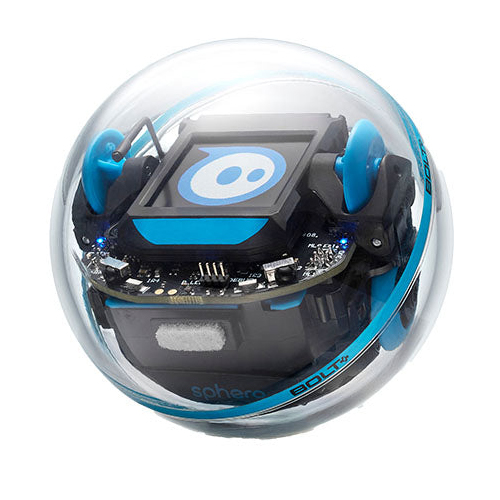
sphero_unsw is a fork of the spherov2 Python library, extended to support the Sphero BOLT+ robot.
About Us
This extension was developed by:
From the School of Systems and Computing, UNSW Canberra, to support the Sphero BOLT+ robot.
This extension has been developed for educational use as part of the course ZEIT1102: Introduction to Programming at the University of New South Wales, Canberra (UNSW Canberra). It is specifically designed to support students in learning programming fundamentals and introductory robotics concepts through hands-on activities using Sphero BOLT+ robots.
Installation
pip install sphero_unsw
Features
- All features from the original
spherov2library. - Extended functionality for Sphero BOLT+.
- Compatible with Python 3.7 through 3.12.x (inclusive)
Current Progress
The library is still under active development. Some features are implemented but not yet fully functional or reliable. Current work includes:
✅ Fully working
- Core robot connectivity and Bluetooth scanning
- Movement commands:
roll(),spin(),stop_roll() - Main LED and back LED control
- Sensor readings (light, orientation, velocity, gyroscope, acceleration, distance, heading)
- Event handling (e.g. collision, landing, freefall)
⚠️ Under development (not working yet)
- IR Communication: Not yet fully functional or reliable
- Matrix Display: Showing images on the BOLT+ matrix not working
We are actively working on identifying and resolving these compatibility issues.
Usage
Usage Example: Sphero BOLT+ Demo with sphero_unsw
This script demonstrates a full-range test of Sphero BOLT+ capabilities using the sphero_unsw library. It includes:
- Connecting to a robot via Bluetooth
- Registering and handling multiple real-time events (e.g. collision, landing, freefall, charging)
- Testing main LED, back LED, and 8×8 matrix display
- Displaying static characters and scrolling messages
- Performing simple movements (roll, spin, stop)
- Reading real-time sensor data including light, orientation, velocity, gyroscope, and more
# Import required libraries
import time
from sphero_unsw.toys_scanner import toys_scanner
from sphero_unsw.sphero_edu import SpheroEduAPI, EventType
from sphero_unsw.types import Color

# ---------------------------
# Define event handler functions
# ---------------------------

def on_collision(api):
    print("💥 Collision detected!")
    api.set_main_led(Color(255, 0, 0))  # Flash red
    time.sleep(0.3)
    api.set_main_led(Color(0, 0, 255))  # Return to blue

def on_freefall(api):
    print("🪂 Freefall detected")
    api.set_main_led(Color(255, 0, 0))  # Red

def on_landing(api):
    print("🟢 Landed")
    api.set_main_led(Color(0, 255, 0))  # Green

def on_gyro_max(api):
    print("🚀 Gyro max")
    api.set_main_led(Color(255, 0, 255))  # Magenta

def on_charging(api):
    print("⚡ Charging")
    api.set_main_led(Color(6, 0, 255))  # Indigo

def on_not_charging(api):
    print("🔋 Not charging")
    api.set_main_led(Color(255, 0, 47))  # Pinkish red

# ---------------------------
# Scan for nearby Sphero robots and connect to one
# ---------------------------

scanner = toys_scanner()
selected_toy = scanner.scan_and_select_toy()

# ---------------------------
# Open connection to the selected robot
# ---------------------------

with SpheroEduAPI(selected_toy) as api:
    print(f"Connected to {selected_toy.name}!")

    # Register events and handlers
    api.register_event(EventType.on_collision, on_collision)
    api.register_event(EventType.on_freefall, on_freefall)
    api.register_event(EventType.on_landing, on_landing)
    api.register_event(EventType.on_gyro_max, on_gyro_max)
    api.register_event(EventType.on_charging, on_charging)
    api.register_event(EventType.on_not_charging, on_not_charging)
    print("Event handlers registered.\n")


    # ---------------------------
    #  Fill the LED matrix using set_matrix_fill
    # ---------------------------
    api.set_matrix_fill(0,0,7,7,Color(255, 255, 255))        # Fill the LED matrix with white color using form pixel (0,0) to (7,7)

    # ---------------------------
    # Fill Main LED (RGB color)
    # ---------------------------
    api.set_main_led(Color(255, 0, 0))  # Red
    time.sleep(0.5)
    api.set_main_led(Color(0, 255, 0))  # Green
    time.sleep(0.5)
    api.set_main_led(Color(0, 0, 255))  # Blue
    time.sleep(0.5)

    # ---------------------------
    # Test Back LED and Front LED
    # ---------------------------
    api.set_back_led(255)                   # Full brightness
    time.sleep(1)
    api.set_back_led(0)                     # Turn off
    time.sleep(1)
    api.set_back_led(255)                   # Set back LED to full brightness
    time.sleep(1)
    api.set_front_led(Color(255, 0, 0))     # Set front LED to red
    time.sleep(1)

    # ---------------------------
    # Light up the LED matrix pixel by pixel
    # ---------------------------
    for x in range(8):
        for y in range(8):
            r = 255 // (x + 1)
            g = 255 // (y + 1)
            api.set_matrix_pixel(x, y, Color(r, g, 0))  # Gradient color
    time.sleep(1)

    # ---------------------------
    # Display a character on the matrix
    # ---------------------------
    api.set_matrix_character("A", Color(255, 255, 0))  # Yellow A
    time.sleep(1)

    # ---------------------------
    # Scroll a message across the matrix
    # ---------------------------
    api.scroll_matrix_text("UNSW", Color(255, 0, 0), fps=5, wait=True)
    time.sleep(8)

    # ---------------------------
    # Movement Tests
    # ---------------------------
    api.roll(0, 100, 2)   # Roll forward at heading 0° for 2 seconds
    time.sleep(2)

    api.spin(720, 3)      # Spin 720° over 3 seconds
    time.sleep(3)

    api.stop_roll()       # Stop movement

    # ---------------------------
    # Change the heading direction
    # ---------------------------
    api.set_heading(0)    # Set heading to 0°
    time.sleep(1)
    api.set_heading(90)   # Set heading to 90°
    time.sleep(1)

    # ---------------------------
    # Read sensor data
    # ---------------------------
    print("Ambient Light:", api.get_luminosity())
    print("Orientation:", api.get_orientation())
    print("Velocity:", api.get_velocity())
    print("Location:", api.get_location())
    print("Gyroscope:", api.get_gyroscope())
    print("Acceleration:", api.get_acceleration())
    print("Travel Distance:", api.get_distance())
    print("Heading:", api.get_heading())

    print("\nDemo complete.")
Acknowledgments
We gratefully acknowledge the original authors of the spherov2 library:
- Hanbang Wang – https://www.cis.upenn.edu/~hanbangw/
- Elionardo Feliciano
This library spherov2 was originally created for educational use in CIS 521: Artificial Intelligence at the University of Pennsylvania, where Sphero robots are used to help teach the foundations of AI.
License
MIT License. See the LICENSE file.
This library is based on the original spherov2 library developed by the University of Pennsylvania.
1 maintainer

Metadata
1 maintainer
Release files for sphero-unsw 0.1.11
For a detailed explanation of source distributions (sdists) and built distributions (wheels), please see the package formats documentation.
Source distribution (sdist)
| File | Size | Uploaded | |
|---|---|---|---|
| sphero_unsw-0.1.11.tar.gz | 66.2 kB | Details |
Built distribution (wheel)
| File | Interpreter | ABI | Platform | Reset |
|---|---|---|---|---|
| sphero_unsw-0.1.11-py3-none-any.whl | Python 3 | none | any | Details |
Total release size: 180.6 kB
Release files / sphero_unsw-0.1.11.tar.gz
| Download URL | sphero_unsw-0.1.11.tar.gz |
|---|---|
| Size | 66.2 kB |
| Tags | Source |
|
SHA-256 checksum How to use checksums |
1d9f21c938a704bcb3a74e097a48aad9b891b2c5529dbb35fd1e4b19634f5862
|
|
BLAKE2b-256 checksum How to use checksums |
80640319c16059b691fa536a59fc2d00ac8598380b3e8ae9408525471f17d781
|
| Upload date | |
|
Uploaded using Trusted Publishing? What is trusted publishing? |
No |
| Uploaded via |
twine/6.2.0 CPython/3.9.23
|
Release files / sphero_unsw-0.1.11-py3-none-any.whl
| Download URL | sphero_unsw-0.1.11-py3-none-any.whl |
|---|---|
| Size | 114.3 kB |
| Tags | Python 3 |
|
SHA-256 checksum How to use checksums |
64df07bd370a5d2f918d380ff6739fe99876f683d0bc8475dd80b3b5dea88fe4
|
|
BLAKE2b-256 checksum How to use checksums |
eab52990499d62ef0386b7780ed56ad27c1e38fa8ef4b20f55071514a9f4784a
|
| Upload date | |
|
Uploaded using Trusted Publishing? What is trusted publishing? |
No |
| Uploaded via |
twine/6.2.0 CPython/3.9.23
|














