
Sphinx Example Includer
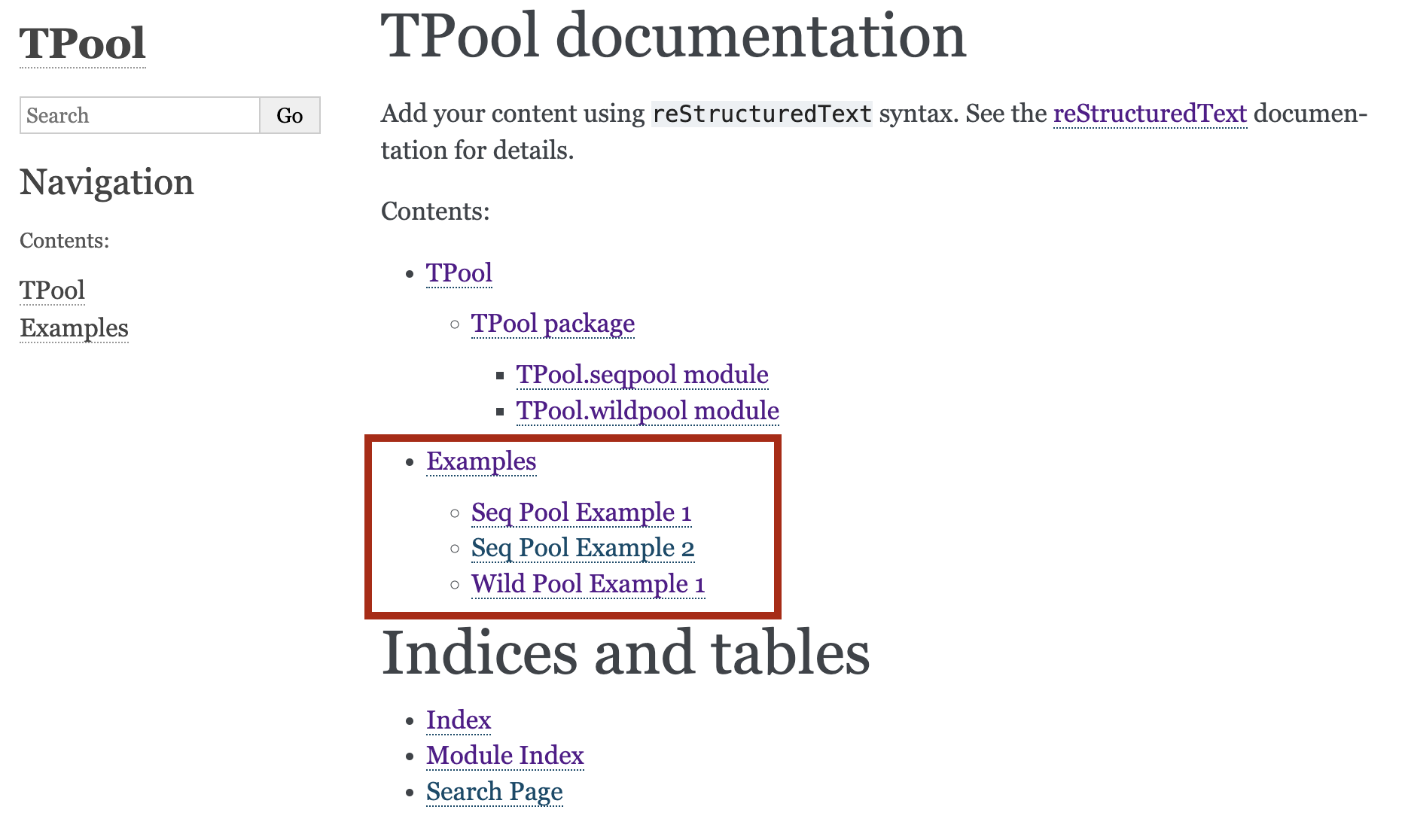
Build Sphinx docs for the package's source code and automatically gaenerate .rst files from examples folder for the sphinx documentation. It is used by the sphinx-docs action to automate the generation of sphinx documentation.
Installation
pip install sphinx_example_includer
Usage
usage: Sphinx Example Includer [-h] [--debug] [--info] [--overwrite] [--files FILES [FILES ...]] [--dest-dir DEST_DIR] [--toc-fname TOC_FNAME]
                               [--title TITLE] [--readme README] [--build] [--conf CONF] [--docs-dir DOCS_DIR] [--project-dir PROJECT_DIR]
                               [--index INDEX]

A Sphinx docs generation tool

options:
  -h, --help            show this help message and exit
  --debug               Showing debug messages
  --info                Showing info messages
  --overwrite           Overwrite files that already exists
  --files FILES [FILES ...]
                        one or more files to be
  --dest-dir DEST_DIR   The output directory of the included files inside the docs dir (e.g., docs/examples)
  --toc-fname TOC_FNAME
                        The name of the toc file
  --title TITLE         The title of the documentation in the index page.
  --readme README       The readme file to include in the docs index page.
  --build               Build Sphinx docs.
  --conf CONF           The configuration file (e.g., pyproject.toml)
  --docs-dir DOCS_DIR   The directory of the documentation
  --project-dir PROJECT_DIR
                        The path of the project's code
  --index INDEX         The name of the index file.
Example
python -m sphinx_example_includer --info --build --project src --files examples/*example*.py --overwrite --readme README.md
How to use it
Assumptions
- You have your example source code in
examples/ - Your code is documented so Sphinx can generate the docs for you.
Generating the docs
- Install the package
sphinx_example_includer - In the directory of your project (that you want to document), run the command
python -m sphinx_example_includer --build. Note that the--buildis the flag responsible for generating the docs. You can also specify the directory of your code with the flag--project. - Include the examples into the docs. This can be done by running the same command with
--filesflag and you can choose multiple files using a pattern as shown in the example above.
1 maintainer

Metadata
1 maintainer
Release files for sphinx-example-includer 0.6
For a detailed explanation of source distributions (sdists) and built distributions (wheels), please see the package formats documentation.
Source distribution (sdist)
| File | Size | Uploaded | |
|---|---|---|---|
| sphinx_example_includer-0.6.tar.gz | 14.3 kB | Details |
Built distribution (wheel)
| File | Interpreter | ABI | Platform | Reset |
|---|---|---|---|---|
| sphinx_example_includer-0.6-py3-none-any.whl | Python 3 | none | any | Details |
Total release size: 25.8 kB
Release files / sphinx_example_includer-0.6.tar.gz
| Download URL | sphinx_example_includer-0.6.tar.gz |
|---|---|
| Size | 14.3 kB |
| Tags | Source |
|
SHA-256 checksum How to use checksums |
50b04a44f5e48ae9894f3cb1974338e4c869b918357636c8871455aacaf8e3f7
|
|
BLAKE2b-256 checksum How to use checksums |
1709a1828d522b8eacb6098192fad91cf62481fffc9025d1f1628e722e7745ff
|
| Upload date | |
|
Uploaded using Trusted Publishing? What is trusted publishing? |
No |
| Uploaded via |
twine/5.1.1 CPython/3.9.19
|
Release files / sphinx_example_includer-0.6-py3-none-any.whl
| Download URL | sphinx_example_includer-0.6-py3-none-any.whl |
|---|---|
| Size | 11.5 kB |
| Tags | Python 3 |
|
SHA-256 checksum How to use checksums |
1a25abe50ea9eaca750181ec7006748d1f283c65a33c61aee3bd02ec68164ea9
|
|
BLAKE2b-256 checksum How to use checksums |
a31cff2775f1e4e061591f3a05842f53fd40cca97740886254af2e238a4e78f9
|
| Upload date | |
|
Uploaded using Trusted Publishing? What is trusted publishing? |
No |
| Uploaded via |
twine/5.1.1 CPython/3.9.19
|














