
sphinx-inline-svg
Overview
Sphinx extension to make SVG images inline.
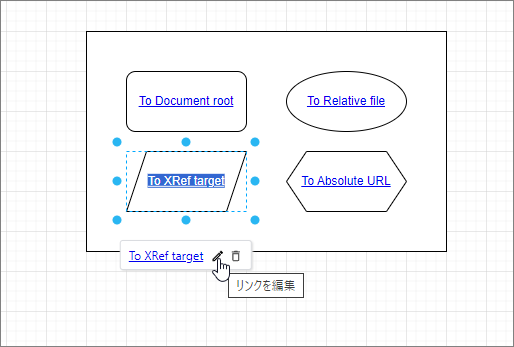
It helps to make text in SVG into hyperlink.
If the builder is not html, it has no effect.
Installation
pip
pip install sphinx-inline-svg
rye
rye add --dev sphinx-inline-svg
Usage
conf.py
Add it to extensions.
# conf.py

extensions = [
    'sphinx_inline_svg',
]
Add CSS class
Add CSS class to SVG image to be inlined.
.. image:: img/chart.drawio.svg
    :class: inline-svg
As for MyST, enable attrs_inline in conf.py.
# conf.py

myst_enable_extensions = [
    "attrs_inline",
]
{.inline-svg}
Define inline-svg class in CSS if actual style is needed.
/* _static/css/custom.css */

/* example */
.inline-svg {
  max-width: 100%;
  height: auto;
}
And add it in conf.py as follows.
# conf.py

def setup(app):
    app.add_css_file('css/custom.css')
[!NOTE] Even if you don't define actual style, giving the class will inline SVGs.
Hyperlink
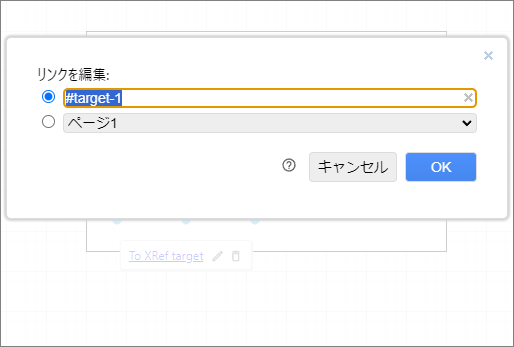
To make text in SVG a hyperlink, for example, edit it as follows in draw.io.
Link notation
Link destination that is generated after build depends on Link notation.
| Notation | Generated destination | Example | Destination for example |
|---|---|---|---|
| Starts with "/". | Path from project root. | /index.rst | Top page. |
| Starts with "#". | Defined cross-reference target. | #target-1 | Position defined as "#target-1" in the project. |
| Starts with "http://" and so on. | As is. | https://google.com | The site on the Internet. |
| Other than above. | Relative path from the page. | detail.rst | detail.html file in the same directory. |
[!NOTE] As for the last notation, generated destination is relative from the page where SVG is extracted to, not from the SVG itself.
Configuration
The following settings can be configured in conf.py. If you do not write the configuration itself, the default value is applied.
# conf.py

inline_svg_classes = ['inline-svg', 'selectable-svg']
| Name | Type | Description | Default value |
|---|---|---|---|
| inline_svg_classes | list[str] |
List of class names. SVG image with any of these will be inlined. | ['inline-svg'] |
| inline_svg_del_attrs | list[str] |
List of attribute names to be deleted from svg element when extracted. | ['content'] |
| inline_svg_resolve_xref | bool |
Whether to convert destination as described in the above "Link notation" section. | True |
[!NOTE] The svg element in SVG file saved by draw.io has "content" attribute, but this is data for editing by the draw.io app, so it is not necessary for the svg element to be inlined.
Known problems
It has been reported that inlining SVG images saved by Draw.io Integration extension of VSCode with sphinx-inline-svg results in garbled characters. 😥
In addition, hyperlinks in SVG images saved by Draw.io Integration may not become clickable. In such cases, inlining with sphinx-inline-svg does not make them clickable. 😥
1 maintainer

Metadata
1 maintainer
Release files for sphinx-inline-svg 0.2.0
For a detailed explanation of source distributions (sdists) and built distributions (wheels), please see the package formats documentation.
Source distribution (sdist)
| File | Size | Uploaded | |
|---|---|---|---|
| sphinx_inline_svg-0.2.0.tar.gz | 76.7 kB | Details |
Built distribution (wheel)
| File | Interpreter | ABI | Platform | Reset |
|---|---|---|---|---|
| sphinx_inline_svg-0.2.0-py3-none-any.whl | Python 3 | none | any | Details |
Total release size: 82.9 kB
Release files / sphinx_inline_svg-0.2.0.tar.gz
| Download URL | sphinx_inline_svg-0.2.0.tar.gz |
|---|---|
| Size | 76.7 kB |
| Tags | Source |
|
SHA-256 checksum How to use checksums |
2b9ac8a211c5fd47150b3ef79768d5d7e56e95da83b2b93e4939f68952c07393
|
|
BLAKE2b-256 checksum How to use checksums |
827c997d83c7aa56b5fe1019a90c7ac5a6a31b896cc2e0e27134bfa917e3f2f2
|
| Upload date | |
|
Uploaded using Trusted Publishing? What is trusted publishing? |
No |
| Uploaded via |
twine/5.1.1 CPython/3.12.7
|
Release files / sphinx_inline_svg-0.2.0-py3-none-any.whl
| Download URL | sphinx_inline_svg-0.2.0-py3-none-any.whl |
|---|---|
| Size | 6.2 kB |
| Tags | Python 3 |
|
SHA-256 checksum How to use checksums |
d41155d081ab937120ee4578fd7f9263cde7209ff163a3caaee3ee71faaf8de4
|
|
BLAKE2b-256 checksum How to use checksums |
b7f8d1d9596bb14a981abc9915184a1a2dd9c25554ce36ea5bf3bd03ff116c9b
|
| Upload date | |
|
Uploaded using Trusted Publishing? What is trusted publishing? |
No |
| Uploaded via |
twine/5.1.1 CPython/3.12.7
|














