
Sphinx Lumina Theme



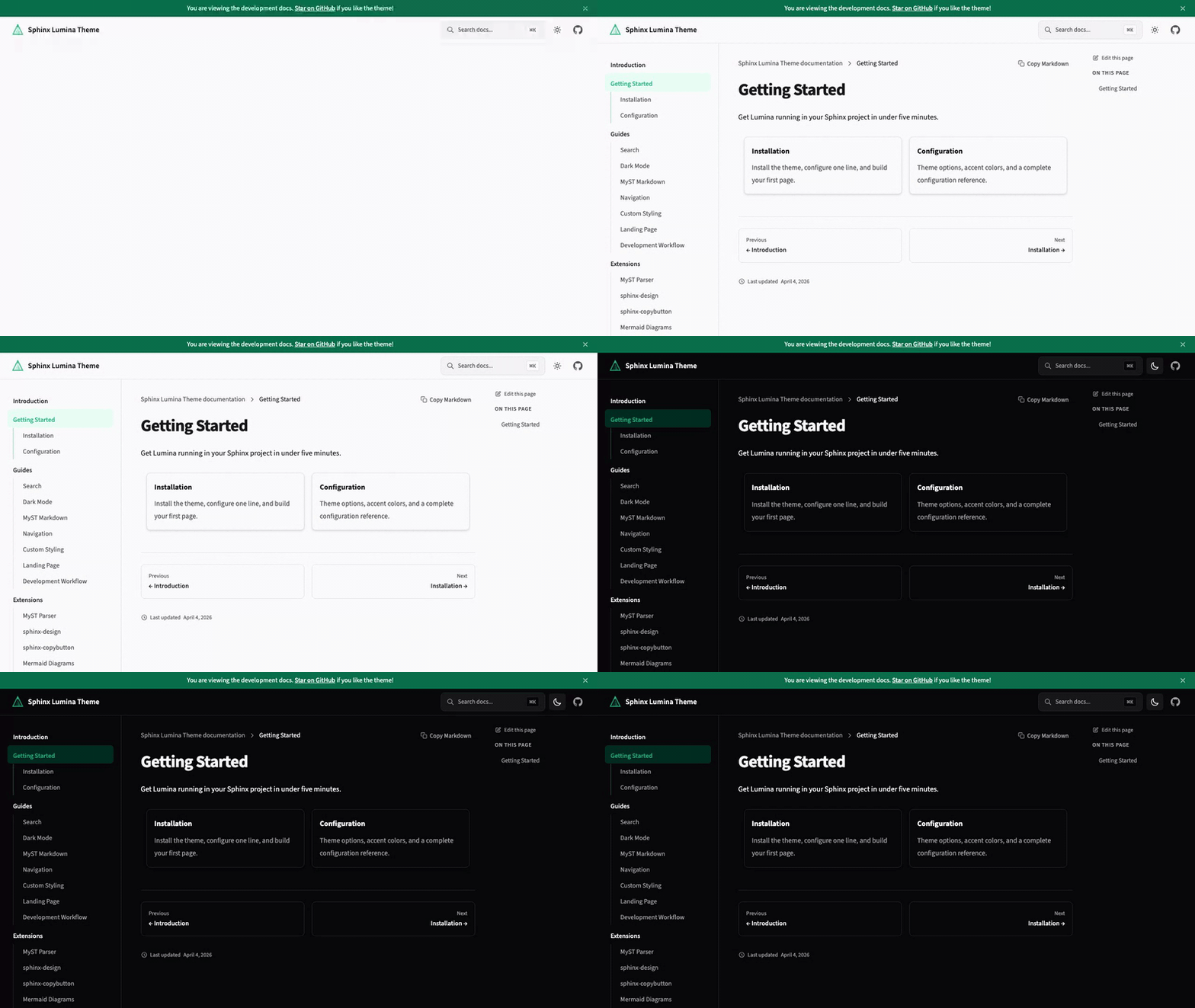
A modern Sphinx theme that treats documentation as a first-class product experience. Clean typography, responsive layout, dark mode, and instant search — out of the box.
Features
- Dark mode — follows system preference with manual toggle, no flash of unstyled content
- Instant search — Pagefind-powered search with keyboard navigation (
⌘K) - Responsive layout — mobile-first with collapsible sidebar and sticky table of contents
- MyST Markdown — write docs in Markdown with full Sphinx directive support
- Interactive HTTP API — OpenAPI endpoint docs with live "Try it out" panels and curl copy buttons; no Swagger UI needed
- Code blocks — syntax highlighting with one-click copy
- Self-hosted fonts — Source Sans 3 and JetBrains Mono, no external CDN calls
- Version switcher — dropdown to navigate between documentation versions, loaded from a JSON URL
- Customizable — accent colors, navigation links, social links, and more via
conf.py
Quick Start
Requires Python 3.12+ and Sphinx 8.0+. Pagefind search also needs Node.js so the build can create its search index.
pip install sphinx-lumina-theme
or with uv:
uv add sphinx-lumina-theme
Set the theme in your conf.py:
html_theme = "lumina"
Build your docs:
# With uv
uv run sphinx-build docs docs/_build/html

# With pip
sphinx-build docs docs/_build/html
That's it. For MyST Markdown setup and configuration options, see the Getting Started guide.
Configuration
All options go in html_theme_options in your conf.py. Every option has a sensible default — you only need to set what you want to change.
html_theme_options = {
    "accent_color": "#10b981",
    "dark_mode_default": "auto",       # "auto", "light", or "dark"
    "nav_links": [
        {"title": "Guide", "url": "guide"},
        {"title": "API", "url": "api"},
    ],
    "source_repository": "https://github.com/you/your-repo",
    "social_links": [
        {"icon": "github", "url": "https://github.com/you"},
    ],
    "api_base_url": "https://api.example.com/v1",  # enables interactive API features
}
See the full Configuration reference for all available options.
Development
git clone https://github.com/r4sky0/sphinx-lumina-theme.git
cd sphinx-lumina-theme
pnpm install        # JS dependencies
uv sync --dev       # Python dependencies
pnpm run build      # Build CSS + JS assets
uv run pytest       # Run tests
License
1 maintainer

Release files for sphinx-lumina-theme 1.44.1
For a detailed explanation of source distributions (sdists) and built distributions (wheels), please see the package formats documentation.
Source distribution (sdist)
| File | Size | Uploaded | |
|---|---|---|---|
| sphinx_lumina_theme-1.44.1.tar.gz | 1.2 MB | Details |
Built distribution (wheel)
| File | Interpreter | ABI | Platform | Reset |
|---|---|---|---|---|
| sphinx_lumina_theme-1.44.1-py3-none-any.whl | Python 3 | none | any | Details |
Total release size: 2.2 MB
Release files / sphinx_lumina_theme-1.44.1.tar.gz
| Download URL | sphinx_lumina_theme-1.44.1.tar.gz |
|---|---|
| Size | 1.2 MB |
| Tags | Source |
|
SHA-256 checksum How to use checksums |
a114f197de20b1007c25d64b11f7c23dc519e2e781d9f3cd81c6d27e5d279cba
|
|
BLAKE2b-256 checksum How to use checksums |
cadd4bfa7da895af98c3396b1058b4832a5152dff95a4fc013b62bab091da3d6
|
| Upload date | |
|
Uploaded using Trusted Publishing? What is trusted publishing? |
Yes |
| Uploaded via |
twine/7.0.0 CPython/3.13.14
|
Provenance
Provenance describes where a file came from. On PyPI, provenance is shared via attestations, which provide a verifiable record of the build or publishing details. View details, limitations and caveats.


PyPI Publish Attestation
PyPI verified that this artifact, at this checksum, originated from the publisher listed below.
Signed by GitHub Actions, verified by PyPI on Sep 20, 2026.
Transparency logRelease files / sphinx_lumina_theme-1.44.1-py3-none-any.whl
| Download URL | sphinx_lumina_theme-1.44.1-py3-none-any.whl |
|---|---|
| Size | 1.1 MB |
| Tags | Python 3 |
|
SHA-256 checksum How to use checksums |
6987ca5b857d5f83bfd4a0432455a0471e3f6842aef2261e8159ce696e3ecfdd
|
|
BLAKE2b-256 checksum How to use checksums |
1f33665920a191f2a78bf4e0da364c9ec9cac9557a35477f3ce16d7848e1f83e
|
| Upload date | |
|
Uploaded using Trusted Publishing? What is trusted publishing? |
Yes |
| Uploaded via |
twine/7.0.0 CPython/3.13.14
|
Provenance
Provenance describes where a file came from. On PyPI, provenance is shared via attestations, which provide a verifiable record of the build or publishing details. View details, limitations and caveats.
PyPI Publish Attestation
PyPI verified that this artifact, at this checksum, originated from the publisher listed below.
Signed by GitHub Actions, verified by PyPI on Sep 20, 2026.
Transparency log













