
sphinx-nekochan






A Sphinx extension for adding the Nekochan(cat) emoji to documents.
See the sphinx-nekochan documantation for more details.
Installation
You can install sphinx-nekochan with pip:
pip install sphinx-nekochan
Enable extension
In your conf.py configuration file, add sphinx_nekochan to your extensions list:
extensions = [
    ...
    "sphinx_nekochan",
    ...
]
Use nekochan role or directive
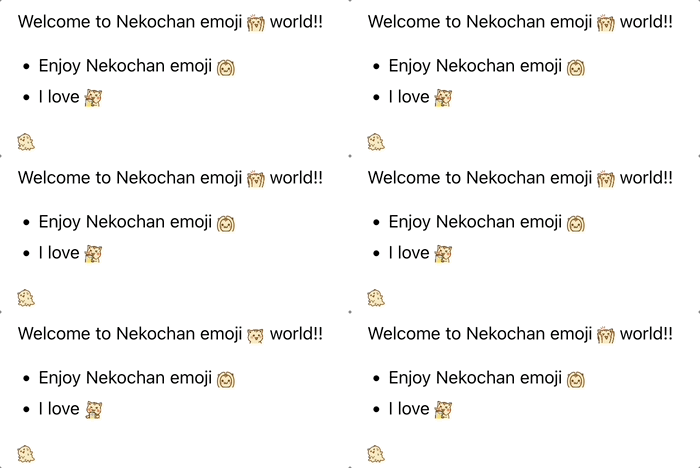
When you use the nekochan roll or directive, you will see any nekochan emoji.
- markdown
Welcome to nekochan emoji {nekochan}`banzai` world!!

* Enjoy nekochan emoji {nekochan}`choo-choo-train`
* I love {nekochan}`beer`

```{nekochan} melty
```
- reStructuredText
Welcome to nekochan emoji :nekochan:`banzai` world!!

* Enjoy nekochan emoji :nekochan:`choo-choo-train`
* I love :nekochan:`beer`

.. nekochan:: melty
Customize emoji height and alt text
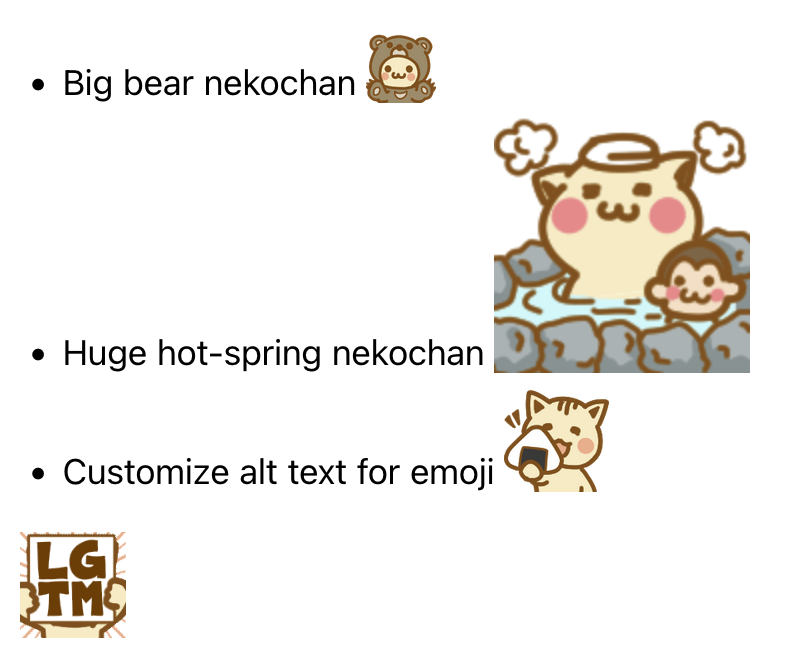
You can specify height and alt text with a semicolon(;) after the name of the nekochan role.
- markdown
* Big bear nekochan {nekochan}`kuma-nya;2em`
* Huge hot-spring nekochan {nekochan}`hot-spring;128px`
* Customize alt text for emoji {nekochan}`gohan-taberu;3em;Nekochan eating rice ball`


```{nekochan} lgtm
:alt: Looks Good To Me
:height: 3em
```
- reStructuredText
* Big bear nekochan :nekochan:`kuma-nya;2em`
* Huge hot-spring nekochan :nekochan:`hot-spring;128px`
* Customize alt text for emoji :nekochan:`gohan-taberu;3em;Nekochan eating rice ball`


.. nekochan:: lgtm
   :alt: Looks Good To Me
   :height: 3em
Transform emoji
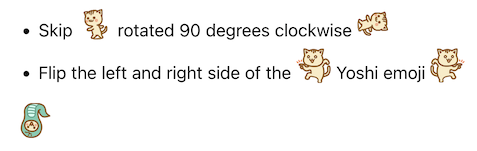
Also, you can specify transform option with a semicolon(;) after the alt text of the nekochan role.
- markdown
* Skip {nekochan}`skip-nya;2em` rotated 90 degrees clockwise {nekochan}`skip-nya;2em;;rotate-90`
* Flip the left and right side of the {nekochan}`yoshi;2em` Yoshi emoji {nekochan}`yoshi;2em;;flip-horizontal`

```{nekochan} snake
:transform: flip-vertical
:height: 2em
```
- reStructuredText
* Skip :nekochan:`skip-nya;2em` rotated 90 degrees clockwise :nekochan:`skip-nya;2em;;rotate-90`
* Flip the left and right side of the :nekochan:`yoshi;2em` Yoshi emoji :nekochan:`yoshi;2em;;flip-horizontal`

.. nekochan:: snake
   :transform: flip-vertical
   :height: 2em
License
- sphinx-nekochan is licensed under the MIT License.
- Please refer to the following guidelines for using Nekochan emojis.
1 maintainer

Metadata
1 maintainer
Release files for sphinx-nekochan 0.5.0
For a detailed explanation of source distributions (sdists) and built distributions (wheels), please see the package formats documentation.
Source distribution (sdist)
| File | Size | Uploaded | Provenance | |
|---|---|---|---|---|
| sphinx_nekochan-0.5.0.tar.gz | 8.6 MB | With provenance | Details |
Built distribution (wheel)
| File | Interpreter | ABI | Platform | Reset |
|---|---|---|---|---|
| sphinx_nekochan-0.5.0-py3-none-any.whl | Python 3 | none | any | Details |
Total release size: 17.1 MB
Release files / sphinx_nekochan-0.5.0.tar.gz
| Download URL | sphinx_nekochan-0.5.0.tar.gz |
|---|---|
| Size | 8.6 MB |
| Tags | Source |
|
SHA-256 checksum How to use checksums |
42d9baa59d0aa5d99613d7390d5d8536233f2a3525168f50b53f4e0d6aab63cb
|
|
BLAKE2b-256 checksum How to use checksums |
ad53e2cd9807063bc00c9741e3c7e0c416caf7127de69ed7f73568063ff22b80
|
| Upload date | |
|
Uploaded using Trusted Publishing? What is trusted publishing? |
Yes |
| Uploaded via |
twine/7.0.0 CPython/3.13.14
|
Provenance
Provenance describes where a file came from. On PyPI, provenance is shared via attestations, which provide a verifiable record of the build or publishing details. View details, limitations and caveats.


PyPI Publish Attestation
PyPI verified that this artifact, at this checksum, originated from the publisher listed below.
Signed by GitHub Actions, verified by PyPI on Oct 14, 2026.
Transparency logRelease files / sphinx_nekochan-0.5.0-py3-none-any.whl
| Download URL | sphinx_nekochan-0.5.0-py3-none-any.whl |
|---|---|
| Size | 8.6 MB |
| Tags | Python 3 |
|
SHA-256 checksum How to use checksums |
2caa92cbb6cb66db927e6f37c31a9bad3b7edaef6c4aff82e4a8a21864d95fb2
|
|
BLAKE2b-256 checksum How to use checksums |
4d59670b13c38082ae9c81e5a1dc6ff4e071433157faab14fae86fcb8a6fdf2d
|
| Upload date | |
|
Uploaded using Trusted Publishing? What is trusted publishing? |
Yes |
| Uploaded via |
twine/7.0.0 CPython/3.13.14
|
Provenance
Provenance describes where a file came from. On PyPI, provenance is shared via attestations, which provide a verifiable record of the build or publishing details. View details, limitations and caveats.
PyPI Publish Attestation
PyPI verified that this artifact, at this checksum, originated from the publisher listed below.
Signed by GitHub Actions, verified by PyPI on Oct 14, 2026.
Transparency logSecurity for sphinx-nekochan 0.5.0
Provenance
Provenance describes where a file came from. On PyPI, provenance is shared via attestations, which provide a verifiable record of the build or publishing details. View details, limitations and caveats.
Full provenance
All 2 files in this release have been uploaded with provenance metadata.
Attestation for sphinx_nekochan-0.5.0.tar.gz
PyPI Publish Attestation
PyPI verified that this artifact, at this checksum, originated from the publisher listed below.
Signed by GitHub Actions, verified by PyPI on Oct 14, 2026.
Transparency logA note on package security
PyPI is a repository for distributing packages, not a service for auditing them. While third-party security researchers and our staff do their best to detect and remove malicious packages, PyPI cannot guarantee the quality, security or suitability of any given package.














