





sphinx-quiz
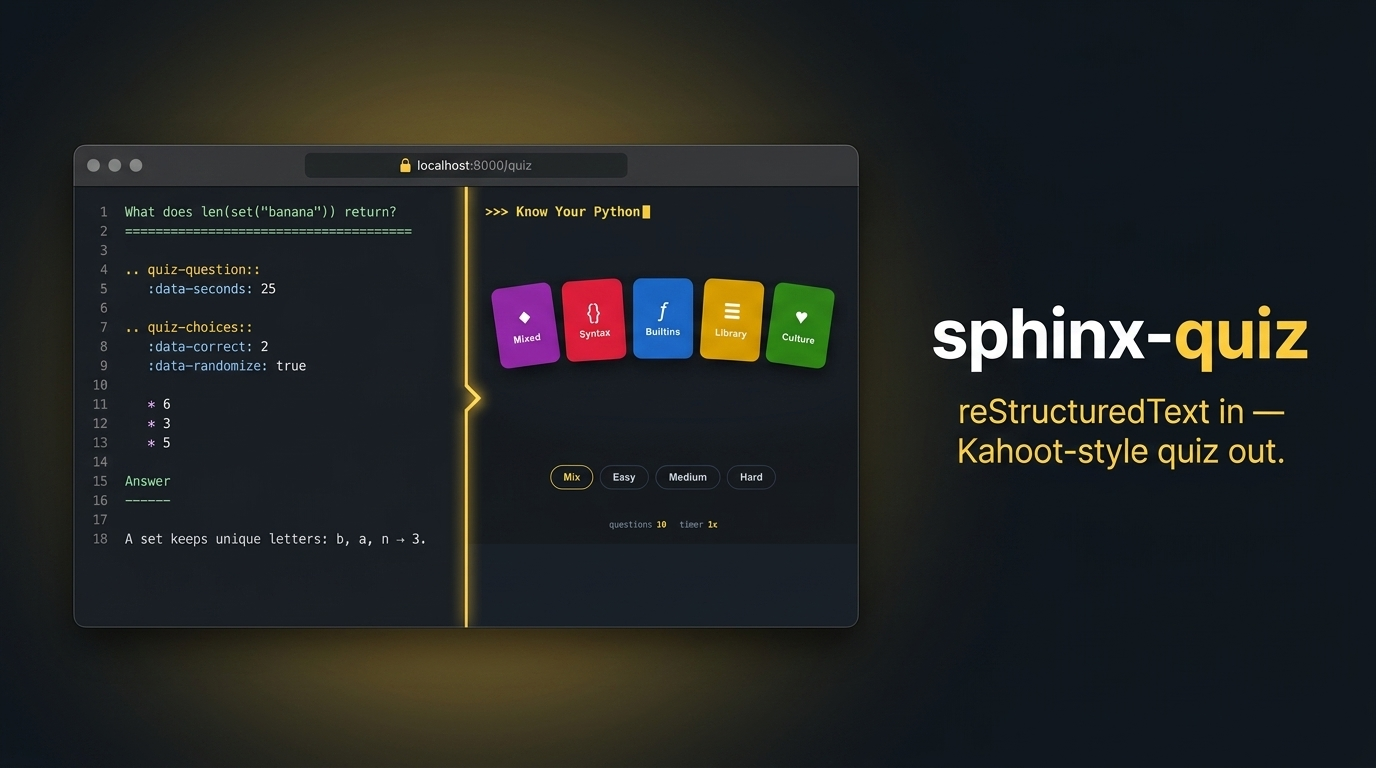
Sphinx extension that builds a static, Kahoot-style quiz website from reStructuredText — no JavaScript to write, no server to run.
A quiz project is a regular Sphinx project using the sphinx_quiz extension. The index page declares the quiz setup (level, category, number of questions and timer), and every question, with its choices, explanation and transition screens, is written as plain rst. The build produces a self-contained static site that even works over file://.
The example project, Know Your Python, lives in its own repository (know-your-python) and installs this package as a dependency.
Features
Author an entire quiz in plain reStructuredText — questions, choices, explanations, timers and results screens.
Kahoot-style SPA rendered client-side: setup screen, timed questions, A/B/C/D colour cards, verdict and results screens.
Single- or multiple-answer questions with client-side shuffling.
Per-question timer with time-based transition screens.
Results screen with per-category/per-level breakdown, a review of missed questions, a shareable results URL + image, and a podium gag.
Internationalization via Sphinx gettext, plus a UI-strings layer.
Ships a dark, sidebar-free HTML theme (html_theme = 'sphinx_quiz').
Zero runtime dependencies in the browser; static output works offline.
Install
If you have Pip installed on your system, you can use it to install the latest stable version:
$ pip install sphinx-quiz
Python 3.10+ is supported. Then enable it in your project’s conf.py:
extensions = ["sphinx_quiz"]
html_theme = "sphinx_quiz"
Quick start
Install the extension, then build a quiz project that uses it. The example project, Know Your Python, lives in its own repository (know-your-python) and installs this package as a dependency:
pip install -e .                     # this extension

# the example quiz project, cloned next to this repo:
cd ../know-your-python
pip install -r requirements.txt      # pulls in ../sphinx-quiz
make html
xdg-open _build/html/index.html
Directives
- quick-select-level / quick-select-category
Options for the setup form. Content lines are the choices; * derives them from the questions found in the project. :data-include-all: adds an all option; :data-default: preselects one. :data-weights: (e.g. easy=1, medium=2, hard=3 on quick-select-level) biases the random sampling when playing with all levels; unlisted values weigh 1.
- quick-select-num-questions
How many questions per game. Content lines are the choices.
- quick-timer
Timer multipliers. 0 disables the timer; 1 is 1x the recommended time (data-seconds) of each question.
- quiz-section
Attaches :data-category: and :data-level: to the enclosing section; all question sections inside inherit them.
- quiz-question
Marks the enclosing section as a question. :data-seconds: is the recommended time. Everything before quiz-choices is the question body; a nested section (e.g. Answer) is the explanation shown after answering.
- quiz-choices
Bullet list of answers. :data-correct: holds the 1-based indexes of the right answers in source order (4 or 1, 2, 4; more than one turns it into a multiple-answer question with a submit button); :data-randomize: shuffles them on screen.
- quiz-transition
Screen shown after a question. :data-status: is success or failure. :data-time-remaining: is a fraction of the question time still left: the transition with the highest threshold below the actual remaining time is picked; 0 matches only a timeout; with no value it is the default (and the only kind used without timer).
- quiz-podium
Results-screen gag. :data-percentage: is the score threshold: the entry with the highest threshold at or below the final score is shown, with its :data-title: headline, :data-image: (source-relative path, copied to _static/quiz-podium/) and :data-text:.
Internationalization
Question content is translated with Sphinx’s standard gettext workflow. Set locale_dirs = ['locale/'] and gettext_compact = False in conf.py, then:
pip install -e '.[i18n]'                 # sphinx-intl
make gettext
sphinx-intl update -p _build/gettext/gettext -l es
# translate the msgstr in locale/es/LC_MESSAGES/*.po
Because :data-correct: lives in the .rst (positional), translating choices never changes which answer is right. UI chrome (button labels, level and category names) is translated inside quiz.js STRINGS, keyed by the build’s language.
Build one combined site with English at the root and another language nested under a sub-path (make site in the example project builds _build/html with Spanish under _build/html/es). A flag switcher in the top-right corner links between them.
Theme
The extension registers a dark, sidebar-free HTML theme; enable it with html_theme = 'sphinx_quiz' in conf.py. It provides a dark pygments_style (monokai) so code blocks match the quiz panel.
The results screen shows a per-category and per-level breakdown, a review of missed questions with their explanations, and keeps the best score per game configuration in the browser’s localStorage.
License
This software is under the MIT license. The author does not provide any warranty. Issues and pull requests are welcome — see CONTRIBUTING.rst.
1 maintainer

Metadata
1 maintainer
Release files for sphinx-quiz 0.1.0
For a detailed explanation of source distributions (sdists) and built distributions (wheels), please see the package formats documentation.
Source distribution (sdist)
| File | Size | Uploaded | |
|---|---|---|---|
| sphinx_quiz-0.1.0.tar.gz | 32.8 kB | Details |
Built distribution (wheel)
| File | Interpreter | ABI | Platform | Reset |
|---|---|---|---|---|
| sphinx_quiz-0.1.0-py3-none-any.whl | Python 3 | none | any | Details |
Total release size: 64.2 kB
Release files / sphinx_quiz-0.1.0.tar.gz
| Download URL | sphinx_quiz-0.1.0.tar.gz |
|---|---|
| Size | 32.8 kB |
| Tags | Source |
|
SHA-256 checksum How to use checksums |
957600824749b8d0f83678e1beb208c4b2cc631ca2242e628acbe930d56f8dfb
|
|
BLAKE2b-256 checksum How to use checksums |
07ad923c6eedf53e738f0258285d052127dbb3d7e334434da69b72122ec4ed85
|
| Upload date | |
|
Uploaded using Trusted Publishing? What is trusted publishing? |
Yes |
| Uploaded via |
twine/6.1.0 CPython/3.13.12
|
Provenance
Provenance describes where a file came from. On PyPI, provenance is shared via attestations, which provide a verifiable record of the build or publishing details. View details, limitations and caveats.


PyPI Publish Attestation
PyPI verified that this artifact, at this checksum, originated from the publisher listed below.
Signed by GitHub Actions, verified by PyPI on Jul 18, 2026.
Transparency logRelease files / sphinx_quiz-0.1.0-py3-none-any.whl
| Download URL | sphinx_quiz-0.1.0-py3-none-any.whl |
|---|---|
| Size | 31.3 kB |
| Tags | Python 3 |
|
SHA-256 checksum How to use checksums |
b6983b0d6df555f787b3c8c32d53942268cc9f4b7176a8e61a4e7cfc2700c7bc
|
|
BLAKE2b-256 checksum How to use checksums |
453fba52576dbf0cd1f12f1f7a5b793c5bf1982bccfc5a47463b9aa07b1934b9
|
| Upload date | |
|
Uploaded using Trusted Publishing? What is trusted publishing? |
Yes |
| Uploaded via |
twine/6.1.0 CPython/3.13.12
|
Provenance
Provenance describes where a file came from. On PyPI, provenance is shared via attestations, which provide a verifiable record of the build or publishing details. View details, limitations and caveats.
PyPI Publish Attestation
PyPI verified that this artifact, at this checksum, originated from the publisher listed below.
Signed by GitHub Actions, verified by PyPI on Jul 18, 2026.
Transparency log












