
This Sphinx extension by Xsolla Backend [XBE] automates the management of multiple documentation repositories as part of building a larger, unified documentation system. It facilitates multi-threaded cloning and updating of external repositories specified in a YAML manifest file before Sphinx builds.

Project description
Sphinx Extension: Repository Manager


About
This Sphinx extension by Xsolla Backend [XBE] automates the management of multiple documentation repositories as part of building a larger, unified documentation system. It facilitates multithreaded cloning and updating of external repositories specified in a YAML manifest file before Sphinx builds.
📜 See the XBE docgen source code and demo doc production site heavily making use of this extension. Here, you may also find tips for how to utilize this extension to its greatest capabilities.
See how it works or quickstart below >>
Installation
This guide assumes you have a basic understanding of Sphinx and RST
Add to Existing Project
-
Install the extension via pip:
pip install sphinx-repo-manager
-
Add extension to your project's docs/source/conf.py (example template):
extensions = [ "sphinx_repo_manager" ] , # https://pypi.org/project/sphinx-repo-manager
-
Ensure a
docs/.envfile exists next to yourMakefile-> setREPO_AUTH_TOKEN= -
Create a docs/repo_manifest.yml (example template) next to your
Makefile
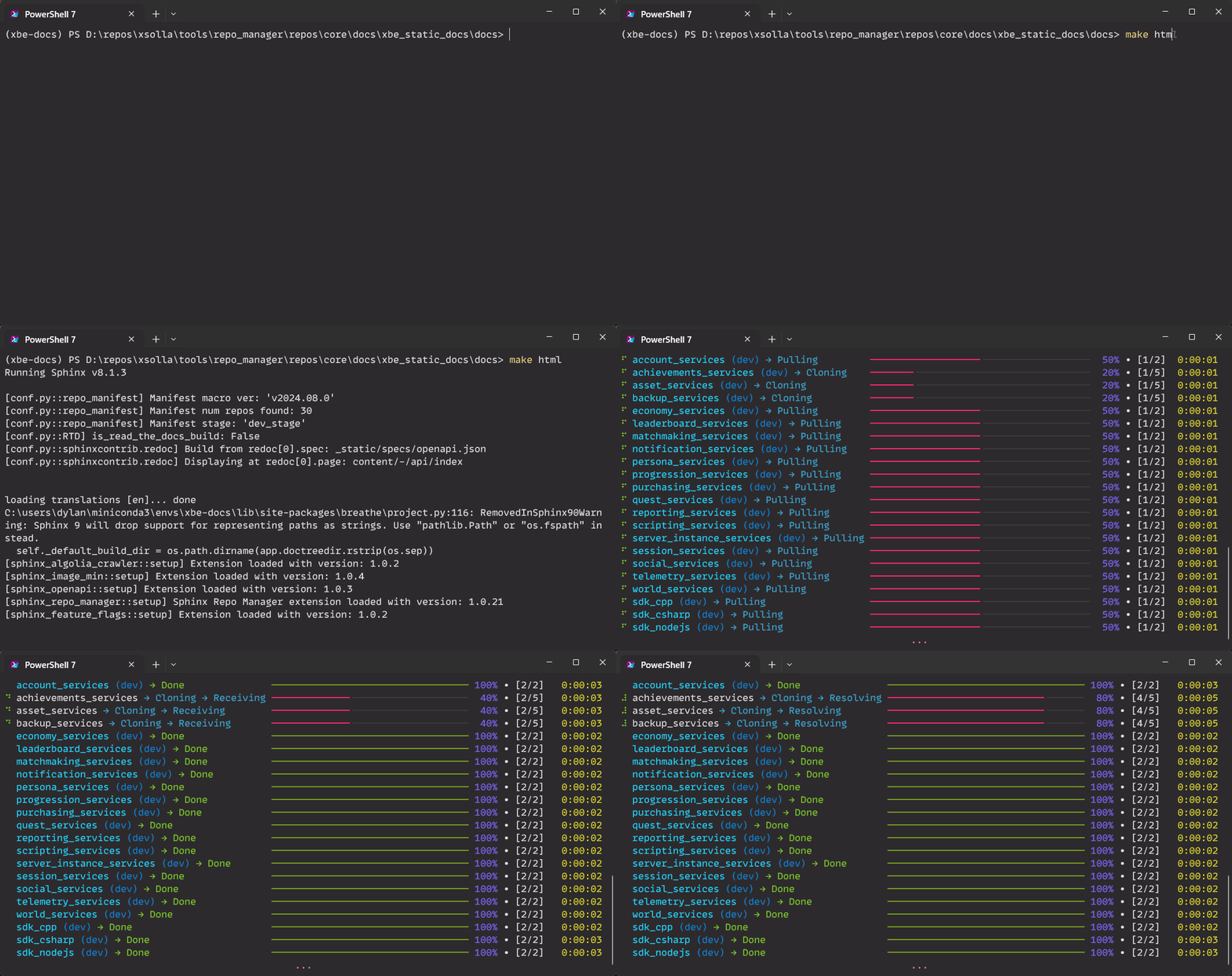
Once setup, sphinx-build as normal (typically via make html next to your Makefile)!
Tips
-
For Windows users, you may want to unlock your max char paths (admin):
Get-ItemProperty -Path "HKLM:\SYSTEM\CurrentControlSet\Control\FileSystem" -Name "LongPathsEnabled"
-
Editing the manifest?
- Consider purging your
docs/source/_repos-availableanddocs/source/contentdirs
- Consider purging your
-
Want speedier build iterations?
- Test bumping up your
max_workers_localcounts - even significantly higher - for high-end machines!
- Test bumping up your
Demos
Minimal Demo
- Clone the source repo for a demo:
- Minimal build architecture begins at at
docs/ repo_manifest.ymlcontains a minimal demo_doc repo to be cloned
Production Demo
Alternately, see sphinx_repo_manager used by Xsolla Backend at a production-grade level:
How it Works
repo_manifest.ymllists repositories with their respective clone URLs [and optional rules].docs/source/creates_repos-available(src repos) andcontent(symlinked) dirs.- Upon running
sphinx-build(commonly viamake html), the extension either clones or updates each repo defined within the manifest. - Source clones will sparse checkout and symlink to the
contentdir, allowing for flexibility such as custom entry points and custom names (such as for shorter url slugs). - All repos in the manifest will be organized in a monolithic doc.
💡 If you want to store local content (eg, static .rst), add it to source/_source-docs/
💡 The only RST file expected for your monolithic repo is the index.rst file (next to your conf.py)
⌛ 5 local workers (default) will take only ~50s to process 30 repos with default manifest settings
Tests
Confirmed compatability with:
- Windows 11 via PowerShell 7, WSL2 (bash)
- Ubuntu 22.04 via ReadTheDocs (RTD) CI, Docker Desktop
- Python 3.10, 3.12
- Sphinx 7.3.7, 8.1.3
Questions?
Join the Xsolla Backend official Discord guild!
License
Release history Release notifications | RSS feed


Download files
Download the file for your platform. If you're not sure which to choose, learn more about installing packages.
Source Distribution
Built Distribution
Filter files by name, interpreter, ABI, and platform.
If you're not sure about the file name format, learn more about wheel file names.
Copy a direct link to the current filters
File details
Details for the file sphinx_repo_manager-1.0.22.tar.gz.
File metadata
- Download URL: sphinx_repo_manager-1.0.22.tar.gz
- Upload date:
- Size: 25.8 kB
- Tags: Source
- Uploaded using Trusted Publishing? No
- Uploaded via: twine/6.0.1 CPython/3.10.15
File hashes
| Algorithm | Hash digest | |
|---|---|---|
| SHA256 |
0032fd4bd3bb1235b807d8b008a92b666d3ccee18bde36d19c0744c82c2aea41
|
|
| MD5 |
941f3035cd3353014167280fcab32cb3
|
|
| BLAKE2b-256 |
ef439e470e10310d244da0cea38744e73973f552b0ff8dafd2a244dc9a58b512
|
File details
Details for the file sphinx_repo_manager-1.0.22-py3-none-any.whl.
File metadata
- Download URL: sphinx_repo_manager-1.0.22-py3-none-any.whl
- Upload date:
- Size: 25.8 kB
- Tags: Python 3
- Uploaded using Trusted Publishing? No
- Uploaded via: twine/6.0.1 CPython/3.10.15
File hashes
| Algorithm | Hash digest | |
|---|---|---|
| SHA256 |
f4ddc33d811d3f44afd6b2529a75902f8850094a53ca4e41e3b1a6edb205462b
|
|
| MD5 |
709b1b36746b1476eca1224ed77b647b
|
|
| BLAKE2b-256 |
11555be356aa8b7b290e73ebd1645eb3afea946eee0cbe82127e34cb328d7ed1
|






