
Ditaa Sphinx extension.

Project description
A sphinx extension for embedding block diagram using ditaa.
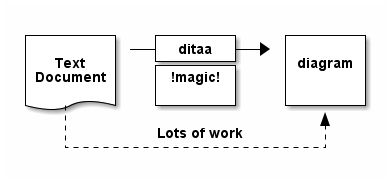
This extension enables you to insert block diagrams into your document generated by sphinx. Following code is an example:
.. ditaa::

    +--------+   +-------+    +-------+
    |        | --+ ditaa +--> |       |
    |  Text  |   +-------+    |diagram|
    |Document|   |!magic!|    |       |
    |     {d}|   |       |    |       |
    +---+----+   +-------+    +-------+
        :                         ^
        |       Lots of work      |
        +-------------------------+
After conversion using ditaa, the above file becomes:
1. Introduction
ditaa is a small command-line utility that can convert diagrams drawn using ascii art (‘drawings’ that contain characters that resemble lines like | / - ), into proper bitmap graphics. See http://ditaa.sourceforge.net/.
ditaa is a java programme and the input must be a plain text file and the output is a seperate image file. It’s inconvenient for user to include the image directly. This extensions allows the plain-text graph in .rst file to be rendered as a graph drawn by ditaa in sphinx scheme. With this plugin you can focus the graph itself and the ditaa and sphinx would convert it automatically.
Now it support to render the image into html and pdf target.
2. Install and configuration
2.1 prerequisite
ditaa is in java, normally it’s call by the following format:
java -jar /usr/local/Cellar/ditaa/0.10/libexec/ditaa0_10.jar art10.txt art10.png
to use it in the sphinx we should convert it to a single command and call it as:
ditaa art10.txt art10.png
There are two means to do that:
Crate a execuable script as following:
$ cat /usr/local/bin/ditaa
#!/bin/bash
exec java  -jar /usr/local/Cellar/ditaa/0.10/libexec/ditaa0_10.jar "$@"
If you don’t like the converttion, please refer to 2.3 Configuration for the workaround. you can add the following configuration to the conf.py:
ditaa = "java"
ditaa_args = ["-jar", "/usr/local/Cellar/ditaa/0.10/libexec/ditaa0_10.jar"]
ditaa_log_enable = True
2.2 install sphinxcontrib-ditaa
pip install sphinxcontrib-ditaa
2.3 configuration
Just add sphinxcontrib.ditaa to the list of extensions in the conf.py file. For example:
extensions = ['sphinxcontrib.ditaa']
sphinxcontrib-ditaa also provide configuration to add different options to ditaa command and render different kind of output:
ditaa <str>:
Ditaa is a java implementation and maybe is not callable directly, please input the ditaa executale name if you didn’t convert it to a normal command. Default is “ditaa”. See examples below.
ditaa_args <list>:
Given a ditaa option list, default is empty.
ditaa_log_enable <Bool>:
Since ditaa is slow, will give out a log to note progress if it’s configured. Default is True.
ditaa_output_suffix: <str>:
The output file format.
For example:
ditaa = "java"
ditaa_args = ["-jar", "/usr/local/Cellar/ditaa/0.10/libexec/ditaa0_10.jar"]
ditaa_log_enable = True
3. Quick Example
This source:
.. ditaa::

    +--------+   +-------+    +-------+
    |        | --+ ditaa +--> |       |
    |  Text  |   +-------+    |diagram|
    |Document|   |!magic!|    |       |
    |     {d}|   |       |    |       |
    +---+----+   +-------+    +-------+
        :                         ^
        |       Lots of work      |
        +-------------------------+
is rendered as:
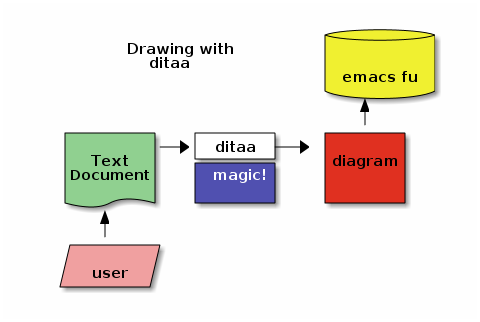
Another example:
.. ditaa::

                              +----------+
          Drawing with        |cYEL   {s}|
            ditaa             +          +
                              | emacs fu |
                              +----------+
                                  ^
                                  |
    +--------+   +-------+    +-------+
    |cGRE    |-->+ ditaa +--> |       |
    |  Text  |   +-------+    |diagram|
    |Document|   | magic!|    |       |
    |     {d}|   |cBLU   |    | cRED  |
    +---+----+   +-------+    +-------+
        ^
        |
    +--------+
    |cPNK{io}|
    |  user  |
    +--------+
is rendered as:
4. Usage
Firstly, make a directory and write the .rst files:
$ mkdir test_dir
$ cd test_dir
$ vim test.rst
2) create a sphinex project in the directory, presss Enter if there is no change:
$ sphinx-quickstart
3) Just add sphinxcontrib.ditaa to the list of extensions in the conf.py file just created in step 2:
extensions = ['sphinxcontrib.ditaa']
Add your work .rst files into index.rst just created in step 2:
Contents:

.. toctree::
   :maxdepth: 2

   test.rst
make your target files:
$ make html
or:
$ make pdf
check your target files:
$ open .build/html/index.html
4.1 Options
ditaa options:
See detail in ditaa -h:
:--no-antialias:
:--background:
:--no-antialias:
:--no-separation:
:--encoding:
:--html:
:--overwrite:
:--round-corners:
:--no-shadows:
:--scale: 1.5 #Please note that it's ditaa's parameter and the units are
           fractions of the default size (2.5 renders 1.5 times bigger
           than the default). Be warning to be different from image's
           scale unit.
:--transparent:
:--tabs:
:--fixed-slope:
image options:
See detail in rst syntax:
:name:
:class:
:alt:
:title:
:height:
:width:
:scale: 50%, Please node that it's integer percentage (the "%" symbol is optional)
:align:
:target:
:inline:
Examples:
.. ditaa::
   :--no-antialias:
   :--transparent:
   :--scale: 1.5
   :alt: a test for ditaa.
   :width: 600
   :height: 400
   :align: left
   :scale: 50

    Color codes
    /-------------+-------------\
    |cRED RED     |cBLU BLU     |
    +-------------+-------------+
    |cGRE GRE     |cPNK PNK     |
    +-------------+-------------+
    |cBLK BLK     |cYEL YEL     |
    \-------------+-------------/
5. License
GPLv3
6. Changelog
0.5, Don’t import sphinx.util.compat since sphinx.util.compat is deprecated at 1.6 and is removed since Sphinx 1.7.
0.6, Support python3
1.0, 10 Upgrade to formal release. 2) Fix a bug that ditaa doesn’t work when ditaa options have values.
1.0.2 Fix some typo.
1.0.3 Use pyproject.toml to build.


Download files
Download the file for your platform. If you're not sure which to choose, learn more about installing packages.
Source Distribution
Built Distribution
Filter files by name, interpreter, ABI, and platform.
If you're not sure about the file name format, learn more about wheel file names.
Copy a direct link to the current filters
File details
Details for the file sphinxcontrib_ditaa-1.0.3.tar.gz.
File metadata
- Download URL: sphinxcontrib_ditaa-1.0.3.tar.gz
- Upload date:
- Size: 7.6 kB
- Tags: Source
- Uploaded using Trusted Publishing? No
- Uploaded via: twine/6.2.0 CPython/3.12.3
File hashes
| Algorithm | Hash digest | |
|---|---|---|
| SHA256 |
f0eef81b26f82b1111fd5945416c07290423898354d5c8799fa78b9de5474c28
|
|
| MD5 |
0220d97b83c59dc0b28f91f08fc4f4e0
|
|
| BLAKE2b-256 |
56106198a3fc912a8cb4ab88837758a84cb1fb0c080471bd27a0afe8c847a1fa
|
File details
Details for the file sphinxcontrib_ditaa-1.0.3-py3-none-any.whl.
File metadata
- Download URL: sphinxcontrib_ditaa-1.0.3-py3-none-any.whl
- Upload date:
- Size: 7.8 kB
- Tags: Python 3
- Uploaded using Trusted Publishing? No
- Uploaded via: twine/6.2.0 CPython/3.12.3
File hashes
| Algorithm | Hash digest | |
|---|---|---|
| SHA256 |
c510aea3e0fc326094a9a3454a8e47602646f1d3e97b11f5bcb93f8714bcfa0d
|
|
| MD5 |
fcecfb18e034d41938d883b116de1ae5
|
|
| BLAKE2b-256 |
b26023b9110fd736d0bc70484f8d4ba7e022da572e2c7f5ed74953f2a60c4d68
|






