
Package to estimate fractal dimension of 3D surfaces formed from overlapping spheres via box-counting algorithm.

Project description
Sphractal

Description
Sphractal is a package that provides functionalities to estimate the fractal dimension of complex 3D surfaces formed from overlapping spheres via box-counting algorithm.
Background
- Atomic objects in molecular and nanosciences such are often represented as collection of spheres with radii associated with the atomic radius of the individual component.
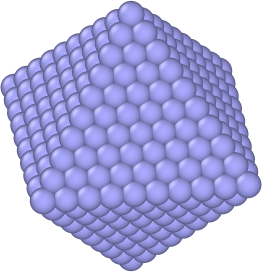
- Some examples of these objects (inclusive of both fine- and coarse-grained representation of the individual components) are small molecules, proteins, nanoparticles, polymers, and porous materials such as zeolite, metal-organic framework (MOFs).
- The overall properties of these objects are often significantly influenced by their surface properties, in particular the surface area available for interaction with other entities, which is related to the surface roughness.
- Fractal dimension allows the surface complexity/roughness of objects to be measured quantitatively.
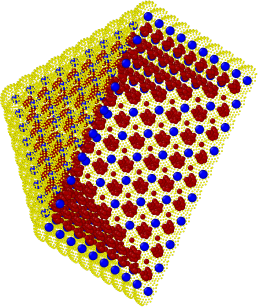
- The fractal dimension could be estimated by applying the box-counting algorithm on surfaces represented as either:
- approximated point cloud:
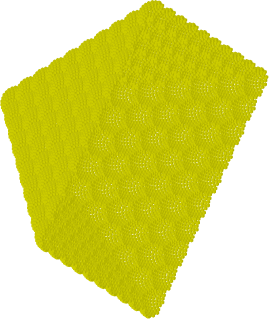
- that are subsequently voxelised:
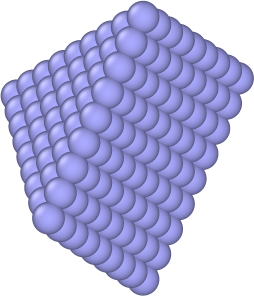
- or mathematically exact surfaces:
Features
Aims
- Representation of the surface as either voxelised point clouds or mathematically exact surfaces.
- Efficient algorithm for 3D box-counting calculations.
- Customisable parameters to control the level of detail and accuracy of the calculation.
Installation
Use pip or conda to install Sphractal:
pip install sphractal
conda install -c conda-forge sphractal
Special Requirement for Point Cloud Surface Representation
Sphractal requires a file compiled from another freely available repository for the functionalities related to voxelised point clouds surface representation to operate properly.
This could be done by:
- Downloading the source code from the repository to a directory of your choice:
git clone https://github.com/jon-ting/fastbc.git
- Compile the code into an executable file (which works on any operating system) by doing either one of the following compilations according to the instructions on the README.md page. This will decide whether you will be running the box counting algorithm with GPU acceleration. Feel free to rename the output file from the compilation:
g++ 3DbinImBCcpu.cpp bcCPU.cpp -o 3DbinImBCcpu
nvcc -O3 3DbinImBCgpu.cpp bcCUDA3D.cu -o 3DbinImBCgpu
- (Optional) Setting the path to the compiled file as an environment variable accessible by Python (replace
<PATH_TO_FASTBC>by the absolute path to the executable file you just built), otherwise you could always pass the path to the compiled file to the relevant functions:
export FASTBC=<PATH_TO_FASTBC>
Note that for the environment variable to be persistent (to still exist after the terminal is closed), the line should be added to your ~/.bashrc.
Usage
from sphractal import getExampleDataPath, runBoxCnt

inpFile = getExampleDataPath()  # Replace with the path to your xyz or lmp file
boxCntResults = runBoxCnt(inpFile)
Check out the basic demonstration and application demonstration notebooks for further explanations and demonstrations!
Documentation
Detailed documentations are hosted by Read the Docs.
Contributing
Sphractal appreciates your enthusiasm and welcomes your expertise!
Please check out the contributing guidelines and code of conduct. By contributing to this project, you agree to abide by its terms.
License
The project is distributed under an MIT License.
Credits
The package was created with cookiecutter using the
py-pkgs-cookiecutter template.
The speeding up of the inner functions via just-in-time compilations with Numba was inspired by the advice received during the NCI-NVIDIA Open Hackathon 2023.
Contact
Email: Jonathan.Ting@anu.edu.au/jonting97@gmail.com
Feel free to reach out if you have any questions, suggestions, or feedback.
Release history Release notifications | RSS feed


Download files
Download the file for your platform. If you're not sure which to choose, learn more about installing packages.
Source Distribution
Built Distribution
Filter files by name, interpreter, ABI, and platform.
If you're not sure about the file name format, learn more about wheel file names.
Copy a direct link to the current filters
File details
Details for the file sphractal-1.1.2.tar.gz.
File metadata
- Download URL: sphractal-1.1.2.tar.gz
- Upload date:
- Size: 918.7 kB
- Tags: Source
- Uploaded using Trusted Publishing? No
- Uploaded via: twine/5.0.0 CPython/3.12.2
File hashes
| Algorithm | Hash digest | |
|---|---|---|
| SHA256 |
f9d689b4ee3b69da255cb2855f9f01eeb5b884d4e86c8525ff8936961a785673
|
|
| MD5 |
f523d24495f37c86deb341b27a4fb008
|
|
| BLAKE2b-256 |
a07f191e6941b9000db99e62e199af0e1c968e55df7b90bc256e4818d88a6edf
|
File details
Details for the file sphractal-1.1.2-py3-none-any.whl.
File metadata
- Download URL: sphractal-1.1.2-py3-none-any.whl
- Upload date:
- Size: 924.1 kB
- Tags: Python 3
- Uploaded using Trusted Publishing? No
- Uploaded via: twine/5.0.0 CPython/3.12.2
File hashes
| Algorithm | Hash digest | |
|---|---|---|
| SHA256 |
6460d4cab71b309bc1aba978e8ce99975df671a5155d676b5cefb3d6da3ac1ab
|
|
| MD5 |
a1eed2ae82d1186d5641b1872bcda3b9
|
|
| BLAKE2b-256 |
3e7b529504a088ef4bfb17b30b0c88cdd3830c160a4742a5146012edce6c05ec
|






