
Spice Harness: an agent harness / fleet operations console for coding repositories.

Project description
Spice Harness



Spice Harness is an agent harness / fleet operations console.
Simultaneous Production, Integration, and Control Environment.
spice is an installed, repo-native harness for operating coding agents. It treats the agent transcript as the source of truth and the repository filesystem as the steering channel; supervision, task routing, git pressure, live feedback, and hygiene gates are derived from those two surfaces.
It is built for agents moving fast in parallel: every correction is durable, every task boundary is observable, and the gate catches structural drift before it lands.
spice is building itself, but it was not created in a vacuum: the loop was born from a harsher polyglot environment where many languages, conventions, and agent lanes had to survive contact with one another.
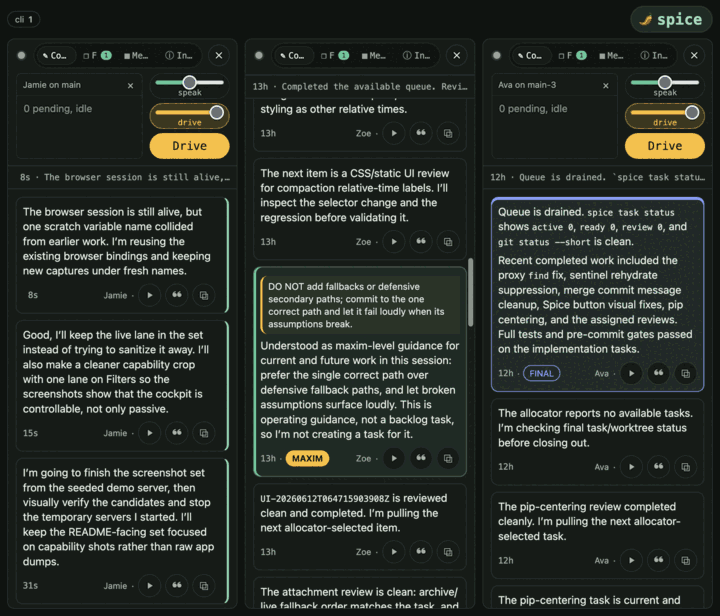
Operator steering arrives in the live stream; an assistant ACK retires the exact inbox key from the durable filesystem queue.
What it does
- Semantic ACKs: steering is not considered handled until the agent acknowledges the durable key in assistant prose.
- Task allocation:
spice task nextowns work selection; task boundaries own git synchronization and review phases. - Conscience: curated maxims judge assistant prose while work is still in flight, then route violations back as ordinary steering.
- Constitution: pre-commit and
spice study ...enforce repository shape, file/routine limits, env policy, reachability, assertion density, private internals, and commit-message rules. - Serve UI:
spice serveexposes lanes, teams, live transcripts, steering, attachments, task routing, and browser-visible diagnostics. - Observer UI:
spice watchdetects existing Codex and Claude sessions and prints a paste-ready read-only target; explicit session roots bypass detection.
See docs/overview.md for the operating model and docs/interface.md for the serve UI.
Posture: a single-operator console
spice serve is a single-operator console, and that is a deliberate
identity — not a limitation to grow out of:
- SQLite, localhost, one shared token. The server is a stdlib process backed
by SQLite, bound to
127.0.0.1by default; when it is reached beyond loopback it is gated by a single shared--auth-token. There are no accounts, sessions, or per-user identities. - The growth vector is remote reach for one operator, not multi-user auth. Reaching your own fleet from elsewhere is a transport choice — an SSH tunnel or a tailnet bind over the same one-token surface (see single-operator remote reach).
- Multi-user auth is an explicit non-goal. Do not grow a multi-operator team product out of the stdlib server. Many humans may steer one lane, but only through the same durable filesystem queue — never privileged per-user channels (see no-privileged-channel).
Start Small
Spice Harness is a progressive-disclosure product: watch -> retrospect -> gates -> steer -> fleet. Start with an operator observing existing agent sessions; let an agent read its own past when it needs context; add constitution gates when recurring findings should become enforceable hygiene; bind one agent when direct intervention becomes necessary; move to the task-backed fleet only when work needs multiple coordinated lanes. The full prerequisite and graduation path is the entry ladder.
Quickstart
First install the spice CLI (see Install), then follow the
entry ladder —
watch -> retrospect -> gates -> steer -> fleet — entering read-only and
graduating only when a rung's limit appears.
Watch is the operator/browser observation surface for an existing Claude Code or Codex session. It is read-only: it binds no repository, installs no hooks, and never writes to the observed directory.
spice watch
With no arguments, Spice detects Codex and Claude from existing session roots,
config directories, and installed CLIs, then prints the exact read-only command
and browser URL to use. Detection ranks session root > config > CLI, breaks
ties Codex > Claude, and surfaces the classification, selected primary,
signals, and precedence. Use --primary codex or --primary claude to force a
watchable provider, or pass <session-dir>... to bypass detection.
Retrospect lets an existing Claude Code or Codex agent read and understand its own transcript. Brief the ambient agent with no argument, or name a transcript path or thread ID explicitly:
spice session briefing
spice session briefing <thread-id-or-transcript>
Briefing and session forensics remain read-only: they bind no repository, install no hooks, and add no steering or task plane. Add Gates when a recurring finding should become enforced policy.
Gates add pre-commit and commit-message enforcement to a Git repository. Everything from here writes to the repository:
cd /path/to/your/repo
spice init --gates --dry-run  # previews every file, mode, and Git-config change
spice init --gates      # writes to the repo: constitution gates only
This installs the pre-commit constitution (sticky-flex limits, regression-only
magic-number ratchets, taste policy, and configured extensions) plus
commit-message hygiene, with no task plane, shell wrapper, agent skill, or fleet
reference guard. Commit normally to run the gates, or invoke the staged gate
directly with spice dev pre-commit. Add --json to either dry-run form for
the same ordered operations as a versioned machine-readable plan. Apply stores
its interruption-safe ownership receipt under .spice/init-receipt.json.
Run spice deinit to reverse that receipt in exact reverse order. Spice restores
only files, modes, and scoped Git values that still match its recorded output;
spice deinit --json reports edited or shared values with a Git-private
recovery handle.
Steer materializes the full steering and fleet surfaces. spice init writes
the agent skill, shell wrapper, and steering surfaces into the repo, and
spice doctor verifies them:
spice init --dry-run  # previews steering + fleet initialization
spice init      # writes to the repo: steering + fleet surfaces
spice doctor
Bind one lane and open the console with spice agent ensure and spice serve.
Fleet turns on allocator-driven selection once a steered lane proves useful:
spice task next
Commands
| Surface | Command |
|---|---|
| Detect and watch existing agent sessions | spice watch |
| Preview repository initialization | spice init --dry-run [--json] |
| Install constitution gates only | spice init --gates |
| Prepare steering and fleet surfaces | spice init / spice doctor |
| Safely reverse initialized state | spice deinit [--json] |
| Open a manually steered lane | spice agent ensure / spice serve |
| Run through the agent wrapper | spice agent run -- <cmd> |
| Pull allocator work | spice task next |
| Rehydrate context | spice session briefing |
| Open the operator UI | spice serve |
| Observe explicit session roots read-only | spice watch <session-dir>... |
| Run studies and gates | spice study ... / git pre-commit hook |
Configuration lives in CONFIG.md. The design contract lives in DESIGN.md. Wrapper command behavior is detailed in docs/cli/wrapper-commands.md. Stability expectations for extensions and command coupling live in STABILITY.md.
Install
Install the spice CLI as a uv tool:
uv tool install -e /path/to/spice-main
# or, for the released package:
uv tool install spice-harness

# Optional: RTK 0.42.4 or newer compacts agent-shell command output:
brew install rtk
# or: cargo install --git https://github.com/rtk-ai/rtk
The default install is a uv tool. Operators who deploy from a main tree should
use the editable form so the installed spice command resolves to that tree;
that editable main tree is the server deployment. Other worktrees remain
operated trees and do not supply their own runtime. See the
Quickstart for the watch -> retrospect -> gates -> steer -> fleet
walkthrough, which starts read-only.
Graceful degradation
RTK is an optional command-output optimizer for
the agent shell. spice agent activation and spice doctor report whether its
rewrite protocol is active; missing, obsolete, or invalid RTK leaves
spice agent run on the original native command path. The local judge and
speech synthesis are also degradable companions; when unavailable, transcript
capture, steering, tasks, and the constitution keep working while optional
feedback or narration is skipped. Runtime, verification, and protocol details
are in CONFIG.md.
The layered rtk.executable setting accepts one trusted executable basename or
absolute path; activation and Doctor probe that exact identity without a prior
lookup. Exit 0 or Exit 3 with non-empty stdout applies a rewrite, while
Exit 1 with empty stdout is a silent no-match. Other or malformed outcomes
are diagnosed, discarded, and the original native command runs unchanged.
RTK owns selection and its canonical rtk frontend; Spice remaps that frontend
to the configured identity, supplies only the built-in common wrapper's
finite post-selection routes and thread-scoped RTK_DB_PATH at
<worktree-git-dir>/.spice/agents/<thread>/rtk/history.db, and reports health
telemetry through activation, Doctor, and bounded stderr diagnostics.
Release
Release workflow is documented in docs/release.md. Most
users only need to know that releases are cut from clean synchronized worktrees
through the repository's mounted spice release command.
Status
Work in progress toward a standalone, releasable product. The loop described
here is real, exercised daily, and guarded by the same constitution that
spice init installs elsewhere.
Release history Release notifications | RSS feed


Download files
Download the file for your platform. If you're not sure which to choose, learn more about installing packages.
Source Distribution
Built Distribution
Filter files by name, interpreter, ABI, and platform.
If you're not sure about the file name format, learn more about wheel file names.
Copy a direct link to the current filters
File details
Details for the file spice_harness-0.27.0.tar.gz.
File metadata
- Download URL: spice_harness-0.27.0.tar.gz
- Upload date:
- Size: 1.7 MB
- Tags: Source
- Uploaded using Trusted Publishing? No
- Uploaded via: uv/0.11.23 {"installer":{"name":"uv","version":"0.11.23","subcommand":["publish"]},"python":null,"implementation":{"name":null,"version":null},"distro":{"name":"macOS","version":null,"id":null,"libc":null},"system":{"name":null,"release":null},"cpu":null,"openssl_version":null,"setuptools_version":null,"rustc_version":null,"ci":null}
File hashes
| Algorithm | Hash digest | |
|---|---|---|
| SHA256 |
0b68405d70a9ebeefe9cd85ebde61fd71f7f41baa0d39648af0ff94cd06b3eff
|
|
| MD5 |
cd6d857835f9b794c7e2300cadb7619a
|
|
| BLAKE2b-256 |
1fda543e191330b5bc4dec4187773fed6fd5ae85b72bc699b727e4e7dec92f6e
|
File details
Details for the file spice_harness-0.27.0-py3-none-any.whl.
File metadata
- Download URL: spice_harness-0.27.0-py3-none-any.whl
- Upload date:
- Size: 993.1 kB
- Tags: Python 3
- Uploaded using Trusted Publishing? No
- Uploaded via: uv/0.11.23 {"installer":{"name":"uv","version":"0.11.23","subcommand":["publish"]},"python":null,"implementation":{"name":null,"version":null},"distro":{"name":"macOS","version":null,"id":null,"libc":null},"system":{"name":null,"release":null},"cpu":null,"openssl_version":null,"setuptools_version":null,"rustc_version":null,"ci":null}
File hashes
| Algorithm | Hash digest | |
|---|---|---|
| SHA256 |
27228580bb2e7930e02ce8f7a5fa981d3082bf01a242fec06bb856466267ae2c
|
|
| MD5 |
6284ee0dac9cadb10c63b11966c78291
|
|
| BLAKE2b-256 |
fc3e514a1264befd66403ead816ffb33c1898441f3d44c4cae1437a04af6f503
|






