
SPIGA: Shape Preserving Facial Landmarks with Graph Attention Networks.



This repository contains the source code of SPIGA, a face alignment and headpose estimator that takes advantage of the complementary benefits from CNN and GNN architectures producing plausible face shapes in presence of strong appearance changes.
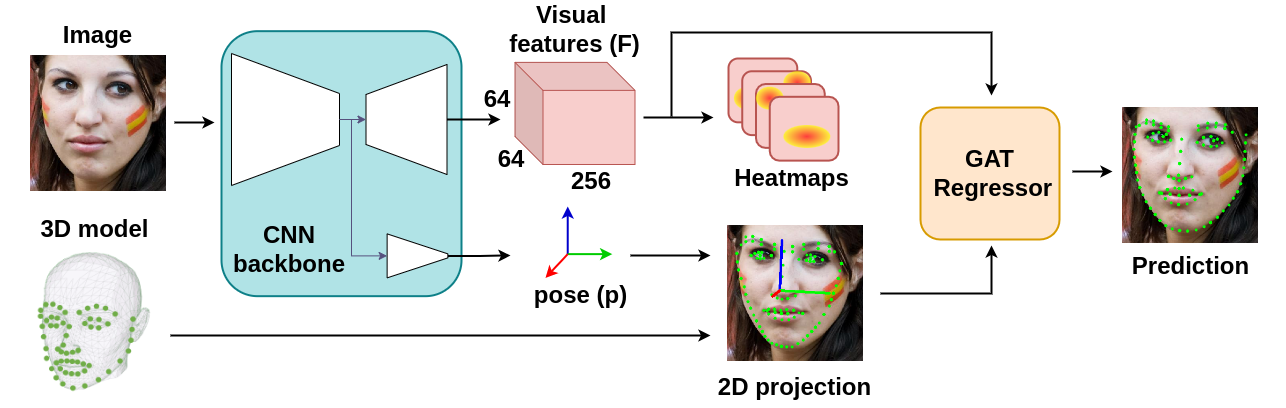
It achieves top-performing results in:







Setup
The repository has been tested on Ubuntu 20.04 with CUDA 11.4, the latest version of cuDNN, Python 3.8 and Pytorch 1.12.1. To run the video analyzer demo or evaluate the algorithm, install the repository from the source code:
# Best practices:
#  1. Create a virtual environment.
#  2. Install Pytorch according to your CUDA version.
#  3. Install SPIGA from source code:

git clone https://github.com/andresprados/SPIGA.git
cd spiga
pip install -e .

# To run the video analyzer demo install the extra requirements.
pip install -e .[demo]
Models: By default, model weights are automatically downloaded on demand and stored at ./spiga/models/weights/.
You can also download them from Google Drive.
Note: All the callable files provide a detailed parser that describes the behaviour of the program and their inputs. Please, check the operational modes by using the extension --help.
Inference and Demo
We provide an inference framework for SPIGA available at ./spiga/inference. The models can be easily deployed
in third-party projects by adding a few lines of code. Check out our inference and application tutorials
for more information:
| Tutorials | Notebook |
|---|---|
| Image Inference Example |  |
| Face Video Analyzer Demo | |
Face Video Analyzer Demo:
The demo application provides a general framework for tracking, detecting and extracting features of human faces in images or videos. You can use the following commands to run the demo:
python ./spiga/demo/app.py \
            [--input] \      # Webcam ID or Video Path. Dft: Webcam '0'.
            [--dataset] \    # SPIGA pretrained weights per dataset. Dft: 'wflw'.
            [--tracker] \    # Tracker name. Dft: 'RetinaSort'.
            [--show] \       # Select the attributes of the face to be displayed. Dft: ['fps', 'face_id', 'landmarks', 'headpose']
            [--save] \       # Save record.
            [--noview] \     # Do not visualize window.
            [--outpath] \    # Recorded output directory. Dft: './spiga/demo/outputs'
            [--fps] \        # Frames per second.
            [--shape] \      # Visualizer shape (W,H).
Note: For more information check the Demo Readme or call the app parser --help.
Dataloaders and Benchmarks
This repository provides general-use tools for the task of face alignment and headpose estimation:
-
Dataloaders: Training and inference dataloaders are available at
./spiga/data. Including the data augmentation tools used for training SPIGA and data-visualizer to analyze the dataset images and features. For more information check the Data Readme . -
Benchmark: A common benchmark framework to test any algorithm in the task of face alignment and headpose estimation is available at
./spiga/eval/benchmark. For more information check the following Evaluation Section and the Benchmark Readme.
Datasets: To run the data visualizers or the evaluation benchmark please download the dataset images from the official websites (300W, AFLW, WFLW, COFW). By default they should be saved following the next folder structure:
./spiga/data/databases/   # Default path can be updated by modifying 'db_img_path' in ./spiga/data/loaders/dl_config.py
|
└───/300w
│   └─── /images
│        | /private
│        | /test
|        └ /train
|
└───/cofw
│   └─── /images
|
└───/aflw
│   └─── /data
|        └ /flickr
|
└───/wflw
    └─── /images
Annotations: We have stored for simplicity the datasets annotations directly in ./spiga/data/annotations. We strongly recommend to move them out of the repository if you plan to use it as a git directory.
Results: Similar to the annotations problem, we have stored the SPIGA results in ./spiga/eval/results/<dataset_name>. Remove them if need it.
Evaluation
The models evaluation is divided in two scripts:
Results generation: The script extracts the data alignments and headpose estimation from the desired <dataset_name> trained network. Generating a ./spiga/eval/results/results_<dataset_name>_test.json file which follows the same data structure defined by the dataset annotations.
python ./spiga/eval/results_gen.py <dataset_name>
Benchmark metrics: The script generates the desired landmark or headpose estimation metrics. We have implemented an useful benchmark which allows you to test any model using a results file as input.
python ./spiga/eval/benchmark/evaluator.py /path/to/<results_file.json> --eval lnd pose -s
Note: You will have to interactively select the NME_norm and other parameters in the terminal window.
Results Sum-up
WFLW Dataset
|
NME_ioc | AUC_10 | FR_10 | NME_P90 | NME_P95 | NME_P99 |
|---|---|---|---|---|---|---|
| full | 4.060 | 60.558 | 2.080 | 6.766 | 8.199 | 13.071 |
| pose | 7.141 | 35.312 | 11.656 | 10.684 | 13.334 | 26.890 |
| expression | 4.457 | 57.968 | 2.229 | 7.023 | 8.148 | 22.388 |
| illumination | 4.004 | 61.311 | 1.576 | 6.528 | 7.919 | 11.090 |
| makeup | 3.809 | 62.237 | 1.456 | 6.320 | 8.289 | 11.564 |
| occlusion | 4.952 | 53.310 | 4.484 | 8.091 | 9.929 | 16.439 |
| blur | 4.650 | 55.310 | 2.199 | 7.311 | 8.693 | 14.421 |
MERLRAV Dataset
|
NME_bbox | AUC_7 | FR_7 | NME_P90 | NME_P95 | NME_P99 |
|---|---|---|---|---|---|---|
| full | 1.509 | 78.474 | 0.052 | 2.163 | 2.468 | 3.456 |
| frontal | 1.616 | 76.964 | 0.091 | 2.246 | 2.572 | 3.621 |
| half_profile | 1.683 | 75.966 | 0.000 | 2.274 | 2.547 | 3.397 |
| profile | 1.191 | 82.990 | 0.000 | 1.735 | 2.042 | 2.878 |
300W Private Dataset
|
NME_bbox | AUC_7 | FR_7 | NME_P90 | NME_P95 | NME_P99 |
|---|---|---|---|---|---|---|
| full | 2.031 | 71.011 | 0.167 | 2.788 | 3.078 | 3.838 |
| indoor | 2.035 | 70.959 | 0.333 | 2.726 | 3.007 | 3.712 |
| outdoor | 2.027 | 37.174 | 0.000 | 2.824 | 3.217 | 3.838 |
COFW68 Dataset
|
NME_bbox | AUC_7 | FR_7 | NME_P90 | NME_P95 | NME_P99 |
|---|---|---|---|---|---|---|
| full | 2.517 | 64.050 | 0.000 | 3.439 | 4.066 | 5.558 |
300W Public Dataset
 |
NME_ioc | AUC_8 | FR_8 | NME_P90 | NME_P95 | NME_P99 |
|---|---|---|---|---|---|---|
| full | 2.994 | 62.726 | 0.726 | 4.667 | 5.436 | 7.320 |
| common | 2.587 | 44.201 | 0.000 | 3.710 | 4.083 | 5.215 |
| challenge | 4.662 | 42.449 | 3.704 | 6.626 | 7.390 | 10.095 |
BibTeX Citation
@inproceedings{Prados-Torreblanca_2022_BMVC,
  author    = {Andrés  Prados-Torreblanca and José M Buenaposada and Luis Baumela},
  title     = {Shape Preserving Facial Landmarks with Graph Attention Networks},
  booktitle = {33rd British Machine Vision Conference 2022, {BMVC} 2022, London, UK, November 21-24, 2022},
  publisher = {{BMVA} Press},
  year      = {2022},
  url       = {https://bmvc2022.mpi-inf.mpg.de/0155.pdf}
}
1 maintainer

Metadata
1 maintainer
Release files for spiga 0.0.6
For a detailed explanation of source distributions (sdists) and built distributions (wheels), please see the package formats documentation.
Built distribution (wheel)
| File | Interpreter | ABI | Platform | Actions Reset |
|---|---|---|---|---|
| spiga-0.0.6-py3-none-any.whl | Python 3 | none | any | Details for spiga-0.0.6-py3-none-any.whl |
Release files / spiga-0.0.6-py3-none-any.whl
| Download URL | spiga-0.0.6-py3-none-any.whl |
|---|---|
| Size | 95.2 kB |
| Tags | Python 3 |
|
SHA-256 checksum How to use checksums |
d098fc4097bc353ad514f5686bc87d8b01f83e6edbe36f9a2a0505afc994304e
|
|
BLAKE2b-256 checksum How to use checksums |
a702a52d7238690c6b28e0ba85b94fa6d456e6bbe3d30e22a37504f5d7fcc81f
|
| Upload date | |
|
Uploaded using Trusted Publishing? What is trusted publishing? |
No |
| Uploaded via |
twine/3.8.0 colorama/0.4.4 importlib-metadata/4.6.4 keyring/23.5.0 pkginfo/1.8.2 readme-renderer/34.0 requests-toolbelt/0.9.1 requests/2.25.1 rfc3986/1.5.0 tqdm/4.57.0 urllib3/1.26.5 CPython/3.10.6
|
Security for spiga 0.0.6
Provenance
Provenance describes where a file came from. On PyPI, provenance is shared via attestations, which provide a verifiable record of the build or publishing details. View details, limitations and caveats.
No provenance found
None of the files in this release were uploaded with provenance metadata.
A note on package security
PyPI is a repository for distributing packages, not a service for auditing them. While third-party security researchers and our staff do their best to detect and remove malicious packages, PyPI cannot guarantee the quality, security or suitability of any given package.
To learn more about protecting yourself from malicious actors, visit our package security documentation.














