

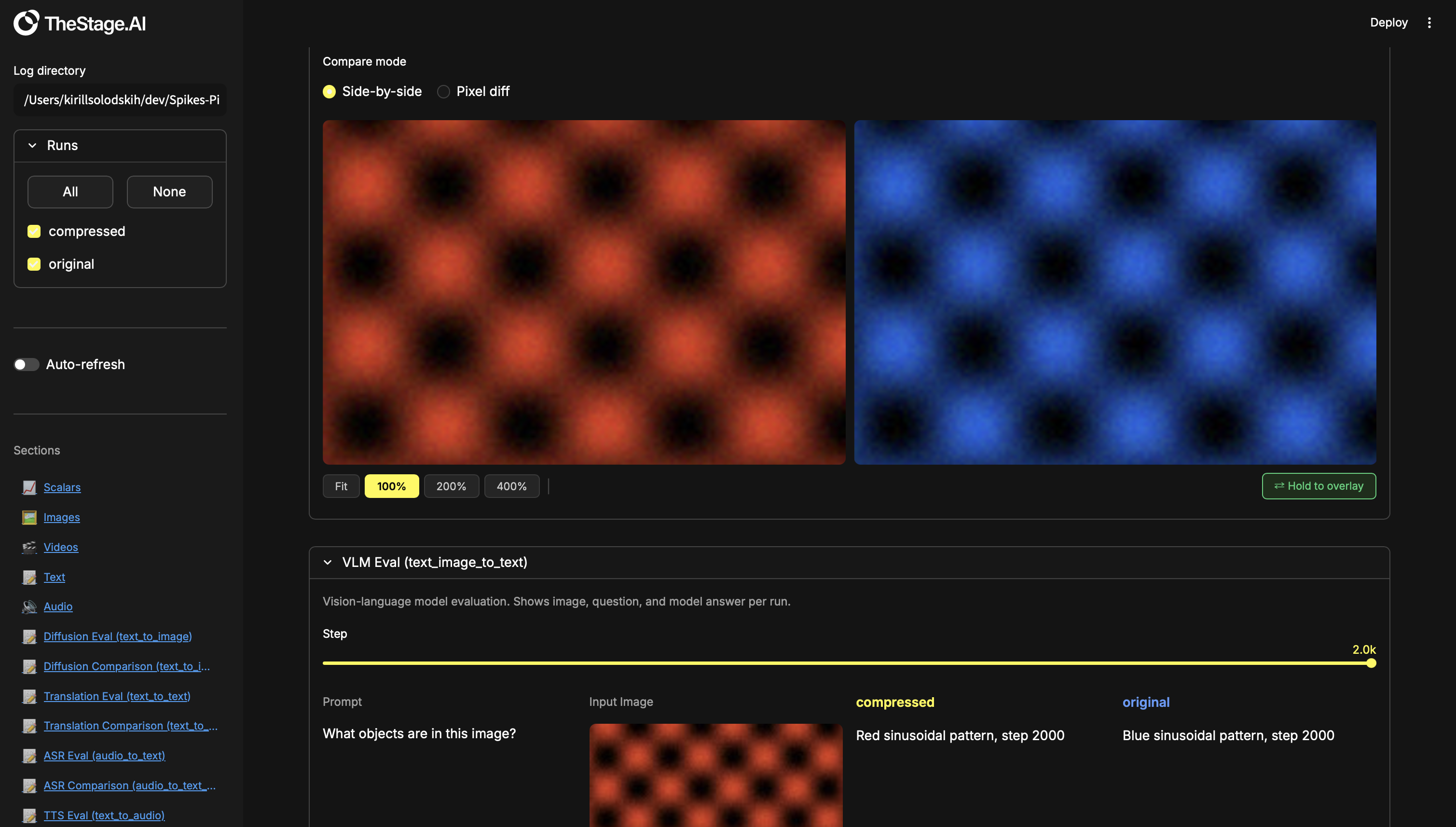
Local-first experiment dashboard for deep learning. Log metrics, media, and structured evaluation data from your training scripts, then compare runs in a rich Streamlit UI — scalars, images, video, audio, text, with built-in A/B comparison tools (toggle/flicker, pixel diff, word diff, synced zoom, synced video playback).
Install
pip install -e .
Quick start
import spikesnpipes as sp

w = sp.Writer("runs/my_experiment")

for step in range(100):
    w.add_scalar("Train/Loss", step=step, val=1.0 / (step + 1))
    w.add_scalar("Train/Accuracy", step=step, val=step / 100)

w.close()
spikesnpipes --logdir runs
That's it — open http://localhost:8501 and you'll see your plots.
To explore all section types with demo data:
python examples/demo_sections.py
spikesnpipes --logdir demo_sections
What's inside
Training logging
Log data from your training loop. The dashboard auto-discovers tags and renders them.
| What | API | Formats |
|---|---|---|
| Scalars | add_scalar |
loss, lr, metrics — any float |
| Images | add_images |
numpy uint8/float32, PIL, file path |
| Video | add_video, add_videos |
numpy uint8 (T,H,W,3), file path |
| Audio | add_audio, add_audios |
numpy float32/int16, file path, bytes |
| Text | add_text |
plain text or markdown |
Evaluation sections
Structured layouts for inspecting model outputs across runs. Shows all selected runs side-by-side with a step slider.
| Section | Use case |
|---|---|
| Text → Image eval | Diffusion, text-to-image generation |
| Text → Text eval | Translation, LLM, summarisation |
| Audio → Text eval | ASR / speech recognition |
| Text → Audio eval | TTS / speech synthesis |
| Text + Image → Image eval | Editing, inpainting, style transfer |
| Text + Image → Text eval | VLM, visual QA |
| Text → Video eval | Video generation |
| Text + Image → Video eval | Image animation |
Comparison sections
Built for model compression, acceleration, and distillation engineers. When you optimise a model (quantize, prune, distil), you need to verify the compressed version still matches the original. Comparison sections give you precise A/B tools to catch regressions that metrics alone might miss.
| Section | Tools |
|---|---|
| Text → Image comparison | Toggle/flicker, pixel diff ×10, synced zoom & pan |
| Text → Text comparison | Word-level diff (green = added, red = removed) |
| Audio → Text comparison | Word-level diff |
| Text → Audio comparison | A/B playback |
| Text + Image → Image comparison | Toggle/flicker, pixel diff ×10, synced zoom & pan |
| Text + Image → Text comparison | Word-level diff |
| Text → Video comparison | Synced playback, frame stepping, speed control |
| Text + Image → Video comparison | Synced playback, frame stepping, speed control |
Training logging
Add this to your training script:
import spikesnpipes as sp

w = sp.Writer("runs/my_run")

for step in range(num_steps):
    w.add_scalar("Train/Loss", step=step, val=loss)

w.close()
Scalars
w.add_scalar("Train/Loss", step=100, val=0.42)
w.add_scalar("Train/LR", step=100, val=3e-4, x=0.42)  # custom x-axis
Images
w.add_images("Gen/Output", images=[output_img], step=step)
w.add_images("Gen/Batch", images=[img1, img2, img3], step=step)
Accepted inputs per image:
| Type | Range |
|---|---|
numpy uint8 (H,W,3) |
0 – 255 |
numpy float32 (H,W,3) |
0.0 – 1.0, auto-scaled to 0–255 |
PIL.Image |
saved directly |
str / Path |
copied from disk |
Video
w.add_video("Gen/Video", video=frames, step=step)
w.add_videos("Gen/Videos", videos=[v1, v2], step=step)
| Type | Range |
|---|---|
numpy uint8 (T, H, W, 3) |
0 – 255, saved as mp4 |
str / Path |
copied from disk |
Audio
w.add_audio("TTS/Output", audio=waveform, step=step, sr=16000)
w.add_audios("ASR/Batch", audios=[wav1, wav2], step=step, sr=16000)
| Type | Range |
|---|---|
numpy float32 |
-1.0 to 1.0, saved as WAV |
numpy int16 |
raw PCM, saved as WAV |
str / Path |
copied from disk |
bytes |
written as-is |
Text
w.add_text("Train/Log", text="epoch 1 done", step=step)
w.add_text("LLM/Output", text="markdown **works** here", step=step)
Evaluation sections
Eval sections show model outputs for all selected runs side-by-side.
Add the add_* calls to your training/eval loop, then register the
section once.
Text → Image eval
w.add_text("Gen/Prompt", text=prompt, step=step)
w.add_images("Gen/Output", images=[generated_image], step=step)

w.create_text_to_image_section("Diffusion Eval",
    prompt_tag="Gen/Prompt", output_tag="Gen/Output")
Text → Text eval
w.add_text("MT/Source", text=source, step=step)
w.add_text("MT/Output", text=model_output, step=step)
w.add_text("MT/Ref", text=reference, step=step)          # optional

w.create_text_to_text_section("Translation Eval",
    input_tag="MT/Source", output_tag="MT/Output",
    ground_truth_tag="MT/Ref")
Audio → Text eval
w.add_audio("ASR/Audio", audio=waveform, step=step, sr=16000)
w.add_text("ASR/GT", text=transcript, step=step)
w.add_text("ASR/Pred", text=prediction, step=step)

w.create_audio_to_text_section("ASR Eval",
    audio_tag="ASR/Audio", prediction_tag="ASR/Pred",
    ground_truth_tag="ASR/GT")
Text → Audio eval
w.add_text("TTS/Text", text=input_text, step=step)
w.add_audio("TTS/Audio", audio=synthesised_wav, step=step, sr=22050)

w.create_text_to_audio_section("TTS Eval",
    input_tag="TTS/Text", output_tag="TTS/Audio")
Text + Image → Image eval
w.add_text("Edit/Prompt", text=instruction, step=step)
w.add_images("Edit/Input", images=[source_image], step=step)
w.add_images("Edit/Output", images=[edited_image], step=step)

w.create_text_image_to_image_section("Edit Eval",
    prompt_tag="Edit/Prompt", input_image_tag="Edit/Input",
    output_tag="Edit/Output")
Text + Image → Text eval
w.add_text("VLM/Question", text=question, step=step)
w.add_images("VLM/Image", images=[input_image], step=step)
w.add_text("VLM/Answer", text=model_answer, step=step)

w.create_text_image_to_text_section("VLM Eval",
    prompt_tag="VLM/Question", input_image_tag="VLM/Image",
    output_tag="VLM/Answer")
Text → Video eval
w.add_text("VGen/Prompt", text=prompt, step=step)
w.add_video("VGen/Output", video=generated_frames, step=step)

w.create_text_to_video_section("Video Gen",
    prompt_tag="VGen/Prompt", output_tag="VGen/Output")
Text + Image → Video eval
w.add_text("Anim/Prompt", text=prompt, step=step)
w.add_images("Anim/Input", images=[still_image], step=step)
w.add_video("Anim/Output", video=animated_frames, step=step)

w.create_text_image_to_video_section("Animate Eval",
    prompt_tag="Anim/Prompt", input_image_tag="Anim/Input",
    output_tag="Anim/Output")
Comparison sections
Built for model compression, acceleration, and distillation engineers. You have an original model and a compressed variant — you need to verify the outputs still match. Comparison sections give you pixel-level A/B tools to catch regressions that metrics alone miss.
How it works
Write one script. Run it twice — once per model. The dashboard compares the two runs automatically.
Each example below is a complete script. Copy it, run it twice with
different --model and --run_name args, then open the dashboard:
python eval_diffusion.py --model models/sd_fp16   --run_name original
python eval_diffusion.py --model models/sd_int8   --run_name compressed
spikesnpipes --logdir runs
runs/
├── original/    ← outputs from sd_fp16
│   └── spikes.db
└── compressed/  ← outputs from sd_int8
    └── spikes.db
The dashboard discovers both runs. Pick Run A and Run B in the comparison section and use the built-in tools to spot differences.
Text → Image comparison
Compare generated images from two models given the same prompt.
Run the script below twice — once for the original model, once for the
compressed one. Both runs log to separate directories under runs/.
Open the dashboard with spikesnpipes --logdir runs and pick Run A / Run B
to compare outputs side-by-side.
Tools: toggle/flicker, pixel diff ×10, synced zoom (100%–400%) & pan.
# eval_diffusion.py — run twice with different --model / --run_name
import argparse
import spikesnpipes as sp
from my_model import load_model

args = argparse.ArgumentParser()
args.add_argument("--model", required=True)
args.add_argument("--run_name", required=True)
args = args.parse_args()

model = load_model(args.model)
w = sp.Writer(f"runs/{args.run_name}")

# 1. Declare the comparison section (what tags to compare)
w.create_text_to_image_comparison("Diffusion Compare",
    prompt_tag="Gen/Prompt", output_tag="Gen/Output")

# 2. Run eval and log data
for step, prompt in enumerate(["a red car at sunset", "a cat on a windowsill"]):
    image = model.generate(prompt)
    w.add_text("Gen/Prompt", text=prompt, step=step)
    w.add_images("Gen/Output", images=[image], step=step)

w.close()
Text → Text comparison
Compare text outputs (translation, LLM, summarisation) from two models.
Run the script twice with different --model / --run_name to produce
two runs, then open the dashboard to see word-level diffs between them.
Tools: word-level diff — green = added, red = removed.
# eval_translate.py — run twice with different --model / --run_name
import argparse
import spikesnpipes as sp
from my_model import load_model

args = argparse.ArgumentParser()
args.add_argument("--model", required=True)
args.add_argument("--run_name", required=True)
args = args.parse_args()

model = load_model(args.model)
w = sp.Writer(f"runs/{args.run_name}")

w.create_text_to_text_comparison("Translation Compare",
    input_tag="MT/Source", output_tag="MT/Output",
    ground_truth_tag="MT/Ref")

for step, (source, reference) in enumerate(test_pairs):
    output = model.translate(source)
    w.add_text("MT/Source", text=source, step=step)
    w.add_text("MT/Output", text=output, step=step)
    w.add_text("MT/Ref", text=reference, step=step)

w.close()
Audio → Text comparison
Compare ASR transcriptions from two models on the same audio clips. Run the script twice — each run transcribes the same audio with a different model. The dashboard highlights word-level differences between the two transcriptions. Tools: word-level diff.
# eval_asr.py — run twice with different --model / --run_name
import argparse
import spikesnpipes as sp
from my_model import load_model

args = argparse.ArgumentParser()
args.add_argument("--model", required=True)
args.add_argument("--run_name", required=True)
args = args.parse_args()

model = load_model(args.model)
w = sp.Writer(f"runs/{args.run_name}")

w.create_audio_to_text_comparison("ASR Compare",
    audio_tag="ASR/Audio", prediction_tag="ASR/Pred",
    ground_truth_tag="ASR/GT")

for step, (audio, transcript) in enumerate(test_samples):
    prediction = model.transcribe(audio)
    w.add_audio("ASR/Audio", audio=audio, step=step, sr=16000)
    w.add_text("ASR/Pred", text=prediction, step=step)
    w.add_text("ASR/GT", text=transcript, step=step)

w.close()
Text → Audio comparison
Compare synthesised speech from two TTS models on the same input text. Run the script twice to produce two sets of audio files, then listen to both side-by-side in the dashboard to catch quality regressions. Tools: A/B playback.
# eval_tts.py — run twice with different --model / --run_name
import argparse
import spikesnpipes as sp
from my_model import load_model

args = argparse.ArgumentParser()
args.add_argument("--model", required=True)
args.add_argument("--run_name", required=True)
args = args.parse_args()

model = load_model(args.model)
w = sp.Writer(f"runs/{args.run_name}")

w.create_text_to_audio_comparison("TTS Compare",
    input_tag="TTS/Text", output_tag="TTS/Audio")

for step, text in enumerate(test_sentences):
    wav = model.synthesise(text)
    w.add_text("TTS/Text", text=text, step=step)
    w.add_audio("TTS/Audio", audio=wav, step=step, sr=22050)

w.close()
Text + Image → Image comparison
Compare image editing / inpainting outputs from two models. Both runs receive the same source image and instruction — each produces an edited output. Run the script twice, then toggle between the two outputs in the dashboard to spot pixel-level artefacts. Tools: toggle/flicker, pixel diff ×10, synced zoom & pan.
# eval_edit.py — run twice with different --model / --run_name
import argparse
import spikesnpipes as sp
from my_model import load_model

args = argparse.ArgumentParser()
args.add_argument("--model", required=True)
args.add_argument("--run_name", required=True)
args = args.parse_args()

model = load_model(args.model)
w = sp.Writer(f"runs/{args.run_name}")

w.create_text_image_to_image_comparison("Edit Compare",
    prompt_tag="Edit/Prompt", input_image_tag="Edit/Input",
    output_tag="Edit/Output")

for step, (instruction, source_image) in enumerate(test_edits):
    edited = model.edit(source_image, instruction)
    w.add_text("Edit/Prompt", text=instruction, step=step)
    w.add_images("Edit/Input", images=[source_image], step=step)
    w.add_images("Edit/Output", images=[edited], step=step)

w.close()
Text + Image → Text comparison
Compare VLM / visual QA answers from two models. Both runs see the same image and question — the dashboard shows the two answers side-by-side with word-level diff highlighting so you can spot semantic regressions. Tools: word-level diff.
# eval_vlm.py — run twice with different --model / --run_name
import argparse
import spikesnpipes as sp
from my_model import load_model

args = argparse.ArgumentParser()
args.add_argument("--model", required=True)
args.add_argument("--run_name", required=True)
args = args.parse_args()

model = load_model(args.model)
w = sp.Writer(f"runs/{args.run_name}")

w.create_text_image_to_text_comparison("VLM Compare",
    prompt_tag="VLM/Question", input_image_tag="VLM/Image",
    output_tag="VLM/Answer")

for step, (image, question) in enumerate(test_questions):
    answer = model.ask(image, question)
    w.add_text("VLM/Question", text=question, step=step)
    w.add_images("VLM/Image", images=[image], step=step)
    w.add_text("VLM/Answer", text=answer, step=step)

w.close()
Text → Video comparison
Compare generated videos from two models given the same prompt. Run the script twice to produce two sets of clips, then play them simultaneously in the dashboard with a single play button to catch temporal differences. Tools: synced playback, frame-by-frame stepping, speed control (0.25×–2×).
# eval_videogen.py — run twice with different --model / --run_name
import argparse
import spikesnpipes as sp
from my_model import load_model

args = argparse.ArgumentParser()
args.add_argument("--model", required=True)
args.add_argument("--run_name", required=True)
args = args.parse_args()

model = load_model(args.model)
w = sp.Writer(f"runs/{args.run_name}")

w.create_text_to_video_comparison("Video Compare",
    prompt_tag="VGen/Prompt", output_tag="VGen/Output")

for step, prompt in enumerate(test_prompts):
    frames = model.generate_video(prompt)
    w.add_text("VGen/Prompt", text=prompt, step=step)
    w.add_video("VGen/Output", video=frames, step=step)

w.close()
Text + Image → Video comparison
Compare animated clips from two models given the same source image and prompt. Run the script twice — each produces an animation from the same still frame. The dashboard syncs both videos so you can step through frame-by-frame and verify temporal consistency. Tools: synced playback, frame stepping, speed control.
# eval_animate.py — run twice with different --model / --run_name
import argparse
import spikesnpipes as sp
from my_model import load_model

args = argparse.ArgumentParser()
args.add_argument("--model", required=True)
args.add_argument("--run_name", required=True)
args = args.parse_args()

model = load_model(args.model)
w = sp.Writer(f"runs/{args.run_name}")

w.create_text_image_to_video_comparison("Animate Compare",
    prompt_tag="Anim/Prompt", input_image_tag="Anim/Input",
    output_tag="Anim/Output")

for step, (image, prompt) in enumerate(test_animations):
    frames = model.animate(image, prompt)
    w.add_text("Anim/Prompt", text=prompt, step=step)
    w.add_images("Anim/Input", images=[image], step=step)
    w.add_video("Anim/Output", video=frames, step=step)

w.close()
Section descriptions
Every create_* method accepts an optional description (markdown):
w.create_text_to_image_comparison("Diffusion Compare",
    prompt_tag="Gen/Prompt", output_tag="Gen/Output",
    description="Comparing SD v1.5 vs quantized INT8 variant.")
CLI reference
spikesnpipes --logdir <path>          # required
             --host 0.0.0.0           # default: localhost
             --port 8501              # default: 8501
Full demo
python examples/demo_sections.py
spikesnpipes --logdir demo_sections
Creates two runs (original and compressed) with scalars, images,
video, text, audio, and every section type listed above.
1 maintainer

Metadata
1 maintainer
Release files for spikesnpipes 0.1.2
For a detailed explanation of source distributions (sdists) and built distributions (wheels), please see the package formats documentation.
Source distribution (sdist)
| File | Size | Uploaded | |
|---|---|---|---|
| spikesnpipes-0.1.2.tar.gz | 85.9 kB | Details |
Built distribution (wheel)
| File | Interpreter | ABI | Platform | Reset |
|---|---|---|---|---|
| spikesnpipes-0.1.2-py3-none-any.whl | Python 3 | none | any | Details |
Total release size: 172.3 kB
Release files / spikesnpipes-0.1.2.tar.gz
| Download URL | spikesnpipes-0.1.2.tar.gz |
|---|---|
| Size | 85.9 kB |
| Tags | Source |
|
SHA-256 checksum How to use checksums |
f637229441e9ae3b1f59511f131dcadd244e8ffb1ca1fc09ef6459892db195f2
|
|
BLAKE2b-256 checksum How to use checksums |
3e0de07104f80d2ca40a8d3e96042f7ec1729cd112a7e441786c3608021e5e9b
|
| Upload date | |
|
Uploaded using Trusted Publishing? What is trusted publishing? |
No |
| Uploaded via |
twine/6.2.0 CPython/3.11.1
|
Release files / spikesnpipes-0.1.2-py3-none-any.whl
| Download URL | spikesnpipes-0.1.2-py3-none-any.whl |
|---|---|
| Size | 86.4 kB |
| Tags | Python 3 |
|
SHA-256 checksum How to use checksums |
960ae2e93422df158a9b64bd35d09329a5e85807e51569dd6215ab84ec724237
|
|
BLAKE2b-256 checksum How to use checksums |
ab295f69942c704d55c0cb4ae57c5aad276de53cb8c84f784584eb1128754a3f
|
| Upload date | |
|
Uploaded using Trusted Publishing? What is trusted publishing? |
No |
| Uploaded via |
twine/6.2.0 CPython/3.11.1
|














