










Website · Install · Where it looks · What it finds · Scrub · Guard · Repos & CI · Compared · How it works · FAQ
Your coding agent writes down everything. Every .env it read, every key you pasted "just to test this one call", every printenv it ran to debug something. Claude Code, Codex, Gemini CLI, Cline and the rest keep those conversations on your disk as plain JSON, and every one of those keys was also sent to the model provider when it happened.
The Claude Code docs say it themselves: "Transcripts and history are not encrypted at rest. OS file permissions are the only protection. If a tool reads a .env file or a command prints a credential, that value is written to projects/<project>/<session>.jsonl." (source)
spillage finds them. It reads the logs of thirteen coding agents, tells you which keys leaked, how they got there (you pasted it, a tool printed it, the model repeated it) and links you to the page where you rotate each one. Then it scrubs them from disk and installs hooks so the next one gets blocked before it's sent.
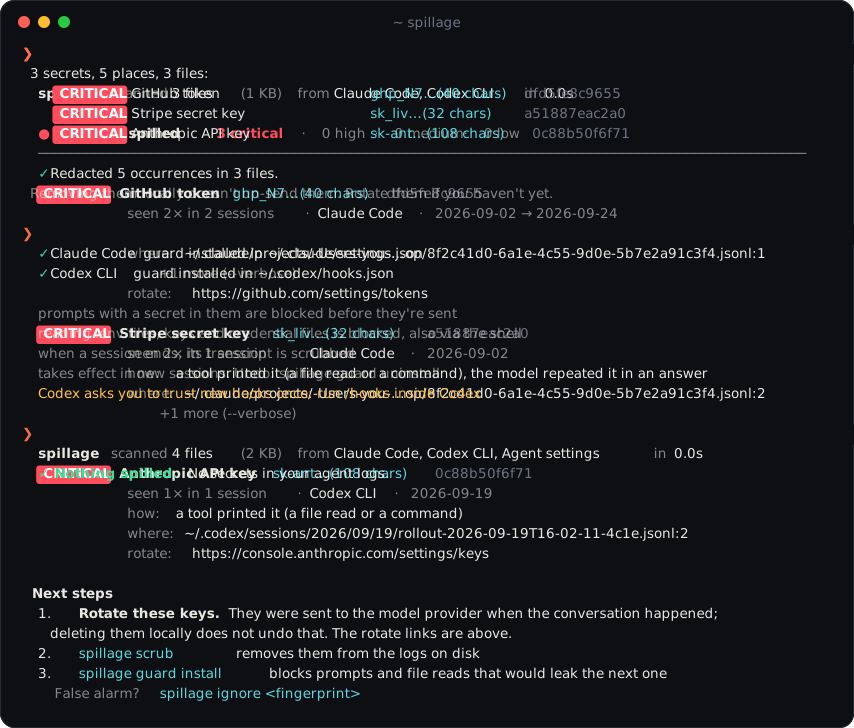
- Zero dependencies, zero network. Standard library only. Nothing leaves your machine, ever. Secrets are only ever shown masked.
- Knows the formats. Tells a pasted prompt from tool output from a model answer, per agent. Finds keys inside JSON-escaped text, like a private key a tool printed with
\nin it. - Few false alarms. GitHub tokens are checked against their built-in CRC32, JWTs have to decode, Discord tokens have to hold a real user id, placeholders like
sk-...your-key-hereare skipped. - Fast. Rules run over the raw files with literal-prefix regexes on all cores. About 240 MB of real agent history in under 4 seconds on a laptop.
- Fixes it, too.
scrubredacts in place without breaking the JSON your agent reads back for--resume.guardblocks the next leak in Claude Code, Codex and Gemini CLI.
Table of contents
- Install
- Where it looks
- What it finds
- Commands · Reports
- Scrub
- Guard · Watch
- Committed transcripts: GitHub Action, pre-commit
- Compared with gitleaks, TruffleHog and ggshield
- How it works
- From Python
- FAQ
- Roadmap · Community · Contributing
Install
pipx install spillage
spillage
Or run it once without installing anything, with uv:
uvx spillage
Or with Homebrew:
brew install maximilianfeix/tap/spillage
Python 3.9 or newer, on macOS, Linux and Windows. No dependencies to audit, which seems fair for a tool you point at your secrets.
As a Claude Code plugin
Only want the guard hooks in Claude Code? Then there is nothing to install besides the plugin. Inside Claude Code:
/plugin install spillage --marketplace maximilianfeix/spillage
It blocks prompts that contain a key, keeps the agent from reading .env files and printing secrets, and scrubs the transcript when a session ends. It runs from the plugin's own folder with the Python you already have (3.9 or newer). Scanning and scrubbing what is already in your logs needs the command line tool above; with it installed, use either the plugin or spillage guard install, not both.
Where it looks
| Agent | What gets read |
|---|---|
| Claude Code | ~/.claude/projects/**/*.jsonl (sessions), history.jsonl, file-history/ (backups of files it edited), paste-cache/, shell-snapshots/, todos/. Honors CLAUDE_CONFIG_DIR |
| Codex CLI | ~/.codex/sessions/, archived_sessions/, history.jsonl, log/. Honors CODEX_HOME |
| Gemini CLI | ~/.gemini/tmp/*/chats/, logs.json, checkpoints |
| OpenCode | ~/.local/share/opencode/storage/ |
| Cline, Roo Code, Kilo Code | task histories in the extension storage of VS Code, Cursor, Windsurf, VSCodium and Kiro |
| Continue | ~/.continue/sessions/ |
| Cursor | chats in state.vscdb (SQLite), global and per workspace. Only chat rows are read, never Cursor's own login |
| Qwen Code | ~/.qwen/tmp/*/chats/, logs and checkpoints |
| Goose | ~/.local/share/goose/sessions/sessions.db (SQLite) and older ~/.config/goose/sessions/*.jsonl |
| Crush | .crush/crush.db (SQLite) in each project it knows about |
| Aider | .aider.chat.history.md and .aider.input.history in your projects |
| SpecStory | .specstory/history/*.md in your projects |
| GitHub Copilot CLI | ~/.copilot/session-state/, history-session-state/ |
| Aider and SpecStory write into the project folder, so spillage checks the current folder plus every folder your Claude Code and Codex sessions ran in | |
| Agent settings | MCP servers and allowed commands, see below |
| anything else | spillage --path <file or folder>, any mix of JSONL, JSON and text |
spillage agents shows what it found on your machine:
  ● claude    Claude Code          441 files, 216.4 MB
    ~/.claude
  ● codex     Codex CLI            4 files, 55.0 MB
    ~/.codex
  ○ gemini    Gemini CLI           not found
    ~/.gemini
Agent settings
Keys don't only end up in transcripts. They sit in plain text in the agents' settings, which every agent reads on start:
- MCP servers with a token in their
envorheaders:~/.claude.json,.mcp.json,~/.cursor/mcp.json, Claude Desktop'sclaude_desktop_config.json,~/.codex/config.toml,~/.gemini/settings.json, Windsurf, VS Code'smcp.json, Cline/Roo/Kilo, OpenCode, Crush, Goose, Continue and Qwen - commands you allowed once: approve
curl -H "Authorization: Bearer …"in Claude Code and the whole command, key included, is saved in.claude/settings.local.json - old prompt history that Claude Code kept per project in
~/.claude.json
spillage checks the global files and the ones in your project folders, and shows them as saved in an agent's settings. Claude Code's own login in ~/.claude.json is not a leak and is left out. scrub doesn't touch the MCP servers and commands in these files, since whatever needs the key would stop working (prompts in that old history do get redacted); move the key into an environment variable (Claude Code expands "GITHUB_TOKEN": "${GITHUB_TOKEN}" in .mcp.json from your shell), then rotate it. spillage scan --agent config looks at nothing else.
What it finds
87 rules. Each one knows the key's exact shape and where to revoke it.
| AI providers | Anthropic (API, admin, and Claude Code OAuth tokens from claude setup-token), OpenAI (user, project, service account, admin), OpenRouter, Google AI / Gemini, Hugging Face, Groq, xAI, Perplexity, Replicate |
| AI app stack | Supabase secret keys, LangSmith, Pinecone, Tavily, Firecrawl, Resend, PostHog, Vercel Blob. Most of these aren't in gitleaks' default rules |
| Code and packages | GitHub (classic, OAuth, app, refresh, fine-grained; checksum-verified), GitLab, npm, PyPI |
| Deploy and hosting | Docker Hub, Fly.io, Netlify, Render, Heroku, Scalingo, Pulumi, Infracost, Tailscale, Cloudflare Origin CA keys, Azure storage account keys, age secret keys, RubyGems, Clojars, Bitbucket app passwords, GitLab agent tokens |
| Cloud and infra | AWS access key id and secret key, Google OAuth client secrets and refresh tokens, DigitalOcean, Databricks, Doppler, HashiCorp Vault, 1Password service accounts, PlanetScale |
| Payments and SaaS | Stripe (live is critical, test is low), Slack tokens and webhooks, Discord bot tokens and webhooks, Telegram bots, SendGrid, Brevo, Twilio, Shopify, Linear, Notion, Sentry, Grafana, Postman, Atlassian, Figma, Square, Stripe webhook secrets, Slack app tokens, New Relic, Mapbox, Airtable, ElevenLabs, E2B, Prefect, ReadMe, Duffel, EasyPost, Frame.io |
| Everything else | private keys (RSA, EC, OpenSSH, PGP, …), database URLs with a password in them, JWTs (Supabase anon keys count as low), and API_KEY=… / "client_secret": "…" / Bearer … with a high-entropy value |
Plus your own secrets. Patterns can't recognise a random database password or an Azure key. So spillage also reads the .env files in your projects (the current folder and every folder your agent sessions ran in), takes the values of anything named like a key, token, secret or password, and looks for those exact strings in the logs. They show up as Value of POSTGRES_PASSWORD from ~/code/shop/.env, never with the value itself. --no-env turns that off; the .env files are only read, never changed.
spillage rules lists them with their ids. Leave some out with --skip-rules jwt,generic-secret.
Commands
spillage                          scan every agent it knows (same as `spillage scan`)
spillage scan --since 7d          only logs written in the last week (also 12h, 2w, 2026-09-01)
spillage scan --agent claude      only some agents, comma separated
spillage scan --min-severity high skip the low and medium stuff
spillage scan -v                  every place a secret was seen, not just the first
spillage scrub                    remove what it found from the logs (asks first)
spillage guard install            agent hooks that block the next leak
spillage watch                    tell me the moment a new key lands in any agent's logs
spillage repo                     agent transcripts committed to this git repo, and secrets in them
spillage check "some text"        scan a string, or stdin: pbpaste | spillage check
spillage ignore <fingerprint>     stop reporting a secret (a test key, say)
spillage doctor                   where you stand: leaks, settings, guard hooks, this repo
spillage agents                   which agents were found, and where
spillage rules                    what it looks for
spillage completions zsh          tab completion for zsh, bash or fish
Tab completion for commands and options: add eval "$(spillage completions zsh)" to your ~/.zshrc (or bash to ~/.bashrc), or for fish run spillage completions fish > ~/.config/fish/completions/spillage.fish.
The exit code is 1 when something was found and 0 when not, so it drops into cron, a shell hook or CI as is. --exit-zero turns that off.
Doctor
One screen that says what is still open, and the command for each point:
  spillage doctor

  ✓ logs      441 files from Claude Code, Codex CLI, Cursor
  ✗ leaks     3 secrets in the logs, 2 critical
              → spillage   (rotate them, then: spillage scrub)
  ✓ settings  no keys in plain text in agent settings
  ✗ guard     hooks are off for Codex CLI
              → spillage guard install
  ✓ env       looking for 12 values from your projects' .env files
  ✓ repo      no agent transcripts committed in this repository

  2 to fix. Run this again when you are done.
It exits with 1 while something is open. spillage doctor -f json gives the same as data.
Reports
spillage scan -f html -o report.html   # a page to open in the browser
spillage scan -f json                  # for scripts: masked values, fingerprints, every location
spillage scan -f markdown              # for an issue or a PR
spillage scan -f sarif                 # SARIF 2.1.0 for code scanning tools
The HTML report is a single file with no CDN or web fonts, so it works offline and doesn't load anything. It shows the severity split, how the secrets got there, a timeline of when they first leaked, and every place each one was seen, with filters and search. Light and dark.
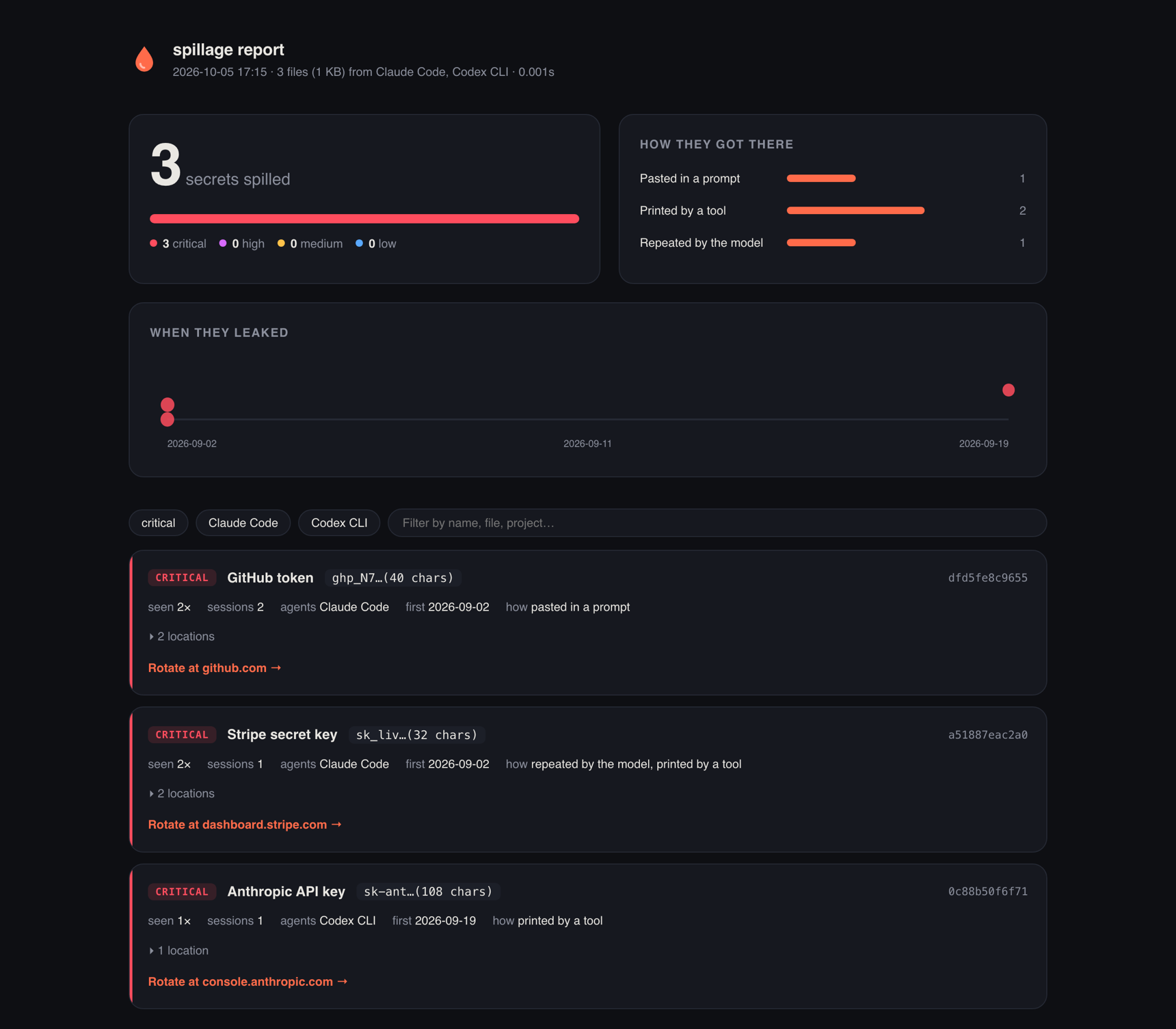
None of the formats ever contain a full secret. They show the first few characters and a fingerprint (the first 12 hex characters of the secret's SHA-256), which is also what spillage ignore takes.
Scrub
spillage scrub            # shows what it will change and asks
spillage scrub --dry-run  # only shows
spillage scrub --yes --only dfd5fe8c9655,a51887eac2a0
Every occurrence is replaced with a marker like [REDACTED:github-token:dfd5fe8c9655], so you can still see that something was there and which key it was.
It is careful with the files, because your agent reads them back when you resume a session:
- works on the raw text, so every byte it doesn't redact stays exactly as it was
- parses every changed JSON line again before writing; if a line would break, the file is left alone
- writes atomically and keeps the file mode, the modification time (so
claude --resumestill sorts right) and the line endings - skips files written in the last minute, since that's most likely the session you're running it from, and leaves a file alone if it changes while being scrubbed
- leaves Claude's signed thinking blocks untouched (editing them breaks
--resume) and tells you how many keys stayed in them
Important
Scrubbing cleans your disk. It does not un-send anything. Every key in these logs went to the model provider when the conversation happened, so rotate first, then scrub. The report links to the right page for each key.
Guard
spillage guard install    # every agent it finds; --agent claude,codex,gemini to pick
spillage guard status
spillage guard uninstall
Adds three hooks to Claude Code, Codex CLI and Gemini CLI:
| Hook | Claude Code / Codex | Gemini CLI | What it does |
|---|---|---|---|
| prompt | UserPromptSubmit |
BeforeAgent |
Blocks a prompt that contains a key, before it's sent. Put spillage:allow in the prompt if you really mean it. |
| tool | PreToolUse |
BeforeTool |
Blocks reading .env files, private keys and credential files (.npmrc, .aws/credentials, *.pem, …) and shell commands that would print secrets: cat .env, printenv, echo $STRIPE_SECRET_KEY, gh auth token, security find-generic-password -w, … in Bash and in PowerShell. The reason goes back to the model, so it asks you instead. .env.example and friends stay readable. |
| session end | SessionEnd |
SessionEnd |
Scrubs the transcript of the session that just ended. |
That last one exists because of something that came up while testing the first against the real Claude Code: a blocked prompt still gets written into the session file. It's never sent, but it ends up on disk as a queue-operation record. The session-end hook cleans that up, along with anything a tool printed that the other hook didn't catch.
The config goes where each agent expects it: ~/.claude/settings.json, ~/.codex/hooks.json, ~/.gemini/settings.json (or the repo's folder with --scope project; --scope local exists only for Claude Code's settings.local.json). Gemini's settings may contain comments; they're read fine, but not written back, and the original is kept as a backup. Your other hooks and settings are left alone, a backup is kept the first time, and a file that isn't valid JSON is refused rather than overwritten. Each hook call takes about a tenth of a second.
The hooks are a guard rail, not a sandbox. They stop the ways a key usually ends up in a conversation: the agent reads .env to "check the config", runs printenv to debug, or you paste a key. An agent that is set on reading a file will find a way the hooks don't know (cp .env notes.txt, then read that), so they don't replace keeping keys out of the folders your agent works in, and a real sandbox if you need one.
Note
Codex runs new hooks only after you've trusted them once: open Codex and run
/hooks. Claude Code and Codex were tested end to end with their real CLIs; Gemini CLI follows its documented hook format.
Watch
spillage watch                  # report new secrets the moment an agent writes them
spillage watch --scrub          # and scrub the file once it's been quiet for 90 s
Hooks only exist for Claude Code, Codex and Gemini. watch covers every agent, Cursor, Cline and Aider included: it keeps an eye on all their logs, reads only what was appended since the last look, and shows a desktop notification (macOS, Linux and Windows) plus a line in the terminal as soon as a key lands:
  09:12:53  [HIGH]     Firecrawl API key  fc-bcc…(35 chars)  Claude Code · ~/code/shop
            a tool printed it (a file read or a command) · rotate: https://www.firecrawl.dev/app/api-keys
Keys that were already there when it started aren't reported again, that's what spillage scan is for. It polls every 2 seconds (--interval), which costs next to nothing and keeps spillage free of dependencies.
Committed transcripts
Some agents write their chat logs into the project, and from there they get committed. GitHub's code search finds about 16,000 SpecStory chat logs and 5,000 Aider histories in public repositories (September 2026). Once a key is in a pushed repo, it's not a local problem anymore.
spillage repo                 # this repository
spillage repo --strict        # also fail on transcripts without secrets in them
spillage repo --all-files     # scan every tracked file, not just transcripts
GitHub Action
# .github/workflows/spillage.yml
on: [push, pull_request]
jobs:
  spillage:
    runs-on: ubuntu-latest
    steps:
      - uses: actions/checkout@v4
      - uses: maximilianfeix/spillage@v0.9.1
        with:
          strict: true   # fail on any committed transcript
Each secret becomes an error annotation on the file and line, and the job summary gets a table with rotate links. Outputs: transcripts and secrets (counts). A test fixture that trips it? Put its fingerprint into a .spillageignore file in the repo.
To see them in the Security tab and on pull requests too, have it write SARIF and upload that:
    permissions:
      contents: read
      security-events: write
    steps:
      - uses: actions/checkout@v4
      - uses: maximilianfeix/spillage@v0.9.1
        with:
          sarif: spillage.sarif
      - uses: github/codeql-action/upload-sarif@v3
        if: always()   # spillage fails the step when it finds something
        with:
          sarif_file: spillage.sarif
Each secret becomes one alert per file, with the masked value, the fingerprint, how it got there and the rotate link. spillage repo -f sarif prints the same.
pre-commit
# .pre-commit-config.yaml
repos:
  - repo: https://github.com/maximilianfeix/spillage
    rev: v0.9.1
    hooks:
      - id: spillage               # block transcripts that contain secrets
      # - id: no-agent-transcripts # or block agent transcripts altogether
Compared with gitleaks, TruffleHog and ggshield
Run them too. They are built for repositories and live sessions, spillage is built for what your agent already kept on your disk.
| spillage | gitleaks, TruffleHog | ggshield AI hooks | |
|---|---|---|---|
| Built for | agent logs and settings on your machine | git repositories and their history | live agent sessions |
| Keys already in the logs | found, with the session, the project and whether you, a tool or the model wrote them | found as plain text, without the conversation around them | not covered, it scans sessions as they happen |
| Cleaning up | redacts in place, --resume keeps working |
no | no |
| Blocking the next one | hooks for Claude Code, Codex and Gemini CLI | pre-commit, not inside the agent | hooks for Cursor, Claude Code, Codex, Copilot CLI and more |
| Detection | 87 rules plus the exact values from your .env files |
hundreds of detectors; TruffleHog also tests whether a key is live | 600+ secret types |
| Account and network | none | none for gitleaks; TruffleHog calls the provider to verify | GitGuardian account, scans go through its API |
Where the others are ahead: far more detectors, live verification of keys (TruffleHog), and hooks for more tools (ggshield). If you only want to check that a few known keys are not in a folder you are about to publish, Simon Willison's scan-for-secrets does exactly that.
Sources: the gitleaks and TruffleHog READMEs and GitGuardian's AI coding tools docs, October 2026.
How it works
 agent logs ──▶ discover ──▶ raw text ──▶ 87 rules ──▶ validate ──▶ locate ──▶ dedupe ──▶ report
 (13 agents)     per agent    per file     literal-     checksums,   parse only  one finding
                                          prefix       entropy,     the JSON    per secret
                                          regexes      placeholders line with
                                          on all cores              a match
- Discover. Each agent has a small adapter that knows where its files live and how its records say who's talking.
- Scan the raw text. The rules run over each file as it is on disk, not over parsed JSON. Almost every rule starts with a literal (
ghp_,sk-ant-,AKIA), which lets Python's regex engine jump straight to candidates instead of trying every position: 0.2 s instead of 6 s per rule on a few hundred MB. Patterns without a literal prefix (database URLs,API_KEY=assignments, Discord tokens) look up an anchor withstr.findfirst and only run the regex there. Big scans fan out over up to 8 processes, and huge session files are cut into parts at line breaks so one 100 MB session doesn't keep a single core busy while the others wait. - Validate. GitHub tokens carry a CRC32 of themselves and have to match it. JWTs have to decode to JSON with an
alg. Discord bot tokens have to start with a real user id. Generic secrets need a key-ish name, enough entropy, mixed character classes and no placeholder words. - Locate. Only the JSON line that holds a match gets parsed, to find out which session and project it belongs to and whether it came from a prompt, a tool result or the model. A match that only exists inside a base64 image or a thinking signature is dropped as noise.
- Dedupe. One finding per distinct secret, with every place it was seen, across agents and sessions.
Sources, rules and output formats are each a small registry, so adding an agent, a key type or a format is one class or function. See CONTRIBUTING.md and docs/ARCHITECTURE.md for how the pieces fit.
From Python
from spillage.scanner import Scanner, scan_text
from spillage.sources import build_sources

result = Scanner().scan(build_sources(["claude", "codex"]))
for finding in result.findings:
    print(finding.severity.label, finding.rule_name, finding.masked, len(finding.locations))

scan_text("does this contain a key?")  # -> [] or a list of findings
FAQ
Does it send anything anywhere?
No. There is no network code in it at all: no update check, no telemetry, and it doesn't test whether keys are still valid (that would mean sending them somewhere). It reads files, and only writes when you run scrub, ignore or guard.
How do I know a release is what's in this repository?
From 0.9.0 on, every released file is built by the release workflow and carries a signed build attestation. With the GitHub CLI:
gh attestation verify spillage-0.9.0-py3-none-any.whl --repo maximilianfeix/spillage
It passes only for a file that this repository's workflow built from the tagged commit. The package has no dependencies, so that one file is everything that gets installed.
I deleted the key from the logs. Am I fine?
No. The key was sent to the model provider as part of the conversation when it happened. Rotate it. spillage scrub is for your disk, your backups and your Time Machine, not for undoing that.
Why not just run gitleaks or trufflehog on ~/.claude?
You can, and they're great at what they do. They're built for repositories, though: they don't know that a private key in a JSONL log is written with \n escapes, that a match in a base64 screenshot is noise, which session or project a line belongs to, or whether you pasted the key or a tool printed it. And they don't scrub the logs without breaking them, or hook into your agent.
It flagged something that isn't a secret.
spillage ignore <fingerprint> hides that one from now on (the fingerprints are in ~/.config/spillage/ignore, one per line). If a whole rule is noisy for you, --skip-rules. And please open an issue with the masked value and what it actually was, the rules get better from those.
It missed a key.
If it's a kind of key spillage doesn't know, request a rule (describe its shape, don't paste it). If it's a format it should know, run spillage check "…" on a made-up key with the same shape and open a bug with that.
Does it work with Cursor?
Yes. Cursor keeps its chats in SQLite (state.vscdb), spillage opens those read-only and without taking a lock, so it's fine while Cursor is running. scrub doesn't touch that database yet; delete the chat in Cursor instead. Cline, Roo and Kilo inside Cursor are covered too.
Roadmap
- CI on all three operating systems
- Cursor support
- Split huge session files across cores
spillage doctor, shell completions, 87 rules- Claude Code plugin, guard for the PowerShell tool, signed releases
- PyPI release
Community
- Questions, ideas, a setup worth showing: Discussions
- A key it missed or a false alarm: open an issue, with the masked value only
- If it found something on your machine, a star helps the next person find it before their key does
Contributing
Rules and agent adapters are the most useful things to add. CONTRIBUTING.md has the setup and the one important rule: never commit a real secret, not even a revoked one. The tests build their fake keys at runtime.
Found a way to make spillage leak what it protects? Please report it privately.
License
MIT
1 maintainer

Metadata
1 maintainer
Release files for spillage 0.9.1
For a detailed explanation of source distributions (sdists) and built distributions (wheels), please see the package formats documentation.
Source distribution (sdist)
| File | Size | Uploaded | |
|---|---|---|---|
| spillage-0.9.1.tar.gz | 141.2 kB | Details |
Built distribution (wheel)
| File | Interpreter | ABI | Platform | Reset |
|---|---|---|---|---|
| spillage-0.9.1-py3-none-any.whl | Python 3 | none | any | Details |
Total release size: 234.7 kB
Release files / spillage-0.9.1.tar.gz
| Download URL | spillage-0.9.1.tar.gz |
|---|---|
| Size | 141.2 kB |
| Tags | Source |
|
SHA-256 checksum How to use checksums |
ea4712690399f5d7fa4a9da6bf3bf75d8f1fdf5605e66d4199e2b374f5d8d032
|
|
BLAKE2b-256 checksum How to use checksums |
24633596d19672cdacb4fbfdc4f2608b40a692c130dff9cfda529d2c44673115
|
| Upload date | |
|
Uploaded using Trusted Publishing? What is trusted publishing? |
Yes |
| Uploaded via |
twine/7.0.0 CPython/3.13.14
|
Provenance
Provenance describes where a file came from. On PyPI, provenance is shared via attestations, which provide a verifiable record of the build or publishing details. View details, limitations and caveats.


PyPI Publish Attestation
PyPI verified that this artifact, at this checksum, originated from the publisher listed below.
Signed by GitHub Actions, verified by PyPI on Oct 10, 2026.
Transparency logRelease files / spillage-0.9.1-py3-none-any.whl
| Download URL | spillage-0.9.1-py3-none-any.whl |
|---|---|
| Size | 93.5 kB |
| Tags | Python 3 |
|
SHA-256 checksum How to use checksums |
e6091ae9192d6c4e29ce30ca23c0d72391906a33868390a16e6d6a90c37977f7
|
|
BLAKE2b-256 checksum How to use checksums |
9b86700dffe691926c0c19be78b1a2ee8a599f1c74a8a2864ef6e485d6bcf2b5
|
| Upload date | |
|
Uploaded using Trusted Publishing? What is trusted publishing? |
Yes |
| Uploaded via |
twine/7.0.0 CPython/3.13.14
|
Provenance
Provenance describes where a file came from. On PyPI, provenance is shared via attestations, which provide a verifiable record of the build or publishing details. View details, limitations and caveats.
PyPI Publish Attestation
PyPI verified that this artifact, at this checksum, originated from the publisher listed below.
Signed by GitHub Actions, verified by PyPI on Oct 10, 2026.
Transparency log













