






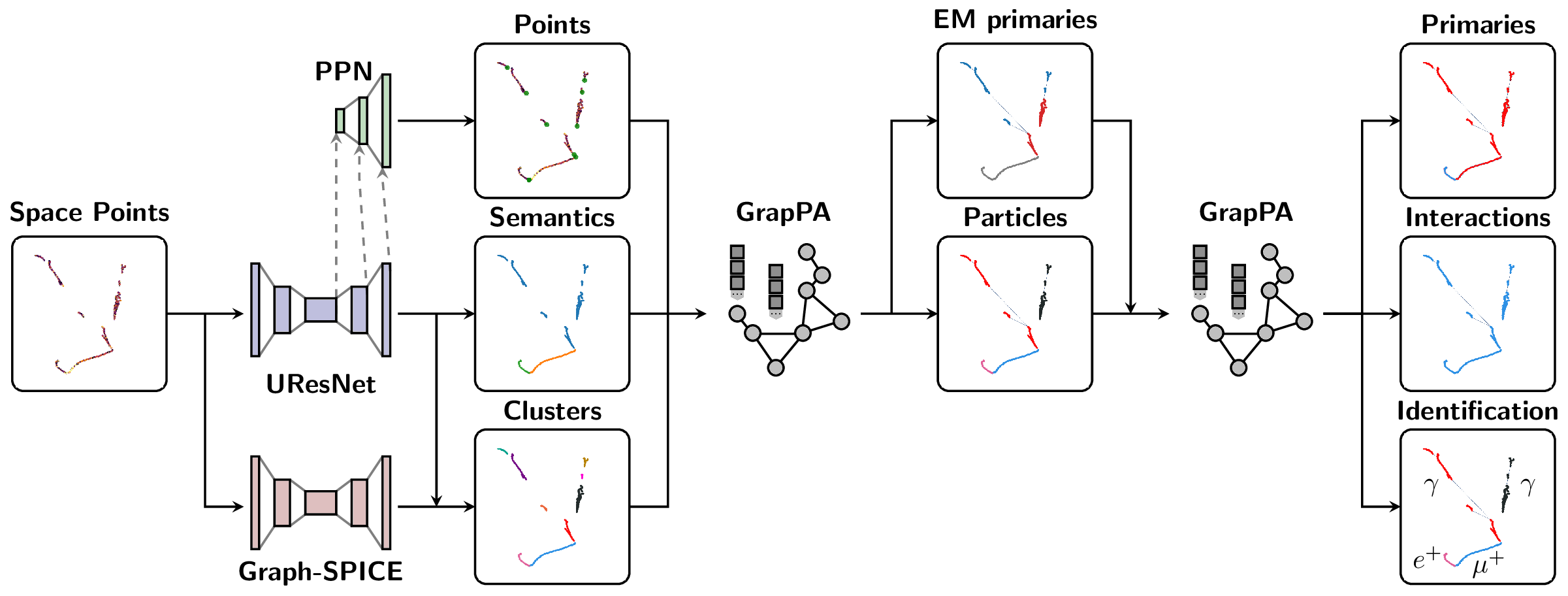
The Scalable Particle Imaging with Neural Embeddings (SPINE) package leverages state-of-the-art Machine Learning (ML) algorithms -- in particular Deep Neural Networks (DNNs) -- to reconstruct particle imaging detector data. This package was primarily developed for Liquid Argon Time-Projection Chamber (LArTPC) data and relies on Convolutional Neural Networks (CNNs) for pixel-level feature extraction and Graph Neural Networks (GNNs) for superstructure formation. The schematic below breaks down the full end-to-end reconstruction flow.
For full SPINE workflows, the recommended runtime is the published SPINE container image released alongside each SPINE version. Use the release-tagged image ghcr.io/deeplearnphysics/spine:<release> when reproducibility matters. When in doubt, use ghcr.io/deeplearnphysics/spine:latest or omit the tag entirely, which is equivalent in Docker-style image references. Docker is the most direct path on workstations and servers; Apptainer/Singularity is the preferred path on HPC systems that do not allow Docker. A local pip installation is mainly intended for post-processing, analysis, visualization, docs, or lightweight development.
Installation
SPINE supports both container-based and local Python installation workflows, but they are not equivalent.
Recommended Runtime: Released SPINE Container
Every SPINE release publishes a matching container image to GHCR. For end-to-end reconstruction, training, and inference, use a release tag when you want a pinned environment. When in doubt, use latest or omit the tag entirely:
# Equivalent to: docker pull ghcr.io/deeplearnphysics/spine:latest
docker pull ghcr.io/deeplearnphysics/spine

# Example: replace <release> with a SPINE release tag such as 1.2.3
docker pull ghcr.io/deeplearnphysics/spine:<release>
Omitting the tag is equivalent to using latest in Docker-style image references.
Docker Path
Use Docker when you have a local workstation or server with container runtime support:
docker run --gpus all -v $(pwd):/workspace \
    ghcr.io/deeplearnphysics/spine:latest \
    spine --config /workspace/config/uresnet/uresnet_train.yaml --source /workspace/data.root

# Or pin to a specific release
docker run --gpus all -v $(pwd):/workspace \
    ghcr.io/deeplearnphysics/spine:<release> \
    spine --config /workspace/config/uresnet/uresnet_train.yaml --source /workspace/data.root
On Apple Silicon macOS systems, the published SPINE image should still be run
as linux/amd64. Specify that explicitly by adding
--platform=linux/amd64 to docker run, for example:
docker run --platform=linux/amd64 --gpus all -v $(pwd):/workspace \
    ghcr.io/deeplearnphysics/spine:<release> \
    spine --config /workspace/config/uresnet/uresnet_train.yaml --source /workspace/data.h5
For Jupyter notebook/lab use specifically, avoid the Docker Desktop combination of Apple Virtualization Framework with Rosetta enabled: the kernel handshake may stall in that setup even though normal SPINE CLI commands still run. Apple Virtualization Framework without Rosetta and Docker VMM have both been verified to work for Jupyter with the published image.
Apptainer / Singularity Path
Use Apptainer or Singularity on HPC systems that do not allow Docker directly. The recommended path is to pull the same released SPINE image from GHCR:
apptainer pull spine_latest.sif docker://ghcr.io/deeplearnphysics/spine:latest
apptainer exec --nv spine_latest.sif \
    spine --config /workspace/config/uresnet/uresnet_train.yaml --source /workspace/data.root

# Or pin to a specific release
apptainer pull spine_<release>.sif docker://ghcr.io/deeplearnphysics/spine:<release>
apptainer exec --nv spine_<release>.sif \
    spine --config /workspace/config/uresnet/uresnet_train.yaml --source /workspace/data.root
The Docker and Apptainer paths consume the same released image; the difference is only the container runtime.
The published image now includes a canonical fallback setup script at
/opt/spine/setup.sh. Normal Docker and Apptainer execution should not require
manual sourcing. Some sites expose the image through CVMFS as an unpacked root
filesystem; in that mode, the site integration should still apply the image
environment automatically. If it does not, diagnose the runtime from inside that
unpacked-image environment with:
source /opt/spine/setup.sh
/opt/spine/check-env.sh
python -c "import ROOT, larcv, spine"
Local Python Installation
Use a local pip installation when you only need downstream tooling such as post-processing, analysis, visualization, documentation, or light development.
1. Core Package (minimal dependencies)
# Essential dependencies: numpy, scipy, pandas, PyYAML, h5py, numba
pip install spine
2. With Visualization Tools
# Adds plotly, matplotlib, seaborn, and PDG particle names for visualization
pip install spine[viz]
3. Development Environment
# Adds testing, formatting, and documentation tools
pip install spine[dev]
The development extra also includes the visualization dependencies, so a
source checkout installed with spine[dev] supports the complete lightweight
development workflow. Model development remains container-first.
PyTorch ecosystem
Option 1: Released SPINE container (recommended)
The published SPINE image already includes the compatible PyTorch, torch-geometric, MinkowskiEngine, and LArCV stack. Use the release-tagged image through Docker or Apptainer as shown above.
Option 2: Manual installation (advanced users)
# Step 1: Install PyTorch with CUDA
pip install torch --index-url https://download.pytorch.org/whl/cu118

# Step 2: Install ecosystem packages (critical order)
pip install --no-build-isolation torch-scatter torch-cluster torch-geometric MinkowskiEngine

# Step 3: Install SPINE (add [viz] or [dev] when needed)
pip install spine
Why the container is preferred: the PyTorch ecosystem (torch, torch-geometric, torch-scatter, torch-cluster, MinkowskiEngine) forms an interdependent group requiring exact version compatibility and complex compilation. The released SPINE container pins that stack for you.
LArCV2
Option 1: Use the released SPINE container (recommended)
LArCV2 is already bundled in the published SPINE image.
Option 2: Build from source
# Clone and build the latest LArCV2
git clone https://github.com/DeepLearnPhysics/larcv2.git
cd larcv2
# Follow build instructions in the repository
Note: Avoid conda-forge larcv packages as they may be outdated. Use the released SPINE container or build LArCV2 from the official source.
Development Installation
For developers who want to work with the source code:
git clone https://github.com/DeepLearnPhysics/spine.git
cd spine
pip install -e .[dev]
Quick Development Testing (No Installation)
For rapid development and testing without reinstalling the package:
# Clone the repository
git clone https://github.com/DeepLearnPhysics/spine.git
cd spine

# Install only the dependencies (not the package itself)
# Or alternatively simple run the commands inside the above container
pip install numpy scipy pandas pyyaml h5py numba psutil

# Run directly from source
python src/spine/bin/run.py --config config/uresnet/uresnet_train.yaml --source /path/to/data.root

# Or make it executable and run directly
chmod +x src/spine/bin/run.py
./src/spine/bin/run.py --config your_config.yaml --source data.root
💡 Development Tip: This approach lets you test code changes immediately without reinstalling. Perfect for rapid iteration during development.
To build and test packages locally:
# Build the package
./build_packages.sh

# Install locally built package
pip install dist/spine-*.whl
Usage
Command Line Interface
Option 1: Run from the released container:
docker run --gpus all -v $(pwd):/workspace \
    ghcr.io/deeplearnphysics/spine:<release> \
    spine --config /workspace/config/uresnet/uresnet_train.yaml --source /workspace/data.h5
Option 2: After installation, use the spine command locally:
# Run training/inference/analysis
spine --config config/uresnet/uresnet_train.yaml --source /path/to/data.h5
Option 3: Run directly from source (development):
# From the spine repository directory
python src/spine/bin/cli.py --config config/uresnet/uresnet_train.yaml --source /path/to/data.h5
Python API
Basic example:
# Necessary imports
from spine.config import load_config_file
from spine.driver import Driver

# Load configuration file
cfg_path = 'config/uresnet/uresnet_train.yaml'  # or your config file
cfg = load_config_file(cfg_path)

# Initialize driver class
driver = Driver(cfg)

# Execute model following the configuration regimen
driver.run()
- Documentation is available at https://spine.readthedocs.io/latest/.
- Tutorials and examples can be found in the documentation.
Example Configuration Files
Example configurations are available in the config folder:
| Configuration name | Model |
|---|---|
uresnet/uresnet_{train,test}.yaml |
UResNet alone |
uresnet/bayes/uresnet_bayes_{train,test}.yaml |
Bayesian UResNet |
uresnet/ppn/uresnet_ppn_{train,test}.yaml |
UResNet + PPN |
image/pid/image_pid_{train,test}.yaml |
Image PID classification |
image/energy/image_energy_{train,test}.yaml |
Image energy regression |
image/pid/image_pid_ancestor_{train,test}.yaml |
Ancestor-tree PID classification |
image/energy/image_energy_ancestor_{train,test}.yaml |
Ancestor-tree energy regression |
graph_spice/graph_spice_{train,test}.yaml |
Graph-SPICE |
grappa_shower/grappa_shower_{train,test}.yaml |
GrapPA for shower fragment clustering |
grappa_track/grappa_track_{train,test}.yaml |
GrapPA for track fragment clustering |
grappa_inter/grappa_inter_{train,test}.yaml |
GrapPA for interaction clustering |
The maintained model directories provide separate training and inference/test configurations where both modes are supported.
Key configuration parameters you may want to modify:
minibatch_size- per-process batch size for training/inferenceweight_prefix- directory to save model checkpointslog_dir- directory to save training logstensorboard- optional TensorBoard scalar logging configurationepochs- number of training epochsweight_path- path to checkpoint to load (optional)train- training instruction blockgpus- GPU IDs to use (leave empty '' for CPU)
Launch-dependent training resources can be overridden directly without changing the experiment configuration:
spine -c config/uresnet/uresnet_train.yaml \
  --source-list train.txt \
  --val-source-list validation.txt \
  --world-size 4 \
  --minibatch-size 64 \
  --num-workers 8 \
  --epochs 25 \
  --log-dir logs/uresnet \
  --tensorboard
--batch-size sets the global loader batch size, while --minibatch-size
sets the per-process/GPU size; the two options are mutually exclusive. An
external distributed launcher remains responsible for multi-node execution,
and its WORLD_SIZE must agree with an explicit --world-size. Use
--tensorboard-dir to override the default <log-dir>/tensorboard location.
Use -n or --num-entries to limit the input dataset and --skip-entries to
skip entries at its beginning. The historical --nskip spelling remains an
alias. Training duration can be selected with mutually exclusive --epochs or
--iterations, which map to the corresponding driver settings under base.
Training instructions live in a top-level train block. Configurations using
the historical base.train location remain supported with a migration warning.
Validation is optional and runs at every configured checkpoint boundary, before
the checkpoint is written:
base:
  epochs: 25.0

train:
  weight_prefix: weights/snapshot
  save_epoch: 1.0
  optimizer:
    name: Adam
    lr: 0.001
  lr_scheduler:
    name: ReduceLROnPlateau
    interval: validation
    monitor: loss
    mode: min
    patience: 2

validation:
  file_keys: /path/to/validation/*.root
  fraction: 1.0
  early_stopping:
    monitor: loss
    mode: min
    patience: 5
    min_delta: 0.0
  best_checkpoint:
    monitor: loss
    mode: min
    min_delta: 0.0
Validation inherits the training loader's schema, batching, collation and worker settings while disabling augmentation and random sampling.
For a non-composite dataset, the validation input can be selected independently
from the command line with --val-source or --val-source-list:
spine -c config.yaml --source-list train.txt --val-source-list validation.txt
Joint and mixed datasets provide both of their validation sources explicitly:
validation:
  sources:
    primary:
      file_keys: /path/to/primary_validation/*.root
    secondary:
      file_keys: /path/to/overlay_validation/*.root
Use source names larcv and hdf5 instead for a mixed dataset. Joint
validation retains the overlay distribution but uses repeatable sequential
primary/secondary pairing. Each checkpoint pass writes its validation batches
to a dedicated validation_log-<next_iteration>.csv, analogous to the
inference_log-* files produced by standalone validation. Aggregate validation
scalars are emitted to TensorBoard with a val_ prefix and stored in the
checkpoint with early-stopping and best-checkpoint state. TrainDrawer
discovers both validation-log forms by default. When best_checkpoint is
enabled, an improving snapshot is atomically copied to
<weight_prefix>-best.ckpt with its own checksum. Set best_checkpoint.path
to choose another stable destination. When early stopping is enabled, each
validation summary reports the monitored value, change from the previous best,
minimum delta, and patience progress.
Learning-rate schedulers should declare their timebase explicitly. Use
interval: step to advance after every optimizer update, interval: epoch to
advance after each complete pass through the training dataset, or
interval: validation to advance after scheduled validation. An optional
monitor passes the named validation scalar to metric-aware schedulers such as
ReduceLROnPlateau; validation-bound schedulers therefore require a validation
block. Omitting interval temporarily preserves the historical step cadence
with a migration warning. The deprecated checkpoint spelling remains an
alias for validation during the same transition.
Graceful-completion snapshots may run validation so that their checkpoint is self-contained, but they do not advance validation-bound schedulers unless the request coincides with an already scheduled validation boundary. Operational checkpointing therefore does not alter the training algorithm.
During distributed training, scalar model/loss outputs are averaged across ranks before CSV and stdout logging. Rank-specific timings and memory metrics remain local, while TensorBoard events are emitted by rank zero only.
SPINE checkpoints use a versioned, backward-compatible format. In addition to model weights and progress, new checkpoints record optimizer and optional learning-rate-scheduler state, per-rank RNG and loader continuation state, the complete normalized configuration, resolved training/validation dataset sources, and a runtime manifest containing the SPINE/Python/PyTorch versions, creation time, distributed world size and source revision when discoverable. Every checkpoint is written atomically with an adjacent SHA-256 checksum:
snapshot-1000.ckpt
snapshot-1000.ckpt.sha256
When training is configured with one top-level model.weight_path, SPINE
automatically restores all available training state. Use resume: true to
make complete restoration strict: a checkpoint without optimizer state is
then rejected. The historical restore_optimizer: true option remains
supported and has the same strict behavior:
model:
  weight_path: weights/snapshot-1000.ckpt

train:
  resume: true
  optimizer:
    name: Adam
    lr: 0.001
Set resume: false explicitly to use weight_path only as parameter
initialization and start a new training process at iteration zero. The same
choices are available as --resume and --no-resume command-line overrides.
Training accepts exactly one checkpoint; weight_list remains an
inference-only facility. During automatic resume, a legacy checkpoint without
optimizer state retains its saved progress, restarts the optimizer and emits
a warning.
By default, resumed training also restores the complete learning-rate-scheduler
state, including its saved progress and constructor parameters. Set
scheduler_resume: restart to preserve accumulated optimizer tensor state while
reapplying the configured optimizer parameter-group values and starting the
configured scheduler from its initial state:
train:
  resume: true
  scheduler_resume: restart
  optimizer:
    name: Adam
    lr: 0.001
  lr_scheduler:
    name: CosineAnnealingLR
    interval: step
    T_max: 100000
    eta_min: 1.0e-7
The default scheduler_resume: restore retains exact-resume behavior. A legacy
checkpoint with no scheduler state follows the restart behavior and emits a
warning.
Epoch progress is restored independently from the global iteration number. Changing the batch size while resuming therefore continues from the saved epoch and recomputes the remaining epoch-based run length using the new number of batches per epoch. The global step remains monotonic. A batch-size change preserves the saved sample order when sampler state is available, but necessarily changes subsequent batch boundaries and emits a warning.
Legacy checkpoints without scheduler, RNG or loader state still load. SPINE warns when a requested resume must restart missing state. Exact stochastic continuation requires the same distributed world size. DataLoader worker RNG and prefetch queues cannot be serialized, so configurations with worker-side stochastic transforms may reproduce the same sample order without being bit-for-bit identical. Exact mid-epoch sample order also requires a checkpointable SPINE sampler; generic third-party samplers are replayed to the saved cursor on a best-effort basis. Numba and external-library RNG state is not generally introspectable and is not included.
Checkpoint provenance can be queried without constructing the model:
from spine.model import inspect_checkpoint, verify_checkpoint

assert verify_checkpoint("snapshot-1000.ckpt")
info = inspect_checkpoint("snapshot-1000.ckpt", verify=True)
print(info["manifest"])
print(info["config"])
print(info["datasets"])
Running A Configuration File
Basic usage with the spine command:
# Run training/inference directly
spine --config config/uresnet/uresnet_train.yaml --source /path/to/data.h5

# Or run in background with logging
nohup spine --config config/uresnet/uresnet_train.yaml --source /path/to/data.h5 > log_uresnet.txt 2>&1 &
You can load a configuration file into a Python dictionary using:
from spine.config import load_config_file

# Load configuration file with SPINE's config loader
cfg = load_config_file('config/uresnet/uresnet_train.yaml')
Reading a Log
A quick example of how to read a training log, and plot something
import pandas as pd
import matplotlib.pyplot as plt
fname = 'path/to/log.csv'
df = pd.read_csv(fname)

# plot moving average of accuracy over 10 iterations
df.accuracy.rolling(10, min_periods=1).mean().plot()
plt.ylabel("accuracy")
plt.xlabel("iteration")
plt.title("moving average of accuracy")
plt.show()

# list all column names
print(df.columns.values)
TensorBoard Logging
TensorBoard logging is optional and configured under the base block.
Use the default TensorBoard directory under log_dir:
base:
    log_dir: logs/train_run
    tensorboard: true
This writes TensorBoard event files under logs/train_run/tensorboard.
You can also pass TensorBoard writer options directly:
base:
    log_dir: logs/train_run
    tensorboard:
        log_dir: tb
        flush_secs: 5
In that case, a relative log_dir such as tb is resolved relative to the
main log directory, so event files are written under logs/train_run/tb.
To inspect the logs:
tensorboard --logdir logs/train_run/tensorboard
or, when using a custom TensorBoard directory:
tensorboard --logdir logs/train_run/tb
SPINE still writes its CSV log alongside TensorBoard output. TensorBoard
requires the tensorboard Python package to be installed in the runtime
environment. It is included in the released SPINE image. To inspect event files
from a lightweight local environment without installing SPINE, use:
pip install tensorboard
tensorboard --logdir /path/to/logs
Recording network output or running analysis
Documentation for analysis tools and output formatting is available in the main documentation at https://spine.readthedocs.io/latest/.
Repository Structure
bincontains utility scripts for data processingconfighas example configuration filesdocscontains documentation source filessrc/spinecontains the main package codetestcontains unit tests using pytest
Please consult the documentation for detailed information about each component.
Testing and Coverage
Running Tests
The SPINE package includes comprehensive unit tests using pytest:
# Run all tests
pytest

# Run tests for a specific module
pytest test/test_data/

# Run with verbose output
pytest -v
Checking Test Coverage
Test coverage tracking helps ensure code quality and identify untested areas. Coverage reports are automatically generated in our CI pipeline and uploaded to Codecov.
To check coverage locally:
# Run the coverage script (generates terminal, HTML, and XML reports)
./check_coverage.sh

# Or run pytest with coverage flags directly
pytest --cov=spine --cov-report=term --cov-report=html

# View the HTML report
open htmlcov/index.html
The coverage configuration is defined in pyproject.toml under [tool.coverage.run] and [tool.coverage.report].
Contributing
Before you start contributing to the code, please see the contribution guidelines.
Adding a new model
The SPINE framework is designed to be extensible. To add a new model:
-
Data Loading: Parsers exist for sparse tensors, clusters, particles, and detector records in
spine.io.parse. If you need fundamentally different data formats, you may need to add new parsers or collation functions. -
Model Implementation: Add your model to the
spine.modelpackage. Include your model in the factory dictionary inspine.model.factoriesso it can be found by the configuration system. -
Configuration: Create a configuration file in the
config/folder that specifies your model architecture and training parameters.
Once these steps are complete, you should be able to train your model using the standard SPINE workflow.
1 maintainer

Metadata
1 maintainer
Release files for spine 1.3.0
For a detailed explanation of source distributions (sdists) and built distributions (wheels), please see the package formats documentation.
Source distribution (sdist)
| File | Size | Uploaded | |
|---|---|---|---|
| spine-1.3.0.tar.gz | 1.0 MB | Details |
Built distribution (wheel)
| File | Interpreter | ABI | Platform | Reset |
|---|---|---|---|---|
| spine-1.3.0-py3-none-any.whl | Python 3 | none | any | Details |
Total release size: 2.3 MB
Release files / spine-1.3.0.tar.gz
| Download URL | spine-1.3.0.tar.gz |
|---|---|
| Size | 1.0 MB |
| Tags | Source |
|
SHA-256 checksum How to use checksums |
fe1c54290853c22055454f6166059e01dc851a04045b8c3b8f830ebe53dac2a7
|
|
BLAKE2b-256 checksum How to use checksums |
297e4129a003bc0a07a39c17e83f4197173d0d766267b9d8b0432f0dbc38a233
|
| Upload date | |
|
Uploaded using Trusted Publishing? What is trusted publishing? |
No |
| Uploaded via |
twine/7.0.0 CPython/3.12.3
|
Release files / spine-1.3.0-py3-none-any.whl
| Download URL | spine-1.3.0-py3-none-any.whl |
|---|---|
| Size | 1.3 MB |
| Tags | Python 3 |
|
SHA-256 checksum How to use checksums |
a028b28bb5c6eff16cb273a45337b98a3244757844fe1c36326312552d52c7b5
|
|
BLAKE2b-256 checksum How to use checksums |
c8b58d0ae6032dee270ecd5e729e8a26edf22fc1f5fe64be3cd1fbeb4e645018
|
| Upload date | |
|
Uploaded using Trusted Publishing? What is trusted publishing? |
No |
| Uploaded via |
twine/7.0.0 CPython/3.12.3
|














