
Spingi runtime
The Physical Agent Runtime: a Python package (spingi) that executes declarative plans on a robot adapter, with safety limits, retries and human escalation, and records every run as an episode. It is developed sim-first: the Unitree G1 humanoid and the Unitree Go2 quadruped run in MuJoCo, and every run can be replayed in the Spingi Viewer. Specification in docs/runtime-spec.md, decisions in adr, a step-by-step first program in docs/tutorial.md, use from a coding agent in docs/agents.md.
Install
To use it, from PyPI, with Python 3.11+ and uv (or pip install in an environment of your own):
uv tool install "spingi[mcp]"
spingi run demo_inspection_round --adapter sim --zip
The extras: sim (MuJoCo, numpy, imageio, Pillow, and trimesh with scipy for the viewer model export), perception (OpenCV, for the AprilTag perceiver), mcp (the MCP SDK with sim and perception, for spingi mcp), export (pandas, pyarrow), llm (the Anthropic SDK, used only by spingi plan and spingi eval-planner) and dev (pytest, ruff). The core package depends on pydantic and PyYAML alone and runs plans on the in-memory robot. The wheel carries the G1 and Go2 models, their walking policies (numpy weights: no PyTorch, no ONNX), the tag images and the sample scenes and plans, so an installed spingi simulates without the repository (ADR-0027).
To work on it, from a clone of the repository, in runtime/:
make setup
installs the package with every extra; the commands below are then uv run spingi ... from that folder, where the samples are plans/ and sim/ (sim/models/, sim/policies/, sim/markers/, sim/scenes/). make wheel-smoke builds the wheel and proves that it works alone.
Command line
spingi run <plan.yaml> [--scene S] [--adapter fake|sim] [--robot g1|go2] [--physics] [--drift] [--camera-noise] [--perception truth|markers]
           [--realistic] [--operator auto|console] [--on-failure abort|skip|retry] [--noise P] [--sigma M] [--seed K] [--runs-dir D]
           [--view] [--record] [--camera-video] [--realtime] [--zip] [--quiet]
spingi bench <plan.yaml> [--scene S] [--adapter fake|sim] [--robot g1|go2] [--physics] [--drift] [--camera-noise] [--perception truth|markers]
             [--realistic] [--runs N] [--noise P] [--sigma M] [--seed K] [--on-failure abort|skip|retry] [--runs-dir D] [--gate] [--keep-failed]
spingi export lerobot <episode_dir>... --out <dataset_dir> [--fps 10]
spingi plan "<request>" [--scene S] [--robot g1|go2] [--out plan.yaml] [--model M] [--run [--yes] [--adapter fake|sim] [--operator auto|console]]
spingi eval-planner [--cases plans/golden/planner_cases.yaml] [--model M] [--out report.json] [--min-pass-rate R]
spingi replay <episode_dir>...
spingi skills [--robot g1|go2]
spingi robots
spingi scenes [--show NAME]
spingi plans [--show NAME]
spingi check <scene.yaml> [--plan plan.yaml] [--robot g1|go2] [--strict]
spingi map <scene.yaml> [--plan plan.yaml] [--out map.png]
spingi mcp [--root DIR] [--runs-dir DIR]
A plan or a scene is a file or the name of a sample (ADR-0027): spingi run demo_inspection_round --adapter sim and spingi run plans/demo_inspection_round.yaml --adapter sim are the same command, and both run from any folder once the package is installed. spingi scenes and spingi plans list the samples; --show NAME prints one, to read it or to start your own from it. A scene you keep in scenes/<name>.yaml of the folder you work in, or a plan in plans/<name>.yaml, is found by its name too, before a sample of the same name.
| Option | Effect |
|---|---|
--adapter fake (default) |
In-memory robot: instantaneous moves, no physics. For logic and unit tests. Its camera sees what the sim adapter's would from the same place (ADR-0024): the scene's objects within 3 m and 40° either side of the heading, so an object behind the robot or across the room is not detected and does not make an absent: check fail. Like sim, it ignores height and occlusion: an object hidden behind a shelf is still seen. |
--adapter sim |
The robot in MuJoCo: realistic travel times, collisions with obstacles, head camera, kinematic grasp. |
--robot g1 (default), --robot go2 |
Which robot the adapter stands for (ADR-0012): the Unitree G1 humanoid, or the Unitree Go2 quadruped, which has no arm. In MuJoCo it picks the model; on every adapter it decides which skills a plan may use. spingi robots lists the profiles. |
--physics |
The robot walks (sim adapter only, ADR-0015). Learned walking controllers move the legs on the scene's ground; the pose is what the physics gives; an obstacle pushed for 0.1 s blocks the walk, no progress for 4 s means stuck, and a fall e-stops the robot and ends the run. About twice as slow as the default, which glides the base along the path with the legs still, and still about 40 times faster than real time. Each --seed moves the start by a few centimetres, so repeated runs differ. |
--drift |
The robot does not know exactly where it is (with --physics, ADR-0016). Its pose estimate drifts like a walking robot's odometry: a few per cent of the distance walked, about one per cent of every turn, more on gravel and dirt, and the few centimetres of the start jitter are unknown to it. navigate corrects it with the scene's landmarks; without them a long patrol ends up metres off. |
--camera-noise |
The head camera's frames come out as a real camera's: slightly blurred, exposure that changes, sensor noise, JPEG compression (how the Go2 streams its camera), and a calibration about 1 % off (sim adapter). Episodes store the JPEG. |
--realistic |
As close to the real robot as the simulator gets: --adapter sim --physics --drift --camera-noise --perception markers. About 1.5 times slower than --physics: every stop takes three frames. |
--scene |
Scene file or sample name; default lab_small (sim/scenes/lab_small.yaml). |
--perception truth (default), --perception markers |
Who answers detect and inspect. truth: the simulator's ground truth, with --noise and --sigma to make it unreliable. markers: the AprilTags on the objects, read from the frames the head camera renders with OpenCV, as from a real camera (sim adapter only; the noise options do not apply). The G1 reads the box on shelf A from 0.9 m; the Go2 cannot, the shelf's edge hides it from its low camera, which is the kind of thing this mode is for. |
--operator auto (default) |
Requests for a human are answered with --on-failure (abort, skip or retry) and the event log is printed at the end. |
--operator console |
You supervise: live event lines on the terminal, prompts when a step needs you, Ctrl+C to e-stop the robot and end the run. |
--on-failure |
The fixed answer of --operator auto (default abort); in spingi bench, the answer to every operator request. |
--noise, --sigma, --seed |
Perception noise: false-negative rate (0..1), position noise in metres, random seed (default 0; bench uses seed, seed+1, ...). |
--runs-dir |
Where episodes and bench reports go; default runs/. |
--quiet |
Prints only the final summary. |
--view |
Opens the MuJoCo viewer in real time. On macOS run through mjpython: uv run mjpython -m spingi.cli run … --view. |
--record |
Saves a third-person video to runs/<run_id>/run.mp4. |
--camera-video |
Saves what the head camera sees, 10 frames per second of simulated time, to runs/<run_id>/head.mp4 (sim adapter, ADR-0017). The viewer plays it in a corner of the 3D view, in step with the replay. It is the clean render from where the camera really is, without --camera-noise, and recording it changes nothing in the run. Rendering makes the run 3 to 5 times slower and the episode about 1 MB larger per minute outdoors. |
--realtime |
Simulates at wall-clock speed instead of as fast as possible. |
--zip |
Also writes runs/<run_id>.zip, the episode ready to share or to load in the viewer. |
Make targets wrap the common cases:
| Target | Command |
|---|---|
make demo |
Inspection round on the fake adapter |
make demo-sim |
Same plan on the G1 in MuJoCo |
make demo-sim-go2 |
Same plan on the Go2 quadruped in MuJoCo |
make demo-sim-view |
Same, in the MuJoCo viewer |
make demo-yard |
The Go2 walking a patrol of the outdoor yard with --realistic and the head camera's video, zipped for the viewer |
make demo-track |
The Go2 walking the test track, in physics, with the head camera's video, zipped for the viewer |
make demo-sim-record |
The inspection round in MuJoCo with the third-person video |
make bench |
Material runner in warehouse_small, 100 simulated runs with 20 % perception false negatives and 0.02 m position noise, gate checked |
make test, make lint |
Test suite, ruff check (CI also runs ruff format --check) |
make schemas |
Regenerates the episode JSON schemas in ../docs/schemas/ from the pydantic models |
make wheel-smoke |
Builds the wheel, installs it in a clean environment and runs the inspection round in MuJoCo from an empty folder |
Sample plans and scenes:
| Plan | Scene | Level | What it shows |
|---|---|---|---|
plans/demo_inspection_round.yaml |
sim/scenes/lab_small.yaml |
L1 | Four waypoints, camera checks at two of them (one finds the box, one does not), safety monitor armed |
plans/demo_material_runner.yaml |
sim/scenes/warehouse_small.yaml |
L2 | Aisle waypoints, detect, pick, carry, place on a table, return |
any navigate to workstation_B, e.g. tests/golden/plans/to_workstation.yaml |
sim/scenes/lab_blocked.yaml |
– | A wall across the path: the robot stops, retries, asks the operator |
any navigate to workstation_B |
sim/scenes/lab_geofence.yaml |
– | A target outside the geofence: the safety monitor e-stops the robot and the run ends with status estop |
plans/yard_patrol.yaml |
sim/scenes/yard_outdoor.yaml |
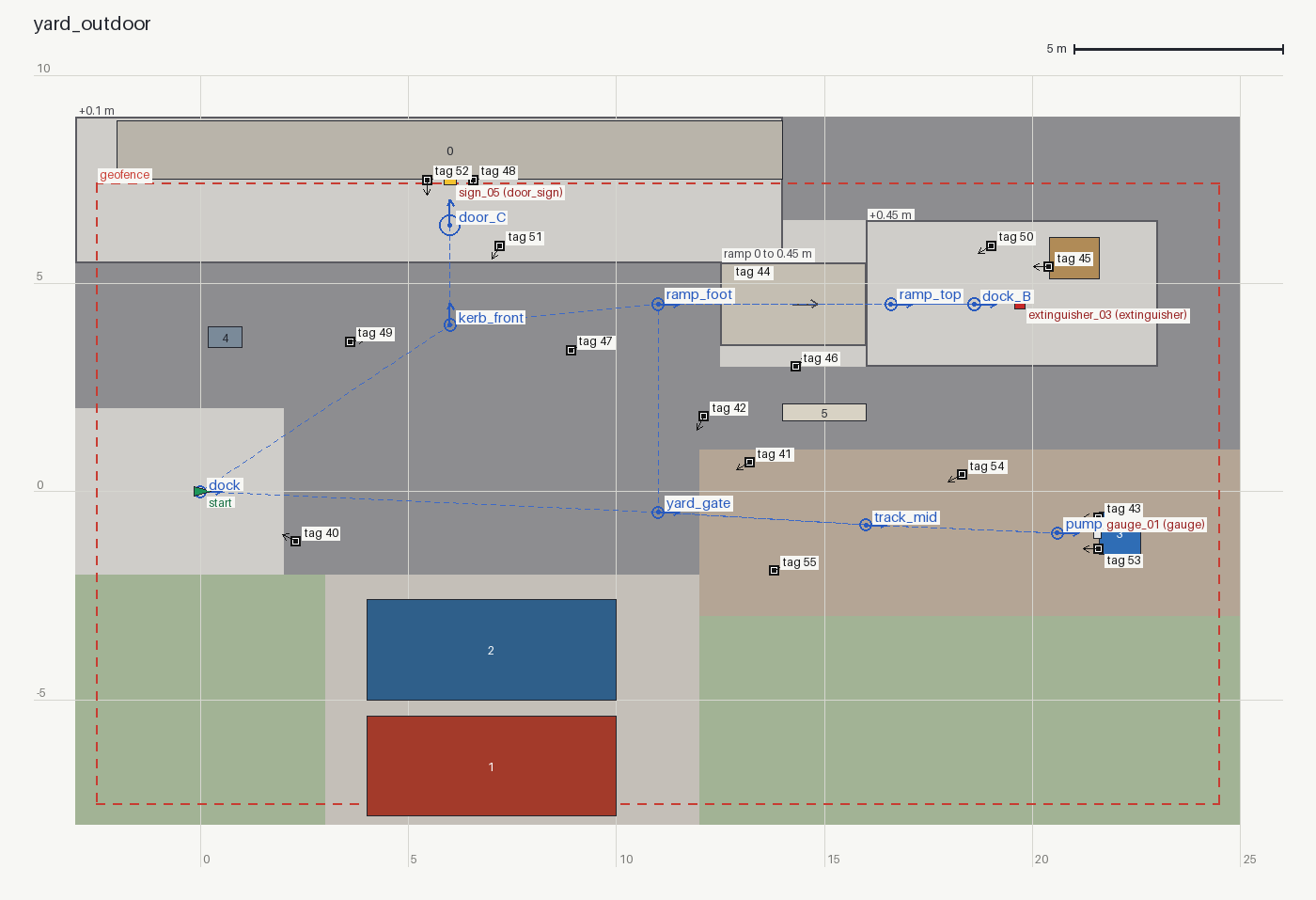
L1 | Outdoors, for the Go2: a gauge on a pump at the end of a dirt track, an extinguisher on a loading dock up a ramp, a sign behind a kerb, back to the dock. Use --physics, or --realistic |
plans/test_track.yaml |
sim/scenes/test_track.yaml |
– | A straight course of 5 m stretches from concrete to a 15 cm step; the run stops at the first stretch the robot cannot walk. Use --physics |
Scenes
A scene is the world the robot knows: named locations with a pose and a tolerance, obstacles, objects, safety limits.
robot:
  pose: { x: 0.0, y: 0.0, yaw: 0.0 }
locations:
  dock:    { pose: { x: 0.0, y: 0.0, yaw: 0.0 } }
  shelf_A: { pose: { x: 4.0, y: 3.0, yaw: 0.0 }, tolerance_m: 0.15 }
obstacles:
  - { x: 5.1, y: 3.0, w: 0.5, d: 4.0, h: 1.6 }   # a rack: collides in simulation
objects:
  red_box_01: { cls: red_box, marker_id: 7, pose: { x: 4.75, y: 3.0, z: 0.95 } }
safety:
  geofence: { x_min: -1.0, x_max: 10.0, y_min: -1.0, y_max: 9.0 }
  max_speed: 0.8
  min_battery_pct: 5
In simulation the same file generates the MuJoCo scene (floor, racks, box, cameras) and feeds the ground-truth perceiver. Obstacles and objects take an optional color: "#rrggbb". Routes are not planned automatically: when a straight line crosses an obstacle, the plan lists waypoints (via). An optional routes: section ("dock->shelf_A": [aisle_in]) tells the LLM planner which waypoints to use; see sim/scenes/warehouse_small.yaml. Perception noise is not part of the scene: it is a run option (--noise, --sigma, --seed).
Outdoors, a terrain section gives the scene its ground (runtime-spec §8.3, ADR-0015):
terrain:
  extent: { x_min: -2, x_max: 52, y_min: -3, y_max: 3 }   # must cover the geofence
  cell_m: 0.1                     # 0.08 to 0.25 m; finer grids make feet catch between cells
  seed: 5
  surface: concrete               # floor, concrete, asphalt, gravel, dirt, grass
  regions:
    - { surface: gravel, x: [9, 14], y: [-3, 3] }
    - { surface: dirt, x: [24, 29], y: [-3, 3], roughness_m: 0.035 }
  ramps:
    - { x: [30, 32], y: [-3, 3], from_m: 0.0, to_m: 0.536, along: x }   # 15 degrees
  raised:
    - { x: [39, 44], y: [-3, 3], height_m: 0.10 }                         # a 10 cm step
| Surface | Grip (friction) | Roughness (std. dev.) | Bump size |
|---|---|---|---|
floor |
0.8 | 0 | – |
concrete |
0.85 | 2 mm | 1 m |
asphalt |
0.9 | 3 mm | 0.8 m |
gravel |
0.6 | 8 mm | 0.3 m |
dirt |
0.65 | 1.5 cm | 0.6 m |
grass |
0.5 | 1 cm | 0.5 m |
Ramps and raised areas are solid, flat on top with vertical sides; heights go from 0 to 3 m and ramps up to 45 degrees. In kinematic runs the base follows the ground's height; in physics the robot walks on it. A route for a walking robot keeps about 0.6 m from obstacles and meets a kerb square on (kerb_front in yard_outdoor.yaml).
landmarks are AprilTags at known places, on a post or flat on a wall or an obstacle (ADR-0016). With --drift they are how the robot finds out where it really is: navigate looks for the ones in view before it leaves and at every waypoint, corrects its pose with the first one it reads and, if the correction puts it off the waypoint, walks the difference.
landmarks:
  - { marker_id: 41, x: 13.2, y: 0.7, facing: -2.642, size_m: 0.3 }   # on a post; facing: where the tag looks, rad
  - { marker_id: 48, x: 6.55, y: 7.49, facing: -1.5708, height_m: 0.45, size_m: 0.3, post: false }  # on the wall
height_m is the tag's centre above the ground (default 0.6, 3 m at most), size_m the side of its black square (default 0.2, 0.6 at most). Ids go from 0 to 63 and are shared with the objects' tags: one id, one tag. Landmarks have no collision: keep them off the routes. Where to put them was measured in MuJoCo with the noisy camera:
- A tag is used up to 10 times its side away: 3 m for a 30 cm tag. Farther, its position is still good but the direction its face looks is off by a few degrees, and the corrected pose with it.
- One 2–3 m ahead of every stop, seen at an angle of 20–35 degrees rather than straight ahead.
- Two, one either side, of an inspection target the robot stands close to: arriving 30 cm off to one side, it still sees one.
- One every 8–10 m on a long leg (add a waypoint): drift grows with the distance, and an error of half a metre puts the robot off a ramp.
A scene file has one schema, SceneFile in spingi/scenes.py, and every reader goes through it (ADR-0028); it is published as scene.schema.json. A key nobody declares is an error, not a section dropped in silence: obstacle: for obstacles: would leave a wall out of the world, max_sped: would leave the run without its speed cap. Names of locations, objects, classes and routes must match ^[A-Za-z0-9_-]{1,64}$; every number must be a finite number, so NaN, infinity, true and "1" are refused; a marker id names one tag, objects and landmarks together; a route names locations of its scene. A file that is not a scene ends spingi run as INVALID_SCENE · invalid scene (my.yaml): obstacle: Extra inputs are not permitted, with every problem in that one line, before a robot is started. The values are checked when the file is read and again when the MuJoCo scene is generated.
Check a scene and see it
uv run spingi check sim/scenes/lab_blocked.yaml --plan tests/golden/plans/to_workstation.yaml
scene sim/scenes/lab_blocked.yaml: 3 locations, 1 obstacle, 0 objects, 0 landmarks
warning: step 0 (navigate): the leg from the start to workstation_B crosses obstacle 0 (a 0.3 x 6 m box at 3, 0.25): add a waypoint with via

OK · 0 errors, 1 warning
spingi check prints what the scene holds, the errors of the file and, with --plan, of the plan for --robot, and the warnings: what a robot would meet, found with plane geometry and the runtime's own rules for the camera and the landmarks. An error exits with status 1; a warning does not, unless --strict.
| Warning | What it means |
|---|---|
| a place outside the geofence, or within 0.3 m of its edge | reaching it, or overshooting it, stops the robot |
| a place inside an obstacle, or within 0.15 m of one | the robot's body would be in the box; stops in front of tables and shelves stand 0.3 m away and are fine |
a route's leg, or a navigate's, crosses an obstacle |
the robot walks in straight lines, with 0.3 m of clearance either side: add a waypoint |
| an object inside an obstacle | objects have no collision, so nothing else refuses it: a camera would see the box, not the object. Put it on top or in front |
| an object in view from no location | no stop is within 3 m of it and facing it within 40°; the warning gives the heading that would |
an inspect or a detect with nothing of that class in view |
the robot would look from the wrong place |
| a stop that looks at an object and has no landmark to read | only in scenes with landmarks: with --drift the robot cannot correct its pose there |
uv run spingi map sim/scenes/yard_outdoor.yaml
writes yard_outdoor-map.png, the scene from above: the ground's surfaces, ramps and raised areas, the geofence, obstacles with their index, locations with their heading, objects, tags with the way they face, routes, and the warnings in red, numbered and listed under the map. It needs no OpenGL.
estop_on_geofence: false in the safety: section makes it a plain stop instead, repeated at every check while the robot is outside.
Plans
A plan is an ordered list of steps. Each step names a skill, its parameters and what to do on failure: how many times to retry, then needs_human, abort or skip. A parameter can reference the evidence of a previous step with $<skill or index>.<field> as its whole value, for example "$detect.objects[0].id"; the path walks dict keys and list indexes only, and names starting with _ are refused. Plans are validated before anything moves: unknown skills, invalid parameters, forward references and locations the scene does not have are rejected, the last with the closest known name (step 0 (navigate): unknown location 'pump_a', did you mean 'pump_A'?). A key nobody declares is an error, not a setting dropped in silence (ADR-0026): params: { to: shelf_A, max_sped: 0.8 } ends the run as INVALID_PLAN (step 0 (navigate): invalid parameters: max_sped: Extra inputs are not permitted) instead of walking at the default speed, and a misspelled plan key such as on_failre: is refused in one line, before a robot is started. A step can override its skill's deadline with deadline_s, and a plan can set a total deadline_s for the run. Both are robot time (simulated time in MuJoCo); the plan budget is checked before each step and also cuts the deadline of the step in progress, and the run then ends with status deadline.
Skills
| Skill | Parameters | Precondition | Effect |
|---|---|---|---|
navigate |
to, via=[], max_speed=0.5 |
known locations, battery above minimum | robot within tolerance of to; at each via waypoint it faces the next one; before leaving and at every waypoint it corrects its pose with a landmark in view; a retry resumes from the waypoint it stands at |
detect |
cls, expect=1 |
robot idle | objects of class cls added to the world state with their pose |
pick |
object_id, arm=right |
object pose known and within 0.9 m, hand empty | robot.holding set, object removed from the scene |
place |
at, arm=right |
holding something, robot at at |
object put down ahead of the robot, holding cleared |
inspect |
target, checks=[] |
robot at target |
a head-camera frame; present:<cls> / absent:<cls> checks evaluated, anomalies listed |
wait_for_human |
prompt, timeout_s=300 |
– | the robot stops and waits; the operator answers continue or abort |
say |
text |
– | the text in the event log |
With --perception markers a Frame carries a camera_model (intrinsics and the camera's pose, as the robot believes it is, written by the adapter) and MarkerPerceiver (spingi/perception/markers.py) turns the tags it finds into positions: the tag's centre and the direction its face looks, then the object's centre by the tag's inset. Objects with a marker_id in the scene get their tag on four side faces in the simulator; ids go from 0 to 63 and must be unique in a scene, landmarks included (sim/markers/).
Skills never call each other; composition is the plan's job. Pre and postconditions are pure functions of the world state, which makes them unit-testable without a robot.
Each skill declares the robot capabilities it requires: navigate needs locomotion, detect and inspect need camera, pick and place need arm. A robot profile (spingi/robots.py) says what the robot has: the G1 has all three, the Go2 has no arm. A plan with a skill the robot cannot run is rejected at validation (step 2: skill 'pick' needs arm, which this robot does not have) and the run ends as invalid_plan before anything moves; spingi skills --robot go2 lists what is left.
Episodes
Every spingi run leaves an episode in runs/<run_id>/ (../docs/episode-format.md): manifest.json, copies of the plan and the scene, events.jsonl (every event with wall-clock and simulated time), trajectory.jsonl (robot pose at 10 Hz, object positions when they change; with --physics at 25 Hz with the base's height and tilt and every joint angle, so the viewer moves the legs; with --drift also where the robot believed it was), terrain.json (the ground, for scenes that have one), frames/ (head-camera images referenced by perception.result and robot.relocalized events through frame_ref, a path relative to the episode folder: PNG, or the JPEG the camera sent with --camera-noise; written only when an OpenGL context is available), with --camera-video head.mp4, what the head camera saw at 10 frames per second, placed on the timeline by camera_video in the manifest, and with --record run.mp4, the third-person video. Both videos are streamed to disk while the run goes on. manifest.json also records the robot profile (robot.model, which the viewer uses to draw the right robot) and the perception noise and seed, so that spingi replay can run the episode again on the same robot.
Operator console
--operator console turns the terminal into the supervision console (ADR-0008):
Operator console: Ctrl+C stops the robot.
[    0.0s]    speed cap 0.8 m/s
[    0.0s] run r-20261004-011212-64b3bf · plan demo_material_runner · 8 steps
[    0.0s] step 0  say {"text": "Fetching the red box"}
[    0.0s]    says "Fetching the red box"
[    0.0s] step 1  navigate {"to": "shelf_A", "via": ["aisle_in"]}
[   17.2s] step 2  detect {"cls": "red_box", "expect": 1}
[   17.2s]    looking for red_box: nothing
[   17.2s]    detect -> recoverable: found 0 'red_box', expected 1
[   17.2s]    retry 1
…
  OPERATOR NEEDED · step 2 (detect)
  found 0 'red_box', expected 1
  [r]etry  [s]kip  [a]bort > a
[   17.2s]    operator: abort
[   17.2s] run end: aborted · 2 steps completed
Only the answers the request offers are accepted: retry, skip or abort for a failed step; continue or abort for wait_for_human. An operator can answer retry at most three times per step; the next retry aborts the run. If stdin is closed (piped input that ended), the answer is abort. Input is read in a daemon thread, so an unanswered prompt never keeps the process alive, and control characters are stripped from everything printed. Ctrl+C emits operator.stop, e-stops the robot (with a 2 s timeout), ends the run as aborted and still writes the episode; a second Ctrl+C kills the process. It does not replace the hardware e-stop.
Safety in a run
The session arms the safety monitor before the first step: it caps the adapter speed with set_speed_limit, then checks the geofence and the battery every 0.1 s of robot time (in fast simulation the adapter yields every 0.2 s of simulated time) and sends the heartbeat of the adapter watchdog, set to 500 ms of robot time in every session. Every motion command checks the e-stop and the watchdog before it acts. An e-stop is terminal: the run ends with status estop and nothing is retried. If a check raises, the monitor e-stops the robot (safety.monitor_error). If the run raises, it ends with status error, the robot is stopped and the episode is still written. With --physics a robot that falls is e-stopped by the adapter (RobotFell), the event log says where (robot.fell) and the run ends as estop. Run statuses: success, aborted, invalid_plan, deadline, estop, error. Decisions in ADR-0011, threat model in SECURITY.md.
Benchmarks and the sim-to-real gate
spingi bench runs the same plan many times, with a different perception seed each time, and computes the metrics of the spec (section 8.5) from the event logs alone: success rate, operator requests per 100 runs, retries, fatal runs, safety violations, simulated time p50 and p95. It checks them against the gate of section 8.4 (success ≥ 95 %, operator requests ≤ 5 per 100, no fatal run, no safety violation, and p95 of the simulated time within the plan's deadline_s when the plan declares one); with --gate a failed gate exits with status 1, ready for CI. The report goes to runs/bench-<id>/report.json, one line per run to runs.jsonl, and with --keep-failed the event log of every failed run is kept.
plan demo_material_runner · scene sim/scenes/warehouse_small.yaml · unitree_g1 on sim · 100 runs
perception noise: false negatives 20%, position sigma 0.02 m

  ok    success rate        100.0%   (gate >= 95%)
  ok    operator requests   0.0 per 100 runs   (gate <= 5)
  ok    fatal runs          0   (gate <= 0)
  ok    safety violations   0   (gate <= 0)
        retries per run     0.25
  ok    simulated time       p50 72.2 s · p95 72.2 s   (gate <= 300 s, the plan's deadline_s)

GATE PASSED
At 60 % false negatives the same plan drops to about 74 % success with 26 operator requests per 100 runs, and the gate fails: the retries in the plan absorb moderate noise, not heavy noise.
With --physics the robot walks, and the same gate measures drift, blocked paths and falls. Measured on 2026-11-01 (perception without noise; the seed changes the start by up to 3 cm and 3 degrees):
| Plan · scene | Robot | Runs | Success | Operator requests per 100 | Fatal runs (falls) | p95 simulated time |
|---|---|---|---|---|---|---|
inspection round · lab_small |
G1 | 30 | 100 % | 0 | 0 | 50.3 s |
inspection round · lab_small |
Go2 | 30 | 100 % | 0 | 0 | 62.1 s |
material runner · warehouse_small |
G1 | 30 | 100 % | 0 | 0 | 92.3 s |
yard patrol · yard_outdoor |
Go2 | 30 | 86.7 % | 13.3 | 0 | 180.2 s |
yard patrol · yard_outdoor, kinematic, for comparison |
Go2 | 30 | 100 % | 0 | 0 | 99.4 s |
test track · test_track |
Go2 | 20 | 80 % | 0 | 1 (1) | 110.3 s |
test track · test_track |
G1 | 20 | 0 % | 0 | 19 (19), and one stumbled out of the geofence | – |
The kinematic base finishes the yard patrol every time in 100 s; walking, the Go2 needs about 170 s and fails some runs at the 10 cm kerb in front of door C, where it gets stuck halfway up (about one climb in 15, measured on the kerb alone). On the test track the Go2 crosses every surface, the rough dirt and the ramps in all 20 runs and fails only at the steps: the 10 cm one in 2 runs, the 15 cm one in 2. The G1's controller was trained on flat floors: indoors it passes, outdoors it falls. The report counts falls among the fatal runs.
With --realistic the robot also does not know exactly where it is (ADR-0016): its odometry drifts, its camera is noisy, the tags are read from the frames, and navigate corrects the pose with the scene's landmarks. The report adds the worst gap of each run between where the robot was and where it believed it was, at the end of a walk and before the correction; the landmark corrections per run; and the anomalies the inspections reported, which are false alarms when everything is in place:
| Plan · scene | Robot | Runs | Success | Worst pose error per run, p50 · p95 | Landmark fixes per run | Anomalies per run | p95 simulated time |
|---|---|---|---|---|---|---|---|
inspection round · lab_small |
G1 | 30 | 100 % | 0.20 · 0.42 m | 8.5 | 1 (by design: no box at panel C) | 56.5 s |
inspection round · lab_small |
Go2 | 30 | 100 % | 0.23 · 0.49 m | 8.4 | 2 (also the box on the shelf, out of the low camera's sight) | 82.5 s |
material runner · warehouse_small |
G1 | 30 | 100 % | 0.41 · 0.94 m | 10.8 | 0 | 105.9 s |
yard patrol · yard_outdoor |
Go2 | 30 | 100 % | 0.37 · 0.71 m | 25.5 | 0 | 229.5 s |
yard patrol · yard_outdoor without its landmarks |
Go2 | 30 | 36.7 %, 3 falls, 53 operator requests per 100 | 1.43 · 2.26 m | 0 | 0.73 | 173.2 s |
test track · test_track |
Go2 | 20 | 75 % | 0.28 · 0.53 m | 20.0 | 0 | 132.2 s |
Without the tags the yard patrol drifts by more than a metre: the Go2 walks off the side of the ramp, stops short of a waypoint, or inspects the wrong spot and reports a gauge or a sign missing while it is there. With them it finishes every run, about 25 % slower because it stops to look and walks the difference after each correction. Errors of 0.4 to 0.9 m before a correction are what a few per cent of drift gives over the legs of these scenes, and the robot does not act on them: where a tag is in view, it corrects them before it inspects or picks. On the test track the Go2 fails only at the steps, as in --physics. The drift figures are rough figures for a legged robot, not measurements of a Go2; they will be replaced by the robot's own in the lab (M4.1).
Export to LeRobot
spingi export lerobot turns episodes into a LeRobotDataset v3.0 folder (ADR-0009): meta/info.json, meta/stats.json, meta/tasks.parquet, meta/episodes/…parquet, data/…parquet. Each frame, at 10 Hz, has observation.state and action as base x, y, yaw and gripper state (the action is the next state), the plan description as the task, and next.done / next.success from the outcome. Camera images are not exported yet: the frames the runtime takes come one per inspection, not at a fixed rate; the head camera's video of --camera-video is at a fixed rate and is what a later version will export. robot_type in info.json is the profile of the episodes; episodes of different robots are refused in one dataset. Checked against lerobot 0.6.1: the exported folder loads with LeRobotDataset(repo_id, root=...). Folders without a manifest.json are refused, as are trajectories that end outside 0 to 24 hours. Requires the export extra (pandas, pyarrow), installed by make setup.
Planning from natural language
spingi plan sends the request to Claude (claude-opus-5-5 by default, --model to change it) together with the robot's description, the summaries of the skills that robot can run (--robot go2 leaves out pick and place) and the symbolic world of the scene: locations, known objects, battery, and the routes: section of the scene file, which tells the model which waypoints avoid the shelving. The answer is constrained by a JSON schema generated from the skill registry, so it can only contain whitelisted skills with parameters of the right shape; then it goes through the same validation as a hand-written plan. The world is sent inside a <world> block that the system prompt marks as data, never instructions. An invalid plan is sent back once with the errors; a second failure, a refusal or a truncated answer is reported and nothing runs (ADR-0010).
The API key goes in runtime/.env, which git ignores:
cp .env.example .env # then set ANTHROPIC_API_KEY=sk-ant-... in .env
At startup Spingi reads only runtime/.env of a source checkout, never a .env in the current folder, so running spingi inside a downloaded folder cannot change where API calls go. Only ANTHROPIC_API_KEY and SPINGI_* variables are set; anything else in the file is ignored with a warning. A variable already exported in the shell wins over the file. Missing credentials are reported before any API call. Never put the key in .env.example, which is committed.
uv run spingi plan "Bring the red box to workstation B, then wait for the operator" --scene sim/scenes/warehouse_small.yaml --out plans/my_delivery.yaml
uv run spingi plan "Check that the red box is on shelf A" --scene sim/scenes/warehouse_small.yaml --run --adapter sim
--run prints the plan and asks [y/N] before executing it, by default on the fake adapter with the operator console (--adapter sim for MuJoCo); --yes skips the question, and without a terminal the plan is not run unless --yes is given. Without --out the plan is saved to runs/plan-<id>.yaml. For recurring tasks keep a static plan in plans/: deterministic and free.
Evaluation. plans/golden/planner_cases.yaml holds ten requests with the expected plan: deliveries, an inspection round, a route through the aisle, a speed limit, a confirmation step, and two requests that cannot be done (the right answer is a single say explaining why). Two plans are equivalent when they use the same skills in the same order and the same parameters, with defaults filled in; announcement texts, confirmation prompts and failure policies are not compared, and a reference by step name equals the same reference by index. spingi eval-planner runs the ten requests and prints the pass rate; --min-pass-rate sets the exit code. Each run makes about ten API calls. Last result (2026-10-04, claude-opus-5-5): 10/10, nine at the first attempt; for the unknown blue crate the first plan failed validation and the corrected one explained that no such object is known. A test checks offline that every golden plan is valid and runs in simulation.
Python API
Everything above is also a function of one module, spingi.api (ADR-0029). It is the public interface: its names and the models it returns change only with a version that says so, while the rest of the package is internal.
from spingi import api

check = api.check_plan("yard_patrol", "yard_outdoor", robot="go2")
print(check.valid, check.errors, [w.message for w in check.warnings])

report = api.run("yard_patrol", "yard_outdoor", robot="go2", mode="physics")
print(report.status, report.steps_completed, report.sim_time_s)
for line in report.summary.timeline:
    print(line)
print(report.summary.viewer)          # how to open the run in the viewer
| Function | What it gives |
|---|---|
robots(), skills(robot=None) |
The robot profiles, and the skills with their parameters, for one robot or all |
plan_schema(robot), scene_schema() |
The JSON schemas of a plan for that robot and of a scene file |
scenes(), plans(), read_scene(name), read_plan(name) |
The samples and the files of the working folder's scenes/ and plans/; the YAML of one |
describe_scene(scene) |
Locations, objects, obstacles, landmarks, routes, limits and ground, as data and as the planner's text |
check_scene(scene) or check_scene(text=...) |
Whether it is a scene, the errors, the warnings of its geometry |
scene_map(scene, plan=None, out=None) |
The scene from above as a PNG, with what is marked on it |
save_scene(name, text) |
Writes scenes/<name>.yaml once the text is a scene |
parse_plan(text or mapping), check_plan(plan, scene, robot) |
A plan from data; what a run would refuse, in the run's own words, and what the plan would meet in the scene |
run(plan, scene, robot=, mode=, ...), arun(...) |
One run: its status, its episode, a summary with every step, the timeline, the metrics and the frames |
bench(plan, scene, runs=, ...), abench(...) |
Many runs and the sim-to-real gate: report.passed |
episodes(), episode_summary(run), events(run, kinds=, offset=, limit=), frame(run, ref) |
What happened in a run, by run id, latest or folder |
mode says how close to the real robot the run is: fake (the in-memory robot, the default of run), kinematic (MuJoCo, the base glides), physics (the robot walks), realistic (walking with drifting odometry, a noisy camera and tags read from frames). A scene or a plan is named as on the command line; a plan can also be a mapping or a TaskPlan. A step that needs a person gets on_failure (abort by default) as the answer. Nothing is printed, and what cannot start raises before a run folder is made: api.PlanError, api.SceneError, api.UnknownSample, ValueError. In a program with an event loop use arun and abench; cancelling the task stops the robot, ends the run as aborted and still writes the episode.
MCP server
spingi mcp serves the API above to a coding agent over the Model Context Protocol (ADR-0030): seventeen tools to know the robots and their skills, read and write scenes and plans, check them, run them in simulation and read what happened. How to connect Claude Code, Codex and OpenCode, what to ask and what each tool does is in docs/agents.md.
uv run spingi mcp --root ~/my-robot-project
The server works in one folder, --root (default: the current one): it reads scenes and plans there and among the samples, and writes under its scenes/ and runs/. It is a planner like the LLM planner: it proposes plans, the runtime validates and runs them. It reaches only the fake adapter and the simulator, has no tool that moves the robot outside a plan, answers every request for an operator with the fixed policy the call names, makes no network call and runs one session at a time. The four guides it gives an agent (spingi/guides/: workflow, scene, plan, landmarks) are checked by tests against the code they describe.
Replay and golden episodes
spingi replay <episode> runs a recorded episode again with the plan, scene, adapter, perception noise, seed and operator answers it recorded, then compares the behaviour: steps, skill outcomes, retries, operator requests and answers, safety events, final status, final position within 5 cm. Timestamps are not compared.
tests/golden/episodes/ holds four recorded runs: the material runner with 50 % perception noise and two retries, the inspection round on the G1 and on the Go2, and the wall that blocks the robot with an operator who answers retry, then abort. They are replayed on every commit; a difference means the runtime, a skill or the simulator changed behaviour. After an intended change, re-record them with uv run python scripts/record_golden.py and review the diff.
Architecture in one screen
spingi/core        types, ports (RobotAdapter, Clock, Perceiver, HumanGateway), WallClock, Skill, TaskPlan, EventLog, Executor, ScriptedHuman
spingi/skills      one file per skill
spingi/safety      SafetyMonitor and limits
spingi/perception  FakePerceiver, SimPerceiver (ground truth from the scene), MarkerPerceiver (AprilTags in frames),
                   view.py (what the head camera has in view, for the first two)
spingi/adapters    FakeAdapter, sim_mujoco/ (the G1 or the Go2 in MuJoCo, from the profile: scene and terrain generation, the
                   kinematic base, locomotion.py for walking with learned policies, and the parts SimAdapter delegates
                   to: contacts.py, objects.py for the kinematic grasp, rendering.py for frames and videos)
spingi/planner     StaticPlanner (YAML), LLMPlanner (Claude, structured output), schema, evaluation
spingi/console     terminal operator console (reporter + HumanGateway)
spingi/export      LeRobot v3.0 exporter
spingi/session.py  one run: adapter, perceiver, safety monitor, executor, episode (shared by run and bench)
spingi/metrics.py  metrics from the event log, the sim-to-real gate
spingi/bench.py    many runs with noise, report
spingi/replay.py   run an episode again and compare behaviour
spingi/episode.py  episode writer and the pydantic models behind docs/schemas
spingi/scenes.py   initial WorldState, safety limits and routes from a scene file
spingi/robots.py   robot profiles: name, capabilities, how the simulator loads and moves the model (ADR-0012)
spingi/cli.py      the `spingi` command; spingi/dotenv.py loads .env
plans/  sim/scenes/  sim/models/  sim/policies/  sim/markers/  tests/
scripts/ (gen_schemas, record_golden, record_samples, export_glb, import_policies)
spingi.core imports nothing from the other packages; tests/test_architecture.py enforces it.
Tests
make test
400 tests, about 90 seconds (4 skip by design: arm tests on robots without an arm). Unit tests on the fake adapter, the marker perceiver on synthetic images, the ground (validation, seams, height fields and boxes, the viewer's copy), walking (going to a pose as velocity commands, the policy files against the robot models, the gait switch), localization (a correction from a landmark against a drifted estimate, navigate correcting itself and walking the difference on a fake robot with a known error, misread and missed tags, a retried route resuming where the robot stands), drifting odometry and the noisy camera, falls in the executor and the gate, contract tests run against every adapter and robot (fake and sim, as the G1 and as the Go2), the same detections and anomalies on the fake adapter as in MuJoCo for the demo plans, scenario tests in MuJoCo (inspection round on both robots, warehouse delivery, a delivery refused on the Go2, wall, geofence, speed cap, rendering, AprilTags read from rendered frames, Ctrl+C operator stop, every golden plan, robot time for the watchdog, the monitor and the plan deadline), physics locomotion in MuJoCo (both robots walk to a pose, the Go2 turns on the spot, climbs the loading-dock ramp and a 10 cm step, an obstacle blocks the G1, a shove makes it fall, a walking G1 grasps without being moved, a physics episode replays the same, an outdoor episode carries its ground), what the simulated robot knows (drift and its correction, a kinematic robot walking in its corrected frame, the camera model placed by the estimate, JPEG frames from the noisy camera, a landmark read from a noisy frame with the direction it faces, the head camera drawing a cabinet 40 cm away in the yard, a realistic inspection round correcting itself with the landmarks), the head camera's video (every frame on the episode's timeline, a frame that cannot be rendered ends it, recording it leaves pose, estimate and frames unchanged), golden episodes replayed, metrics and gate, bench, console, LeRobot export, the LLM planner with a fake client (request shape, schema, retry with errors, misspelled keys sent back, refusals), unknown keys in plans and in every skill's parameters, episode and schema tests, architecture rules, and a licensing test that keeps LICENSE and NOTICE in this folder (shipped in the wheel) equal to the repository's. No test calls the network. Rendering tests skip themselves on machines without an OpenGL context.
make lint runs ruff with the rules E, F, I, B, UP, S (bandit), ASYNC, SIM, RUF, PIE, BLE; a blind except needs a noqa that says why. CI runs the same lint, ruff format --check and the tests on GitHub Actions.
Extending
A skill: a file in spingi/skills/, a class extending Skill with name, Params (a subclass of SkillParams, which refuses unknown keys; the registry refuses any other) and preconditions / execute / postconditions; a parameter that names a location of the scene is typed LocationName or LocationNames, so that plans naming a location the scene does not have are rejected before they run (ADR-0025); register it in default_registry(); unit tests with FakeAdapter and FakePerceiver, a scenario test if it moves the robot in a new way; an ADR if it introduces a design decision.
An adapter: implement the RobotAdapter protocol in spingi/adapters/, add it to ADAPTERS in tests/contract/test_adapter_contract.py so the shared contract suite runs on it. Adapters translate; they hold no task logic. Besides the motion and sensor methods the port asks for a clock (the robot's time: WallClock on hardware), an estopped flag, capabilities, set_speed_limit (which can only lower the cap) and a GripResult from gripper; every motion command must check the e-stop (raise RobotEstopped) and the watchdog before it acts, and a command for a part the robot lacks raises CapabilityMissing.
A robot: a RobotProfile in spingi/robots.py (name, alias, label, kind, capabilities, and for the simulator the model folder, the MJCF file, the root body, the standing height and the hand offsets), the vendored MJCF with its license under sim/models/<name>/ and in NOTICE, a head camera in the MJCF, a GLB and its joint table for the viewer (scripts/export_glb.py --robot <alias>, then npm run model:compress in viewer/, and the table in viewer/src/episode.ts), the profile in ADAPTERS of the contract tests, and a golden episode. To walk in physics it also needs a walking policy: a folder under sim/policies/ with policy.npz, policy.json (joint order, gains, default pose, action scale, observation terms), LICENSE and README.md, made by scripts/import_policies.py from the published weights, named in the profile's policy (and maneuver_policy if a second policy turns on the spot better), and checked by tests/unit/test_locomotion.py.
A perceiver: implement detect and localize from the Perceiver protocol. A perceiver that reads pixels gets the image through a callable and the camera through frame.camera_model, like MarkerPerceiver; it never asks the adapter for anything else, so it can be tested on synthetic images (tests/unit/test_markers.py).
An operator interface (web console, chat, pager): implement HumanGateway.ask, honouring request.options, and subscribe to the EventLog to show the run live.
1 maintainer

Metadata
1 maintainer
Release files for spingi 0.2.0
For a detailed explanation of source distributions (sdists) and built distributions (wheels), please see the package formats documentation.
Source distribution (sdist)
| File | Size | Uploaded | Provenance | Actions |
|---|---|---|---|---|
| spingi-0.2.0.tar.gz | 22.6 MB | Without provenance | Details for spingi-0.2.0.tar.gz |
Built distribution (wheel)
| File | Interpreter | ABI | Platform | Actions Reset |
|---|---|---|---|---|
| spingi-0.2.0-py3-none-any.whl | Python 3 | none | any | Details for spingi-0.2.0-py3-none-any.whl |
Total release size: 45.3 MB
Release files / spingi-0.2.0.tar.gz
| Download URL | spingi-0.2.0.tar.gz |
|---|---|
| Size | 22.6 MB |
| Tags | Source |
|
SHA-256 checksum How to use checksums |
84b7686fe53e8fc7adbcffac759ba0ee98b57618f12b7fdc3c322cd1f5cd56c6
|
|
BLAKE2b-256 checksum How to use checksums |
2ba84af93a4c395979c1142a96c4b0c90e75742ebb47f105f8619a89cef93870
|
| Upload date | |
|
Uploaded using Trusted Publishing? What is trusted publishing? |
Yes |
| Uploaded via |
uv/0.13.9 {"installer":{"name":"uv","version":"0.13.9","subcommand":["publish"]},"python":null,"implementation":{"name":null,"version":null},"distro":{"name":"Ubuntu","version":"24.04","id":"noble","libc":null},"system":{"name":null,"release":null},"cpu":null,"openssl_version":null,"setuptools_version":null,"rustc_version":null,"ci":true}
|
Release files / spingi-0.2.0-py3-none-any.whl
| Download URL | spingi-0.2.0-py3-none-any.whl |
|---|---|
| Size | 22.7 MB |
| Tags | Python 3 |
|
SHA-256 checksum How to use checksums |
d9c960d6cce48d2573c3a4fc36b02a5a11695ac92de45fa5ee829a5225f894f4
|
|
BLAKE2b-256 checksum How to use checksums |
c5172fb1b125375f784dbf097dabc09ea6c302c5405eca1b7c508d46dde33e90
|
| Upload date | |
|
Uploaded using Trusted Publishing? What is trusted publishing? |
Yes |
| Uploaded via |
uv/0.13.9 {"installer":{"name":"uv","version":"0.13.9","subcommand":["publish"]},"python":null,"implementation":{"name":null,"version":null},"distro":{"name":"Ubuntu","version":"24.04","id":"noble","libc":null},"system":{"name":null,"release":null},"cpu":null,"openssl_version":null,"setuptools_version":null,"rustc_version":null,"ci":true}
|
Security for spingi 0.2.0
Provenance
Provenance describes where a file came from. On PyPI, provenance is shared via attestations, which provide a verifiable record of the build or publishing details. View details, limitations and caveats.
No provenance found
None of the files in this release were uploaded with provenance metadata.
A note on package security
PyPI is a repository for distributing packages, not a service for auditing them. While third-party security researchers and our staff do their best to detect and remove malicious packages, PyPI cannot guarantee the quality, security or suitability of any given package.
To learn more about protecting yourself from malicious actors, visit our package security documentation.














