
SplitScore




Separate any audio file into 6 stems, then transcribe the ones you want to MIDI. A local web console — no cloud, no accounts after initial model download.
audio ──▶ BS-RoFormer-SW ──▶ 6 stems ──▶ MuScriptor ──▶ per-stem .mid
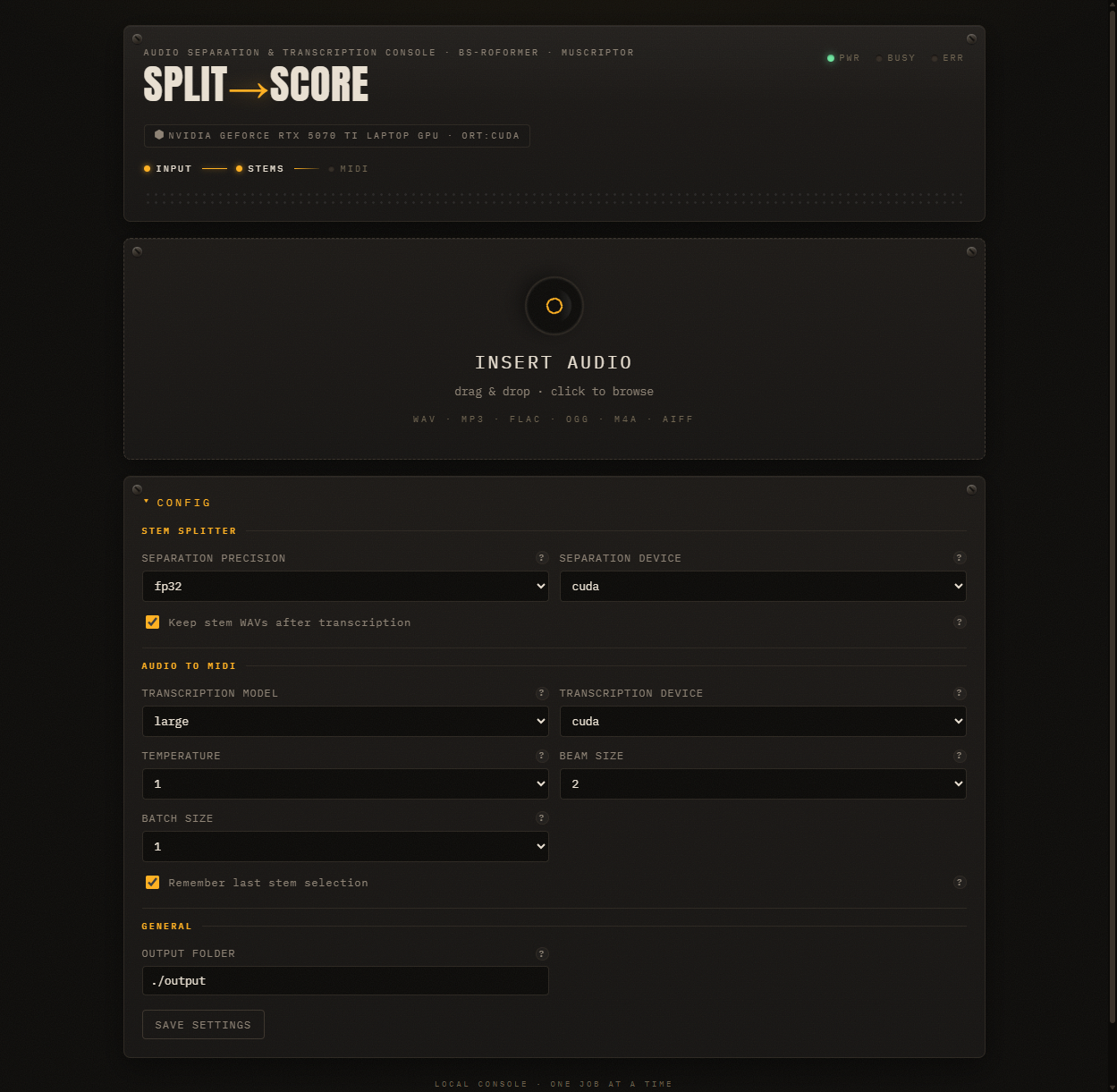
Table of Contents
Features
- 6-stem audio separation via BS-RoFormer-SW (ONNX inference)
- Per-stem MIDI transcription via MuScriptor (small / medium / large models)
- Local web console — drag-and-drop, progress bars, inline audio previews
- Auto-detects NVIDIA, AMD, Intel, and Apple Silicon GPUs
- One-command install via
uvx— correct torch + ONNX backends installed automatically - Configurable beam size, temperature, batch size, and model size
- REST API with SSE progress streaming
Installation
uvx (recommended)
uvx splitscore
Auto-detects your GPU, installs the correct torch variant and ONNX runtime,
and opens the app at http://127.0.0.1:8000 (auto-falls back to a free port if 8000 is taken).
First run downloads models (~3 GB) to ~/.cache/.
pip
pip install splitscore
splitscore
From source
git clone https://github.com/SeanDolan0/splitscore.git
cd splitscore
uv run python sync.py          # auto-detect GPU, install torch
uv run python -m app           # → http://127.0.0.1:8000 (auto-fallback if busy)
uv run python -m app --port 9000  # explicit port
Hugging Face setup
MuScriptor weights are gated behind a CC BY-NC 4.0 (non-commercial) license. You need a free Hugging Face account before transcription will work:
- Accept the license at https://huggingface.co/muscriptor/muscriptor
- Log in from the terminal:
uv run hf auth login
(or exportHF_TOKEN=hf_...in your shell)
Requirements
- Python 3.13 and uv
- Windows 11 or Linux
- NVIDIA GPU recommended
- AMD GPU (Linux, ROCm) works fully for both separation and transcription
- Apple Silicon — separation runs on CPU (ONNX has no Apple GPU provider), transcription uses MPS
- Intel GPU — falls back to CPU for both (no ONNX/ROCm provider available)
Usage
- Drop an audio file onto the console (wav, mp3, flac, ogg, m4a, aiff).
- Separation runs automatically — watch the progress bar while 6 stems are extracted.
- Pick stems — tick the checkboxes for vocals, piano, guitar, bass, drums, or other.
- Set instruments — each stem gets an instrument dropdown; leave blank for auto-detect, or pick a specific instrument (piano, guitar, sax, synth, choir, etc.).
- Transcribe — hit "TRANSCRIBE SELECTED TO MIDI" and download the
.midfiles.
Stems
The separation model outputs 6 stems in a fixed order:
| Stem | Description |
|---|---|
| Bass | Electric/acoustic bass |
| Drums | Drum kit and percussion |
| Other | Everything not classified into the other 5 |
| Vocals | Singing, speech, voice |
| Guitar | Acoustic and electric guitar |
| Piano | Piano, keys, and keyboard |
Melodic stems (vocals, piano, guitar, bass) give the cleanest MIDI. Drums and "other" tend to transcribe poorly.
GPU Support
SplitScore auto-detects your hardware on startup:
| GPU | Torch variant | ONNX Runtime | Notes |
|---|---|---|---|
| NVIDIA | CUDA (auto-matched to driver) | onnxruntime-gpu | Best performance. No CUDA toolkit needed. |
| AMD | ROCm | onnxruntime-rocm | Linux only. |
| Intel | CPU | onnxruntime-directml | Windows only. |
| Apple Silicon | MPS | onnxruntime (CPU) | ONNX has no Apple GPU provider; separation runs on CPU. |
| None | CPU | onnxruntime | Works, just slower. |
The sync.py script handles all of this during dev setup.
The splitscore CLI handles it automatically for end users.
Settings
All settings are adjustable in the web console's config panel and persist across runs.
Separation
| Setting | Default | Notes |
|---|---|---|
| Device | auto | Compute device for ONNX inference. Auto-detects best GPU. |
| Precision | fp16 | fp16 (~336 MB model, faster, less VRAM) or fp32 (~669 MB). Switch to fp32 only if you hear artifacts. |
Transcription (MuScriptor)
| Setting | Default | Notes |
|---|---|---|
| Model size | large | small (103M), medium (307M), large (1.4B). Small works on CPU. |
| Device | auto | Auto-detects best GPU. CUDA is significantly faster. |
| Temperature | 0.0 | 0 = deterministic. 0.5–1.0 adds natural variation but may introduce wrong notes. |
| Beam size | 4 | Higher = better sequences, more VRAM. 1 = greedy. |
| Batch size | 1 | 1 = best quality (enables prelude forcing). Higher = faster on long files but can cause chunk-boundary artifacts. |
General
| Setting | Default | Notes |
|---|---|---|
| Output folder | ./output | Each job gets a subfolder with stems/ and midi/ subdirectories. |
| Keep stems | on | Keep separated WAV files after transcription. Turn off to save disk space. |
| Remember selection | on | Restore your last stem checkboxes across jobs via browser storage. |
API
The app exposes a REST API consumed by the frontend:
| Method | Route | Description |
|---|---|---|
| POST | /api/jobs |
Upload audio → returns {job_id}, starts separation |
| GET | /api/jobs/{id} |
Job status, stem list, MIDI file list |
| POST | /api/jobs/{id}/transcribe |
Start transcription: {"stems": ["vocals","piano"]} |
| POST | /api/jobs/{id}/cancel |
Cancel a running job |
| GET | /api/jobs/{id}/events |
SSE stream — real-time progress, stem/MIDI events |
| GET | /api/settings |
Current settings |
| PUT | /api/settings |
Update settings (partial merge, persists to disk) |
| GET | /api/instruments |
MuScriptor instrument vocabulary |
| GET | /api/hardware |
GPU info, torch/CUDA/ONNX versions |
Project Structure
splitscore/
├── app/
│   ├── __init__.py        # version
│   ├── __main__.py        # python -m app
│   ├── cli.py             # uvx splitscore entry point
│   ├── gpu.py             # GPU detection + provider resolution
│   ├── main.py            # FastAPI routes, SSE, static mount
│   ├── pipeline.py        # Job orchestration, one-at-a-time lock
│   ├── separator.py       # BS-RoFormer-SW ONNX inference
│   ├── settings.py        # Settings dataclass, JSON persistence
│   ├── transcribe.py      # MuScriptor wrapper
│   └── static/            # Vanilla JS/CSS frontend (no build step)
├── tests/                 # pytest, ~2s, no GPU needed
├── sync.py                # Dev setup: detect GPU, install torch
├── pyproject.toml
└── LICENSE                # MIT
Testing
uv run pytest                              # all tests
uv run pytest tests/test_pipeline.py       # single test file
Tests use fake separator/transcriber factories — no GPU, no Hugging Face token, no real models. The full suite runs in ~2 seconds.
License
- Code: MIT — see LICENSE.
- Models: the separation model and MuScriptor weights are distributed under their own licenses. MuScriptor's weights are CC BY-NC 4.0 (non-commercial) and gated on Hugging Face; that restriction applies to the models regardless of this project's MIT license.
1 maintainer

Metadata
1 maintainer
Release files for splitscore 0.1.6
For a detailed explanation of source distributions (sdists) and built distributions (wheels), please see the package formats documentation.
Source distribution (sdist)
| File | Size | Uploaded | |
|---|---|---|---|
| splitscore-0.1.6.tar.gz | 51.4 kB | Details |
Built distribution (wheel)
| File | Interpreter | ABI | Platform | Reset |
|---|---|---|---|---|
| splitscore-0.1.6-py3-none-any.whl | Python 3 | none | any | Details |
Total release size: 96.1 kB
Release files / splitscore-0.1.6.tar.gz
| Download URL | splitscore-0.1.6.tar.gz |
|---|---|
| Size | 51.4 kB |
| Tags | Source |
|
SHA-256 checksum How to use checksums |
309b6830859f84ccc8b04a27cca373263ae5facbd6ec3abd378e1624aea39747
|
|
BLAKE2b-256 checksum How to use checksums |
a24a3290add8afc41b772b16b41fb318813606bfb9f36a46681e0638a946871c
|
| Upload date | |
|
Uploaded using Trusted Publishing? What is trusted publishing? |
Yes |
| Uploaded via |
twine/7.0.0 CPython/3.13.14
|
Provenance
Provenance describes where a file came from. On PyPI, provenance is shared via attestations, which provide a verifiable record of the build or publishing details. View details, limitations and caveats.


PyPI Publish Attestation
PyPI verified that this artifact, at this checksum, originated from the publisher listed below.
Signed by GitHub Actions, verified by PyPI on Sep 17, 2026.
Transparency logRelease files / splitscore-0.1.6-py3-none-any.whl
| Download URL | splitscore-0.1.6-py3-none-any.whl |
|---|---|
| Size | 44.8 kB |
| Tags | Python 3 |
|
SHA-256 checksum How to use checksums |
9fba98606fd0d2e2672c8273b0f1d48a23ee3f6ca684bad353554b31149bb9f1
|
|
BLAKE2b-256 checksum How to use checksums |
ea7e90427773551939a0a4d827e6912ea5410bb313c117e7c2449b2418926781
|
| Upload date | |
|
Uploaded using Trusted Publishing? What is trusted publishing? |
Yes |
| Uploaded via |
twine/7.0.0 CPython/3.13.14
|
Provenance
Provenance describes where a file came from. On PyPI, provenance is shared via attestations, which provide a verifiable record of the build or publishing details. View details, limitations and caveats.
PyPI Publish Attestation
PyPI verified that this artifact, at this checksum, originated from the publisher listed below.
Signed by GitHub Actions, verified by PyPI on Sep 17, 2026.
Transparency log













