
Embedding-based train/test splitting beyond random splits: adversarial, overlap, and distribution-balanced splits for robust model evaluation.
Verified details
These details have been verified by PyPIProject links
GitHub Statistics
Maintainers

Project description
splytters







Train/test splitting algorithms for dataset partitioning — beyond random splits.
pip install splytters
A random split tells you how a model performs on data that looks just like its training set. Often that's not the question you're asking. This library provides splitters with three different objectives:
| Objective | Package module | What it does | Use it for |
|---|---|---|---|
| Adversarial | splytters.adversarial |
Minimize train/test similarity | Hard evaluation — measure generalization to unfamiliar data |
| Overlap | splytters.overlap |
Maximize train/test similarity | Easy evaluation — sanity checks, debugging, upper-bound estimates |
| Balanced | splytters.balanced |
Match train/test distributions | Fair evaluation — avoid accidental distribution shift |
All splitters operate on embeddings (any (n_samples, dim) array — numpy, lists,
pandas, or torch tensors) and return integer index arrays, so they work with any
data you can embed: text, images, audio, tabular rows.
Installation
pip install splytters
The core install (numpy, scipy, scikit-learn) covers every splitter. Optional
extras add modality-specific dependencies for the sorters and built-in embedders:
pip install "splytters[text]"       # text sorters (pysbd, transformers, wordfreq, ...)
pip install "splytters[image]"      # image sorters (pillow)
pip install "splytters[audio]"      # audio sorters (librosa)
pip install "splytters[tabular]"    # tabular sorters (pandas)
pip install "splytters[embedders]"  # built-in embedders (sentence-transformers, ...)
pip install "splytters[all]"        # all of the above
Requires Python 3.10+ (tested on 3.10–3.14).
Quickstart
import numpy as np
from splytters import cluster_split

embeddings = np.random.rand(500, 384)  # your embeddings here

train_idx, test_idx = cluster_split(embeddings, train_size=0.7)
Every splitter follows the same scikit-learn-style interface:
train_indices, test_indices = some_split(
    embeddings,        # (n_samples, embedding_dim) array-like
    train_size=0.7,    # fraction in (0, 1) OR an absolute count
    random_state=42,
)
A more realistic example with text:
from sentence_transformers import SentenceTransformer
from splytters import centroid_adversarial_split

texts = [...]  # your dataset
embeddings = SentenceTransformer("all-MiniLM-L6-v2").encode(texts)

train_idx, test_idx = centroid_adversarial_split(embeddings, train_size=0.7)
train = [texts[i] for i in train_idx]
test = [texts[i] for i in test_idx]
Works with scikit-learn, pandas, PyTorch & HF datasets
Drop a splitter into any scikit-learn workflow — as a cross-validator or a
train_test_split replacement:
from sklearn.linear_model import LogisticRegression
from sklearn.model_selection import cross_validate
from splytters import SplytterSplit, adversarial_train_test_split, cluster_split

# 1) as a CV object (single hard split) in cross_validate / GridSearchCV
cv = SplytterSplit(cluster_split, embeddings=X, n_clusters=10)
cross_validate(LogisticRegression(), X, y, cv=cv)

# 2) as a train_test_split drop-in (splits every array the same way)
X_tr, X_te, y_tr, y_te = adversarial_train_test_split(X, y, embeddings=X)
Native helpers for the rest of the ecosystem (heavy deps imported lazily):
from splytters import split_dataframe, to_torch_subsets, split_dataset

train_df, test_df   = split_dataframe(df, embeddings)              # pandas
train_ds, test_ds   = to_torch_subsets(torch_dataset, embeddings)  # PyTorch
dsdict              = split_dataset(hf_dataset, embeddings)        # → DatasetDict
How hard is my split? — split_report
from splytters import split_report, compare_splitters, random_split, cluster_split

compare_splitters(embeddings, {"random": random_split, "adversarial": cluster_split})
# {'random': {...}, 'adversarial': {'mmd_rbf': ..., 'energy_distance': ...,
#                                   'wasserstein_mean': ..., 'coverage': ..., ...}}
split_report quantifies how adversarial/overlapping/balanced a split actually
is (centroid & nearest-train distance, coverage, cluster leakage, MMD, energy
distance, mean 1-D Wasserstein/KS, and optional label-distribution shift).
Available splitters
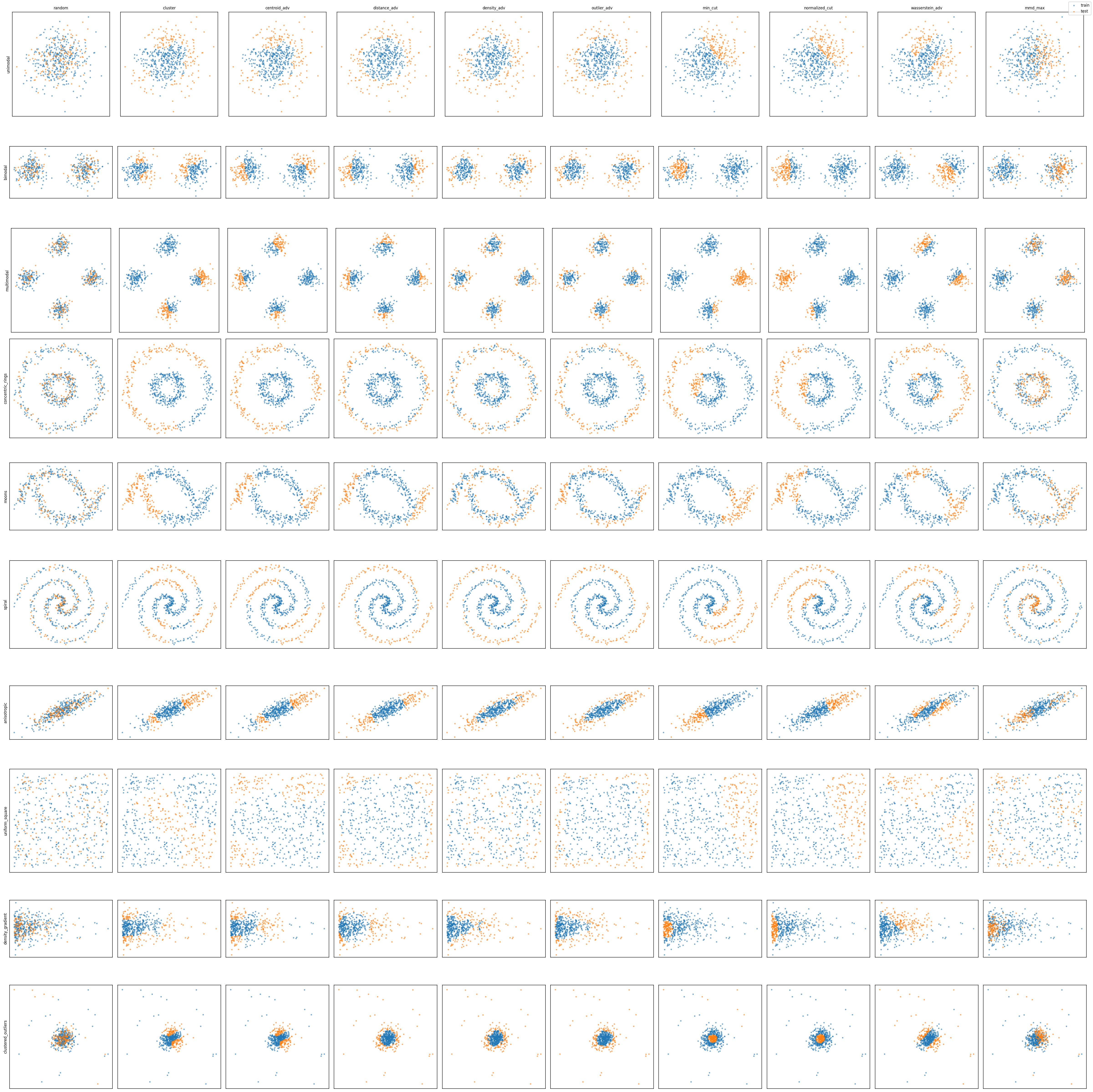
Adversarial (minimize train/test similarity):
cluster_split, centroid_adversarial_split, distance_adversarial_split, density_adversarial_split, outlier_adversarial_split, min_cut_split, normalized_cut_split, wasserstein_adversarial_split, mmd_maximized_split, minority_split, class_boundary_split, decision_boundary_split, maximin_split
Overlap (maximize train/test similarity):
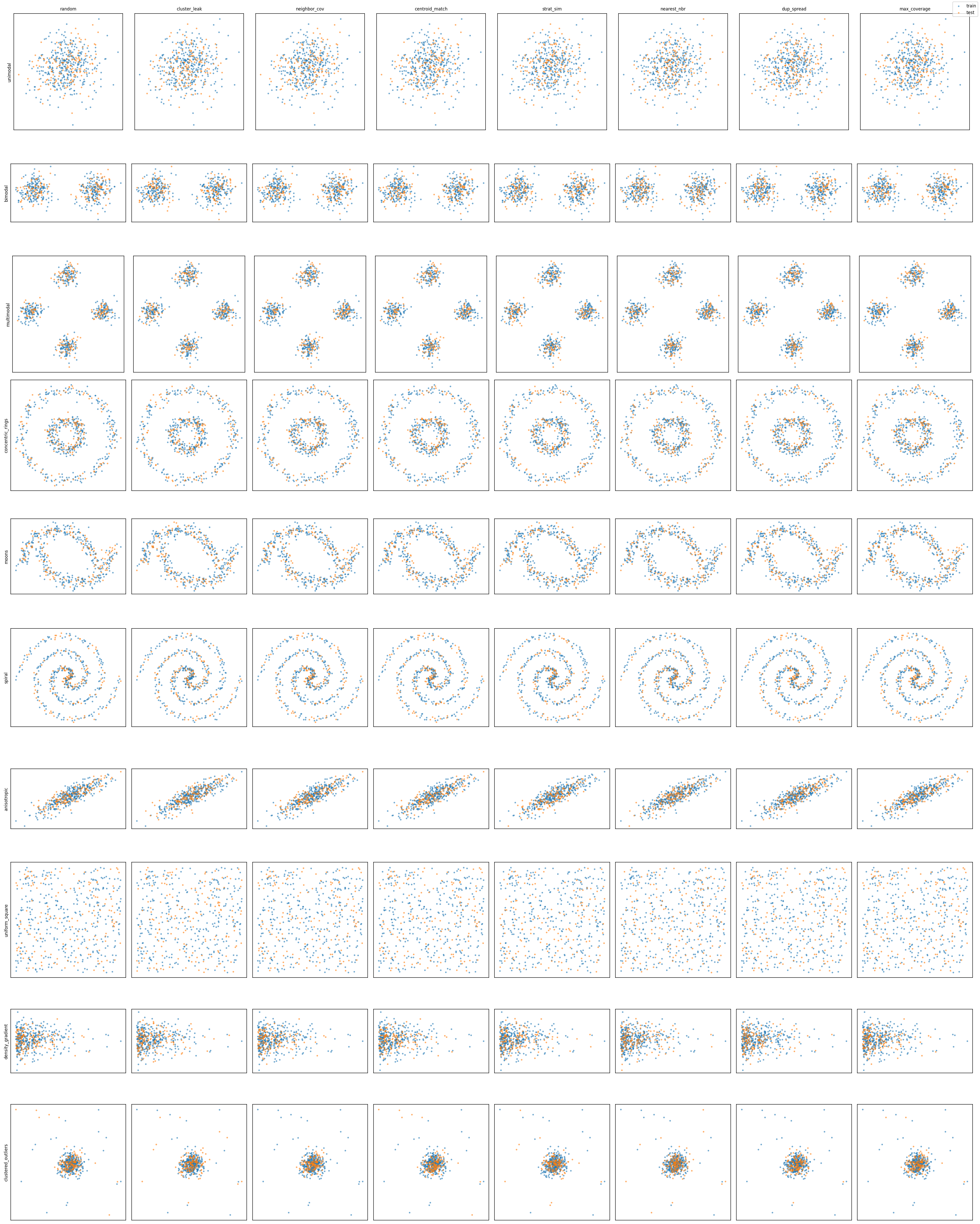
cluster_leak_split, neighbor_coverage_split, centroid_matched_split, stratified_similarity_split, nearest_neighbor_split, duplicate_spread_split, max_coverage_split
Balanced (match train/test distributions):
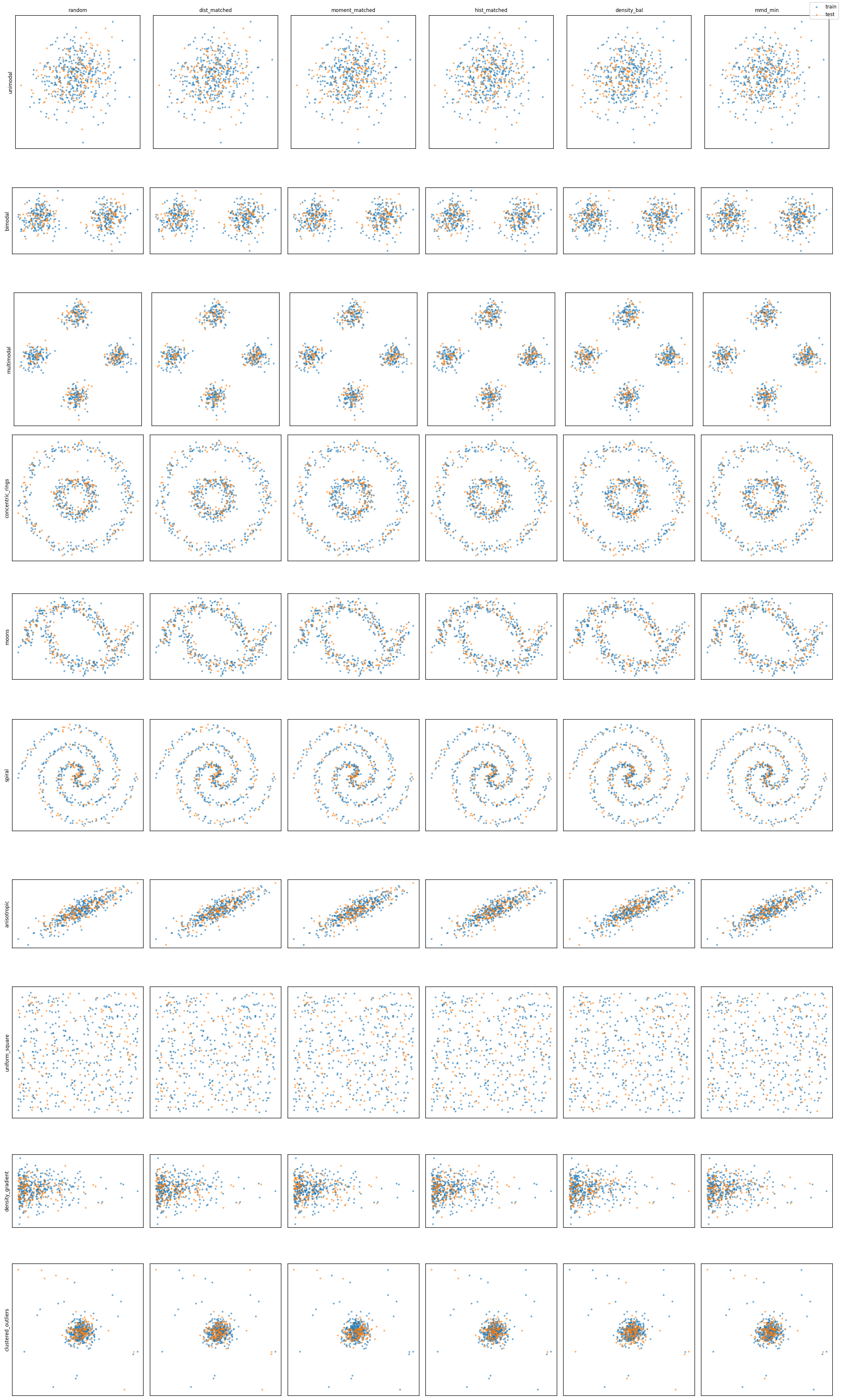
distribution_matched_split, moment_matched_split, histogram_matched_split, stratified_random_split, density_balanced_split, mmd_minimized_split
Grouped (keep related samples / near-duplicates on one side, preventing leakage):
group_split (explicit group ids), deduplicated_split (discovered near-duplicates)
Supervised (label-aware — these take class labels y):
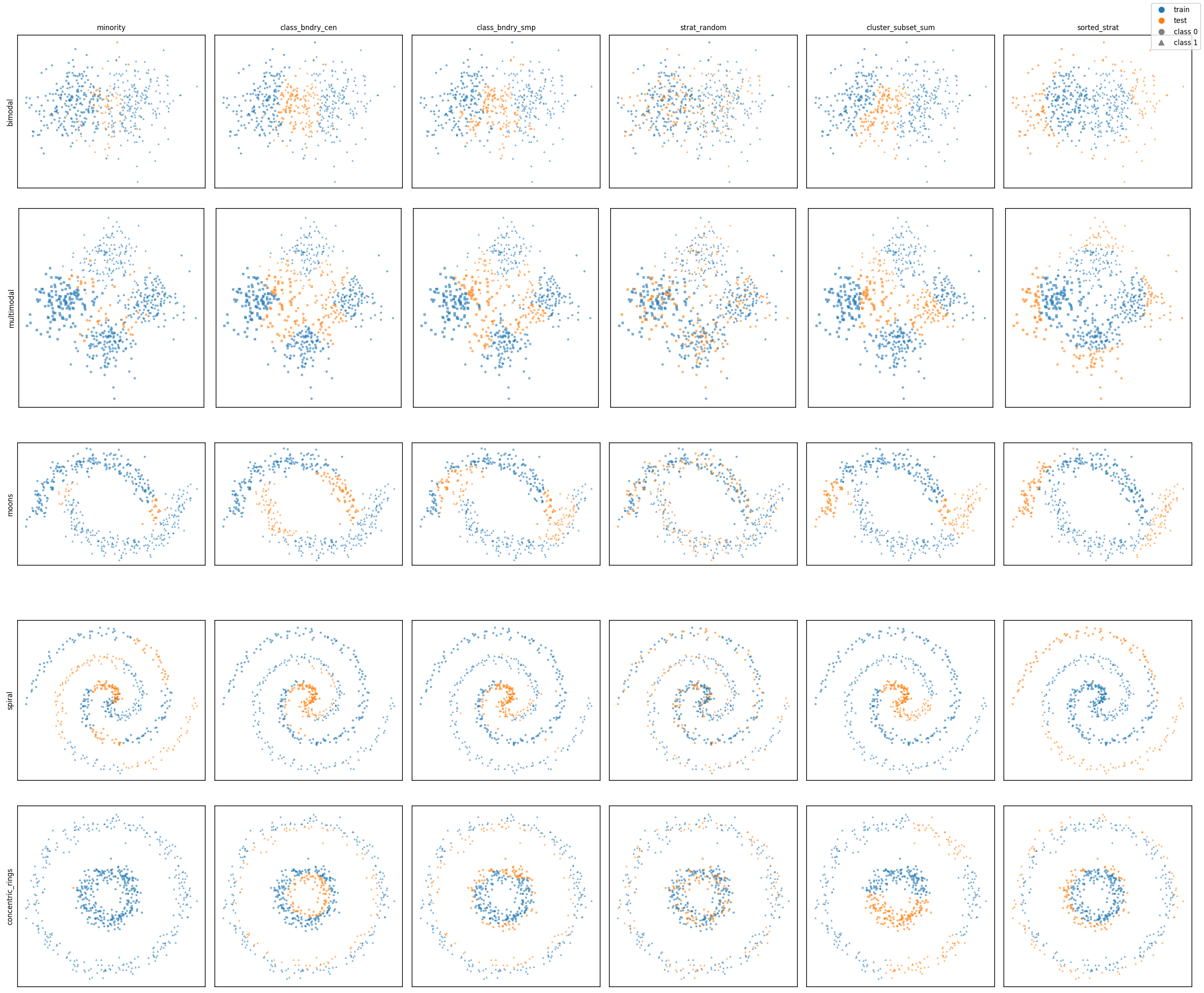
class_boundary_split, decision_boundary_split, minority_split, stratified_random_split, sorted_stratified_split, cluster_split(strategy="subset_sum")
A plain random_split baseline and utilities (compute_pairwise_distances, compute_split_similarity, cluster_embeddings, ...) are also exported from splytters.
The unsupervised figures are generated by demos/visualize_splits.py and the supervised one by demos/visualize_supervised_splits.py — each row is a 2D distribution (unimodal, moons, spirals, rings, ...), each column a splitter. Blue = train, orange = test; in the supervised figure marker shape encodes the class. (The supervised figure uses overlapping-class variants of the blob distributions so the label-aware splitters have a contested boundary to work with.)
Sorters
The companion splytters.sorters package ranks samples by interpretable difficulty/quality metrics — useful for curriculum-style splits ("train on easy, test on hard") or just inspecting your data:
embedding_sorters—distance_to_mean,mahalanobis_distance_to_mean,distance_to_nearest_neighbor,local_density,outlier_score,knn_label_disagreement(label-aware)text_sorters— length, readability, perplexity, lexical diversity, vocabulary rarity, sentence count, gzip complexityimage_sorters— brightness, contrast, color variance, compression ratio, frequency content, sharpnessaudio_sorters— loudness, spectral features, MFCCs, rhythm, quality metricstabular_sorters— column- and row-level metrics, categorical handling, multi-column sorting
from splytters.sorters import distance_to_mean

ranked = distance_to_mean(embeddings)  # most typical → most atypical
Pair a sorter with sorted_stratified_split to turn that ranking into an actual
curriculum split — within each class, the first train_size fraction (by the
sort order) becomes train, the rest test:
from splytters.sorters import readability_score
from splytters import sorted_stratified_split

ranking = readability_score(texts)                 # easy → hard
train_idx, test_idx = sorted_stratified_split(ranking, y, train_size=0.7)
# largest_first=True flips it to "train on hard, test on easy"
See demos/demo.py for sorters on a real dataset (TREC questions), demos/im_demo.py
for an image example with CLIP embeddings, and demos/trec_sorter_experiment.py
for a TREC curriculum-split benchmark (text sorters + linear SVM) that quantifies
which sorters capture a real difficulty axis.
Install from source
git clone https://github.com/gxlarson/splytters
cd splytters
pip install -e .             # core splitters (numpy, scipy, scikit-learn)
Optional extras, depending on which sorters/demos you use:
pip install -e ".[text]"     # text sorters (torch, transformers, py-readability-metrics, wordfreq, pysbd)
pip install -e ".[audio]"    # audio sorters (librosa)
pip install -e ".[image]"    # image sorters (Pillow)
pip install -e ".[tabular]"  # tabular sorters (pandas)
pip install -e ".[ann]"      # approximate-NN backend for large datasets (pynndescent)
pip install -e ".[demo]"     # demos (sentence-transformers, datasets, matplotlib, umap-learn)
pip install -e ".[all]"      # everything
Note: sorter imports are lazy per modality —
import splytters.sorterspulls in no optional dependencies, and each extra is self-sufficient (e.g.[image]alone powers the image sorters). The coresplyttersinstall (numpy, scipy, scikit-learn) is all the splitters need.
Documentation
Full API reference and guides: splytters.readthedocs.io.
Tests
pip install -e ".[dev]"
pytest
Project layout
splytters/                # the installable package
  adversarial.py / overlap.py / balanced.py / utils.py   # splitting algorithms
  sklearn_api.py          # SplytterSplit + *_train_test_split
  interop.py              # pandas / torch / HuggingFace adapters
  report.py               # split_report, compare_splitters
  embedders.py            # text / image embedders (TextEmbedder, CLIP, OpenAI)
  sorters/                # ranking metrics (text, image, audio, embedding, tabular)
tests/                    # pytest suite
test_data/                # sample audio/images/text used by tests
demos/                    # demo.py, im_demo.py (sorter demos: TREC text, CLIP images)
                          # visualize_splits.py + visualize_supervised_splits.py (README figures), visualize_text_splits.py
scripts/                  # generate_test_*.py (regenerate the test_data/ fixtures)
docs/                     # README figures
Project details
Verified details
These details have been verified by PyPIProject links
GitHub Statistics
Maintainers


Download files
Download the file for your platform. If you're not sure which to choose, learn more about installing packages.
Source Distribution
Built Distribution
Filter files by name, interpreter, ABI, and platform.
If you're not sure about the file name format, learn more about wheel file names.
Copy a direct link to the current filters
File details
Details for the file splytters-0.2.0.tar.gz.
File metadata
- Download URL: splytters-0.2.0.tar.gz
- Upload date:
- Size: 114.7 kB
- Tags: Source
- Uploaded using Trusted Publishing? Yes
- Uploaded via: twine/6.1.0 CPython/3.13.12
File hashes
| Algorithm | Hash digest | |
|---|---|---|
| SHA256 |
441a83071e93e30057119b2cd8704935b81272e0ee52dfe3d2c5c4ba4ad3de6e
|
|
| MD5 |
d468fb323e48979bbe5ce17f48ffd04a
|
|
| BLAKE2b-256 |
9bcc56f5090b880a8cbf564f4b3ad4f755e976c3c6a91bba0b8a5c88e6931dfd
|
Provenance
The following attestation bundles were made for splytters-0.2.0.tar.gz:
Publisher:
publish.yml on gxlarson/splytters
-
Statement:
-
Statement type:
https://in-toto.io/Statement/v1 -
Predicate type:
https://docs.pypi.org/attestations/publish/v1 -
Subject name:
splytters-0.2.0.tar.gz -
Subject digest:
441a83071e93e30057119b2cd8704935b81272e0ee52dfe3d2c5c4ba4ad3de6e - Sigstore transparency entry: 2034730514
- Sigstore integration time:
-
Permalink:
gxlarson/splytters@ee434e942c69b178447922f5e452e3be3a98a5b1 -
Branch / Tag:
refs/tags/v0.2.0 - Owner: https://github.com/gxlarson
-
Access:
public
-
Token Issuer:
https://token.actions.githubusercontent.com -
Runner Environment:
github-hosted -
Publication workflow:
publish.yml@ee434e942c69b178447922f5e452e3be3a98a5b1 -
Trigger Event:
release
-
Statement type:
File details
Details for the file splytters-0.2.0-py3-none-any.whl.
File metadata
- Download URL: splytters-0.2.0-py3-none-any.whl
- Upload date:
- Size: 83.1 kB
- Tags: Python 3
- Uploaded using Trusted Publishing? Yes
- Uploaded via: twine/6.1.0 CPython/3.13.12
File hashes
| Algorithm | Hash digest | |
|---|---|---|
| SHA256 |
04230914c0cd25bd06acfdd18a7a5a10852622bca1419f3856070837e8c7f13e
|
|
| MD5 |
8be8af3d75d63dd9c271d30f6ebf88b1
|
|
| BLAKE2b-256 |
4e367ff957bb13ce33659931d7796e68999a6decd2e9cb7fec4990af4d6c97b8
|
Provenance
The following attestation bundles were made for splytters-0.2.0-py3-none-any.whl:
Publisher:
publish.yml on gxlarson/splytters
-
Statement:
-
Statement type:
https://in-toto.io/Statement/v1 -
Predicate type:
https://docs.pypi.org/attestations/publish/v1 -
Subject name:
splytters-0.2.0-py3-none-any.whl -
Subject digest:
04230914c0cd25bd06acfdd18a7a5a10852622bca1419f3856070837e8c7f13e - Sigstore transparency entry: 2034730860
- Sigstore integration time:
-
Permalink:
gxlarson/splytters@ee434e942c69b178447922f5e452e3be3a98a5b1 -
Branch / Tag:
refs/tags/v0.2.0 - Owner: https://github.com/gxlarson
-
Access:
public
-
Token Issuer:
https://token.actions.githubusercontent.com -
Runner Environment:
github-hosted -
Publication workflow:
publish.yml@ee434e942c69b178447922f5e452e3be3a98a5b1 -
Trigger Event:
release
-
Statement type:






