
A minimalist, borderless, zero-delay synced lyrics miniplayer for Spotify on Windows.

Project description

SpoLyrics
A minimalist, transparent, and zero-delay Spotify lyrics miniplayer.
🌐 Visit the Official Website




0-Delay Sync · Native Windows API · Glassmorphism UI · Invisible Controls
Built with Python & Windows System Media Transport Controls for 100% precision.
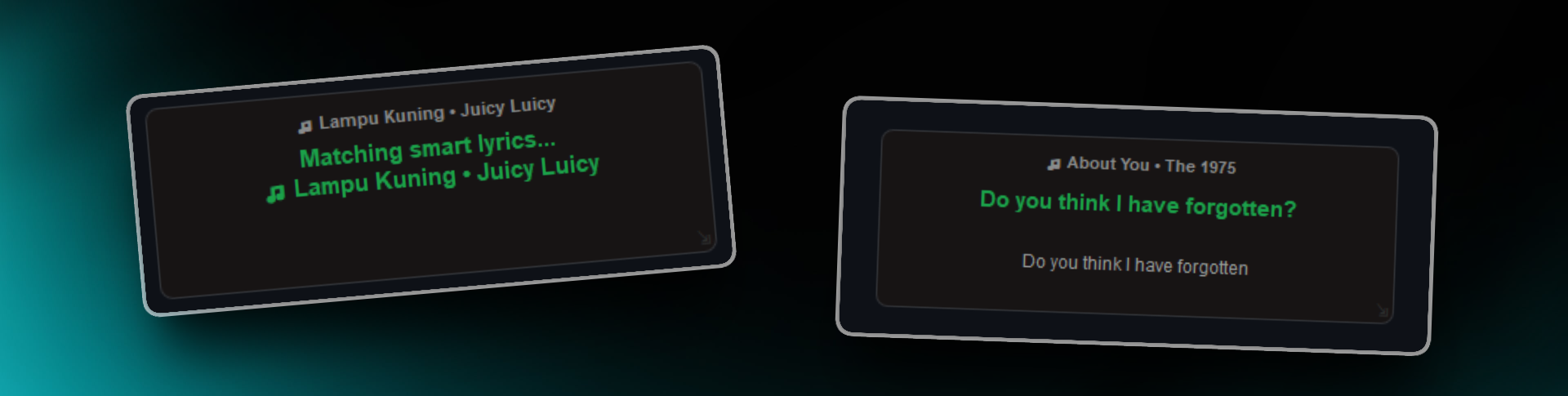
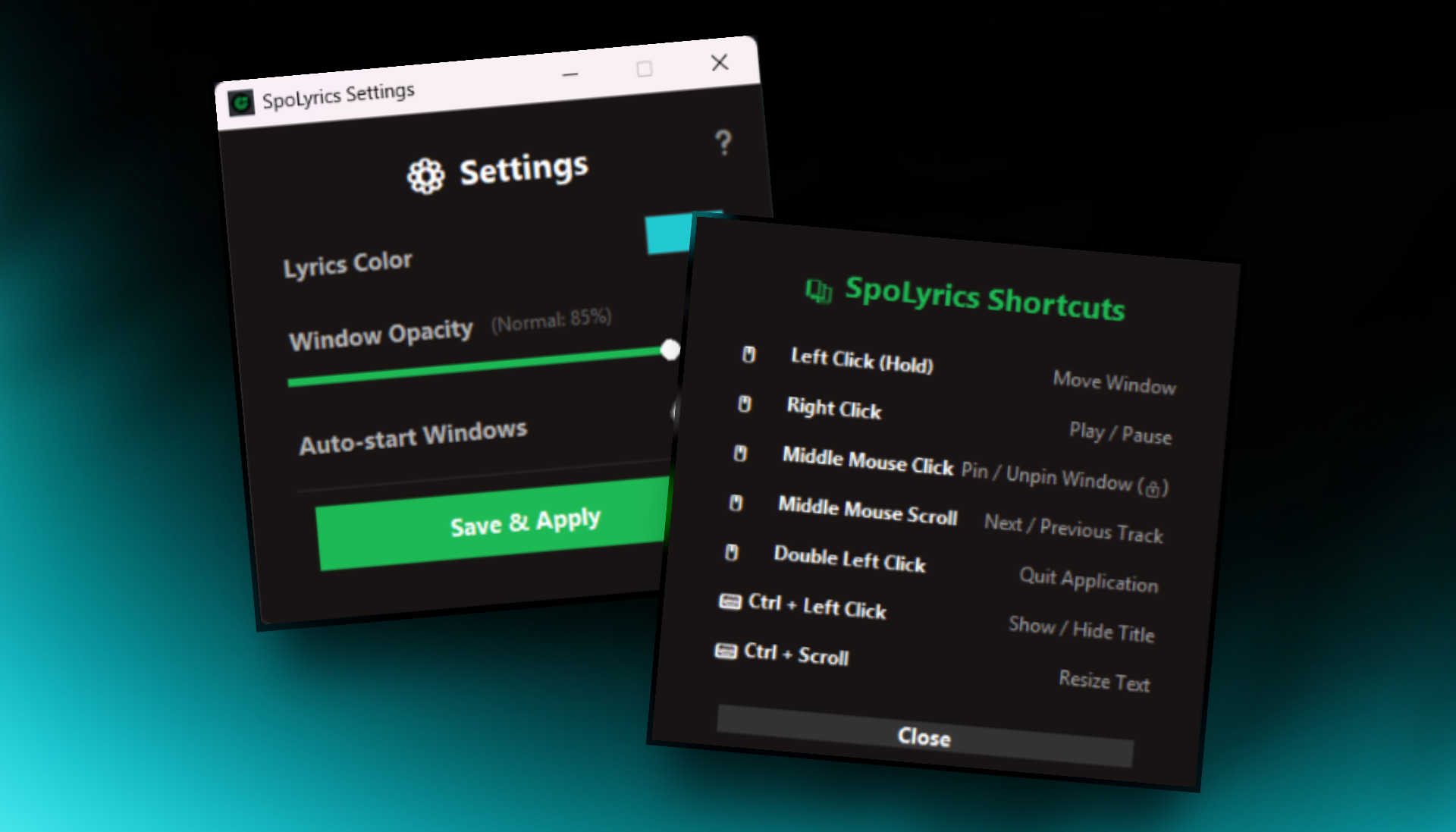
Background & Feedback
I built this project to solve a specific complaint from my friends: they wanted to listen to songs on Spotify or YouTube Music while working, but the official miniplayers didn't show any lyrics.
Note: This application is still in active development! If you encounter any bugs, have a feature request, or just want to suggest an improvement, please don't hesitate to open an issue or let me know.
Key Features
-
Zero-Delay Sync 100% precise time synchronization. Pulls real-time duration data directly from the Windows OS core.
-
Smart Duration Match Automatically matches lyrics based on the duration of the currently playing song version (solving the Radio Edit vs. Album Version mismatch).
-
Glassmorphism UI Elegant, transparent, and borderless design.
-
Freely Draggable Left-click and hold anywhere to drag the lyrics window wherever you like.
-
System Tray Integration Runs quietly in the background. Right-click the system tray icon (SpoLyrics logo) to access settings, hide the lyrics, or view shortcuts.
-
Advanced Customization (Settings) Change lyrics color using a modern real-time custom HSV color picker, adjust window transparency (opacity), and enable "Auto-Start with Windows". All configurations are permanently saved.
-
Auto Update Checker Automatically checks for the newest version on PyPI when you launch the app, offering a seamless one-click update and restart experience.
Invisible Controls
This application uses zero conventional buttons to keep the UI perfectly clean. Use these mouse gestures:
Right Click: Play / PauseMouse Scroll (Up/Down): Next / Previous trackMiddle Click (Scroll Wheel or 3-Finger Tap on Touchpad): Toggle Pin / Lock Window- When locked, the resize icon changes to a padlock (🔒) and the app ignores all drags/clicks to prevent accidental touches. Middle click again to unlock.
Ctrl + Left Click: Toggle song title visibilityCtrl + Mouse Scroll: Increase / Decrease font sizeDrag Bottom Right Corner (⇲): Resize the windowDouble Left Click: Close the application
Installation
Run this single command in your Windows Terminal or Command Prompt (Requires Python 3.8 to 3.12):
Note on Python Version: Do NOT use Python 3.13. The required
winsdkpackage does not yet have pre-compiled binaries for Python 3.13 and will fail to install. Please stick to Python 3.12 or older.
pip install spolyrics
(If you get a pip is not recognized error, use this alternative command instead:)
python -m pip install spolyrics
IMPORTANT (OS Support): This app is Exclusive to Windows. Because it uses
winsdk(Windows System Media Transport Controls) to achieve 0-delay performance without third-party servers, it CANNOT be installed on macOS or Linux.
Alternative Installation (Manual)
If you prefer to download the source code manually (e.g., as a .zip file) instead of using the direct git command above, you must install the required dependencies (the "shopping list") yourself.
Open your terminal inside the SpoLyrics folder and run:
pip install -r requirements.txt
Usage
Once installed, you can launch the app from any directory by typing:
spolyrics
Or, if you want it to run smoothly without spawning a black background terminal:
pythonw -m main
(Make sure Spotify or your Windows media player is running and playing a song!)
Updating
To update the application to the latest version, run:
pip install --upgrade spolyrics
Uninstallation
If you wish to remove this application from your computer, simply run:
pip uninstall spolyrics
License
This project is licensed under the MIT License - see the LICENSE file for details.
Release history Release notifications | RSS feed


Download files
Download the file for your platform. If you're not sure which to choose, learn more about installing packages.
Source Distribution
Built Distribution
Filter files by name, interpreter, ABI, and platform.
If you're not sure about the file name format, learn more about wheel file names.
Copy a direct link to the current filters
File details
Details for the file spolyrics-1.2.5.tar.gz.
File metadata
- Download URL: spolyrics-1.2.5.tar.gz
- Upload date:
- Size: 115.1 kB
- Tags: Source
- Uploaded using Trusted Publishing? No
- Uploaded via: twine/6.2.0 CPython/3.11.15
File hashes
| Algorithm | Hash digest | |
|---|---|---|
| SHA256 |
237aefde845113772c72d83af68b078ae4fababf62d96e4ff33350e57a597115
|
|
| MD5 |
1114506ea3fe47f7e15d0f7ae8dc3d5d
|
|
| BLAKE2b-256 |
18e1595322d57c0c84856b3033ef5bde2587415e69d79069ca160775461dbce0
|
File details
Details for the file spolyrics-1.2.5-py3-none-any.whl.
File metadata
- Download URL: spolyrics-1.2.5-py3-none-any.whl
- Upload date:
- Size: 111.3 kB
- Tags: Python 3
- Uploaded using Trusted Publishing? No
- Uploaded via: twine/6.2.0 CPython/3.11.15
File hashes
| Algorithm | Hash digest | |
|---|---|---|
| SHA256 |
a2655064abb96b80325b12241b8a38d7bc3a94f08033058b921fd3f7ea63986c
|
|
| MD5 |
d49cec5eba6d9aeb28d8a140815109d8
|
|
| BLAKE2b-256 |
37699df44d076f7666ee1ea3462baf841489403441d286304fb696da5827d27c
|






