
SDK for SpoonAI tools and agents

Project description
🚀 SpoonOS Core Developer Framework(SCDF)

Core developer framework of SpoonOS ——Agentic OS for the sentient economy. Next-Generation AI Agent Framework | Powerful Interactive CLI | Web3 infrastructure optimized Support
📘 How to Use This README
This README is your guide to getting started with the SpoonOS Core Developer Framework (SCDF). It walks you through everything you need—from understanding core capabilities to actually running your own agents.
Here's how to navigate it:
-
✨ Features: Start here to understand what SpoonOS can do. This section gives you a high-level overview of its agentic, composable, and interoperable architecture.
-
🔧 Installation: As of June 2025, SpoonOS currently supports Python only. This section tells you which Python version to use and how to set up a virtual environment.
-
🔐 Environment & API Key Config: Learn how to configure the API keys for various LLMs (e.g., OpenAI, Claude, deepseek). We also provide configuration methods for Web3 infrastructure such as chains, RPC endpoints, databases, and blockchain explorers.
-
🚀 Quick Start: Once your environment is ready, start calling our MCP server, which bundles a wide range of tools. Other servers are also available.
-
🛠️ CLI Tools: This section shows how to use the CLI to run LLM-powered tasks with ease.
-
🧩 Agent Framework: Learn how to create your own agents, register custom tools, and extend SpoonOS with minimal setup.
-
📊 Enhanced Graph System: Discover the powerful graph-based workflow orchestration system for complex AI agent workflows.
-
🔌 API Integration: Plug in external APIs to enhance your agent workflows.
-
🤝 Contributing: Want to get involved? Check here for contribution guidelines.
-
📄 License: Standard license information.
By the end of this README, you'll not only understand what SCDF is—but you'll be ready to build and run your own AI agents and will gain ideas on scenarios what SCDF could empower. Have fun!
Features
SpoonOS is a living, evolving agentic operating system. Its SCDF is purpose-built to meet the growing demands of Web3 developers — offering a complete toolkit for building sentient, composable, and interoperable AI agents.
- 🧠 ReAct Intelligent Agent - Advanced agent architecture combining reasoning and action
- 🔧 Custom Tool Ecosystem - Modular tool system for easily extending agent capabilities
- 💬 Multi-Model Support - Compatible with major large language models including OpenAI, Anthropic, DeepSeek, and more Web3 fine-tuned LLM
- 🏗️ Unified LLM Architecture - Extensible provider system with automatic fallback, load balancing, and comprehensive monitoring
- 📊 Enhanced Graph System - LangGraph-inspired workflow orchestration with state management, multi-agent coordination, and human-in-the-loop patterns
- ⚡ Prompt Caching - Intelligent caching for Anthropic models to reduce token costs and improve response times
- 🌐 Web3-Native Interoperability - Enables AI agents to communicate and coordinate across ecosystems via DID and ZKML-powered interoperability protocols.
- 🔌 MCP (Model Context Protocol) – Dynamic, protocol-driven tool invocation system. Agents can discover and execute tools at runtime over
stdio,http, orwebsockettransports — without hardcoding or restarts. - 📡 Scalable Data Access – Combined with MCP, agents gain seamless access to structured/unstructured data, including databases, Web3 RPCs, external APIs, and more.
- 💻 Interactive CLI - Feature-rich command line interface
- 🔄 State Management - Comprehensive session history and state persistence
- 🔗Composable Agent Logic - Create agents that can sense, reason, plan, and execute modularly — enabling use cases across DeFi, creator economy, and more
- 🚀 Easy to Use - Well-designed API for rapid development and integration
⚙️ Quick Installation
Prerequisites
- Python 3.11+
- pip package manager (or uv as a faster alternative)
# Clone the repo
$ git clone https://github.com/XSpoonAi/spoon-core.git
$ cd spoon-core

# Create a virtual environment
$ python -m venv spoon-env
$ source spoon-env/bin/activate  # For macOS/Linux

# Install dependencies
$ pip install -r requirements.txt
Prefer faster install? See docs/installation.md for uv-based setup.
🔐 Configuration Setup
SpoonOS uses a unified configuration system that supports multiple setup methods. Choose the one that works best for your workflow:
Method 1: Environment Variables (.env file) - Recommended
Create a .env file in the root directory:
cp .env.example .env
Fill in your API keys:
# LLM Provider Keys
OPENAI_API_KEY=sk-your-openai-key
ANTHROPIC_API_KEY=sk-your-claude-key
DEEPSEEK_API_KEY=your-deepseek-key
GEMINI_API_KEY=your-gemini-api-key

# Web3 Configuration
PRIVATE_KEY=your-wallet-private-key
RPC_URL=https://mainnet.rpc
CHAIN_ID=12345

# Tool-specific Keys
TAVILY_API_KEY=your-tavily-api-key
OKX_API_KEY=your-okx-api-key
OKX_SECRET_KEY=your-okx-secret-key
OKX_API_PASSPHRASE=your-okx-passphrase
Then load it in your Python entry file:
from dotenv import load_dotenv
load_dotenv(override=True)
Method 2: CLI Configuration
Start the CLI and configure interactively:
python main.py

# Configure API keys
> config api_key openai sk-your-openai-key
> config api_key anthropic sk-your-claude-key

# View current configuration
> config
Method 3: Direct config.json
Create or edit config.json directly for advanced configurations:
{
  "api_keys": {
    "openai": "sk-your-openai-key",
    "anthropic": "sk-your-claude-key"
  },
  "default_agent": "trading_agent",
  "agents": {
    "trading_agent": {
      "class": "SpoonReactMCP",
      "tools": [
        {
          "name": "tavily-search",
          "type": "mcp",
          "enabled": true,
          "mcp_server": {
            "command": "npx",
            "args": ["--yes", "tavily-mcp"],
            "env": {"TAVILY_API_KEY": "your-tavily-key"}
          }
        },
        {
          "name": "crypto_powerdata_cex",
          "type": "builtin",
          "enabled": true,
          "env": {
            "OKX_API_KEY": "your-okx-key",
            "OKX_SECRET_KEY": "your-okx-secret",
            "OKX_API_PASSPHRASE": "your-okx-passphrase",
            "OKX_PROJECT_ID": "your-okx-project-id"
          }
        }
      ]
    }
  }
}
📖 Complete Configuration Guide
Configuration Priority
SpoonOS uses a hybrid configuration system:
config.json(Highest Priority) - Runtime configuration, can be modified via CLI.envfile (Fallback) - Initial setup, used to generateconfig.jsonif it doesn't exist
Tool Configuration
SpoonOS supports two main tool types:
- MCP Tools: External tools via Model Context Protocol (e.g., web search, GitHub)
- Built-in Tools: Native SpoonOS tools (e.g., crypto data, blockchain analysis)
Example agent with both tool types:
{
  "agents": {
    "my_agent": {
      "class": "SpoonReactMCP",
      "tools": [
        {
          "name": "tavily-search",
          "type": "mcp",
          "mcp_server": {
            "command": "npx",
            "args": ["--yes", "tavily-mcp"],
            "env": {"TAVILY_API_KEY": "your-key"}
          }
        },
        {
          "name": "crypto_powerdata_cex",
          "type": "builtin",
          "enabled": true,
          "env": {
            "OKX_API_KEY": "your_okx_api_key",
            "OKX_SECRET_KEY": "your_okx_secret_key",
            "OKX_API_PASSPHRASE": "your_okx_api_passphrase",
            "OKX_PROJECT_ID": "your_okx_project_id"
          }
      ]
    }
  }
}
🏗️ Unified LLM Architecture
SpoonOS features a unified LLM infrastructure that provides seamless integration with multiple providers, automatic fallback mechanisms, and comprehensive monitoring.
Key Benefits
- Provider Agnostic: Switch between OpenAI, Anthropic, Gemini, and custom providers without code changes
- Automatic Fallback: Built-in fallback chains ensure high availability
- Load Balancing: Distribute requests across multiple provider instances
- Comprehensive Monitoring: Request logging, performance metrics, and error tracking
- Easy Extension: Add new providers with minimal code
Basic Usage
from spoon_ai.llm import LLMManager, ConfigurationManager

# Initialize the LLM manager
config_manager = ConfigurationManager()
llm_manager = LLMManager(config_manager)

# Simple chat request (uses default provider)
response = await llm_manager.chat([
    {"role": "user", "content": "Hello, world!"}
])
print(response.content)

# Use specific provider
response = await llm_manager.chat(
    messages=[{"role": "user", "content": "Hello!"}],
    provider="anthropic"
)

# Chat with tools
tools = [{"name": "get_weather", "description": "Get weather info"}]
response = await llm_manager.chat_with_tools(
    messages=[{"role": "user", "content": "What's the weather?"}],
    tools=tools,
    provider="openai"
)
Provider Configuration
Configure providers in your config.json:
{
  "llm_providers": {
    "openai": {
      "api_key": "sk-your-openai-key",
      "model": "gpt-4.1",
      "max_tokens": 4096,
      "temperature": 0.3
    },
    "anthropic": {
      "api_key": "sk-ant-your-key",
      "model": "claude-sonnet-4-20250514",
      "max_tokens": 4096,
      "temperature": 0.3
    },
    "gemini": {
      "api_key": "your-gemini-key",
      "model": "gemini-2.5-pro",
      "max_tokens": 4096
    }
  },
  "llm_settings": {
    "default_provider": "openai",
    "fallback_chain": ["openai", "anthropic", "gemini"],
    "enable_monitoring": true,
    "enable_caching": true
  }
}
Fallback and Load Balancing
# Set up fallback chain
llm_manager.set_fallback_chain(["openai", "anthropic", "gemini"])

# The manager will automatically try providers in order if one fails
response = await llm_manager.chat([
    {"role": "user", "content": "Hello!"}
])
# If OpenAI fails, it will try Anthropic, then Gemini
Custom Provider Integration
from spoon_ai.llm import LLMProviderInterface, register_provider

@register_provider("custom", capabilities=["chat", "completion"])
class CustomProvider(LLMProviderInterface):
    async def initialize(self, config):
        self.api_key = config["api_key"]
        # Initialize your provider

    async def chat(self, messages, **kwargs):
        # Implement chat functionality
        return LLMResponse(
            content="Custom response",
            provider="custom",
            model="custom-model",
            finish_reason="stop"
        )

    # Implement other required methods...
Monitoring and Debugging
from spoon_ai.llm import get_debug_logger, get_metrics_collector

# Get monitoring instances
debug_logger = get_debug_logger()
metrics = get_metrics_collector()

# View provider statistics
stats = metrics.get_provider_stats("openai")
print(f"Success rate: {stats['success_rate']:.1f}%")
print(f"Average response time: {stats['avg_response_time']:.2f}s")

# Get recent logs
logs = debug_logger.get_recent_logs(limit=10)
for log in logs:
    print(f"{log.timestamp}: {log.provider} - {log.method}")
Using OpenRouter (Multi-LLM Gateway)
from spoon_ai.chat import ChatBot
from spoon_ai.agents import SpoonReactAI

# Using OpenAI's GPT-4
openai_agent = SpoonReactAI(
    llm=ChatBot(model_name="gpt-4.1", llm_provider="openai")
)

# Using Anthropic's Claude
claude_agent = SpoonReactAI(
    llm=ChatBot(model_name="claude-sonnet-4-20250514", llm_provider="anthropic")
)

# Using OpenRouter (OpenAI-compatible API)
# Uses OPENAI_API_KEY environment variable with your OpenRouter API key
openrouter_agent = SpoonReactAI(
    llm=ChatBot(
        model_name="anthropic/claude-sonnet-4",     # Model name from OpenRouter
        llm_provider="openai",                      # MUST be "openai"
        base_url="https://openrouter.ai/api/v1"     # OpenRouter API endpoint
)
)
📊 Enhanced Graph System
SpoonOS includes a powerful graph-based workflow orchestration system inspired by LangGraph, designed for building complex AI agent workflows with state management, multi-agent coordination, and human-in-the-loop patterns.
Key Features
- StateGraph Architecture - Build workflows using nodes, edges, and conditional routing
- Multi-Agent Coordination - Supervisor patterns and agent routing capabilities
- Human-in-the-Loop - Interrupt/resume mechanisms for human approval workflows
- Streaming Execution - Real-time monitoring with values, updates, and debug modes
- LLM Integration - Seamless integration with SpoonOS LLM Manager
- State Persistence - Checkpointing and workflow resumption capabilities
Quick Example
from spoon_ai.graph import StateGraph
from typing import TypedDict

class WorkflowState(TypedDict):
    counter: int
    completed: bool

def increment(state: WorkflowState):
    return {"counter": state["counter"] + 1}

def complete(state: WorkflowState):
    return {"completed": True}

# Build and execute workflow
graph = StateGraph(WorkflowState)
graph.add_node("increment", increment)
graph.add_node("complete", complete)
graph.add_edge("increment", "complete")
graph.set_entry_point("increment")

compiled = graph.compile()
result = await compiled.invoke({"counter": 0, "completed": False})
# Result: {"counter": 1, "completed": True}
🚀 Quick Start
1. Start the CLI
python main.py
2. Load an Agent
# Load the default trading agent (includes web search + crypto tools)
> load-agent trading_agent

# Or load a specific agent
> load-agent web_researcher
3. Start Chatting
# Simple chat
> action chat "Hello, what can you help me with?"

# Use tools automatically
> action chat "Search for latest Bitcoin news"

# Get crypto market data
> action chat "Get BTC price and trading volume"
4. Explore Available Commands
# List all available commands
> help

# View current configuration
> config

# List available agents
> list-agents

# Check tool status
> action list_mcp_tools
🧩 Build Your Own Agent
1. Define Your Own Tool
from spoon_ai.tools.base import BaseTool

class MyCustomTool(BaseTool):
    name: str = "my_tool"
    description: str = "Description of what this tool does"
    parameters: dict = {
        "type": "object",
        "properties": {
            "param1": {"type": "string", "description": "Parameter description"}
        },
        "required": ["param1"]
    }

    async def execute(self, param1: str) -> str:
        # Tool implementation
        return f"Result: {param1}"
2. Define Your Own Agent
from spoon_ai.agents import ToolCallAgent
from spoon_ai.tools import ToolManager

class MyAgent(ToolCallAgent):
    name: str = "my_agent"
    description: str = "Agent description"
    system_prompt: str = "You are a helpful assistant..."
    max_steps: int = 5

    available_tools: ToolManager = Field(
        default_factory=lambda: ToolManager([MyCustomTool()])
    )
3. Run the Agent and Interact via Prompt
import asyncio

async def main():
    agent = MyCustomAgent(llm=ChatBot())
    result = await agent.run("Say hello to Scarlett")
    print("Result:", result)

if __name__ == "__main__":
    asyncio.run(main())
Register your own tools, override run(), or extend with MCP integrations. See docs/agent.md or docs/mcp_mode_usage.md
🔌 Advanced: Use Web3 Tools via MCP
SpoonOS supports runtime pluggable agents using the MCP (Model Context Protocol) — allowing your agent to connect to a live tool server (via SSE/WebSocket/HTTP) and call tools like get_contract_events or get_wallet_activity with no extra code.
Two ways to build MCP-powered agents:
Built-in Agent Mode: Build and run your own MCP server (e.g., mcp_thirdweb_collection.py) and connect to it using an MCPClientMixin agent.
Community Agent Mode: Use mcp-proxy to connect to open-source agents hosted on GitHub.
⚡ Prompt Caching
SpoonOS supports prompt caching for Anthropic models to reduce costs and improve performance. Enable/disable globally:
from spoon_ai.chat import ChatBot

# Enable prompt caching (default: True)
chatbot = ChatBot(
    llm_provider="anthropic",
    enable_prompt_cache=True
)
🗂️ Project Structure
spoon-core/
├── 📄 README.md                    # This file
├── 🔧 main.py                      # CLI entry point
├── ⚙️ config.json                  # Runtime configuration
├── 🔐 .env.example                 # Environment template
├── 📦 requirements.txt             # Python dependencies
│
├── 📁 spoon_ai/                    # Core framework
│   ├── 🤖 agents/                  # Agent implementations
│   ├── 🛠️ tools/                   # Built-in tools
│   ├── 🧠 llm/                     # LLM providers & management
│   ├── 📊 graph.py                 # Graph workflow system
│   └── 💬 chat.py                  # Chat interface
│
├── 📁 examples/                    # Usage examples
│   ├── 🤖 agent/                   # Custom agent demos
│   ├── 🔌 mcp/                     # MCP tool examples
│   └── 📊 graph_demo.py            # Graph system demo
│
├── 📁 doc/                         # Documentation
│   ├── 📖 configuration.md         # Setup & config guide
│   ├── 🤖 agent.md                 # Agent development
│   ├── 📊 graph_agent.md           # Graph workflows
│   ├── 🔌 mcp_mode_usage.md        # MCP integration
│   └── 💻 cli.md                   # CLI reference
│
└── 📁 tests/                       # Test suite
    ├── 🧪 test_agents.py
    ├── 🧪 test_tools.py
    └── 🧪 test_graph.py
Key Files
main.py- Start here! CLI entry pointconfig.json- Main configuration file (auto-generated)doc/configuration.md- Complete setup guideexamples/- Ready-to-run examples
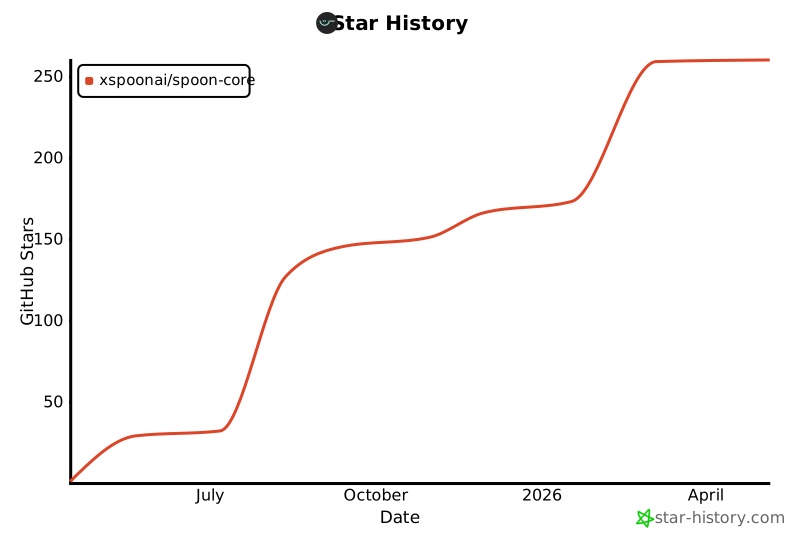
Star History
Release history Release notifications | RSS feed


Download files
Download the file for your platform. If you're not sure which to choose, learn more about installing packages.
Source Distribution
Built Distribution
Filter files by name, interpreter, ABI, and platform.
If you're not sure about the file name format, learn more about wheel file names.
Copy a direct link to the current filters
File details
Details for the file spoon_ai_sdk-0.2.1.tar.gz.
File metadata
- Download URL: spoon_ai_sdk-0.2.1.tar.gz
- Upload date:
- Size: 169.6 kB
- Tags: Source
- Uploaded using Trusted Publishing? No
- Uploaded via: twine/6.1.0 CPython/3.13.7
File hashes
| Algorithm | Hash digest | |
|---|---|---|
| SHA256 |
1f1e87088c78977d19909e2e372253401380972ec31ebfa79ab1eba28fca132c
|
|
| MD5 |
7fddf7f595a00e3a0e4fc9d08922a785
|
|
| BLAKE2b-256 |
95b40d898b3bb3accc1e3e50faa63bd8ae30ed015662570746701df77c0afd2f
|
File details
Details for the file spoon_ai_sdk-0.2.1-py3-none-any.whl.
File metadata
- Download URL: spoon_ai_sdk-0.2.1-py3-none-any.whl
- Upload date:
- Size: 178.4 kB
- Tags: Python 3
- Uploaded using Trusted Publishing? No
- Uploaded via: twine/6.1.0 CPython/3.13.7
File hashes
| Algorithm | Hash digest | |
|---|---|---|
| SHA256 |
e03e8f3e69f94e021fed96c561836bd62f22f94fdb0c872736a15241c1bf55e1
|
|
| MD5 |
ff98ec8c01538ebaff51ac619073cf3f
|
|
| BLAKE2b-256 |
deacdae6ed0da7f18db06f49b9f948513d745c2ffb0e4e157a02d4a86cf82772
|






