
Sports Betting Captcha Solver API
This project is the SadCaptcha Sports Betting Captcha Solver API client. The purpose is to make integrating SadCaptcha into your Selenium, Playwright, or Async Playwright app as simple as one line of code. Instructions for integrating with Selenium, Playwright, and Async Playwright are described below in their respective sections.
This package makes it easy to solve the soccer captcha where you need to drag the slider to score a goal. This captcha is often on sports betting platforms including paripulse, 1xbet, melbet, linebet, and starz888. Here is an example of what the captcha looks like:
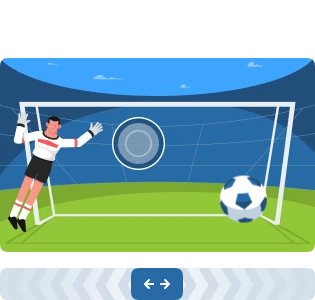
The user is required to drag the slider and release the mouse at the correct location. The captcha comes with a prompt that says "Drag the slider left or right to score a goal". This extension is able to handle that challenge automatically.
Requirements
- Python >= 3.10
- If using Nodriver - Chromium installed on system. This is the recommended method. Must use chromium, since Google Chrome does not support programmatically loading extensions.
- If using Selenium - Selenium properly installed and in
PATH. - If using Playwright - Playwright must be properly installed with
playwright install. - Stealth plugin - You should use the appropriate
stealthplugin for whichever browser automation framework you are using.- For Selenium, you can use undetected-chromedriver
- For Playwright, you can use playwright-stealth
Installation
This project can be installed with pip. Just run the following command:
pip install sports-betting-captcha-solver
Nodriver Client (Recommended)
⚠️ IMPORTANT ⚠️ Must use Chromium for nodriver since Google chrome no longer supports programmatically loading extensions!!
Nodriver is the latest advancement in undetected automation technology, and is the recommended method for using SadCaptcha.
Import the function make_nodriver_solver
This function will create an nodriver instance patched with the Sports Betting Captcha Solver chrome extension.
The extension will automatically detect and solve the captcha in the background, and there is nothing further you need to do.
from sports_betting_captcha_solver.launcher import make_nodriver_solver

async def main():
    launch_args = ["--headless=chrome"] # If running headless, use this option, or headless=new
    api_key = "YOUR_API_KEY_HERE"
    # NOTE: Keyword arguments passed to make_nodriver_solver() are directly passed to nodriver.start()!
    driver = await make_nodriver_solver(
        api_key,
        browser_args=launch_args,
        browser_executable_path="/usr/bin/chromium-browser" # IMPORTANT! Must use Chromium for nodriver since Google chrome no longer supports programmatically loading extensions!!
    ) # Returns nodriver browser
    # ... [The rest of your code that accesses the website goes here]
    # Now soccer captchas will be automatically solved!
All keyword arguments passed to make_nodriver_solver() are passed directly to nodriver.start().
Selenium Client
Selenium is not reccommended for this since these websites have strong bot detection. Use the nodriver package instead.
Import the function make_undetected_chromedriver_solver.
This function will create an undetected chromedriver instance patched with the Sports Betting Captcha Solver chrome extension.
The extension will automatically detect and solve the captcha in the background, and there is nothing further you need to do.
from sports_betting_captcha_solver import make_undetected_chromedriver_solver
from selenium_stealth import stealth
from selenium.webdriver import ChromeOptions
import undetected_chromedriver as uc

chrome_options = ChromeOptions()
# chrome_options.add_argument("--headless=chrome") # If running headless, use this option

api_key = "YOUR_API_KEY_HERE"
driver = make_undetected_chromedriver_solver(api_key, options=options) # Returns uc.Chrome instance
stealth(driver) # Add stealth if needed
# ... [The rest of your code that accesses soccer goes here]

# Now soccer captchas will be automatically solved!
You may also pass ChromeOptions to make_undetected_chromedriver_solver(), as well as keyword arguments for uc.Chrome().
Playwright Client
Playwright is not reccommended for this since these websites have strong bot detection. Use the nodriver package instead.
Import the function make_playwright_solver_context.
This function will create a playwright BrowserContext instance patched with the Sports Betting Captcha Solver chrome extension.
The extension will automatically detect and solve the captcha in the background, and there is nothing further you need to do.
from sports_betting_captcha_solver import make_playwright_solver_context
from playwright.sync_api import sync_playwright

# Need this arg if running headless
launch_args = ["--headless=chrome"]

api_key = "YOUR_API_KEY_HERE"
with sync_playwright() as p:
    context = make_playwright_solver_context(p, api_key, args=launch_args) # Returns playwright BrowserContext instance
    # ... [The rest of your code that accesses the website goes here]

# Now soccer captchas will be automatically solved!
You may also pass keyword args to this function, which will be passed directly to playwright's call to playwright.chromium.launch_persistent_context().
By default, the user data directory is a tempory directory that is deleted at the end of runtime.
Async Playwright Client
Import the function make_async_playwright_solver_context.
This function will create an async playwright BrowserContext instance patched with the Sports Betting Captcha Solver chrome extension.
The extension will automatically detect and solve the captcha in the background, and there is nothing further you need to do.
import asyncio
from playwright.async_api import async_playwright
from sports_betting_captcha_solver import make_async_playwright_solver_context

# Need this arg if running headless
launch_args = ["--headless=chrome"]

async def main():
    api_key = "YOUR_API_KEY_HERE"
    async with async_playwright() as p:
        context = await make_async_playwright_solver_context(p, api_key, args=launch_args) # Returns playwright BrowserContext instance
        # ... [The rest of your code that accesses the site goes here]

asyncio.run(main())

# Now soccer captchas will be automatically solved!
You may also pass keyword args to this function, which will be passed directly to playwright's call to playwright.chromium.launch_persistent_context().
By default, the user data directory is a tempory directory that is deleted at the end of runtime.
Contact
- Homepage: https://www.sadcaptcha.com/
- Email: greg@sadcaptcha.com
- Telegram @toughdata
1 maintainer

Download files
Download the file for your platform. If you're not sure which to choose, learn more about installing packages.
Source Distribution
Built Distribution
Filter files by name, interpreter, ABI, and platform.
If you're not sure about the file name format, learn more about wheel file names.
Copy a direct link to the current filters
File details
Details for the file sports_betting_captcha_solver-0.0.1.tar.gz.
File metadata
- Download URL: sports_betting_captcha_solver-0.0.1.tar.gz
- Upload date:
- Size: 9.8 kB
- Tags: Source
- Uploaded using Trusted Publishing? No
- Uploaded via:
twine/6.2.0 CPython/3.14.6
File hashes
| Algorithm | Hash digest | |
|---|---|---|
| SHA256 |
d3676efa7414d81fe6aba1ba51e9336819e41c578daa56e64f2a04cd6ddca589
|
|
| MD5 |
e835f433516fe75cf99c0f1918dd1901
|
|
| BLAKE2b-256 |
1110c812837fd6e10bec33cbf01099b89cf9f7c7d616011113ad615c557107c3
|
File details
Details for the file sports_betting_captcha_solver-0.0.1-py3-none-any.whl.
File metadata
- Download URL: sports_betting_captcha_solver-0.0.1-py3-none-any.whl
- Upload date:
- Size: 9.6 kB
- Tags: Python 3
- Uploaded using Trusted Publishing? No
- Uploaded via:
twine/6.2.0 CPython/3.14.6
File hashes
| Algorithm | Hash digest | |
|---|---|---|
| SHA256 |
6ec7463c755a578021581164a8b15446c1533902a3bd2c59dbe14e009b01d0fa
|
|
| MD5 |
f7014863955ed23be7b5b9144cae0ddb
|
|
| BLAKE2b-256 |
3799c8a0b9727f4af53f8430f3a6028b9dc15bd99f2a6b871da2512fca2e5cf2
|







