
Terminal based Spotify client designed to use Vim keybindings.

Project description
Spoti-CLI
Intro
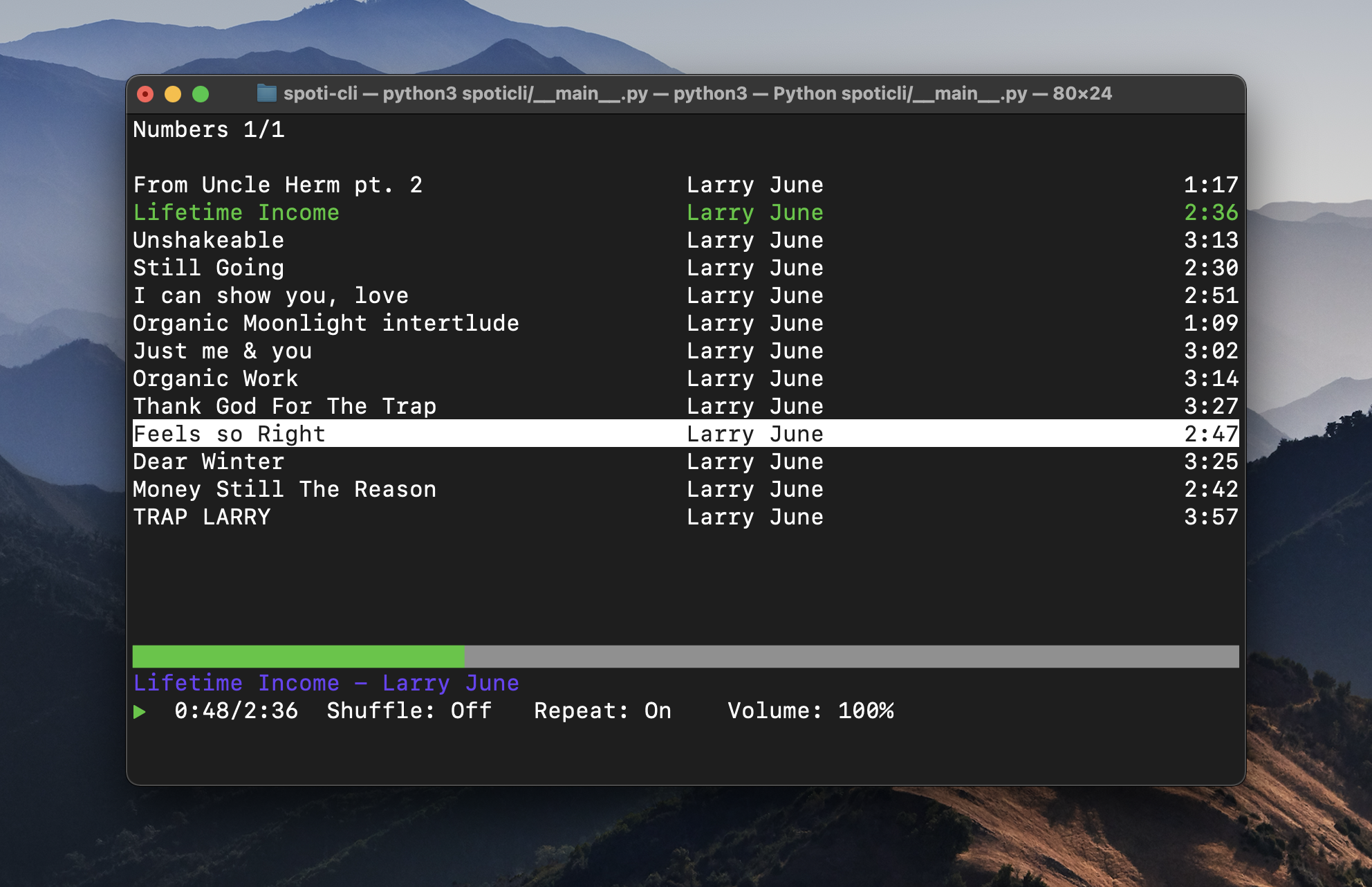
Spoti-CLI (subject to name change) is a command line TUI (terminal user interface) client for Spotify. Designed with efficiency in mind, Terminal Spotify uses Vim based keybindings for navigating and controlling the application.
Requirements
- python3 & pip
- Spotify Premium
- Spotify Developer Application
Install & Usage
pip3 install spoti-cli
spoticli
Shortcuts
Navigation
- h: back to previous menu (not implemented)
- j: down 1 menu item
- k: up 1 menu item
- l: select menu item
- enter: select menu item
- n: next page
- N: previous page
- g: go to first item on page
- G: go to last item on page
Music Player
- space: play/pause
- H: previous song
- L: next song
- s: toggle shuffle
- r: toggle repeat
- i: show lyrics
Development/Utils
- ?: help menu
- C: clear cache
- D: toggle logging display
To Do
Necesarry
- add package to package repos (homebrew, apt, etc...)
Useful Functionality
- responsive lines
- add setting; reset cache on startup
- menu searching with / (esc to exit search mode)
- artist menu
- album menu
- podcast listening functionality
Nice To Have
- add lyrics caching (permanent)
- Spotify search
- audio visualizer
- change Spotify device
- player view only mode
- minimal ui mode here
- centered lyrics/help menu
Known Bugs
- linux, can't play song in context
Contributing
Feel free to contribute any ideas or code to this project. Anything is welcomed!
If you come across any issues please report them in the issues tab. Thank you!
Release history Release notifications | RSS feed


Download files
Download the file for your platform. If you're not sure which to choose, learn more about installing packages.
Source Distribution
Built Distribution
Filter files by name, interpreter, ABI, and platform.
If you're not sure about the file name format, learn more about wheel file names.
Copy a direct link to the current filters
File details
Details for the file spoti-cli-1.0.0.tar.gz.
File metadata
- Download URL: spoti-cli-1.0.0.tar.gz
- Upload date:
- Size: 12.7 kB
- Tags: Source
- Uploaded using Trusted Publishing? No
- Uploaded via: twine/3.2.0 pkginfo/1.5.0.1 requests/2.24.0 setuptools/49.2.0 requests-toolbelt/0.9.1 tqdm/4.50.0 CPython/3.8.5
File hashes
| Algorithm | Hash digest | |
|---|---|---|
| SHA256 |
b2f90f699aa5cd1b98f879de9f0a022137c85c4e9930cdb1c8d185bc6a939ce7
|
|
| MD5 |
5c0ca9b968281d4303123c47480c8a1e
|
|
| BLAKE2b-256 |
9501bb5a75348eb51f8d0403663da5855abb75ea4712519196d0471f86afccd7
|
File details
Details for the file spoti_cli-1.0.0-py3-none-any.whl.
File metadata
- Download URL: spoti_cli-1.0.0-py3-none-any.whl
- Upload date:
- Size: 55.2 kB
- Tags: Python 3
- Uploaded using Trusted Publishing? No
- Uploaded via: twine/3.2.0 pkginfo/1.5.0.1 requests/2.24.0 setuptools/49.2.0 requests-toolbelt/0.9.1 tqdm/4.50.0 CPython/3.8.5
File hashes
| Algorithm | Hash digest | |
|---|---|---|
| SHA256 |
1b1dd97a37acda693afa5c92b778706a8ab5350c00dd22659fe0b2904f0eea53
|
|
| MD5 |
e0481ec49e64c80c13ab5c34a731fa04
|
|
| BLAKE2b-256 |
244e33be7fd3840e66da06a3e3ec0e721dd3ab4dd929d437e72c4186e2e32522
|







