
This project has been archived by its maintainers, and is no longer receiving any updates.
spotify-dlp



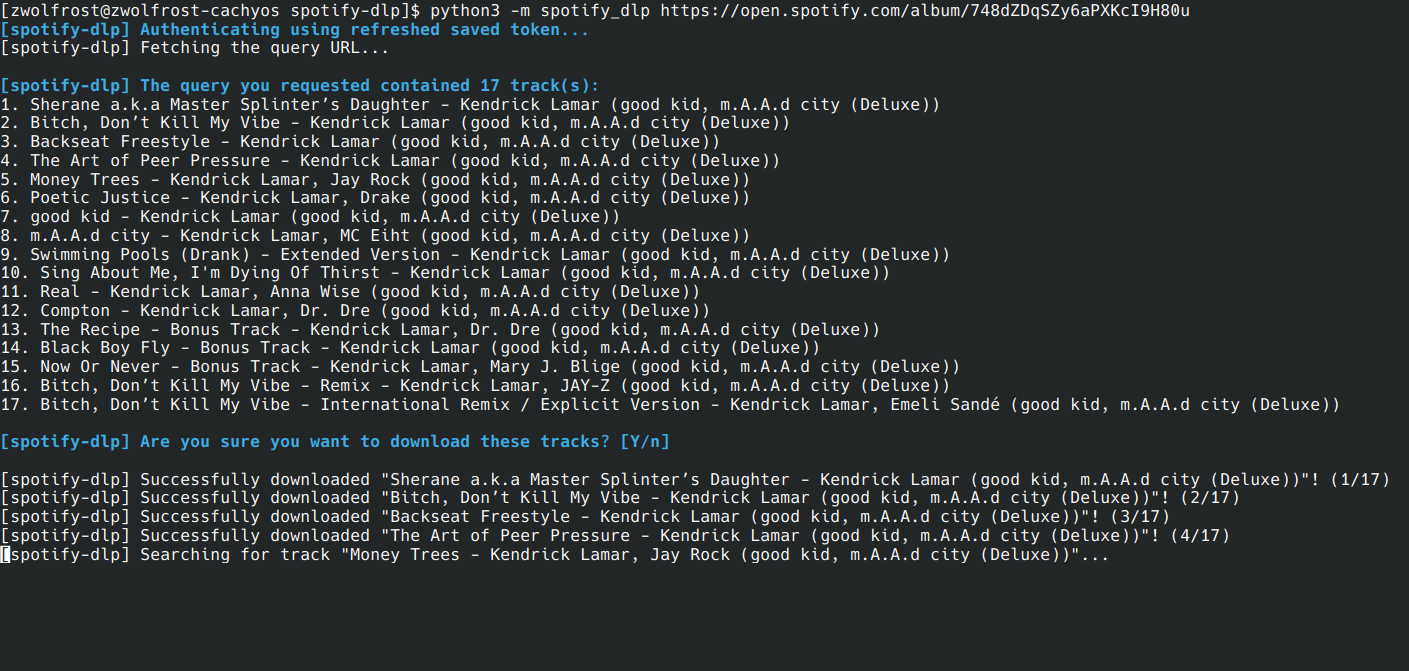
Command line downloader for spotify tracks, playlists, albums and top artists songs.
It works by taking the metadata out of these items using the Spotify API and searching them up on YouTube.
Then, it downloads the result by using yt-dlp.
This technically means that the tracks have a really small chance to be incorrect.
Installation
-
After having installed Python 3 with pip, you can install spotify-dlp using the following command:
pip install spotify-dlp
-
Then, you can authenticate your Spotify account by running this command and following the instructions:
spotify-dlp --authThe authentication tokens should get saved automatically and used for future commands.
Arguments
| Command | Example | Short Description |
|---|---|---|
| "kid a album" | The words to search up or a link to a spotify album, artist, playlist or track. Include keywords like album or playlistto specify the type of item to search for. |
|
-a --auth |
Authenticate using the client credentials flow and exit. | |
-i --client-id |
"qwertyuiop" | The Spotify Client ID. |
-s --client-secret |
"asdfghjkl" | The Spotify Client Secret. |
-f --format |
"{index}. {title}" | The format of the downloaded tracks' names. Set to help for a list of available fields. |
-r --range |
"2:6,10" | The beginning and ending index of the list items to download, separated by a colon " :" (1-based). Multiple ranges can be specified with a comma " ,". |
-o --output |
"./album/" | The output path of the downloaded tracks. |
-c --codec |
"mp3" | The audio codec of the downloaded tracks. Requires ffmpeg to be installed. |
-m --metadata |
Whether to download metadata (such as covers). | |
-b --browser |
"chrome" | The name of the browser from which cookies should be extracted, to bypass the age restriction. |
-y --yes |
Whether to skip the confirmation prompt. | |
-v --verbose |
Whether to display verbose information and full errors. | |
-h --help |
Show the help message and exit. |
Usage Examples
spotify-dlp jigsaw falling into place
spotify-dlp spirit phone album -o "./Desktop/spotify" -c mp3 -y
spotify-dlp https://open.spotify.com/album/2Vq0Y8wgiZRYtZ1mQ7zOMG -i "your_client_id" -s "your_client_secret"
Screenshots
Changelog
This changelog only includes changes that are worth mentioning.
- 2.0.0:
- Basically, everything changed. Also added package to PyPI.- 2.0.1:
- Fixed--verboseargument not working.
- Made youtube search more accurate.
- Better error handling.
- 2.0.1:
- 2.1.0:
- Added some QOL features.
- Fixed bug where a playlist with more than 100 tracks would be cut off.
- Better error handling.- 2.1.1:
- Fixed bug where track indexes would not show.
- Fixed bug where an album with more than 50 tracks would be cut off. - 2.1.2:
- Fixed bug where an error with a track would stop the whole process. - 2.1.3:
- Fixed bug where an already downloaded track would be downloaded again.
- Added colors to the output.
- Minor tweaks.
- 2.1.1:
- 2.2.0:
- Added--metadataargument, which allows cover downloading.
- Fixed bug where a playlist with an episode in it would error out.
- Fixed bug where the -c argument would give files double extensions. - 2.3.0:
- Removed client credentials authentication trough environment variables!
- Added--authargument, which allows for easy PKCE/browser authentication.
- Way more accurate youtube search (but a little slower)
- Better error handling.- 2.3.1:
- Fix windows path issues and terminal colors. - 2.3.2:
- Fixed port conflicts with--authargument.
- Faster searching.
- 2.3.1:
- 2.4.0:
- Removed authentication via PKCE flow, as spotify only supports up to 25 users for apps not made by companies. - 2.5.0:
- Added config file support.
- Renamed--sliceargument to--range.
- Added comma (",") support for--rangeargument.
- The item type can be now specified in the search query; removed--typeargument.- 2.5.1:
- Fixed wrong config path message on Windows.
- Fixed "Requested format is not available" error.
- Other small bug fixes. - 2.5.2:
- Fixed "Requested format is not available." error.
- 2.5.1:
- 2.6.0:
- Added--browserargument which allows importing cookies from a browser.
1 maintainer

Download files
Download the file for your platform. If you're not sure which to choose, learn more about installing packages.
Source Distribution
Built Distribution
Filter files by name, interpreter, ABI, and platform.
If you're not sure about the file name format, learn more about wheel file names.
Copy a direct link to the current filters
File details
Details for the file spotify_dlp-2.6.0.tar.gz.
File metadata
- Download URL: spotify_dlp-2.6.0.tar.gz
- Upload date:
- Size: 11.9 kB
- Tags: Source
- Uploaded using Trusted Publishing? No
- Uploaded via:
twine/6.1.0 CPython/3.13.11
File hashes
| Algorithm | Hash digest | |
|---|---|---|
| SHA256 |
1849dd4b0f4d9104a0bc2e08775a81cad5b36273e13c3cf86e771e0d502fc55a
|
|
| MD5 |
5c529c60bf03c47533e9233e258b3aee
|
|
| BLAKE2b-256 |
ea67c8f388237c4a3ceb751a9f4d3dfd0247df0586ed2b6d61838471923dbe48
|
File details
Details for the file spotify_dlp-2.6.0-py3-none-any.whl.
File metadata
- Download URL: spotify_dlp-2.6.0-py3-none-any.whl
- Upload date:
- Size: 11.6 kB
- Tags: Python 3
- Uploaded using Trusted Publishing? No
- Uploaded via:
twine/6.1.0 CPython/3.13.11
File hashes
| Algorithm | Hash digest | |
|---|---|---|
| SHA256 |
458264a1c50a77ee9d161ad71383682f48d88c98f70caa5f0b008f7b7683c15e
|
|
| MD5 |
642273876f77f1ce4d6917ee6d2a6e56
|
|
| BLAKE2b-256 |
cacb5b250137f14b18f94ede15e6fed661eda2f6dd8c8ae8fe08ecbbbbca5c67
|














