













spotify-utils
An awesome and easy-to-use CLI & TUI for various Spotify® utility tasks!
Report Bug
·
Request Feature
About The Project
spotify-utils is a lightweight command-line tool that takes care of the Spotify® housekeeping the official
clients don't. Authenticate once with your own Spotify® app credentials and you get a fast, scriptable way to
inspect, export, and clean up your playlists — either from plain CLI commands or from an interactive terminal UI.
Everything talks directly to the Spotify® Web API, output is available in formats you can pipe into other tools
(JSON) or hand to a human (console tables, HTML), and authentication is lazy so commands like --help and version
work without any configuration.
Key features
- Interactive TUI — a Textual-based terminal UI with tabs for browsing playlists and their tracks, scanning for duplicates, finding unavailable tracks, and exporting — all fully keyboard navigable and non-blocking.
- List playlists — show every playlist of the authenticated user as a console table or as JSON.
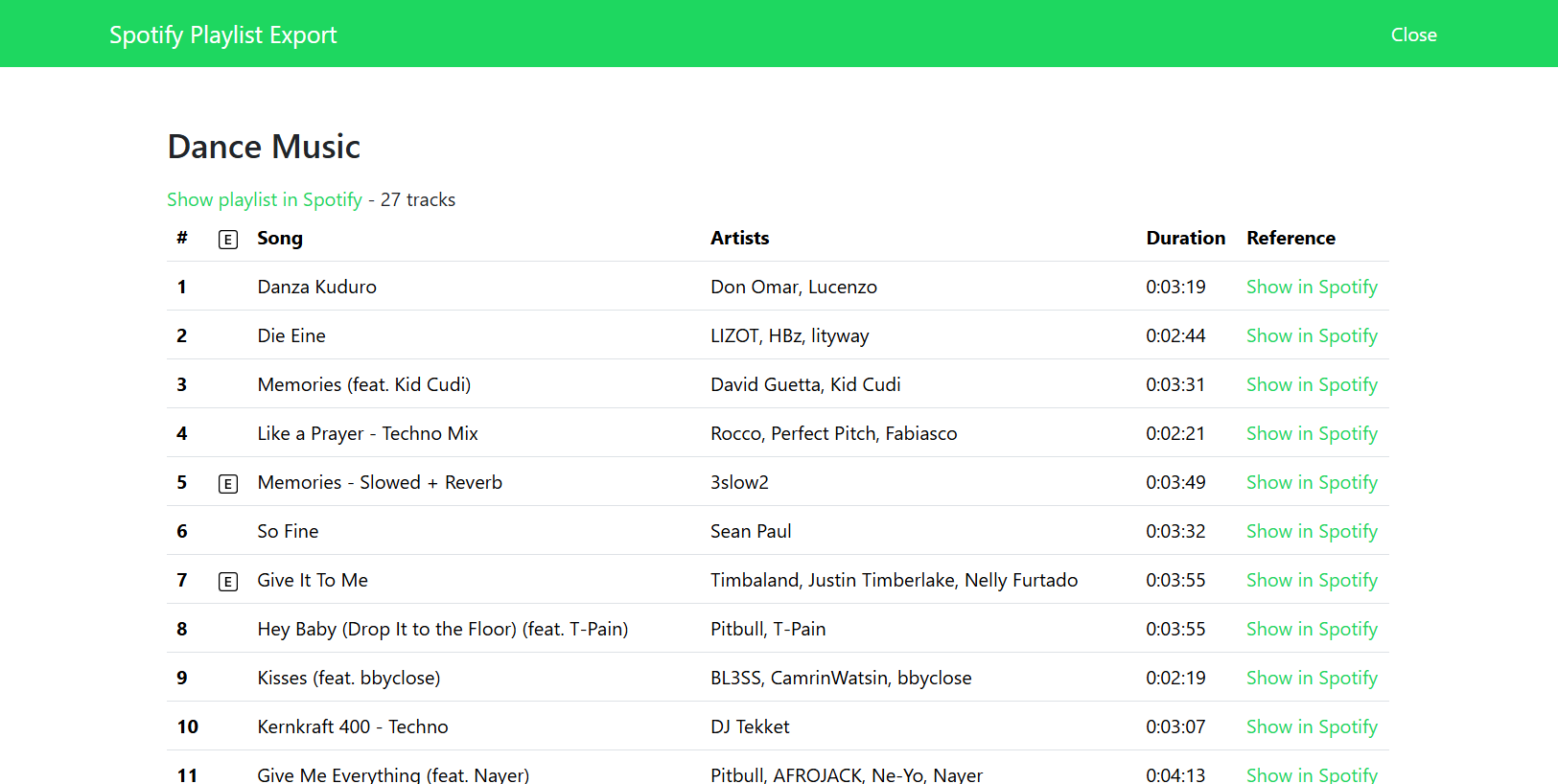
- Export playlists — export all playlists or a single playlist by ID to JSON or to a self-contained HTML report.
- Find duplicates — scan your owned playlists for tracks that appear in more than one playlist, with an optional detailed breakdown of which playlists each duplicate lives in.
- Find unavailable tracks — detect tracks in your owned playlists that have been removed from Spotify® or are greyed out (unavailable) in your market, including the reason why.
This CLI won't serve every need — more features are planned. Suggestions are welcome: fork the repo and open a pull request, or open an issue.
Getting Started
Prerequisites
- Python 3.10+
Installation
pipx install spotify-utils
Configuration
All methods require user authorization. You will need to register your app at Spotify Developer Dashboard to get the credentials necessary to make authorized calls. Click here to go to the step-by-step guide for creating a Spotify® application.
The CLI uses the Authorization Code Flow, which the user logs into once. It provides an access token that can be refreshed.
Environment variables are being used for configuration. In order for the CLI to function properly you need to provide the following environment variables (use export instead of SET on Linux):
set SPOTIFY_UTILS_CLIENT_ID='your-spotify-client-id'
set SPOTIFY_UTILS_CLIENT_SECRET='your-spotify-client-secret'
set SPOTIFY_UTILS_REDIRECT_URI='your-app-redirect-url'
In addition, the use of an .env file is supported:
SPOTIFY_UTILS_CLIENT_ID='your-spotify-client-id'
SPOTIFY_UTILS_CLIENT_SECRET='your-spotify-client-secret'
SPOTIFY_UTILS_REDIRECT_URI='your-app-redirect-url'
Usage and examples
In this section you can find usage examples of the CLI
Launch the interactive TUI
spotify-utils tui
The TUI provides four tabs:
- Playlists — browse all your playlists in a table; click a row to view its tracks
- Duplicates — scan your owned playlists and list any duplicate tracks
- Unavailable — scan your owned playlists for removed or greyed-out tracks
- Export — select a playlist (or all), choose JSON or HTML, and pick an output directory
Key bindings: Ctrl+L Playlists · Ctrl+D Duplicates · Ctrl+U Unavailable · Ctrl+E Export · Ctrl+Q Quit
List all playlists of the current user in JSON format
spotify-utils playlists list --format json
[
  {
    "collaborative": false,
    "description": "Car Music Mix 2022 🔥 Best Remixes of Popular Songs 2022 EDM, Bass Boosted  by Rise Music",
    "external_urls": {
      "spotify": "https://open.spotify.com/playlist/0fM4AkfoGygOHVXjsNB7io"
    }
  }
]
Find duplicates across all playlists and display additional details
spotify-utils playlists duplicates --verbose
Output:
Found 43 duplicate tracks across 20 playlists

| Index | Name              | Artists                 | Playlists              | Track ID               |
|-------|-------------------|-------------------------|------------------------|------------------------|
| 0     | Piercing Light    | League of Legends, Mako | Rock, Sonos Mainstream | 0163ud7I4Vb0ID5K7WBkq9 |
| 1     | Edge Of The Earth | Thirty Seconds To Mars  | Rock, Pop              | 0g9IOJwdElaCZEvcqGRP4b |
| ...   | ...               | ...                     | ...                    | ...                    |
Find removed or unavailable tracks across all playlists
spotify-utils playlists unavailable --verbose
Output:
Found 3 unavailable tracks across 20 playlists

| Index | Name            | Artists     | Playlist | Reason  |
|-------|-----------------|-------------|----------|---------|
| 0     | (removed track) |             | Rock     | removed |
| 1     | Some Song       | Some Artist | Pop      | market  |
| ...   | ...             | ...         | ...      | ...     |
Export playlists as HTML
spotify-utils playlists export --format html
Export specific playlist as JSON
spotify-utils playlists export --format json --id {PLAYLIST_ID}
Contributing
Contributions are what make the open source community such an amazing place to learn, inspire, and create. Any contributions you make are greatly appreciated.
If you have a suggestion that would make this better, please fork the repo and create a pull request. You can also simply open an issue with the tag "enhancement". Don't forget to give the project a star! Thanks again!
- Fork the Project
- Create your Feature Branch (
git checkout -b feature/AmazingFeature) - Commit your Changes (
git commit -m 'Add some AmazingFeature') - Push to the Branch (
git push origin feature/AmazingFeature) - Open a Pull Request
License
Distributed under the Apache License 2.0. See LICENSE for more information.
Disclaimer
[!IMPORTANT] This project isn’t endorsed by Spotify AB and doesn’t reflect the views or opinions of Spotify AB or anyone officially involved in producing or managing Spotify®
1 maintainer

Metadata
1 maintainer
Release files for spotify-utils 2.1.1
For a detailed explanation of source distributions (sdists) and built distributions (wheels), please see the package formats documentation.
Source distribution (sdist)
| File | Size | Uploaded | |
|---|---|---|---|
| spotify_utils-2.1.1.tar.gz | 21.9 kB | Details |
Built distribution (wheel)
| File | Interpreter | ABI | Platform | Reset |
|---|---|---|---|---|
| spotify_utils-2.1.1-py3-none-any.whl | Python 3 | none | any | Details |
Total release size: 45.3 kB
Release files / spotify_utils-2.1.1.tar.gz
| Download URL | spotify_utils-2.1.1.tar.gz |
|---|---|
| Size | 21.9 kB |
| Tags | Source |
|
SHA-256 checksum How to use checksums |
c2e45e11e2956c257b1e0c6550b6fc0c300b6e865e643fe1157c01de51fd9a02
|
|
BLAKE2b-256 checksum How to use checksums |
65648a09480b7f25f5d1988c771655410a739b048bb516d0ad7e24ce2bce9824
|
| Upload date | |
|
Uploaded using Trusted Publishing? What is trusted publishing? |
Yes |
| Uploaded via |
twine/6.1.0 CPython/3.13.13
|
Provenance
Provenance describes where a file came from. On PyPI, provenance is shared via attestations, which provide a verifiable record of the build or publishing details. View details, limitations and caveats.


PyPI Publish Attestation
PyPI verified that this artifact, at this checksum, originated from the publisher listed below.
Signed by GitHub Actions, verified by PyPI on Jun 18, 2026.
Transparency logRelease files / spotify_utils-2.1.1-py3-none-any.whl
| Download URL | spotify_utils-2.1.1-py3-none-any.whl |
|---|---|
| Size | 23.4 kB |
| Tags | Python 3 |
|
SHA-256 checksum How to use checksums |
99242158607c27caab59d21c6657deeffcd8e3949aea4ec9a23e5a450cb1fc80
|
|
BLAKE2b-256 checksum How to use checksums |
161ae7336ec179309e65603a1b35c2c2b8f0fe66e6cb807878680ce0c2c2ccac
|
| Upload date | |
|
Uploaded using Trusted Publishing? What is trusted publishing? |
Yes |
| Uploaded via |
twine/6.1.0 CPython/3.13.13
|
Provenance
Provenance describes where a file came from. On PyPI, provenance is shared via attestations, which provide a verifiable record of the build or publishing details. View details, limitations and caveats.
PyPI Publish Attestation
PyPI verified that this artifact, at this checksum, originated from the publisher listed below.
Signed by GitHub Actions, verified by PyPI on Jun 18, 2026.
Transparency log













