
Spotilyzer - AWS Spot Fleet Analyzer
Spotilyzer is a tool that defines AWS spot fleet pools for EKS. It uses spot fleet price data to select instance types for your pools. While there are many excellent articles which describe the architecture (such as this one), the task of selecting instance types is generally glossed over. This tool fills that gap by making the selection process a data-driven one.
Requirements
To run spotilyzer you need the following:
- Python 3.6 or later; and
- an AWS account with ec2:Describe* privileges.
Installation
If you just want to use the tool, you can install it with pip:
pip install spotilyzer
If you want to work on the code you can download and install it in developer mode like so:
git clone https://github.com/conrad-mukai/spotilyzer
cd spotilyzer
python setup.py develop
Background
The goal of spotilyzer is to provide a selection of spot fleet pools that can be used for EKS worker nodes, where the worker nodes are autoscaled with the Cluster Autoscaler. The autoscaler requires that all instance types in the spot fleet are approximately the same size (i.e., they have the same vCPU and memory). In addition, to optimize resource allocation several groups of spot fleets are provided where each instance type in a group has a similar memory to core ratio. Pods are assigned into groups based upon the ratio of the pod's memory to the pod's core.
Usage
The process of generating recommendations for spot fleets is done as follows:
spotilyzer init(optional);- edit
~/.spotilyzer/seeds.json(optional); spotilyzer create-candidates candidates.json;spotilyzer group-requests candidates.json requests.csv grouped-requests.json; andspotilyzer size-fleets candidates.json grouped-requests.json
Help
To get a list of subcommands use the -h option like so:
spotilyzer -h
To get details for a specific subcommand use the -h option again:
spotilyzer create-candidates -h
Setup
To satisfy the memory to core and similar size requirements, instance types are
grouped in a JSON file called seeds.json. These groupings are used throughout
spotilyzer calculations. The file has the following structure:
{
  "seeds": [
    {
      "group": "compute",
      "candidates": [
        {
          "candidate-name": "large",
          "instance-types": [
            "c3.large", "c4.large", "c5.large", "c5d.large", "c5a.large",
            "c5ad.large", "c5n.large", "c6g.large", "c6gd.large", "c6gn.large"
          ]
        },
        {
          "candidate-name": "xlarge",
          "instance-types": [
            "c3.xlarge", "c4.xlarge", "c5.xlarge", "c5d.xlarge", "c5a.xlarge",
            "c5ad.xlarge", "c5n.xlarge", "c6g.xlarge", "c6gd.xlarge",
            "c6gn.xlarge"
          ]
        },
        ...
      ]
    },
    {
      "group": "general",
      "candidates": [
        {
          "candidate-name": "large",
          "instance-types": [
            "m3.large", "m4.large", "m5.large", "m5d.large", "m5a.large",
            "m5ad.large", "m5n.large", "m5dn.large", "m5zn.large", "m6g.large",
            "m6gd.large"
          ]
        },
        ...
      ]
    },
    {
      "group": "memory",
      "candidates": [
        {
          "candidate-name": "large",
          "instance-types": [
            "r3.large", "r4.large", "r5.large", "r5d.large", "r5a.large",
            "r5ad.large", "r5b.large", "r5n.large", "r5dn.large", "r6g.large",
            "r6gd.large"
          ]
        },
        ...
      ]
    },
    ...
  ]
}
The seeds array has 3 objects which describe groups. A group is a collection
of instance types that have similar memory to core ratios, which AWS refers to
as a family. The seeds.json uses 3 families: c for compute optimized
(~2G/core), m for general purpose (~4G/core), and r for memory optimized
(~8G/core). Each group contains a candidates array which clusters instance
types according to size. For example in the compute group the large
candidate instance types generally have 4G memory and 2 cores, the xlarge
candidate instance types generally have 8G memory and 4 cores, etc.
Spotilyzer is packaged with seeds.json, but the user can get an editable copy
of the file in their home directory by running spotilyzer init which copies
the file to ~/.spotilyzer/seeds.json. If the user does this, that file takes
precedence over the file in the spotilyzer package. The user can also specify
an arbitrary seeds file using the create-candidates -s option.
Creating Candidates
The create-candidates subcommand pulls data from AWS to create spot fleet
candidates based upon the seeds file. The selection process uses the spot price
history for each instance type in every availability zone the instance type is
offered. Spotilyzer computes the average and standard deviation for every
instance type/availability zone combination. The n-lowest dynamic prices (where
dynamic price is average plus standard deviation) determines which instance
types are placed in the candidate pools.
The n-lowest calculation is driven by the minimum number of pools in a
candidate. This defaults to 20, but can be adjusted using the -m option.
The actual number of pools in a candidate can be less than the minimum if
instance type availability limits the selection size.
The results of the calculation are stored in a JSON file and summarized in the console like so:
group: compute
+-------------+---------+-----------------+---------------------------------------------+
| Candidate   |   Price | Instance Type   | Availability Zones                          |
+=============+=========+=================+=============================================+
| large       |   0.033 | c5d.large       | us-west-2c,us-west-2d,us-west-2a,us-west-2b |
|             |         | c3.large        | us-west-2a,us-west-2b,us-west-2c            |
|             |         | c5n.large       | us-west-2a,us-west-2c,us-west-2b            |
|             |         | c6g.large       | us-west-2a,us-west-2b,us-west-2c,us-west-2d |
|             |         | c4.large        | us-west-2a,us-west-2b,us-west-2c            |
|             |         | c5.large        | us-west-2a,us-west-2d,us-west-2b,us-west-2c |
+-------------+---------+-----------------+---------------------------------------------+
| xlarge      |   0.068 | c3.xlarge       | us-west-2c,us-west-2a,us-west-2b            |
|             |         | c6g.xlarge      | us-west-2a,us-west-2b,us-west-2c,us-west-2d |
|             |         | c4.xlarge       | us-west-2c,us-west-2b,us-west-2a            |
|             |         | c5n.xlarge      | us-west-2c,us-west-2b,us-west-2a            |
|             |         | c5d.xlarge      | us-west-2b,us-west-2c,us-west-2d,us-west-2a |
|             |         | c5ad.xlarge     | us-west-2a,us-west-2b,us-west-2d            |
+-------------+---------+-----------------+---------------------------------------------+
This shows the candidate name, the average hourly price across the candidate
fleet, and the pools (the instance types and all availability zones they are
offered). The information stored in the JSON file is difficult to read. To
view the contents of the JSON file in the same tabular format as shown above
use the show-candidates subcommand.
The create-candidates subcommand can be run against any AWS region and with
any subset of availability zones (the default is all availability zones in a
region). The candidates should only be used in the specified region since
spot prices and instance type availability vary greatly across regions.
Grouping Resources
After creating candidates, pod requests are assigned to node groups. The
group-requests subcommand loads a file describing all pods to be deployed
onto spot fleets and assigns each pod to a group in the candidates file. This
is done by comparing the memory to cores ratio of each pod with the group
average memory to cores ratios. The closest match determines the group
assignment.
The requests are specified in either CSV or JSON format. The CSV format is intended to load data from a spreadsheet. Generally the cluster administrator does not know the details of all pods deployed, so they can request that development teams fill out a spreadsheet with the relevant data. After collecting all data in a single spreadsheet, it is exported to a CSV file. An example of the spreadsheet is shown below:
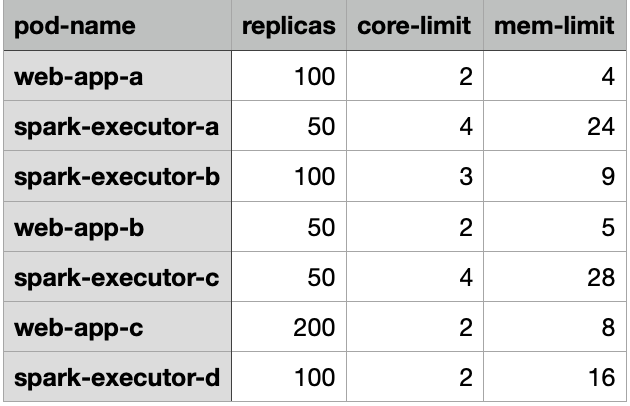
The headers are used to set keys in a JSON document, so they must be present in the CSV file.
The group-requests subcommand results are summarized on the console like so:
Pod               Group
----------------  -------
web-app-a         compute
spark-executor-a  memory
spark-executor-b  general
web-app-b         compute
spark-executor-c  memory
web-app-c         general
spark-executor-d  memory
The user can then update the node-selector or node-affinity specs in the
Kubernetes manifest to the designated node groups.
Sizing Fleets
The size-fleets subcommand takes the results of create-candidates and
group-requests to create an estimate of each spot fleet candidate's size and
cost. The results of this analysis is presented on the console like so:
+---------+----------+------------------+--------------+
| Group   | Fleet    |   Instance Count |   Total Cost |
+=========+==========+==================+==============+
| compute | xlarge   |               95 |        6.481 |
|         | 2xlarge  |               50 |        6.821 |
|         | 16xlarge |                6 |        7.010 |
|         | 4xlarge  |               25 |        7.136 |
|         | 8xlarge  |               13 |        7.175 |
|         | 12xlarge |                9 |        7.569 |
|         | 24xlarge |                5 |        8.040 |
+---------+----------+------------------+--------------+
| general | xlarge   |              210 |       14.577 |
|         | 12xlarge |               18 |       15.445 |
|         | 2xlarge  |              105 |       15.543 |
|         | 4xlarge  |               55 |       15.995 |
|         | 8xlarge  |               28 |       16.306 |
|         | 16xlarge |               14 |       17.213 |
|         | 24xlarge |                9 |       17.409 |
+---------+----------+------------------+--------------+
| memory  | 2xlarge  |               90 |       13.320 |
|         | 12xlarge |               15 |       13.629 |
|         | 4xlarge  |               45 |       13.877 |
|         | 8xlarge  |               23 |       14.396 |
|         | 16xlarge |               12 |       14.783 |
|         | 24xlarge |                8 |       15.675 |
+---------+----------+------------------+--------------+
The output shows an estimate of the number of instances and total hourly cost for each spot fleet candidate. The fleets are ordered by cost.
In order to account for overhead and wasted resources due to random packing of
pods a buffer is applied to the requests. The default buffer is 20%, but this
can be adjusted using the -b option.
A selection of fleets are presented so specific requirements can be applied. For example, too few nodes can result in an adverse blast radius effect where the loss of a single node is overly disruptive. On the other hand if there is a limit on the number of instances available, then too many nodes is undesirable. Given all the choices, the tool provides a data driven rationale for selecting spot fleet pools.
Testing
To run the unit tests download the code and enter the following command in the root directory of the repository:
python -m unittest
1 maintainer

Release files for spotilyzer 0.2.0
For a detailed explanation of source distributions (sdists) and built distributions (wheels), please see the package formats documentation.
Source distribution (sdist)
| File | Size | Uploaded | |
|---|---|---|---|
| spotilyzer-0.2.0.tar.gz | 23.7 kB | Details |
Built distribution (wheel)
| File | Interpreter | ABI | Platform | Reset |
|---|---|---|---|---|
| spotilyzer-0.2.0-py3-none-any.whl | Python 3 | none | any | Details |
Total release size: 50.1 kB
Release files / spotilyzer-0.2.0.tar.gz
| Download URL | spotilyzer-0.2.0.tar.gz |
|---|---|
| Size | 23.7 kB |
| Tags | Source |
|
SHA-256 checksum How to use checksums |
4bd5dfbf8c4d88ee1f95f4c879950b9062fe0544f023a0f5f7b2db5ed3a022b9
|
|
BLAKE2b-256 checksum How to use checksums |
bb83dab2683e4842601b53a996d0c5aa8aafebfebdd81eb4f1e1950d9147d52c
|
| Upload date | |
|
Uploaded using Trusted Publishing? What is trusted publishing? |
No |
| Uploaded via |
twine/3.3.0 pkginfo/1.7.0 requests/2.25.1 setuptools/49.2.1 requests-toolbelt/0.9.1 tqdm/4.56.2 CPython/3.8.7
|
Release files / spotilyzer-0.2.0-py3-none-any.whl
| Download URL | spotilyzer-0.2.0-py3-none-any.whl |
|---|---|
| Size | 26.4 kB |
| Tags | Python 3 |
|
SHA-256 checksum How to use checksums |
0d2482aa6315f28d83faf25d0cbc0668b915b7032c193000f890895c9b1d2128
|
|
BLAKE2b-256 checksum How to use checksums |
bc18cff247030766f0da3af6335681c9192e6f1c743950fb86ef1fc8c984be0d
|
| Upload date | |
|
Uploaded using Trusted Publishing? What is trusted publishing? |
No |
| Uploaded via |
twine/3.3.0 pkginfo/1.7.0 requests/2.25.1 setuptools/49.2.1 requests-toolbelt/0.9.1 tqdm/4.56.2 CPython/3.8.7
|














