
sprezzature-audio
Local-first speech processing for the sprezzature stack.
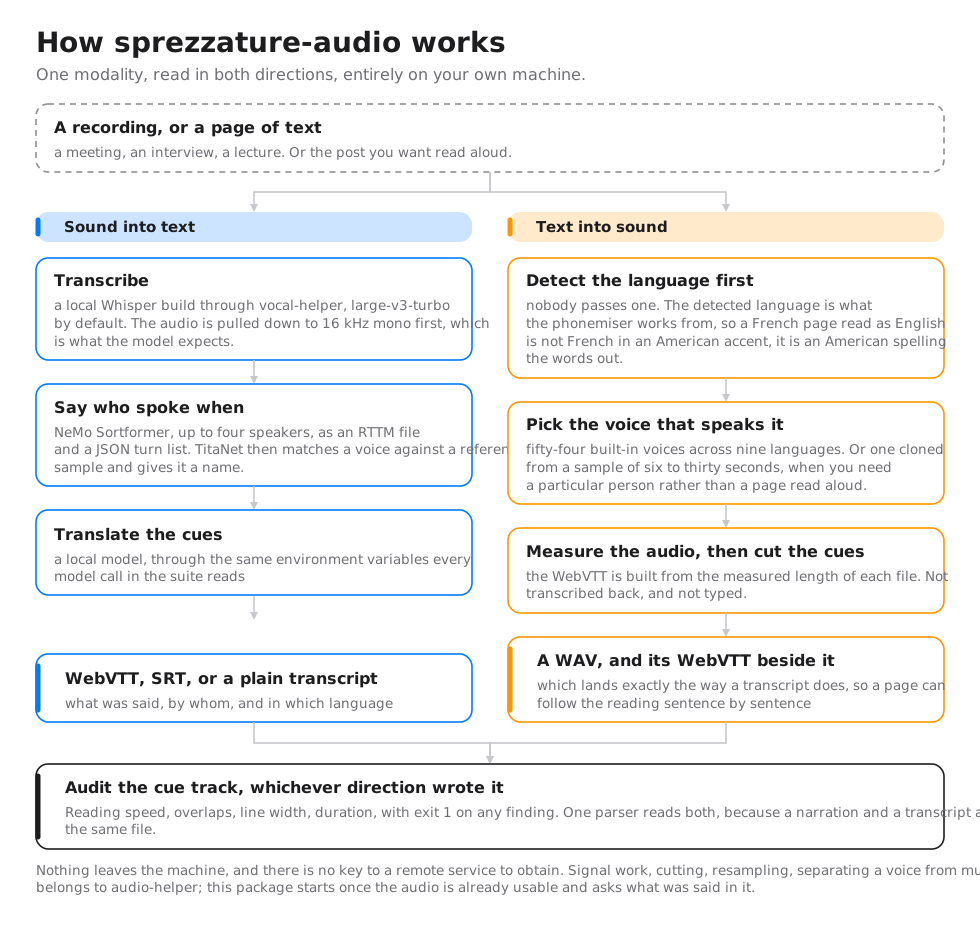
Point it at a recording (a meeting, an interview, a lecture) and it hands back a transcript that says not just what was said, but who said it and in which language. Everything runs on your own machine: no audio leaves it, and no API key is needed. If you instead need to cut, resample, or clean up the audio signal itself (trim silence, separate a voice from background music), that is a different job, handled by a sibling package, audio-helper; this package starts once the audio is already usable and asks what was said in it.
How it works
What it does
Six scripts, each one stage of the pipeline. A few terms recur throughout the table below, so here they are once, up front, rather than repeated at every mention:
- ASR (automatic speech recognition) is the technical name for speech-to-text: turning a sound wave into written words.
- WebVTT and SRT are two competing plain-text file formats for storing subtitles: a list of
[start time, end time, text]triples. WebVTT is the web-standard one (what a<video>tag expects); SRT is older and more universally supported by video players. - RTTM is a plain-text format from the speech-research world for recording who spoke when: one line per speaker turn, with a start time, a duration, and a speaker label.
- NeMo is NVIDIA's open-source toolkit for speech models; Sortformer and TitaNet are two specific NeMo models used here (diarization and speaker fingerprinting, explained below).
| Script | What it produces |
|---|---|
captions_from_whisper.py |
WebVTT, SRT, or a plain transcript, via a local Whisper model (through vocal-helper) |
diarize_from_nemo.py |
An RTTM file plus a JSON turn list, via NeMo's Sortformer model (up to 4 speakers) |
identify_from_titanet.py |
A speaker's identity, matched against a reference voice sample, via NeMo's TitaNet model |
caption_diarize.py |
The combined pipeline: transcript and speaker turns merged in one pass |
name_from_transcript.py |
A guess at each speaker's real name, read off the diarized transcript (pattern matching, with an optional LLM assist) |
translate_captions.py |
A translated copy of a VTT/SRT file, via a local LLM |
audit_captions.py |
What is wrong with a caption track: reading speed, overlaps, line width, duration |
And the other direction — text back into sound, because that is the same modality read backwards. A narration lands as a WAV plus a WebVTT, exactly like a transcript does, so a page can follow the reading sentence by sentence.
| Script | What it produces |
|---|---|
narrate_kokoro.py |
A narrated WAV and its cues, from 54 built-in voices in nine languages. The default. |
narrate_openvoice.py |
The same, in a voice cloned from a 6–30 s sample |
narrate_chatterbox.py |
The same, with emotion and intensity hints the model can act on |
pick_voice.py |
A one-line demo clip per voice, so a narrator is chosen by listening |
install_narrate.py |
The checkpoints each engine needs |
Nobody passes a language. narrate_kokoro.py reads the text, detects the
language, and picks the voice that speaks it — which matters more than it
sounds: the detected language is what the phonemiser works from, so French
read as English is not French in an American accent, it is an American
spelling the words out.
Install
One line. Everything this package does — captioning, diarization, speaker ID, translation, narration, the HTTP and MCP surfaces — installs with it.
pip install sprezzature-audio
Until 2026-11-01 this section listed eight extras and you had to know which
one you wanted before the package could do its job. pip install sprezzature-audio gave four packages and no voice, and [all] did not even
include narration. The extras are gone; the two that remain are not features
([dev] is the test toolchain, [narrate] is a deprecated empty alias kept
so that siblings asking for it keep resolving).
Two things pip cannot do for you:
# espeak-ng is the one half pip cannot supply. Kokoro needs it to phonemise.
brew install espeak-ng          # or: apt install espeak-ng

# Model weights are fetched on demand, not shipped in the wheel.
sprezzature-audio-install-voice --engine kokoro       # ~340 MB
sprezzature-audio-install-voice --engine openvoice    # weights from GitHub
Two consequences worth stating rather than discovering:
- Python 3.10 to 3.13.
requires-pythonis>=3.10,<3.14, becausevocal-helper,audio-helper,video-helperandspeaker-helperall declare<3.14at the versions named in the manifest. While they sat behind extras the base resolved on 3.14; onepip installmeans the ceiling is the package's own, so the package says so instead of handing you a resolver dump. - torch comes with it, through
speaker-helper[chatterbox]— the engine the router answers for offline narration. It is a floor (torch>=2.0.0), not a pin: a resolved install gives torch 2.15 and numpy 2.5 across 195 packages. Importing the library does not load it;import sprezzature_audioto parse a WebVTT file touches no model at all, and a test enforces that.
Quick start
Fifteen tools ship here, each with its own command — which is what a script should call. One front door is how you find them, under two spellings:
sprezzature-audio --help   # the catalogue, with a line per tool
make-audio --help          # the same command, under its older name

make-audio audit subtitles.vtt
make-audio narrate post.md --out post.mp3
Both names resolve to the same callable, so they cannot drift. There were two parsers until 2026-10-25, an argparse one and a click one sharing a table, and every sub-command had to be written twice; click is the only one now, and a base dependency rather than an extra, because with argparse gone no parser ships with Python.
Every argument after the tool name belongs to that tool, so
make-audio captions --help shows the transcription flags, not these.
# Transcribe a video to WebVTT
sprezzature-audio-captions talk.mp4

# Same, as a plain-text transcript
sprezzature-audio-captions podcast.mp3 --format text

# Diarize an audio file: who spoke when
sprezzature-audio-diarize interview.wav

# Full pipeline: caption_diarize.py merges caption + diarization files
# already produced by the two steps above (it takes no media file itself)
sprezzature-audio-captions meeting.mp4
sprezzature-audio-diarize meeting.mp4
sprezzature-audio-pipeline --captions meeting.vtt --diarization meeting.diarization.json

# Guess speaker names from the diarized transcript
sprezzature-audio-name meeting.speakers.vtt

# Translate captions to French
sprezzature-audio-translate talk.vtt --lang fr
As a library
import sprezzature_audio hands back the engine, not a version string. What
is importable with no extras at all is everything that needs no model —
the same set the HTTP API serves, and for the same reason: it is fast and
pure.
import sprezzature_audio as audio

cues = audio.parse(open("talk.vtt").read())
for finding in audio.audit_cues(cues):      # too fast, too short, too wide
    print(finding)

print(audio.write_srt(cues))                # VTT -> SRT, same reader
print(audio.word_error_rate(reference, hypothesis)["wer"])
print(audio.describe_device())              # which accelerator this host uses
The model-backed half resolves on first use, so the import above costs nothing even on a machine with Whisper, NeMo and Kokoro installed:
audio.synthesise(...)      # [narrate]  — Kokoro
audio.transcribe(...)      # Whisper, through vocal-helper
audio.diarize(...)         # NeMo Sortformer
audio.translate_cues(...)  # a local model, through best-engine-ai-helper
Ask for one without its extra and the error names the pip install that
fixes that tool, not the package in general.
How this differs from audio-helper
audio-helper works at the signal level: converting formats, slicing a waveform, resampling, separating a voice from background music with Demucs. It has no notion of words; a silence and a sentence look the same to it.
sprezzature-audio works at the content level: it reads speech, attributes it to a speaker, and translates it. The two packages are meant to be used together, not as alternatives; captions_from_whisper.py in fact calls audio-helper internally, to extract a 16 kHz mono WAV file (the format Whisper expects) before it ever runs the speech model.
Models used
| Task | Model | Backend |
|---|---|---|
| ASR (speech to text) | large-v3-turbo by default, or any other GGML-format Whisper weights (the compact file format vocal-helper's underlying engine, whisper.cpp, expects) |
vocal-helper / pywhispercpp |
| Diarization (who spoke when) | nvidia/diar_sortformer_4spk-v1 |
NeMo |
| Speaker ID (matching a voice to a reference sample) | nvidia/speakerverification_en_titanet_large |
NeMo |
| Translation | Configured through the SPREZZATURE_LLM_* environment variables |
best-engine-ai-helper |
Environment variables
| Variable | Purpose |
|---|---|
SPREZZATURE_WHISPER_MODEL |
Override the Whisper model path or alias |
SPREZZATURE_CACHE_DIR |
Cache directory for Whisper weights and transcripts |
SPREZZATURE_NO_CACHE |
Set to any value to disable the transcript cache |
NEMO_DIAR_MODEL |
Override the NeMo diarization checkpoint |
SPREZZATURE_LLM_* |
LLM backend configuration (see best-engine-ai-helper) |
License
BSD 3-Clause. See LICENSE.
Author
Warith HARCHAOUI: deraison.ai
1 maintainer

Metadata
1 maintainer
Release files for sprezzature-audio 1.9.0
For a detailed explanation of source distributions (sdists) and built distributions (wheels), please see the package formats documentation.
Source distribution (sdist)
| File | Size | Uploaded | Provenance | Actions |
|---|---|---|---|---|
| sprezzature_audio-1.9.0.tar.gz | 170.7 kB | Without provenance | Details for sprezzature_audio-1.9.0.tar.gz |
Built distribution (wheel)
| File | Interpreter | ABI | Platform | Actions Reset |
|---|---|---|---|---|
| sprezzature_audio-1.9.0-py3-none-any.whl | Python 3 | none | any | Details for sprezzature_audio-1.9.0-py3-none-any.whl |
Total release size: 306.5 kB
Release files / sprezzature_audio-1.9.0.tar.gz
| Download URL | sprezzature_audio-1.9.0.tar.gz |
|---|---|
| Size | 170.7 kB |
| Tags | Source |
|
SHA-256 checksum How to use checksums |
176fcb0ecda0c7372102afb2ba705c45b98ae75b970480199260542b2ca6daf5
|
|
BLAKE2b-256 checksum How to use checksums |
6119f74b5139f92cbbc0ad346385ea8266cfcd4f77b544296189e66490428233
|
| Upload date | |
|
Uploaded using Trusted Publishing? What is trusted publishing? |
No |
| Uploaded via |
twine/7.0.0 CPython/3.13.13
|
Release files / sprezzature_audio-1.9.0-py3-none-any.whl
| Download URL | sprezzature_audio-1.9.0-py3-none-any.whl |
|---|---|
| Size | 135.8 kB |
| Tags | Python 3 |
|
SHA-256 checksum How to use checksums |
6550d9cca0061d5a83aec3a34669bb2049f0da234e254afee12c9d62a15c45ac
|
|
BLAKE2b-256 checksum How to use checksums |
76f0b05f0f6946ef4b180ebad90d26564f844cbb17c46f8ec317e5afbc0b0ad3
|
| Upload date | |
|
Uploaded using Trusted Publishing? What is trusted publishing? |
No |
| Uploaded via |
twine/7.0.0 CPython/3.13.13
|
Security for sprezzature-audio 1.9.0
Provenance
Provenance describes where a file came from. On PyPI, provenance is shared via attestations, which provide a verifiable record of the build or publishing details. View details, limitations and caveats.
No provenance found
None of the files in this release were uploaded with provenance metadata.
A note on package security
PyPI is a repository for distributing packages, not a service for auditing them. While third-party security researchers and our staff do their best to detect and remove malicious packages, PyPI cannot guarantee the quality, security or suitability of any given package.
To learn more about protecting yourself from malicious actors, visit our package security documentation.














