
Zero-trust Python package security scanner. Analyzes PyPI packages for malicious behavior before installation.

Project description
sprobe
Zero-trust Python package scanner. Detects malicious behavior before it reaches your machine.
sprobe never installs anything. It downloads, analyzes, reports, and cleans up. You decide what to install.
Zero runtime dependencies. sprobe uses only Python 3.11+ stdlib. The only thing it trusts is Python itself.
The problem
Supply chain attacks on PyPI are getting worse. The LiteLLM incident showed that even popular packages can be compromised. A single pip install can silently steal your API keys, SSH keys, and credentials.
Tools like pip-audit and Safety only catch known CVEs. They miss new malicious packages and compromised updates entirely.
sprobe catches what they miss: runtime behavior, code patterns, and supply chain signals, before you install.
Who watches the watchmen?
Libraries like httpx, requests, typer, rich, and pyyaml are themselves potential attack vectors. A security tool that depends on third-party packages contradicts its own premise.
sprobe uses zero external dependencies. Everything is built on Python's stdlib:
urllib.requestinstead ofhttpx/requestsargparseinstead oftypertomllibinstead ofpyyaml- ANSI escape codes instead of
rich logginginstead ofloguru
Python's stdlib could theoretically be compromised too (trojanized interpreter, modified stdlib modules). But at that point the entire machine is already owned. The language runtime is the most reasonable trust boundary. Verifying Python itself is the OS's job (package manager signatures, checksums).
What it does
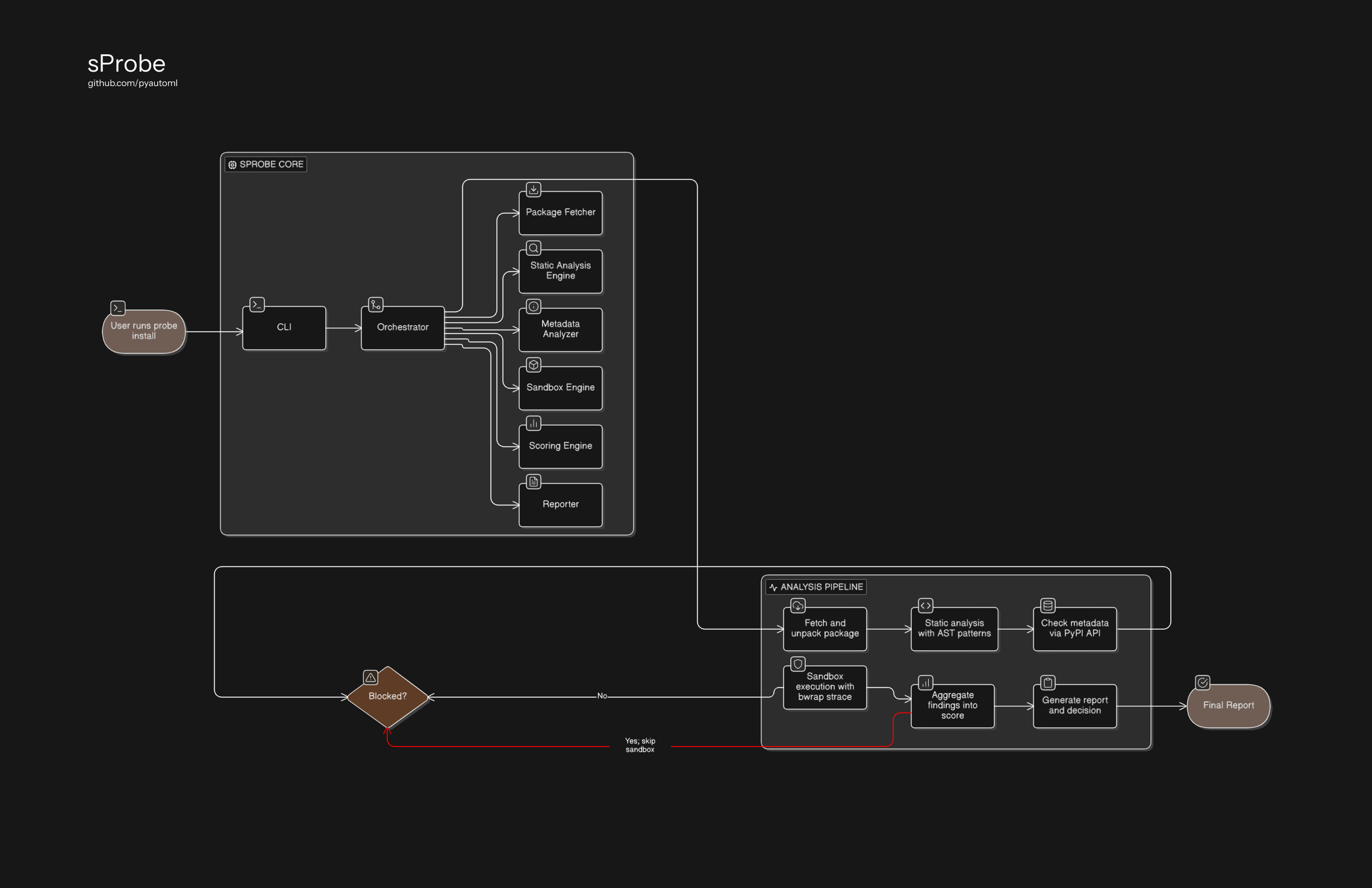
sprobe runs three analysis layers on every package:
| Layer | What it catches | How |
|---|---|---|
| Static analysis | Suspicious code patterns in source | Regex + AST scanning against extensible TOML patterns |
| Metadata analysis | Supply chain risk signals | Package age, typosquatting, missing author, no project URLs |
| Sandbox execution | Runtime malicious behavior | bubblewrap isolation + strace + honeypot credential files |
Quick start
pip install sprobe

# Check a package before installing it
sprobe check requests flask numpy

# Scan a local package directory
sprobe scan /path/to/unpacked/package
Or run from source:
git clone https://github.com/pyautoml/sprobe.git
cd sprobe

python3 -m sprobe check requests flask numpy

# Run threat playbooks to verify detection
python3 -m sprobe test-playbooks
System requirements
- Python 3.11+
- Linux (bubblewrap and strace for sandbox layer)
# Install sandbox dependencies (Debian/Ubuntu)
sudo apt install bubblewrap strace
Static analysis and metadata analysis work without bwrap/strace. The sandbox layer is automatically skipped if they are not installed.
Examples
Safe package
$ sprobe check requests
============================================================
  sprobe scan | requests==2.33.0  SAFE
============================================================
  No suspicious behaviors detected.
------------------------------------------------------------
  Risk Score: 0/100
  No suspicious behavior detected
============================================================
Malicious package (credential theft + exfiltration)
$ sprobe scan ./threat_playbooks/steals_ssh_key --name steals_ssh_key
============================================================
  sprobe scan | steals_ssh_key==unknown  BLOCKED
============================================================

  [CRITICAL] file_access
    Package attempts to read SSH private keys
    steals_ssh_key/__init__.py:28
    ssh_key_path = os.path.expanduser("~/.ssh/id_rsa")

  [CRITICAL] network
    Package makes outbound HTTP POST requests, common for data exfiltration
    steals_ssh_key/__init__.py:39
    urllib.request.urlopen(request)

  [CRITICAL] credential_theft
    Package accessed honeypot file at runtime: /home/user/.ssh/id_rsa
    sandbox
    openat: /home/user/.ssh/id_rsa

------------------------------------------------------------
  Risk Score: 100/100
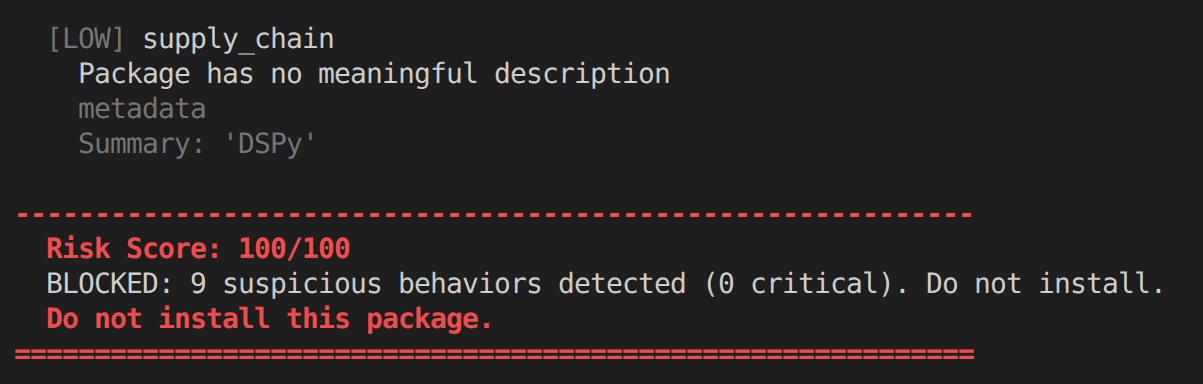
  BLOCKED: 3 suspicious behaviors detected (3 critical). Do not install.
  Do not install this package.
============================================================
Three layers caught it: static analysis found the SSH key read and HTTP POST, the sandbox confirmed the file was actually accessed at runtime.
CI/CD gate
sprobe check my-dependency || exit 1
Exit code 0 for SAFE/CAUTION, 1 for DANGER/BLOCKED.
Batch check
$ sprobe check requests flask boto3 numpy
Packages are analyzed concurrently. The exit code reflects the worst verdict across all packages.
Usage
Check packages from PyPI
# Single package
sprobe check requests

# Multiple packages (analyzed concurrently)
sprobe check requests flask boto3 numpy

# Specific version
sprobe check flask==3.0.0

# Verbose output (shows all analysis steps)
sprobe check requests --verbose
sprobe downloads each package to a temporary directory, verifies SHA256 against PyPI's published hash, runs all three analysis layers, reports the verdict, then deletes the downloaded files. Non-existent packages are skipped with a warning.
Scan local source
sprobe scan ./my-package --name my-package --version 1.0.0
Exit codes
0- SAFE or CAUTION (no significant risk)1- DANGER or BLOCKED (risk detected)
This makes sprobe usable in CI/CD pipelines:
sprobe check my-dependency || exit 1
How detection works
Layer 1: Static analysis
Scans Python source files against extensible detection patterns defined as TOML files:
- Regex patterns - match suspicious strings (credential paths, network calls, subprocess usage)
- AST patterns - detect code structures regex cannot catch (
exec(base64.b64decode(...))) - File scope - patterns like
setup_py_execonly fire onsetup.py, preventing false positives
Patterns are grouped by category:
patterns/
  file_access/       # SSH keys, AWS creds, .env, git credentials
  network/           # HTTP POST, DNS exfiltration
  obfuscation/       # base64+exec, eval with dynamic args
  code_execution/    # subprocess, os.system, ctypes
  install_hooks/     # malicious setup.py
Each pattern carries an expected_for list of packages where that behavior is legitimate. When sprobe scans paramiko, it sees SSH key access and recognizes that as expected for an SSH library, not a threat. sprobe itself does not depend on or install any of those packages.
Layer 2: Metadata analysis
Queries the PyPI JSON API and checks:
- Typosquatting - Levenshtein distance against 100+ popular packages (
requetsvsrequests) - Package age - brand new packages flagged (most attacks use fresh uploads)
- Missing identity - no author, no maintainer email
- No project URLs - no homepage, no repository link
- Empty description - placeholder or missing summary
Layer 3: Sandbox execution
Runs the package import inside an isolated bubblewrap sandbox:
- Network disabled (
--unshare-net) - package cannot exfiltrate data, but connection attempts are logged - PID namespace isolated (
--unshare-pid) - cannot see or signal host processes - Honeypot credentials injected - fake SSH keys, AWS credentials,
.env, git tokens - Syscall tracing via strace - monitors
openat,connect,sendto,execve
If the package touches a honeypot file, it is flagged as CRITICAL. No legitimate package reads another application's SSH keys on import.
Adding custom patterns
Drop a .toml file into ~/.sprobe/patterns/ and sprobe picks it up automatically:
id = "my_company_secrets"
category = "file_access"
severity = "critical"
description = "Package attempts to read internal company credentials"
tags = ["custom", "internal"]
expected_for = ["our-internal-tool"]

[detection]
type = "regex"
target = "source"

[[detection.rules]]
pattern = 'INTERNAL_API_KEY'

[[detection.rules]]
pattern = '\.company/credentials'
Threat playbooks
sprobe ships with test packages that simulate real attack patterns. Playbooks are available when running from a source checkout:
| Playbook | Attack type | Expected verdict |
|---|---|---|
steals_ssh_key |
Reads SSH keys + exfiltrates via HTTP | BLOCKED |
exfiltrates_env |
Steals env vars (API keys, tokens) | BLOCKED |
obfuscated_exec |
base64 + exec hidden payload | BLOCKED |
honeypot_trigger |
Reads all common credential paths | BLOCKED |
delayed_payload |
threading.Timer delayed subprocess | DANGER+ |
setup_py_backdoor |
Malicious code in setup.py | BLOCKED |
clean_package |
Harmless package (control group) | SAFE |
python3 -m sprobe test-playbooks
All 7 playbooks must pass. If any fails, sprobe's detection has regressed.
Architecture
sprobe follows hexagonal architecture (ports & adapters):
sprobe/
  domain/           # Core types: PackageInfo, ScanFinding, RiskVerdict
  ports/            # Protocol definitions (interfaces)
  static_analysis/  # Regex + AST scanners
  metadata/         # PyPI metadata + typosquatting detector
  sandbox/          # bwrap runner + strace parser + honeypots
  scoring/          # Risk scoring engine
  reporting/        # Terminal output (ANSI)
  fetching/         # PyPI downloader with SHA256 verification
  patterns/         # Pattern loader (TOML) + built-in detection rules
Every external integration is behind a Protocol. Swap the PyPI fetcher for a private registry adapter by changing one line.
Security posture
- Zero runtime dependencies - attack surface is Python stdlib only
- SHA256 verification - every download checked against PyPI's published hash
- Path traversal protection - archive unpacking rejects
../paths - Network isolation - sandbox blocks all outbound connections
- Honeypot canaries - unique per session, unpredictable tokens
- No installation - sprobe never runs
pip install, only analyzes source - Size limits - rejects downloads over 50 MB (zip bomb protection)
License
PyAutoML Non-Commercial License v1.0
Free for personal and educational use. Commercial use requires written permission.


Download files
Download the file for your platform. If you're not sure which to choose, learn more about installing packages.
Source Distribution
Built Distribution
Filter files by name, interpreter, ABI, and platform.
If you're not sure about the file name format, learn more about wheel file names.
Copy a direct link to the current filters
File details
Details for the file sprobe-0.1.2.tar.gz.
File metadata
- Download URL: sprobe-0.1.2.tar.gz
- Upload date:
- Size: 47.8 kB
- Tags: Source
- Uploaded using Trusted Publishing? No
- Uploaded via: twine/6.2.0 CPython/3.13.11
File hashes
| Algorithm | Hash digest | |
|---|---|---|
| SHA256 |
47196f6c1d33dbfe62d161b6c306c98fd82b089881846698e41e9887b9d08a4d
|
|
| MD5 |
f9a4c35dd55aa32c4c5d6916ec197a1a
|
|
| BLAKE2b-256 |
36861a8077992819298ecb23be476236229a90768c477eaf39c54ae619b986e5
|
File details
Details for the file sprobe-0.1.2-py3-none-any.whl.
File metadata
- Download URL: sprobe-0.1.2-py3-none-any.whl
- Upload date:
- Size: 60.5 kB
- Tags: Python 3
- Uploaded using Trusted Publishing? No
- Uploaded via: twine/6.2.0 CPython/3.13.11
File hashes
| Algorithm | Hash digest | |
|---|---|---|
| SHA256 |
6a2ecb38f73da858ac0b92df0ac997e200943768e2101d867f41c22746096905
|
|
| MD5 |
1b06e2fb47dac9ce1dc45d9f2ea4e531
|
|
| BLAKE2b-256 |
9a8982ed5834a1046196d2b2ddb79862249e2cd33cba2f82544e4839bd64e7a6
|






