
The Scientific Python Development Environment


Project description

Copyright © 2009–2019 Spyder Project Contributors
Some source files and icons may be under other authorship/licenses; see NOTICE.txt.
Project status






Build status






Help support Spyder, the community-developed scientific IDE!
Thanks to your continuing support, we are on track for a Spyder 4 release in early 2019 with all of your most-requested features (a new debugger and completion architecture, better Projects, new Editor functionality, full Variable Explorer object support, a built-in dark theme and much more)!
Spyder development is made possible by contributions from our global user community, along with organizations like NumFOCUS and Quansight. There are numerous ways you can help, many of which don't require any programming. If you'd like to make a donation to help fund further improvements, we're on OpenCollective.
Thanks for all you do to make the Spyder project thrive! More details
Overview
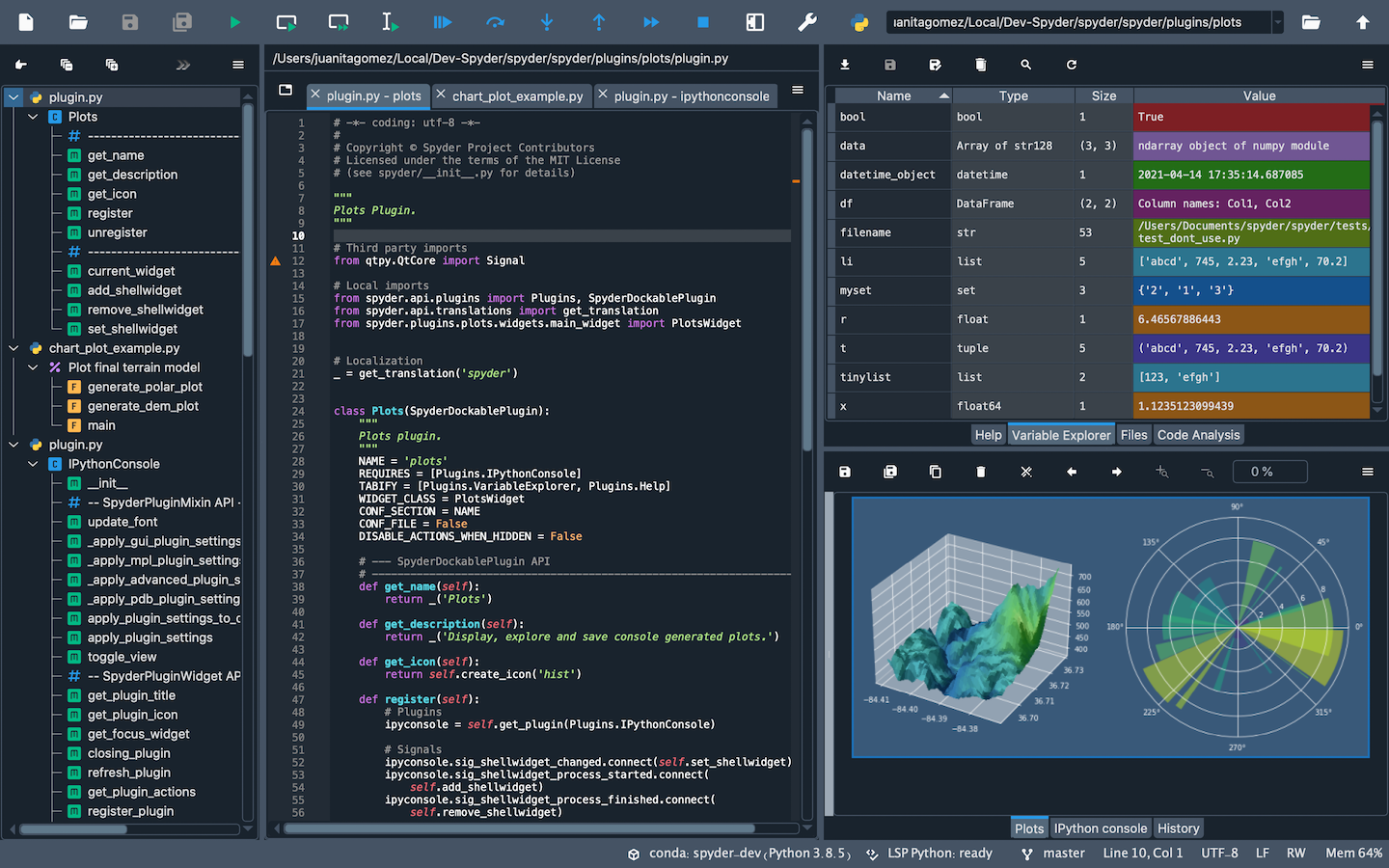
Spyder is a powerful scientific environment written in Python, for Python, and designed by and for scientists, engineers and data analysts. It offers a unique combination of the advanced editing, analysis, debugging, and profiling functionality of a comprehensive development tool with the data exploration, interactive execution, deep inspection, and beautiful visualization capabilities of a scientific package.
Beyond its many built-in features, its abilities can be extended even further via its plugin system and API. Furthermore, Spyder can also be used as a PyQt5 extension library, allowing you to build upon its functionality and embed its components, such as the interactive console, in your own software.
For more general information about Spyder and to stay up to date on the latest Spyder news and information, please check out our new website.
Core components
-
Editor
Work efficiently in a multi-language editor with a function/class browser, real-time code analysis tools (
pyflakes,pylint, andpycodestyle), automatic code completion (jediandrope), horizontal/vertical splitting, and go-to-definition. -
Interactive console
Harness the power of as many IPython consoles as you like with full workspace and debugging support, all within the flexibility of a full GUI interface. Instantly run your code by line, cell, or file, and render plots right inline with the output or in interactive windows.
-
Documentation viewer
Render documentation in real-time with Sphinx for any class or function, whether external or user-created, from either the Editor or a Console.
-
Variable explorer
Inspect any variables, functions or objects created during your session. Editing and interaction is supported with many common types, including numeric/strings/bools, Python lists/tuples/dictionaries, dates/timedeltas, Numpy arrays, Pandas index/series/dataframes, PIL/Pillow images, and more.
-
Development tools
Examine your code with the static analyzer, trace its execution with the interactive debugger, and unleash its performance with the profiler. Keep things organized with project support and a builtin file explorer, and use find in files to search across entire projects with full regex support.
Documentation
You can read the Spyder documentation online on the Spyder Docs website.
Installation
For a detailed guide to installing Spyder, please refer to our installation instructions.
The easiest way to install Spyder on any of our supported platforms
is to download it as part of the Anaconda
distribution, and use the conda package and environment manager to keep it
and your other packages installed and up to date.
If in doubt, you should always install Spyder via this method to avoid unexpected issues we are unable to help you with; it generally has the least likelihood of potential pitfalls for non-experts, and we may be able to provide limited assistance if you do run into trouble.
Other install options exist, including:
- The WinPython distribution for Windows
- The MacPorts project for macOS
- Your distribution's package manager (i.e.
apt-get,yum, etc) on Linux - The
pippackage manager, included with most Python installations
However, we lack the resources to provide individual support for users who install via these methods, and they may be out of date or contain bugs outside our control, so we recommend the Anaconda version instead if you run into issues.
Troubleshooting
Before posting a report, please carefully read our Troubleshooting Guide and search the issue tracker for your error message and problem description, as the great majority of bugs are either duplicates, or can be fixed on the user side with a few easy steps. Thanks!
Contributing and Credits
Spyder was originally created by Pierre Raybaut, and is currently maintained by Carlos Córdoba and an international community of volunteers.
You can join us—everyone is welcome to help with Spyder! Please read our contributing instructions to get started!
Certain source files are distributed under other compatible permissive licenses and/or originally by other authors. The icons for the Spyder 3 theme are derived from Font Awesome 4.7 (© 2016 David Gandy; SIL OFL 1.1). Most Spyder 2 theme icons are sourced from the Crystal Project icon set (© 2006-2007 Everaldo Coelho; LGPL 2.1+). Other Spyder 2 icons are from Yusuke Kamiyamane (© 2013 Yusuke Kamiyamane; CC-BY 3.0), the FamFamFam Silk icon set (© 2006 Mark James; CC-BY 2.5), and the KDE Oxygen icons (© 2007 KDE Artists; LGPL 3.0+).
See NOTICE.txt for full legal information.
Running from a Github clone
Spyder can be run directly from the source code, hosted on the Spyder github repo. You may want to do this for fixing bugs in Spyder, adding new features, learning how Spyder works or to try out development versions before they are officially released.
If using conda (strongly recommended), this can be done by running the
following from the command line (the Anaconda Prompt, if on Windows):
conda install spyder
conda remove spyder
git clone https://github.com/spyder-ide/spyder.git
cd spyder
python bootstrap.py
You also need to make sure the correct spyder-kernels version is installed
for the version of Spyder you are testing. The above procedure will give you
spyder-kernels 0.x for the 3.x branch (Spyder 3),
so to run the master branch (Spyder 4) you need to additionally execute:
conda install -c spyder-ide spyder-kernels=1.*
Alternatively, you can use pip to install PyQt5 and the other
runtime dependencies listed below. However, beware:
this method is recommended for experts only, and you'll need to solve any
problems on your own.
See the installation instructions for more details on all of this.
Dependencies
Important Note: Most or all of the dependencies listed below come with Anaconda and other scientific Python distributions, so you don't need to install them separately in those cases.
Build dependencies
When installing Spyder from its source package, the only requirement is to have a Python version equal or greater than 3.5 or 2.7.
Runtime dependencies
The basic dependencies to run Spyder are:
- Python 3.5+ or 2.7: The core language Spyder is written in and for.
- PyQt5 5.6+: Python bindings for Qt, used for Spyder's GUI.
The rest our dependencies (both required and optional) are declared in this file.
Sponsors
Spyder is funded thanks to the generous support of


and the donations we have received from our users around the world through Open Collective:

More information
Release history Release notifications | RSS feed


Download files
Download the file for your platform. If you're not sure which to choose, learn more about installing packages.
Source Distribution
Built Distributions
Filter files by name, interpreter, ABI, and platform.
If you're not sure about the file name format, learn more about wheel file names.
Copy a direct link to the current filters
File details
Details for the file spyder-4.0.1.tar.gz.
File metadata
- Download URL: spyder-4.0.1.tar.gz
- Upload date:
- Size: 9.3 MB
- Tags: Source
- Uploaded using Trusted Publishing? No
- Uploaded via: twine/3.1.1 pkginfo/1.4.2 requests/2.22.0 setuptools/44.0.0 requests-toolbelt/0.8.0 tqdm/4.24.0 CPython/3.6.3
File hashes
| Algorithm | Hash digest | |
|---|---|---|
| SHA256 |
4b279c16487d224368dd2213e1517185fa59fc528f539601fffb34ea97accb7b
|
|
| MD5 |
e1a93105a82128c8578cc323c0ff728d
|
|
| BLAKE2b-256 |
557bd0052b500ce347a1355eb14a3abcd342f4a014a5a5b5014230dfc7ffd8a7
|
File details
Details for the file spyder-4.0.1-py3-none-any.whl.
File metadata
- Download URL: spyder-4.0.1-py3-none-any.whl
- Upload date:
- Size: 10.1 MB
- Tags: Python 3
- Uploaded using Trusted Publishing? No
- Uploaded via: twine/3.1.1 pkginfo/1.4.2 requests/2.22.0 setuptools/44.0.0 requests-toolbelt/0.8.0 tqdm/4.24.0 CPython/3.6.3
File hashes
| Algorithm | Hash digest | |
|---|---|---|
| SHA256 |
460dec293675e094162eb9e6b52ff8babcec0d2e5519180365e1d1b4d6629855
|
|
| MD5 |
164611fad6b7ee101b96f7942b3a4fbe
|
|
| BLAKE2b-256 |
cca989e09a17eb9860b51b2aa2eb4cae6730302115b7a9704c51a9ac8c50fa71
|
File details
Details for the file spyder-4.0.1-py2-none-any.whl.
File metadata
- Download URL: spyder-4.0.1-py2-none-any.whl
- Upload date:
- Size: 10.1 MB
- Tags: Python 2
- Uploaded using Trusted Publishing? No
- Uploaded via: twine/3.1.1 pkginfo/1.4.2 requests/2.22.0 setuptools/44.0.0 requests-toolbelt/0.8.0 tqdm/4.24.0 CPython/3.6.3
File hashes
| Algorithm | Hash digest | |
|---|---|---|
| SHA256 |
db6cdf175616937f3e7268cb4c465ca381b77a46e5a0b3586ac34eb6b3fd9341
|
|
| MD5 |
6cbe6a97ddfecd6d793818a49409915f
|
|
| BLAKE2b-256 |
b4100ca0362a3bbb9625d450a9dfe067b77fc907909371544cfcff12ecf2aa2e
|






