
spys




spys is a typed Python library for fetching, parsing, and filtering lists of free public proxies. It provides an object-oriented and easy-to-use interface to effortlessly obtain available HTTP, HTTPS, and SOCKS5 proxies for web scraping, automation, or network testing.
Under the hood, the library retrieves data from popular public proxy aggregators and structures it into convenient Python objects.
Installation
You can install or update the package via pip or poetry:
pip install -U spys
# or
poetry add spys
Usage Guide
The library is divided into two primary submodules based on how the proxy data is retrieved:
- spys.me — Fast, text-based API wrapper. Recommended for quick and safe proxy retrieval without the risk of being blocked.
- spys.one — Advanced web scraper. Allows for highly detailed proxy filtering directly at the source, but requires careful usage.
1. Fast Proxy Retrieval (spys.me module)
This module provides quick access to proxy lists using lightweight HTTP requests. It is the best choice for stability and speed.
from spys import me

# Get proxies using high-level Getters
http_proxies = me.Getters.get_http_proxies()
socks5_proxies = me.Getters.get_socks5_proxies()
all_proxies = me.Getters.get_all_proxies()

# Alternatively, use the get_proxies function directly
https_proxies = me.get_proxies('https')

for proxy in https_proxies:
    print(f"Proxy: {proxy.host}:{proxy.port}")
    print(f"Country: {proxy.country} | Anonymity: {proxy.anonymity}")
    print(f"SSL Support: {proxy.ssl_support} | Google Passed: {proxy.google_passed}")
    print("-" * 30)
Available protocols for me.get_proxies(protocol):
proxy, socks, socks5, all, http, https, ssl
2. Advanced Filtering via Scraping (spys.one module)
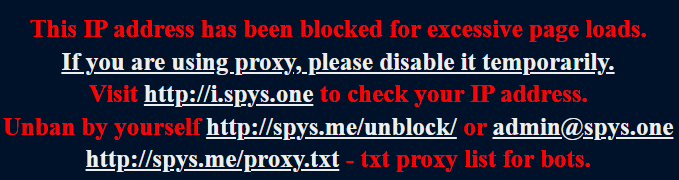
WARNING: This module uses direct web scraping to retrieve data. Frequent requests or abusing this method will lead to your IP being temporarily or permanently banned by the provider. Use responsibly and implement adequate delays.
This approach allows you to filter proxies by Anonymity, SSL support, Port, and Type before downloading the list.
from spys import one
from spys.filters import Show, Anm, SSL, Sort, Type

# Fetch 100 proxies, highly anonymous, with SSL support, sorted by speed
proxies = one.get_proxies(
    show=Show(100),  # Amount (30, 50, 100, 200, 300, 500)
    anm=Anm('HIA'),  # Anonymity (ALL, A+H, NOA, ANM, HIA)
    ssl=SSL('SSL+'),  # SSL support (ALL, SSL+, SSL-)
    sort=Sort('SPEED'),  # Sort by (DATE, SPEED)
    type=Type('HTTP')  # Type (ALL, HTTP, SOCKS)
)

for proxy in proxies:
    print(proxy)
    # Additional detailed attributes available in this module:
    # proxy.city, proxy.hostname, proxy.org, proxy.latency, proxy.uptime, proxy.check_date
ProxyView Object Structure
All fetched proxies are returned as iterables of ProxyView objects (which inherit from BaseProxyView).
Base attributes (available in both modules):
host(str): IP Addressport(int): Portcountry(str): Country Codeanonymity(str): Anonymity levelmore_info(str | bool): Additional available proxy info
Exclusive to the spys.me module:
ssl_support(bool)google_passed(bool)
Exclusive to the spys.one module:
type(str)city(str)hostname(str)org(str)latency(float | str)uptime(int | str)last_check_status(bool)check_date(datetime | str)
Documentation
For complete, automatically generated English documentation of modules, classes, and methods, you can run Python's
built-in pydoc server locally:
python -m pydoc -p 8081
Then open http://localhost:8081/spys in your browser.
License
This project is licensed under the MIT License. See the LICENSE file for details.
2 maintainers


Metadata
2 maintainers
Release files for spys 1.2.1
For a detailed explanation of source distributions (sdists) and built distributions (wheels), please see the package formats documentation.
Source distribution (sdist)
| File | Size | Uploaded | Provenance | Actions |
|---|---|---|---|---|
| spys-1.2.1.tar.gz | 7.5 kB | Without provenance | Details for spys-1.2.1.tar.gz |
Built distribution (wheel)
| File | Interpreter | ABI | Platform | Actions Reset |
|---|---|---|---|---|
| spys-1.2.1-py3-none-any.whl | Python 3 | none | any | Details for spys-1.2.1-py3-none-any.whl |
Total release size: 16.6 kB
Release files / spys-1.2.1.tar.gz
| Download URL | spys-1.2.1.tar.gz |
|---|---|
| Size | 7.5 kB |
| Tags | Source |
|
SHA-256 checksum How to use checksums |
af88e746862758c63df8792f067900ce8ce20354bcee83842249671bd1c71807
|
|
BLAKE2b-256 checksum How to use checksums |
654eb196ea3950cf1c9f73c26b3885a3b51dc1b83ad525201a32c2330c3963cd
|
| Upload date | |
|
Uploaded using Trusted Publishing? What is trusted publishing? |
No |
| Uploaded via |
poetry/2.4.1 CPython/3.13.14 Linux/7.1.3-zen2
|
Release files / spys-1.2.1-py3-none-any.whl
| Download URL | spys-1.2.1-py3-none-any.whl |
|---|---|
| Size | 9.1 kB |
| Tags | Python 3 |
|
SHA-256 checksum How to use checksums |
972b29e97f5c670a55ea64390c5092885ab2f045c47a920f7cea87613f6bc6b2
|
|
BLAKE2b-256 checksum How to use checksums |
699f6add40c21a228d01b4d6dbe063716b0b6cdcb5e0114f73143d2e84edfbe7
|
| Upload date | |
|
Uploaded using Trusted Publishing? What is trusted publishing? |
No |
| Uploaded via |
poetry/2.4.1 CPython/3.13.14 Linux/7.1.3-zen2
|
Security for spys 1.2.1
Provenance
Provenance describes where a file came from. On PyPI, provenance is shared via attestations, which provide a verifiable record of the build or publishing details. View details, limitations and caveats.
No provenance found
None of the files in this release were uploaded with provenance metadata.
A note on package security
PyPI is a repository for distributing packages, not a service for auditing them. While third-party security researchers and our staff do their best to detect and remove malicious packages, PyPI cannot guarantee the quality, security or suitability of any given package.
To learn more about protecting yourself from malicious actors, visit our package security documentation.














