





SQLAlchemy API is a library that helps to turn the SQLAlchemy models into a REST API. It uses the power of Pydantic 2, to validate and serialize the data. This is a framework-agnostic library that can be used with any web framework. Currently, it provides support for Starlette and FastAPI.
Documentation: https://nacosdev.github.io/sqlalchemy_api
Source Code: https://github.com/nacosdev/sqlalchemy_api
Table of Contents
Requirements
- Python>=3.7
- SQLAlchemy>=1.4
- Pydantic>=2
Installation
pip install sqlalchemy-api
Example
Create it
- Create a file
main.pywith SQLAlchemy models and mount the crud using one of the adapters, in this example we will use the FastAPI adapter:
from sqlalchemy_api.adapters.fastapi_crud import APICrud
from sqlalchemy import create_engine, ForeignKey
from sqlalchemy.orm import relationship, mapped_column, Mapped
from sqlalchemy.ext.declarative import declarative_base
from fastapi import FastAPI
from typing import List

Base = declarative_base()

engine = create_engine(
    "sqlite:///example.db",
    connect_args={"check_same_thread": False},
)

class User(Base):
    __tablename__ = "user"
    id: Mapped[int] = mapped_column(primary_key=True)
    name: Mapped[str] = mapped_column(default="John Doe")
    age: Mapped[int] = mapped_column(nullable=False)
    posts: Mapped[List['Post']] = relationship(back_populates="user")

class Post(Base):
    __tablename__ = "post"
    id: Mapped[int] = mapped_column(primary_key=True)
    title: Mapped[str] = mapped_column()
    content: Mapped[str] = mapped_column()
    user_id: Mapped[int] = mapped_column(ForeignKey("user.id"), nullable=False)
    user: Mapped['User'] = relationship(back_populates="posts")

Base.metadata.create_all(engine)  # Create tables

user_crud_router = APICrud(User, engine)
post_crud_router = APICrud(Post, engine)

app = FastAPI()
app.include_router(user_crud_router, prefix="/user", tags=["User"])
app.include_router(post_crud_router, prefix="/post", tags=["Post"])
You will also need an ASGI server and FastAPI to be able to run this app, both are optional dependencies of SQLAlchemy API:
pip install sqlalchemy-api[fastapi]
Run it
uvicorn main:app --reload
Use it
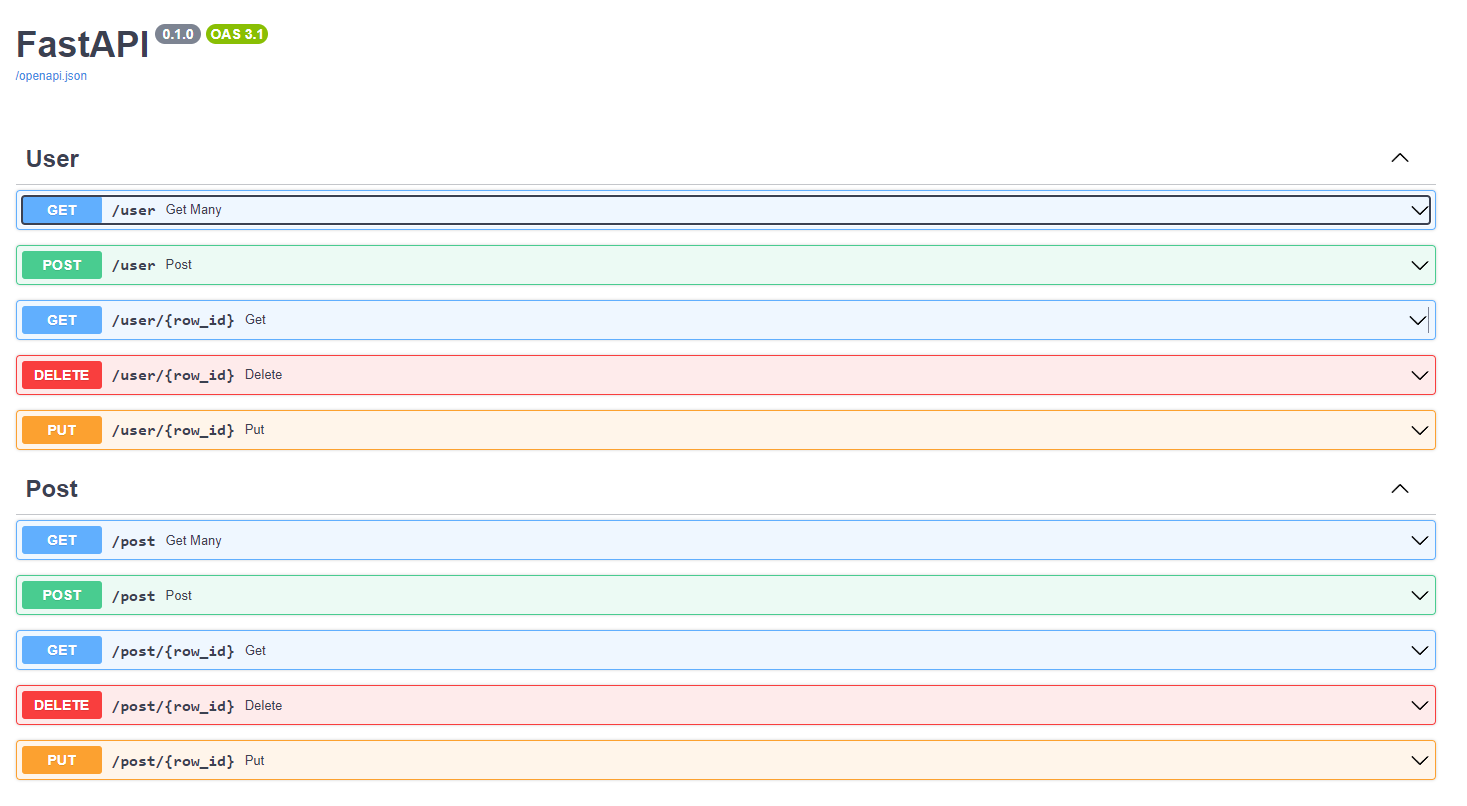
Endpoints are automatically generated for the defined models and the FastAPI adapter provides automatic Swagger documentation, you can access localhost:8000/docs to interact with them:
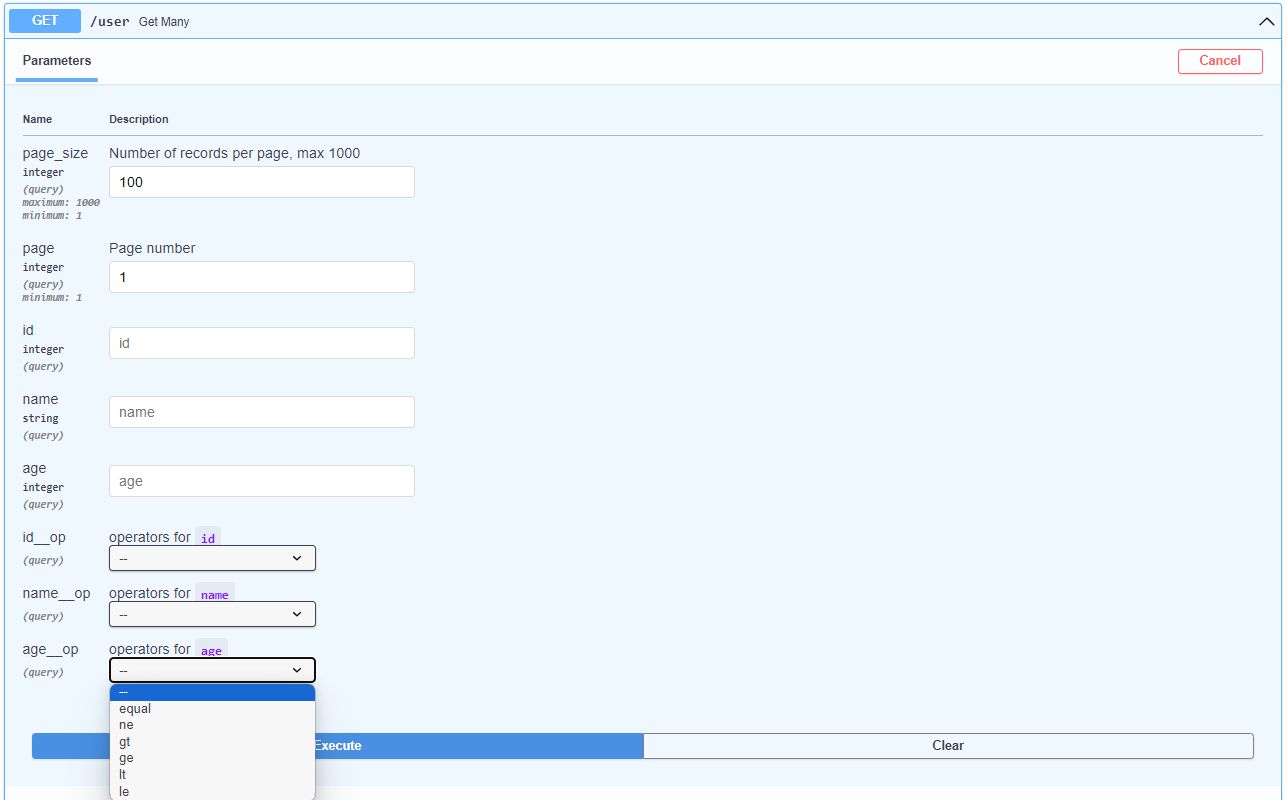
SQLAlchemyAPI also provides different operators depending on the column data type, to filter the data:
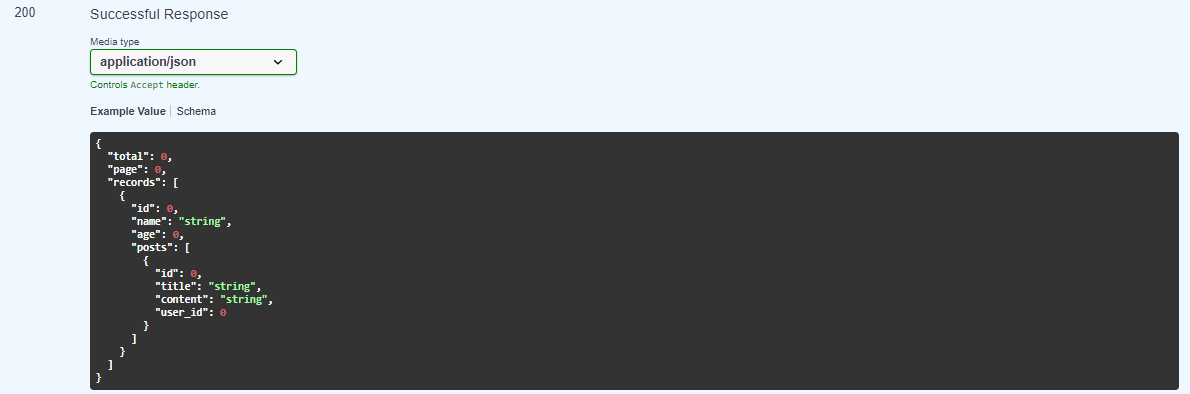
The data returned is automatically paginated and serialized, including the relationships defined in the models:
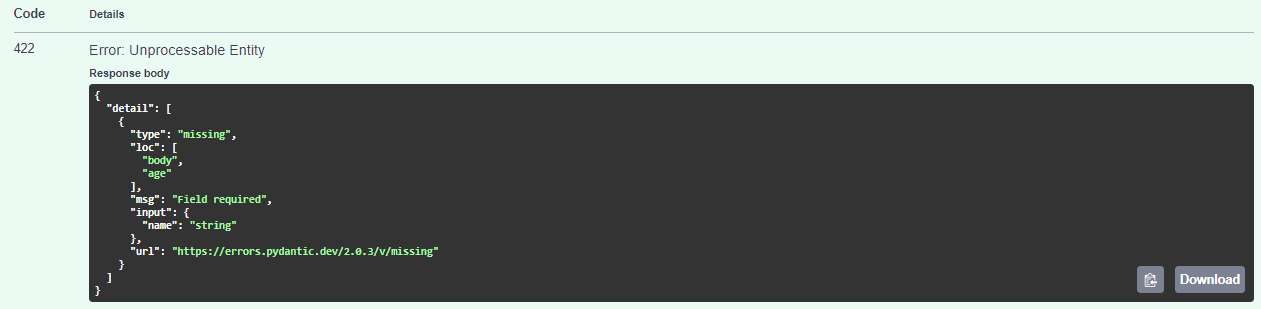
Post data is automatically validated and serialized using Pydantic, for example, if you try to create a user wihout the required age field, you will get an error like this:
License
sqlalchemy-api is distributed under the terms of the MIT license.
1 maintainer

Release files for sqlalchemy-api 0.0.2
For a detailed explanation of source distributions (sdists) and built distributions (wheels), please see the package formats documentation.
Source distribution (sdist)
| File | Size | Uploaded | |
|---|---|---|---|
| sqlalchemy_api-0.0.2.tar.gz | 301.7 kB | Details |
Built distribution (wheel)
| File | Interpreter | ABI | Platform | Reset |
|---|---|---|---|---|
| sqlalchemy_api-0.0.2-py3-none-any.whl | Python 3 | none | any | Details |
Total release size: 317.6 kB
Release files / sqlalchemy_api-0.0.2.tar.gz
| Download URL | sqlalchemy_api-0.0.2.tar.gz |
|---|---|
| Size | 301.7 kB |
| Tags | Source |
|
SHA-256 checksum How to use checksums |
5035dc554ce02f051e92c1568ce2099d8005126229e7b24c6dbffe73d5395ed4
|
|
BLAKE2b-256 checksum How to use checksums |
038e3bf6d348742ddb343bd440796bcf38ceba0ffcb234e58fbe5753208b9011
|
| Upload date | |
|
Uploaded using Trusted Publishing? What is trusted publishing? |
No |
| Uploaded via |
twine/4.0.2 CPython/3.9.18
|
Release files / sqlalchemy_api-0.0.2-py3-none-any.whl
| Download URL | sqlalchemy_api-0.0.2-py3-none-any.whl |
|---|---|
| Size | 15.9 kB |
| Tags | Python 3 |
|
SHA-256 checksum How to use checksums |
88efab6e93f79d176b17fb95988600c55c08a5c8af7288f2a6daf8b22a377c91
|
|
BLAKE2b-256 checksum How to use checksums |
e3fffed02b5bd8c2045c09990ec68021027b4a9dac31a1c9a9edced747303891
|
| Upload date | |
|
Uploaded using Trusted Publishing? What is trusted publishing? |
No |
| Uploaded via |
twine/4.0.2 CPython/3.9.18
|














