
SQLAlchemy Data Model Visualizer
Overview
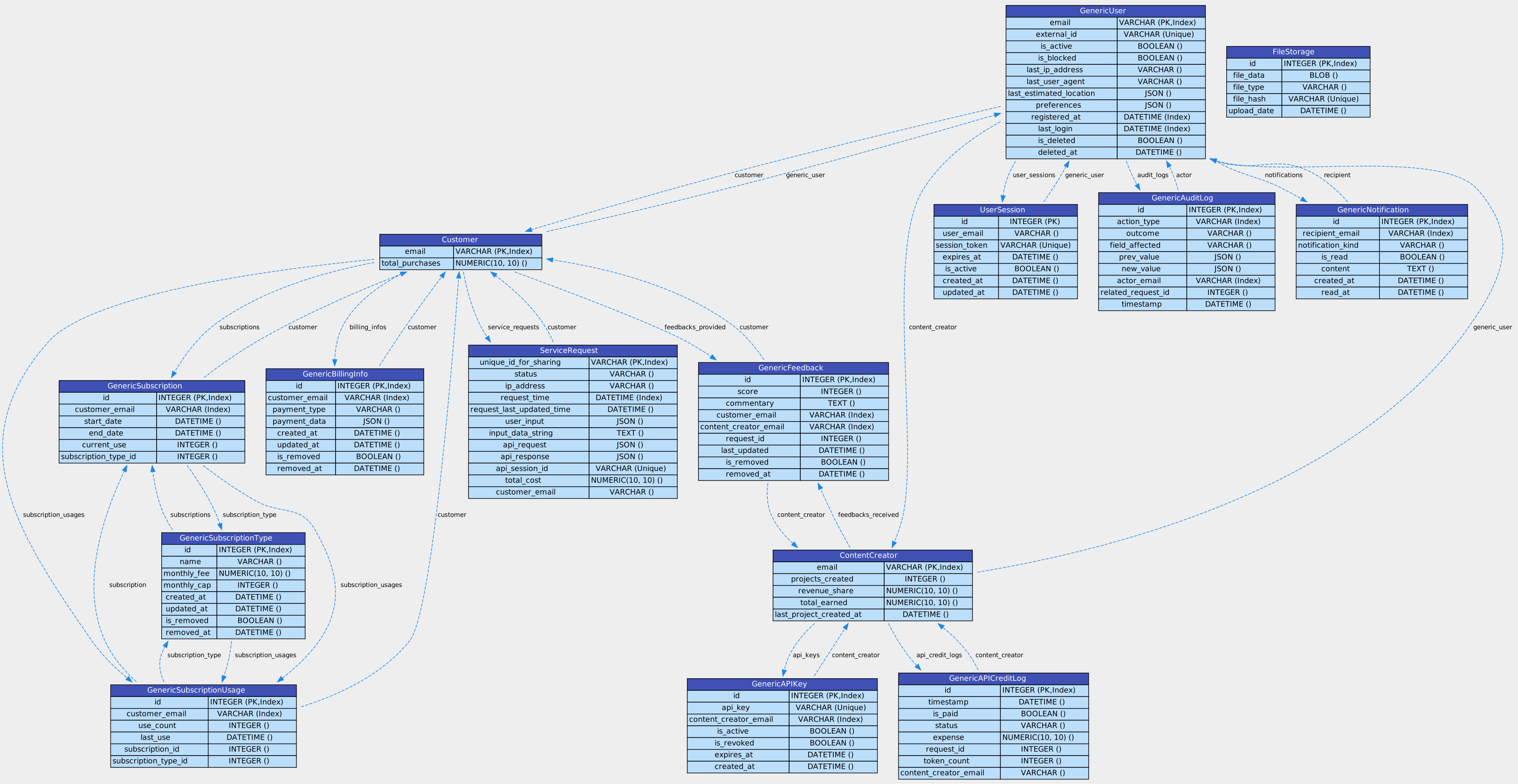
This Python-based utility generates high-quality, readable visualizations of your SQLAlchemy ORM models with almost no effort. With a focus on clarity and detail, it uses Graphviz to render each model as a directed graph, making it easier to understand the relationships between tables in your database schema.
Try it Out Easily in Colab:

Features
- Automatically maps SQLAlchemy ORM models to a directed graph.
- Table-like representation of each model with fields, types, and constraints.
- Export diagrams to SVG format for high-quality viewing and printing using Roboto font.
Installation with pip and Usage:
pip install sqlalchemy-data-model-visualizer

# Suppose these are your SQLAlchemy data models defined above in the usual way, or imported from another file:
models = [GenericUser, Customer, ContentCreator, UserSession, FileStorage, ServiceRequest, GenericAuditLog, GenericFeedback, GenericAPIKey, GenericNotification, GenericAPICreditLog, GenericSubscriptionType, GenericSubscription, GenericSubscriptionUsage, GenericBillingInfo]
output_file_name = 'my_data_model_diagram'
generate_data_model_diagram(models, output_file_name)
add_web_font_and_interactivity('my_data_model_diagram.svg', 'my_interactive_data_model_diagram.svg')
Installation from Source
To get started, clone the repository and install the required packages.
git clone https://github.com/Dicklesworthstone/sqlalchemy_data_model_visualizer.git
cd sqlalchemy_data_model_visualizer
python3 -m venv venv
source venv/bin/activate
python3 -m pip install --upgrade pip
python3 -m pip install wheel
pip install -r requirements.txt
Requirements
- Python 3.x
- SQLAlchemy
- Graphviz
- lxml
Usage
Generate Data Model Diagram
First, paste in your SQLAlchemy models. A set of fairly complex data models are provided in the code directly as an example-- just replace these with your own from your application.
Then, simply call the generate_data_model_diagram function. This will generate an SVG file with the name my_data_model_diagram.svg.
API Documentation
generate_data_model_diagram(models, output_file='my_data_model_diagram', add_labels=True)
models: List of SQLAlchemy models you want to visualize.output_file: Name of the output SVG file.add_labels: Set to False to hide labels on the edges between tables
Contributing
Contributions are welcome! Please open an issue or submit a pull request.
License
This project is licensed under the MIT License.
1 maintainer

Release files for sqlalchemy-data-model-visualizer 0.1.3
For a detailed explanation of source distributions (sdists) and built distributions (wheels), please see the package formats documentation.
Source distribution (sdist)
| File | Size | Uploaded | |
|---|---|---|---|
| sqlalchemy_data_model_visualizer-0.1.3.tar.gz | 6.7 kB | Details |
Built distribution (wheel)
| File | Interpreter | ABI | Platform | Reset |
|---|---|---|---|---|
| sqlalchemy_data_model_visualizer-0.1.3-py3-none-any.whl | Python 3 | none | any | Details |
Total release size: 13.7 kB
Release files / sqlalchemy_data_model_visualizer-0.1.3.tar.gz
| Download URL | sqlalchemy_data_model_visualizer-0.1.3.tar.gz |
|---|---|
| Size | 6.7 kB |
| Tags | Source |
|
SHA-256 checksum How to use checksums |
ae829e040627be392bb23dd81030df8197096d5e6ddc815d0bbceed8a74b8a2c
|
|
BLAKE2b-256 checksum How to use checksums |
f571c7a37401fe8fa24c7b46627c39e18d806f42e7fb41613d4091e4c36a4c00
|
| Upload date | |
|
Uploaded using Trusted Publishing? What is trusted publishing? |
No |
| Uploaded via |
twine/4.0.2 CPython/3.12.0
|
Release files / sqlalchemy_data_model_visualizer-0.1.3-py3-none-any.whl
| Download URL | sqlalchemy_data_model_visualizer-0.1.3-py3-none-any.whl |
|---|---|
| Size | 7.1 kB |
| Tags | Python 3 |
|
SHA-256 checksum How to use checksums |
aac23e64f0c9c4e4683908b7e350aabf30353743ed513ea29a2c07664373702c
|
|
BLAKE2b-256 checksum How to use checksums |
ef533aeb421486e8658ef793b4dc33aa24c58e47b9748d7714b3b4a9ff02eb4a
|
| Upload date | |
|
Uploaded using Trusted Publishing? What is trusted publishing? |
No |
| Uploaded via |
twine/4.0.2 CPython/3.12.0
|














