
A module to display sqlalchemy database tables and keys as a graph

Project description
Sqlalchemy DB graphing tool version 0.2.0
A module to display sqlalchemy database tables and keys as a graph. Inspired by https://pypi.org/project/sqlalchemy-schemadisplay/.
license: MIT license
Features
Generate graphs from your sqlalchemy declarative database in one simple function call.
How to use:
from sqlalchemy_db_graphing import generate_graph_as_png
from mymodule.database_schema import MySQLAlchemySchema

filename = "path/to/save/file.png"
generate_graph_as_png(metadata=MySQLAlchemySchema.metadata, filename=filename)
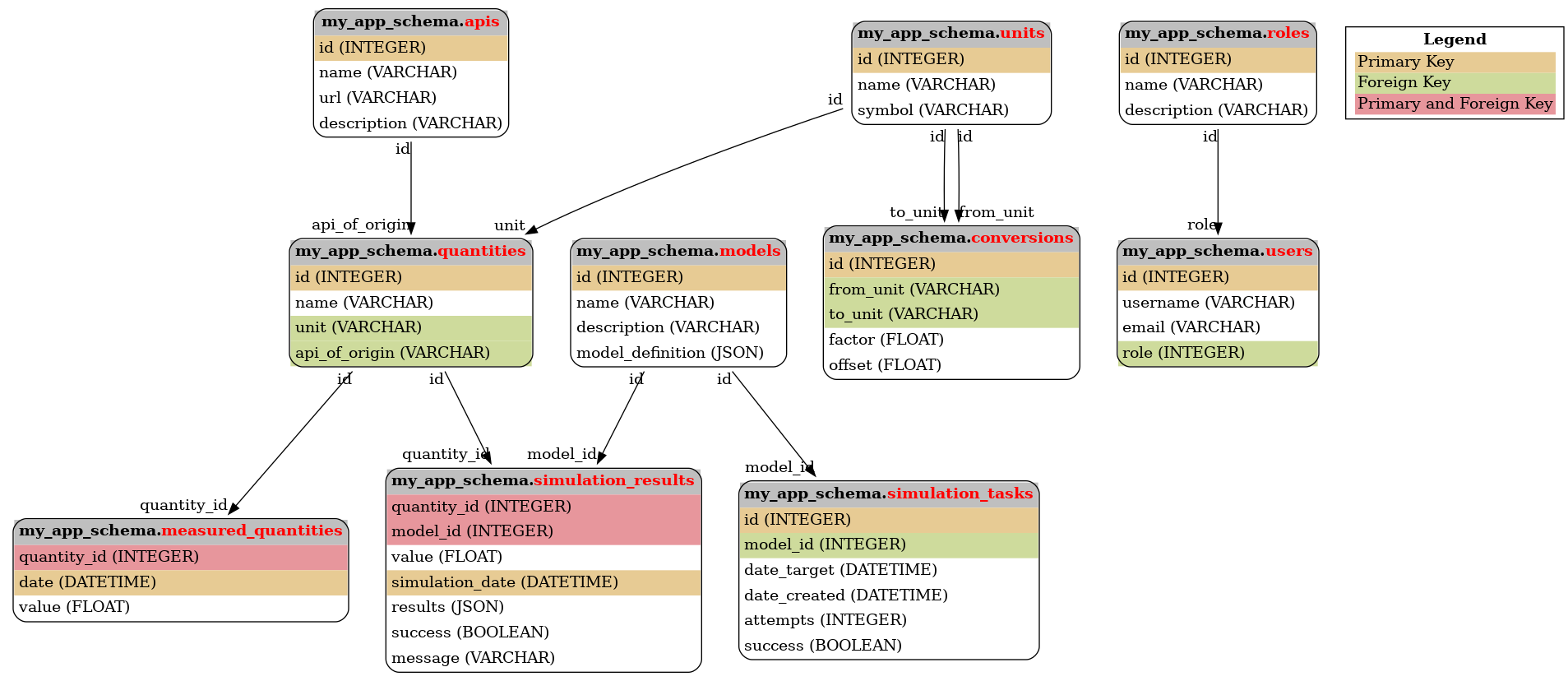
generate_graph_as_png also supports arguments:
style_options: either a string referring to a style preset, or a dictionary of options defining the style of each graphviz node. Keys are: -table_style: Style of each table (table element). -table_name_style: Style of the table name (font element). -header_style: Style of the table headers (td element). -schema_name_style: Style of the schema name (font element). -pk_style: Style of a column identified as a primary key (td element). -fk_style: Style of a column identified as a foreign key (td element). -pk_fk_style: Style of a column identified as both a primary and foreign key (td element). -column_style: Style of all other columns (td element). -legend_style: Style of the legend (table element).display_legend: whether the legend is displayed or not.
Style options dict example (Default style):
{
    "table_style": "cellborder='1' cellspacing='0' cellpadding='4' border='1' style='rounded'",
    "table_name_style": "color='red'",
    "header_style": "align='center' bgcolor='grey' border='0'",
    "schema_name_style": "color='black'",
    "pk_style": "align='left' bgcolor='#99CCFF' border='0'",
    "fk_style": "align='left' bgcolor='#CCFF99' border='0'",
    "pk_fk_style": "align='left' bgcolor='#99CCFF' border='0'",
    "column_style": "align='left' border='0'",
    "legend_style": "border='0' cellpadding='2' cellspacing='0'"
}
Finally, all graphviz keyword arguments are supported, see https://graphviz.org/docs/graph/ for a comprehensive list.
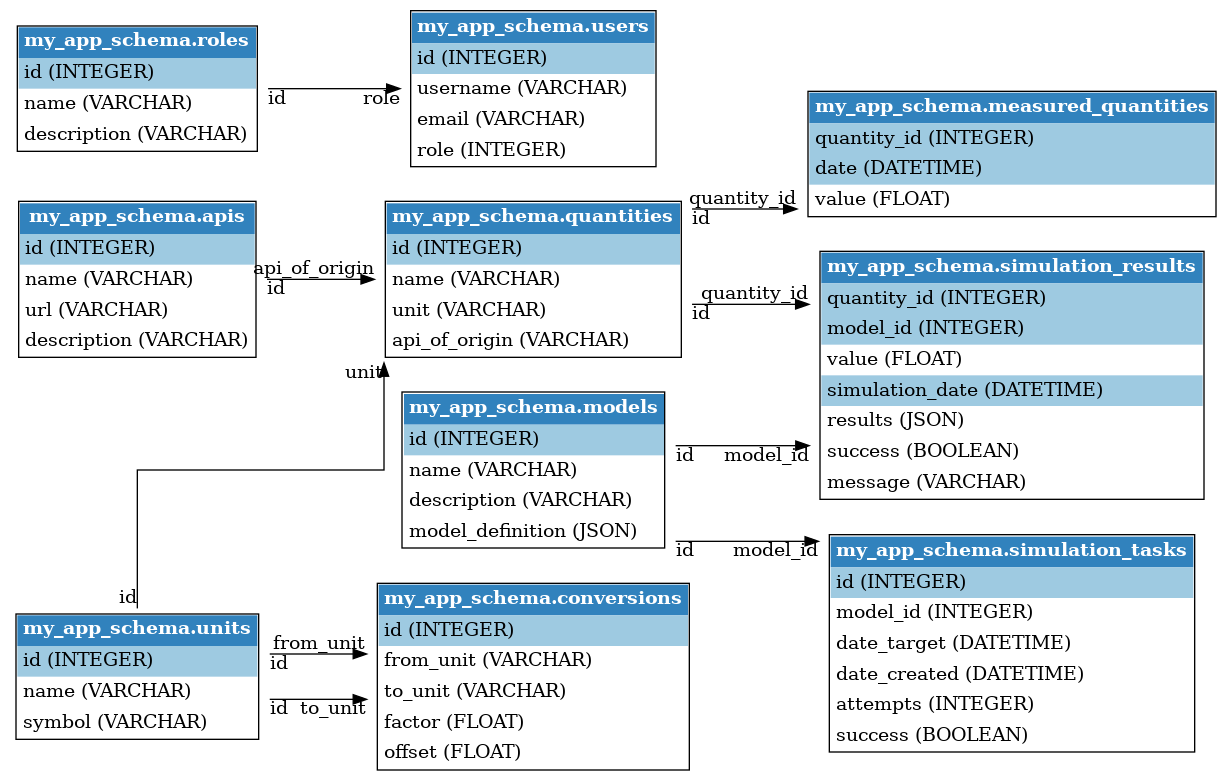
generate_graph_as_png(
        metadata=MySQLAlchemySchema.metadata,
        filename=filename,
        style_options="blue_rounded",
        display_legend=False,
        rankdir="LR",  # Draw the graph from Left to Right instead of Top Down.
        splines = "ortho",
)
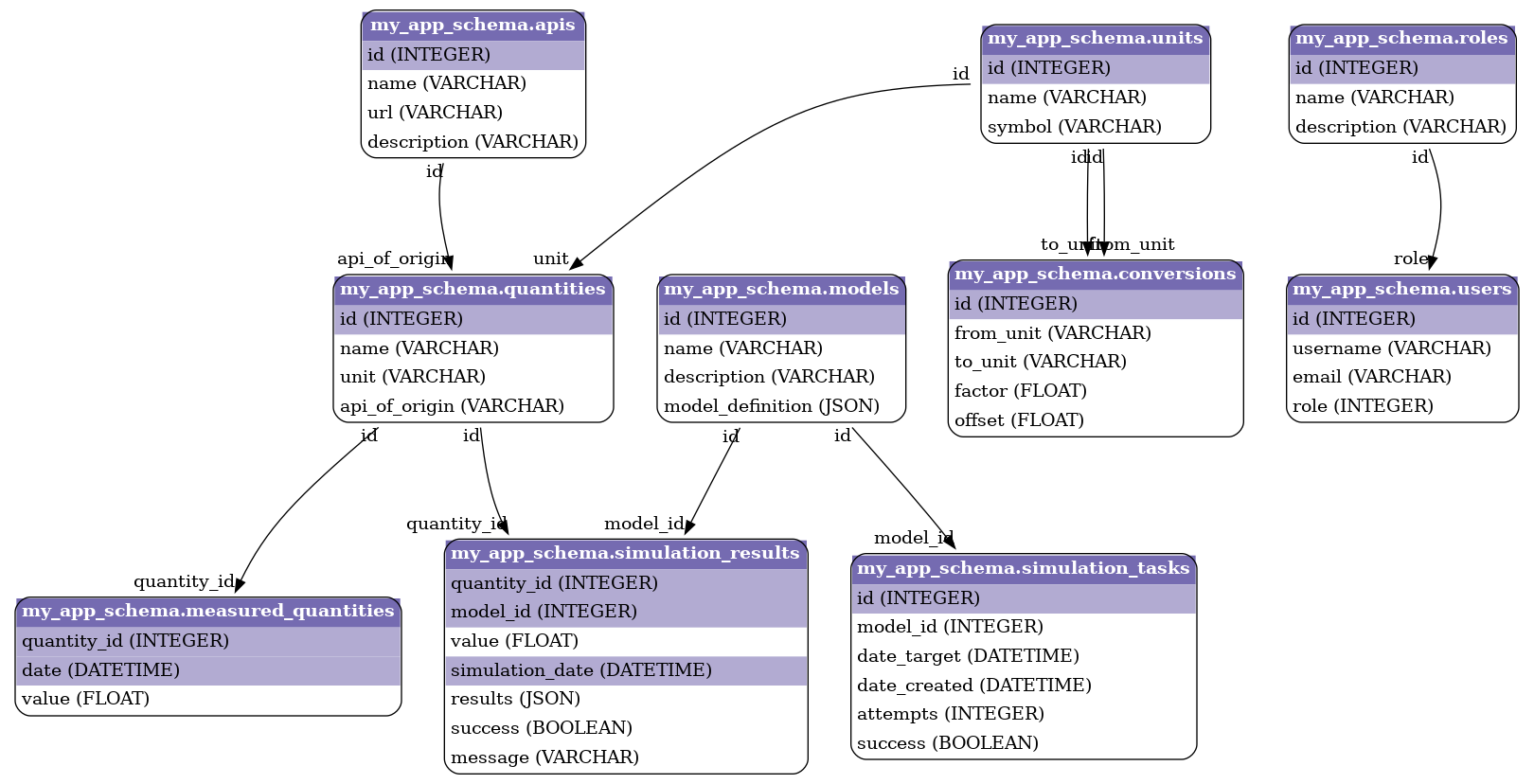
generate_graph_as_png(
        metadata=MySQLAlchemySchema.metadata,
        filename=filename,
        style_options="purple_rounded",
        display_legend=False,
        rankdir="TD",
        splines = "curved",
)
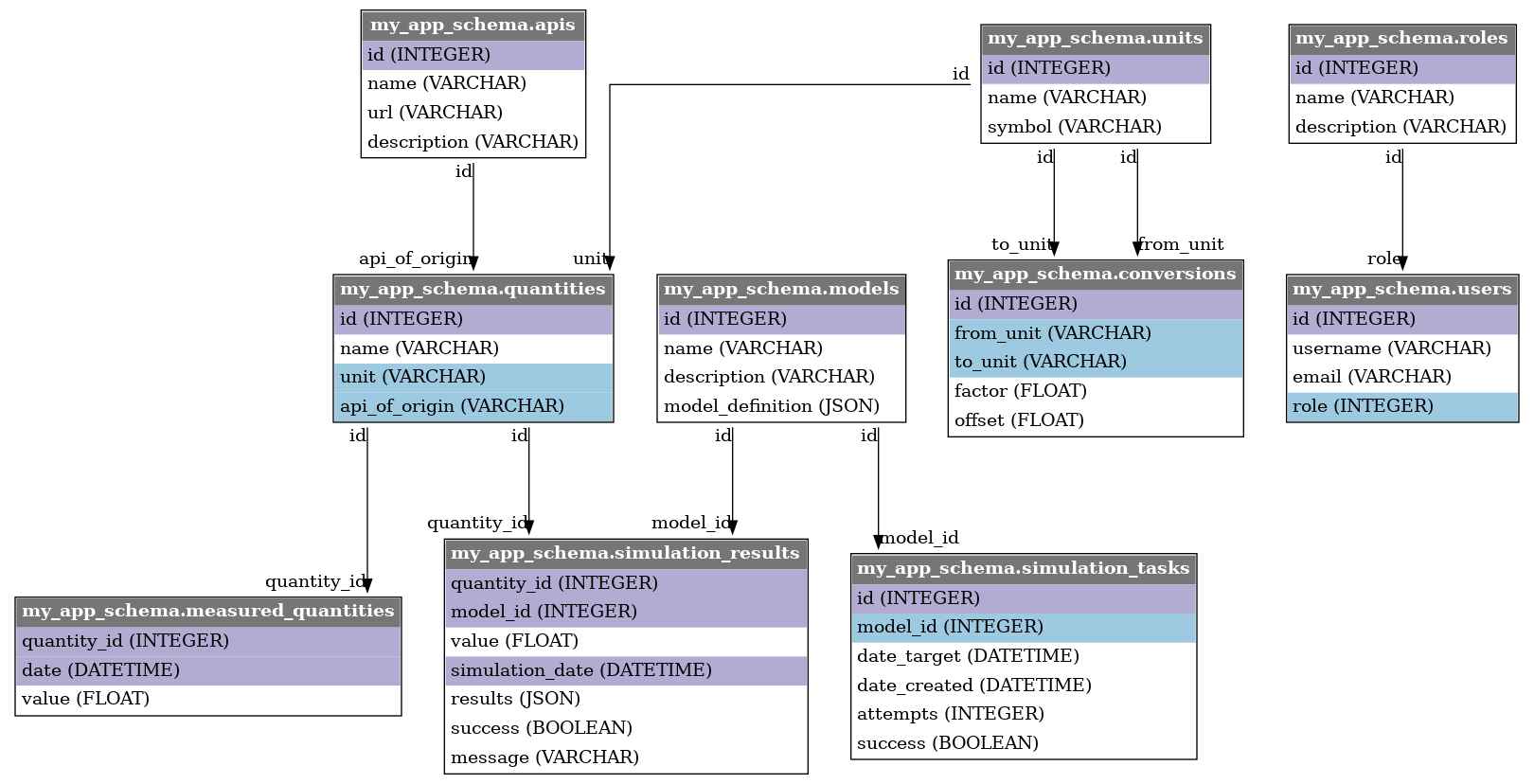
generate_graph_as_png(
        metadata=MySQLAlchemySchema.metadata,
        filename=filename,
        style_options="purple_blue",
        display_legend=False,
        rankdir="TD",
        splines = "curved",
)
The module also includes a few other functions:
generate_graph_as_svgfor svg pictures generation.generate_graph_as_pydotto get a pydot representation of your declarative base.get_schema_metadata_from_live_databaseto retrieve the metadata from a live database instead of the declarative database
Example with live database:
from sqlalchemy_db_graphing import get_schema_metadata_from_live_database

database_url = f"postgresql+psycopg2://username:password@host:port/db_name"
metadata = get_schema_metadata_from_live_database(url=database_url, schema="my_app_schema")
Credits
This package was created with Cookiecutter and the audreyr/cookiecutter-pypackage project template.
- Cookiecutter: https://github.com/audreyr/cookiecutter
audreyr/cookiecutter-pypackage: https://github.com/audreyr/cookiecutter-pypackage
Release history Release notifications | RSS feed


Download files
Download the file for your platform. If you're not sure which to choose, learn more about installing packages.
Source Distribution
Built Distribution
Filter files by name, interpreter, ABI, and platform.
If you're not sure about the file name format, learn more about wheel file names.
Copy a direct link to the current filters
File details
Details for the file sqlalchemy_db_graphing-0.2.0.tar.gz.
File metadata
- Download URL: sqlalchemy_db_graphing-0.2.0.tar.gz
- Upload date:
- Size: 11.4 kB
- Tags: Source
- Uploaded using Trusted Publishing? Yes
- Uploaded via: twine/5.1.1 CPython/3.12.7
File hashes
| Algorithm | Hash digest | |
|---|---|---|
| SHA256 |
a6380e10604dea99132f9cf3571baecc94694fe0516d358de9294d07e4865385
|
|
| MD5 |
a927fc573237c2365e00342ecce2f2dc
|
|
| BLAKE2b-256 |
f04d4d15769403804fd7ae453b33f0f1fccba60f84e8d7b59b4e289d66da05f6
|
Provenance
The following attestation bundles were made for sqlalchemy_db_graphing-0.2.0.tar.gz:
Publisher:
publish.yaml on erwann-met/sqlalchemy-db-graphing
-
Statement:
-
Statement type:
https://in-toto.io/Statement/v1 -
Predicate type:
https://docs.pypi.org/attestations/publish/v1 -
Subject name:
sqlalchemy_db_graphing-0.2.0.tar.gz -
Subject digest:
a6380e10604dea99132f9cf3571baecc94694fe0516d358de9294d07e4865385 - Sigstore transparency entry: 151729356
- Sigstore integration time:
-
Permalink:
erwann-met/sqlalchemy-db-graphing@74e2f15a00e1675da8f0f6293c4548ab01568cd0 -
Branch / Tag:
refs/tags/v0.2.0 - Owner: https://github.com/erwann-met
-
Access:
public
-
Token Issuer:
https://token.actions.githubusercontent.com -
Runner Environment:
github-hosted -
Publication workflow:
publish.yaml@74e2f15a00e1675da8f0f6293c4548ab01568cd0 -
Trigger Event:
release
-
Statement type:
File details
Details for the file sqlalchemy_db_graphing-0.2.0-py3-none-any.whl.
File metadata
- Download URL: sqlalchemy_db_graphing-0.2.0-py3-none-any.whl
- Upload date:
- Size: 8.7 kB
- Tags: Python 3
- Uploaded using Trusted Publishing? Yes
- Uploaded via: twine/5.1.1 CPython/3.12.7
File hashes
| Algorithm | Hash digest | |
|---|---|---|
| SHA256 |
5d311f60cb51869d332d7bddae7f6bb002561995df67f64fea9562b6b95f788f
|
|
| MD5 |
8b2cd4918682ba03cb2d6512c95cba07
|
|
| BLAKE2b-256 |
88662732d90eab313af93b84ce85bb9f18a805f57bfa085efba6a4d7e237f3c7
|
Provenance
The following attestation bundles were made for sqlalchemy_db_graphing-0.2.0-py3-none-any.whl:
Publisher:
publish.yaml on erwann-met/sqlalchemy-db-graphing
-
Statement:
-
Statement type:
https://in-toto.io/Statement/v1 -
Predicate type:
https://docs.pypi.org/attestations/publish/v1 -
Subject name:
sqlalchemy_db_graphing-0.2.0-py3-none-any.whl -
Subject digest:
5d311f60cb51869d332d7bddae7f6bb002561995df67f64fea9562b6b95f788f - Sigstore transparency entry: 151729357
- Sigstore integration time:
-
Permalink:
erwann-met/sqlalchemy-db-graphing@74e2f15a00e1675da8f0f6293c4548ab01568cd0 -
Branch / Tag:
refs/tags/v0.2.0 - Owner: https://github.com/erwann-met
-
Access:
public
-
Token Issuer:
https://token.actions.githubusercontent.com -
Runner Environment:
github-hosted -
Publication workflow:
publish.yaml@74e2f15a00e1675da8f0f6293c4548ab01568cd0 -
Trigger Event:
release
-
Statement type:






