
Sqlite Index Blaster for Python
This library provides API for creating huge Sqlite indexes at breakneck speeds for millions of records much faster than the official SQLite library by leaving out crash recovery.
This repo exploits a lesser known feature of the Sqlite database file format to store records as key-value pairs or documents or regular tuples.
This repo is a pybind11 wrapper for the C++ lib at https://github.com/siara-cc/sqlite_blaster
Statement of need
There are a number of choices available for fast insertion of records, such as Rocks DB, LMDB and MongoDB but even they are slow due to overheads of using logs or journals for providing durability. These overheads are significant for indexing huge datasets.
This library was created for inserting/updating billions of entries for arriving at word/phrase frequencies for building dictionaries for the Unishox project using publicly available texts and conversations.
Furthermore, the other choices don't have the same number of IDEs or querying abilities of the most popular Sqlite data format.
Applications
- Lightning fast index creation for huge datasets
- Fast database indexing for embedded systems
- Fast data set creation and loading for Data Science and Machine Learning
Performance
The performance of this repo was compared with the Sqlite official library, LMDB and RocksDB under similar conditions of CPU, RAM and NVMe disk and the results are shown below:
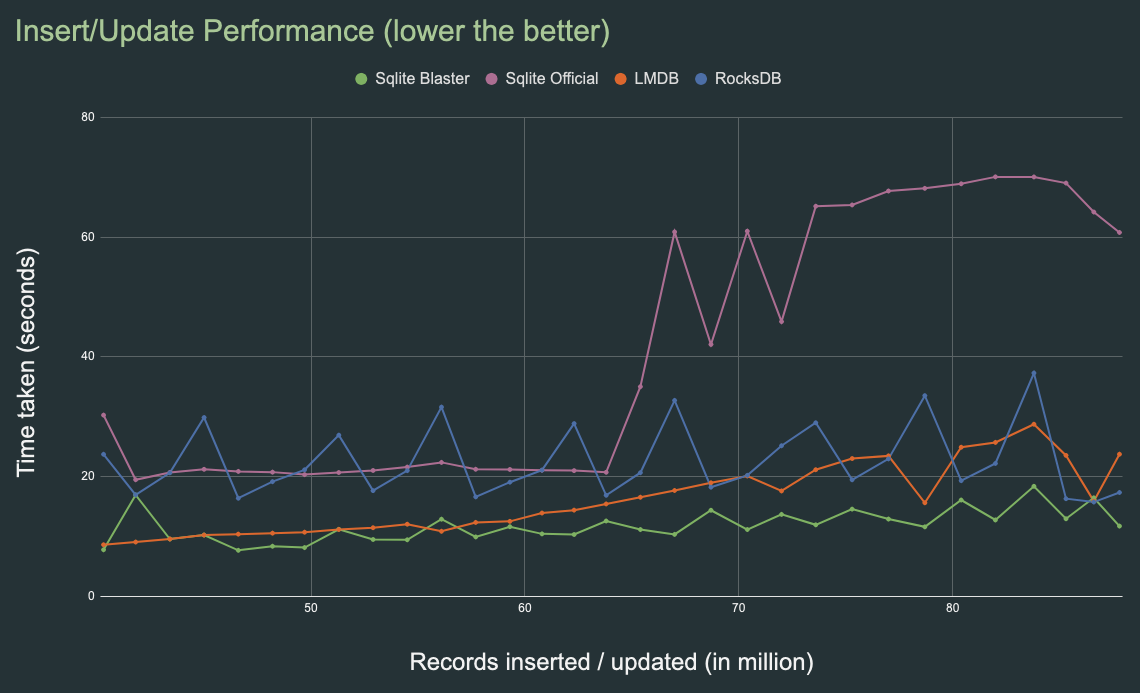
RocksDB performs much better than other choices and performs consistently for over billion entries, but it is quite slow initially.
The chart data can be found here.
Building and running tests
Clone this repo and run:
python3 setup.py test
Note: This only builds the module. To run tests, install pytest and run:
pip3 install pytest
pytest
To install the module, run:
mkdir build
cd build
cmake ..
make
pip3 install ./sqlite_blaster_python
Getting started
Essentially, the library provides 4 methods put_string(), get_string(), put_rec(), get_rec() for inserting and retrieving records. Shown below are examples of how this library can be used to create a key-value store, or a document store or a regular table.
Note: The cache size is used as 40kb in these examples, but in real life 32mb or 64mb would be ideal. The higher this number, better the performance.
Creating a Key-Value store
In this mode, a table is created with just 2 columns, key and value as shown below:
import sqlite_blaster_python

col_names = ["key", "value"]
sqib = sqlite_blaster_python.sqlite_index_blaster(2, 1, col_names, "imain", 4096, 40000, "kv_idx.db")
sqib.put_string("hello", "world")
sqib.close()
A file kv_idx.db is created and can be verified by opening it using sqlite3 official console program:
sqlite3 kv_idx.db ".dump"
and the output would be:
PRAGMA foreign_keys=OFF;
BEGIN TRANSACTION;
CREATE TABLE kv_index (key, value, PRIMARY KEY (key)) WITHOUT ROWID;
INSERT INTO kv_index VALUES('hello','world');
COMMIT;
To retrieve the inserted values, use get method as shown below
import sqlite_blaster_python

col_names = ["key", "value"]
sqib = sqlite_blaster_python.sqlite_index_blaster(2, 1, col_names, "imain", 4096, 40, "kv_idx.db")
sqib.put_string("hello", "world")
print("Value of hello is", sqib.get_string("hello", "not_found"))
sqib.close()
The second parameter to get_string is for specifying what value is to be returned when the 1st parameter could not be found in the database index.
Creating a Document store
In this mode, a table is created with just 2 columns, key and doc as shown below:
import sqlite_blaster_python

json1 = '{"name": "Alice", "age": 25, "email": "alice@example.com"}'
json2 = '{"name": "George", "age": 32, "email": "george@example.com"}'

col_names = ["key", "doc"]
sqib = sqlite_blaster_python.sqlite_index_blaster(2, 1, col_names, "doc_index", 4096, 40, "doc_store.db")
sqib.put_string("primary_contact", json1)
sqib.put_string("secondary_contact", json2)
sqib.close()
The index is created as doc_store.db and the json values can be queried using sqlite3 console as shown below:
SELECT json_extract(doc, '$.email') AS email
FROM doc_index
WHERE key = 'primary_contact';
Creating a regular table
This repo can be used to create regular tables with primary key(s) as shown below:
import sqlite_blaster_python

col_names = ["student_name", "age", "maths_marks", "physics_marks", "chemistry_marks", "average_marks"]
sqib = sqlite_blaster_python.sqlite_index_blaster(6, 2, col_names, "student_marks", 4096, 40, "student_marks.db")

sqib.put_rec(["Robert", 19, 80, 69, 98, round((80+69+98)/3, 2)])
sqib.put_rec(["Barry", 20, 82, 99, 83, round((82+99+83)/3, 2)])
sqib.put_rec(["Elizabeth", 23, 84, 89, 74, round((84+89+74)/3, 2)])

sqib.get_rec(["Elizabeth", 23])

sqib.close()
The index is created as student_marks.db and the data can be queried using sqlite3 console as shown below:
sqlite3 student_marks.db "select * from student_marks"
Barry|20|82|99|83|88.0
Elizabeth|23|84|89|74|82.33
Robert|19|80|69|98|82.33
Constructor parameters of sqlite_index_blaster class
total_col_count- Total column count in the indexpk_col_count- Number of columns to use as key. These columns have to be positioned at the beginningcol_names- Column names to create the tabletbl_name- Table (clustered index) nameblock_sz- Page size (must be one of 512, 1024, 2048, 4096, 8192, 16384, 32768 or 65536)cache_sz- Size of LRU cache in kilobytes. 32 or 64 mb would be ideal. Higher values lead to better performancefname- Name of the Sqlite database file
Limitations
-
No crash recovery. If the insertion process is interruped, the database would be unusable.
-
The record length cannot change for update. Updating with lesser or greater record length is not implemented yet.
-
Deletes are not implemented yet. This library is intended primarily for fast inserts.
-
Support for concurrent inserts not implemented yet.
-
The regular ROWID table of Sqlite is not implemented.
-
Key lengths are limited depending on page size as shown in the table below. This is just because the source code does not implement support for longer keys. However, this is considered sufficient for most practical purposes.
Page Size Max Key Length 512 35 1024 99 2048 227 4096 484 8192 998 16384 2026 32768 4082 65536 8194
License
Sqlite Index Blaster and its command line tools are dual-licensed under the MIT license and the AGPL-3.0. Users may choose one of the above.
- The MIT License
- The GNU Affero General Public License v3 (AGPL-3.0)
Credits
- The template for developing this Python binding was taken from the
pybindrepo https://github.com/pybind/cmake_example (See PYBIND_LICENSE file) ChatGPTwas used in quickly figuring out the intricacies ofpybind11
Support
If you face any problem, create issue in this website, or write to the author (Arundale Ramanathan) at arun@siara.cc.
1 maintainer

Metadata
1 maintainer
Release files for sqlite-blaster-python 0.0.3
For a detailed explanation of source distributions (sdists) and built distributions (wheels), please see the package formats documentation.
Source distribution (sdist)
| File | Size | Uploaded | |
|---|---|---|---|
| sqlite_blaster_python-0.0.3.tar.gz | 16.8 MB | Details |
Release files / sqlite_blaster_python-0.0.3.tar.gz
| Download URL | sqlite_blaster_python-0.0.3.tar.gz |
|---|---|
| Size | 16.8 MB |
| Tags | Source |
|
SHA-256 checksum How to use checksums |
adb0550a36a88ba7cc3302720b82487bd75764cd1b6eb372e6bd0631a7525f91
|
|
BLAKE2b-256 checksum How to use checksums |
f9be148526c6ea64a3e7ea02089fba02fee9ff4428c530d38e10f521758e9473
|
| Upload date | |
|
Uploaded using Trusted Publishing? What is trusted publishing? |
No |
| Uploaded via |
twine/4.0.2 CPython/3.10.8
|













