
AI-powered SQL injection testing tool with multiple AI providers

Project description
SQLMap AI Assistant
An AI-powered wrapper around SQLMap that makes SQL injection testing more accessible and automated.
Features
- AI-assisted SQL injection testing
- Automated result analysis and next step suggestions
- User-friendly output and reporting
- NEW: Adaptive step-by-step testing with DBMS-specific optimizations and WAF bypass
- NEW: Ollama support for local AI analysis
Quick Start
Step 1: Install SQLMap AI
# Clone the repository
git clone https://github.com/atiilla/sqlmap-ai.git
cd sqlmap-ai

# Install the package
pip install -e .

# Run installation check (sets up SQLMap and creates config files)
sqlmap-ai --install-check

pip install sqlmap-ai
Step 2: Configure AI Providers
Choose one or more AI providers to use:
Option A: Groq (Recommended - Fastest)
- Get a free API key from https://console.groq.com
- Add to your
.envfile:
GROQ_API_KEY=your_groq_api_key_here
Option B: OpenAI
- Get an API key from https://platform.openai.com
- Add to your
.envfile:
OPENAI_API_KEY=your_openai_api_key_here
Option C: Anthropic (Claude)
- Get an API key from https://console.anthropic.com
- Add to your
.envfile:
ANTHROPIC_API_KEY=your_anthropic_api_key_here
Option D: Ollama (Local AI - Privacy Focused)
- Install Ollama: https://ollama.ai/download
- Start Ollama service:
ollama serve
- Download a model:
ollama pull llama3.2
- Enable in your
.envfile:
ENABLE_OLLAMA=true
OLLAMA_MODEL=llama3.2
Step 3: Run Configuration Wizard
# Interactive setup
sqlmap-ai --config-wizard
This will:
- Check your AI provider setup
- Let you select Ollama models (if using Ollama)
- Configure security settings
- Set up SQLMap options
Step 4: Test Your Setup
# Check if everything is working
sqlmap-ai --check-providers

# List available Ollama models (if using Ollama)
sqlmap-ai --list-ollama-models
Usage Examples
Basic SQL Injection Test
# Test a vulnerable website
sqlmap-ai -u "http://example.com/page.php?id=1"

# Use specific AI provider
sqlmap-ai -u "http://example.com/page.php?id=1" --ai-provider groq
HTTP Request File Testing (NEW!)
# Test using HTTP request capture file
sqlmap-ai -r request.txt

# Enhanced mode with request file and adaptive testing
sqlmap-ai --enhanced --adaptive -r request.txt

# With specific AI provider
sqlmap-ai --enhanced -r request.txt --ai-provider groq

# Simple mode with request file
sqlmap-ai --simple -r request.txt
Request File Format:
POST /login.php HTTP/1.1
Host: example.com
User-Agent: Mozilla/5.0 (Windows NT 10.0; Win64; x64) AppleWebKit/537.36
Accept: text/html,application/xhtml+xml,application/xml;q=0.9
Content-Type: application/x-www-form-urlencoded
Content-Length: 38

username=admin&password=test
Creating Request Files:
-
From Browser Developer Tools:
- Open Developer Tools (F12)
- Go to Network tab
- Perform the action you want to test
- Right-click the request → Copy → Copy as cURL
- Convert cURL to HTTP format
-
From Burp Suite:
- Intercept the request
- Right-click → Save item
- Save as .txt file
-
From OWASP ZAP:
- Right-click request → Export → HTTP Message
- Save as .txt file
Supported Request Types:
- GET requests with parameters
- POST requests with form data
- POST requests with JSON data
- Requests with cookies
- Requests with custom headers
- Multipart form data
Advanced Testing
# Adaptive testing (recommended)
sqlmap-ai --adaptive

# Simple mode (basic SQLMap without AI)
sqlmap-ai --simple -u "http://example.com/page.php?id=1"

# Enhanced mode with custom options
sqlmap-ai --enhanced -u "http://example.com/page.php?id=1" --level 3 --risk 2
AI Provider Selection
# Use Groq (fastest)
sqlmap-ai -u "http://example.com/page.php?id=1" --ai-provider groq

# Use Ollama (local, private)
sqlmap-ai -u "http://example.com/page.php?id=1" --ai-provider ollama

# Use OpenAI
sqlmap-ai -u "http://example.com/page.php?id=1" --ai-provider openai

# Auto-select best available
sqlmap-ai -u "http://example.com/page.php?id=1" --ai-provider auto
Complete Testing Workflow
# 1. Basic scan with URL
sqlmap-ai -u "http://example.com/page.php?id=1"

# 2. Enhanced scan with request file
sqlmap-ai --enhanced --adaptive -r captured_request.txt

# 3. Advanced scan with custom options
sqlmap-ai --enhanced -r request.txt --level 4 --risk 3 --threads 10

# 4. Simple mode for quick testing
sqlmap-ai --simple -r request.txt --batch
Testing Modes
Enhanced Mode (Default)
Full AI-powered testing with advanced features:
# Basic enhanced scan
sqlmap-ai --enhanced -u "http://example.com/page.php?id=1"

# With request file
sqlmap-ai --enhanced -r request.txt

# Adaptive testing with AI analysis
sqlmap-ai --enhanced --adaptive -r request.txt --ai-provider groq
Features:
- AI-powered vulnerability analysis
- Adaptive testing strategies
- WAF evasion techniques
- Beautiful HTML reports
- Risk assessment and remediation guidance
- Interactive CLI with progress tracking
- Multiple AI providers (Groq, OpenAI, Anthropic, Ollama)
- Advanced configuration management
- Request file support (NEW!)
Simple Mode
Basic SQL injection testing without AI features:
# Basic simple scan
sqlmap-ai --simple -u "http://example.com/page.php?id=1"

# With request file
sqlmap-ai --simple -r request.txt

# Quick batch mode
sqlmap-ai --simple -r request.txt --batch
Features:
- Basic SQL injection detection
- Standard SQLMap functionality
- Minimal dependencies
- Fast execution
- Request file support (NEW!)
- Simple text output
- Basic result saving
Adaptive Mode
Intelligent step-by-step testing that adapts to the target:
# Full adaptive testing
sqlmap-ai --enhanced --adaptive -r request.txt

# With specific AI provider
sqlmap-ai --enhanced --adaptive -r request.txt --ai-provider groq
Adaptive Steps:
- 🟢 Initial Assessment - Check for SQL injection vulnerabilities
- 🟠 DBMS Identification - Detect database type (MySQL, PostgreSQL, etc.)
- 🔴 Enhanced Testing - Try more aggressive techniques
- 🟣 Data Extraction - Extract valuable data from identified tables
- 🤖 AI Analysis - Get AI recommendations for next steps
AI Providers Comparison
| Provider | Setup | Speed | Privacy | Cost |
|---|---|---|---|---|
| Groq | API Key | ⚡ Fastest | Cloud | Free tier available |
| OpenAI | API Key | ⚡ Fast | Cloud | Pay per use |
| Anthropic | API Key | ⚡ Fast | Cloud | Pay per use |
| Ollama | Local install | Fast | 🔒 Local | Free |
Configuration Files
.env File
Created automatically by sqlmap-ai --install-check:
# AI Provider API Keys
GROQ_API_KEY=your_groq_api_key_here
OPENAI_API_KEY=your_openai_api_key_here
ANTHROPIC_API_KEY=your_anthropic_api_key_here

# Ollama Settings (if using local AI)
ENABLE_OLLAMA=false
OLLAMA_BASE_URL=http://localhost:11434
OLLAMA_MODEL=llama3.2

# Security Settings
MAX_REQUESTS_PER_MINUTE=60
SAFE_MODE=true
AUDIT_LOGGING=true
config.yaml
Created automatically by sqlmap-ai --config-wizard:
version: "2.0"
security:
  safe_mode: true
  max_requests_per_minute: 60
  audit_logging: true

sqlmap:
  default_timeout: 120
  default_risk: 1
  default_level: 1
  default_threads: 5

ui:
  show_banner: true
  interactive_mode: false
Troubleshooting
Common Issues
1. "No AI providers available"
- Check your
.envfile has correct API keys - Run
sqlmap-ai --check-providersto verify
2. "Ollama not detected"
- Make sure Ollama is running:
ollama serve - Check if models are installed:
ollama list - Verify
.envhasENABLE_OLLAMA=true
3. "SQLMap not found"
- Run
sqlmap-ai --install-checkto install SQLMap - Or install manually:
pip install sqlmap
4. "Configuration issues"
- Run
sqlmap-ai --config-wizardto fix setup - Check
sqlmap-ai --validate-configfor issues
5. "Request file not working"
- Ensure request file has proper HTTP format
- Check that Host header is present
- Verify request file path is correct
- Try with
--simplemode first:sqlmap-ai --simple -r request.txt
6. "URL validation failed"
- When using request files, the URL is automatically extracted
- Ensure request file contains valid HTTP request
- Check that the Host header matches the target domain
Getting Help
# Show all available commands
sqlmap-ai --help

# Show enhanced mode help
sqlmap-ai --enhanced --help

# Show simple mode help
sqlmap-ai --simple --help
Advanced Features
Adaptive Testing Mode
Automatically adapts testing strategy based on target:
sqlmap-ai --adaptive
This mode:
- Initial Assessment - Check for SQL injection vulnerabilities
- DBMS Identification - Detect database type
- DBMS-Specific Attacks - Use optimized techniques
- WAF Bypass - Automatically select tamper scripts
- Data Extraction - Extract sensitive information
- Alternative Testing - Test POST, cookies, headers
Ollama Model Selection
If using Ollama, you can select different models:
# List available models
sqlmap-ai --list-ollama-models

# Interactive model selection
sqlmap-ai --config-wizard
Popular models:
- llama3.2 - Good general performance
- codellama - Specialized for code analysis
- mistral - Fast and efficient
- qwen2.5 - Good reasoning capabilities
Result:
{
  "timestamp": 1755896586,
  "scan_info": {
    "vulnerable_parameters": [
      "cat"
    ],
    "techniques": [
      "MySQL"
    ],
    "databases": [],
    "tables": [],
    "columns": {},
    "dbms": "back-end DBMS: MySQL >= 5.6",
    "os": "Unknown",
    "waf_detected": false,
    "web_app": [],
    "payloads": [],
    "raw_result": "[+] the following parameters are vulnerable to SQL injection:\n    Parameter: cat (GET)\n[+] back-end DBMS: back-end DBMS: MySQL >= 5.6\n[+] banner: 8.0.22-0ubuntu0.20.04.2",
    "url": "",
    "extracted": {}
  },
  "scan_history": [
    {
      "step": "initial_reconnaissance",
      "command": "sqlmap -u http://testphp.vulnweb.com/listproducts.php?cat=1 --fingerprint --dbs",
      "result": {
        "vulnerable_parameters": [
          "cat"
        ],
        "techniques": [
          "MySQL"
        ],
        "databases": [
          "acuart",
          "information_schema"
        ],
        "tables": [],
        "columns": {},
        "dbms": "back-end DBMS: MySQL >= 5.6",
        "os": "Unknown",
        "waf_detected": false,
        "web_app": [],
        "payloads": [],
        "raw_result": "[+] the following parameters are vulnerable to SQL injection:\n    Parameter: cat (GET)\n[+] back-end DBMS: back-end DBMS: MySQL >= 5.6\n[+] banner: 8.0.22-0ubuntu0.20.04.2\n[+] available databases [2]:\n[*] acuart\n[*] information_schema",
        "url": "",
        "extracted": {}
      }
    },
    {
      "step": "follow_up_scan",
      "command": "sqlmap -u http://testphp.vulnweb.com/listproducts.php?cat=1 ['-D acuart --tables', '-D acuart --columns', '-D acuart -T users --dump']",
      "result": {
        "vulnerable_parameters": [
          "cat"
        ],
        "techniques": [
          "MySQL"
        ],
        "databases": [],
        "tables": [],
        "columns": {},
        "dbms": "back-end DBMS: MySQL >= 5.6",
        "os": "Unknown",
        "waf_detected": false,
        "web_app": [],
        "payloads": [],
        "raw_result": "[+] the following parameters are vulnerable to SQL injection:\n    Parameter: cat (GET)\n[+] back-end DBMS: back-end DBMS: MySQL >= 5.6\n[+] banner: 8.0.22-0ubuntu0.20.04.2",
        "url": "",
        "extracted": {}
      }
    }
  ]
}
Requirements
- Python 3.8+
- SQLMap (installed automatically)
- Internet connection (for cloud AI providers)
- 2GB+ RAM (for Ollama local models)
License
This project is licensed under the MIT License.
Disclaimer
This tool is intended for educational and ethical hacking purposes only. Always obtain permission before testing any system or application. The developers are not responsible for any misuse or damage caused by this tool.
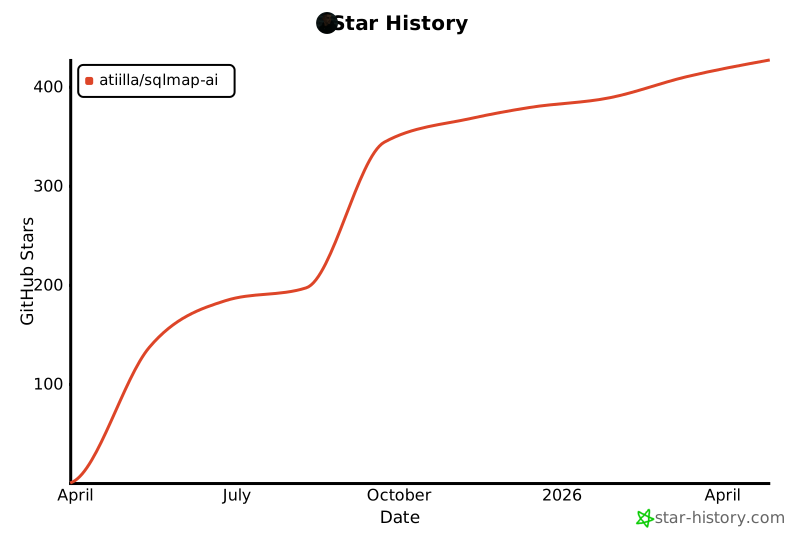
Star History


Download files
Download the file for your platform. If you're not sure which to choose, learn more about installing packages.
Source Distribution
Built Distribution
Filter files by name, interpreter, ABI, and platform.
If you're not sure about the file name format, learn more about wheel file names.
Copy a direct link to the current filters
File details
Details for the file sqlmap_ai-2.0.1.tar.gz.
File metadata
- Download URL: sqlmap_ai-2.0.1.tar.gz
- Upload date:
- Size: 81.0 kB
- Tags: Source
- Uploaded using Trusted Publishing? No
- Uploaded via: twine/6.1.0 CPython/3.13.7
File hashes
| Algorithm | Hash digest | |
|---|---|---|
| SHA256 |
ceb96a866bda2371090527f976e6234b3225b14badabce93ba2c7582de81c242
|
|
| MD5 |
82d4c9361a64870fcd221c7267beba3a
|
|
| BLAKE2b-256 |
a3de310cf797dba5e039a0a23e31ace0003688361febab8133f4aaebb7687c67
|
File details
Details for the file sqlmap_ai-2.0.1-py3-none-any.whl.
File metadata
- Download URL: sqlmap_ai-2.0.1-py3-none-any.whl
- Upload date:
- Size: 78.3 kB
- Tags: Python 3
- Uploaded using Trusted Publishing? No
- Uploaded via: twine/6.1.0 CPython/3.13.7
File hashes
| Algorithm | Hash digest | |
|---|---|---|
| SHA256 |
1f46948010e777a247f7ec31d46f77da72d007033e99c5496a75c3e85c41b9a8
|
|
| MD5 |
9b2892fde44f8b39b42da1374d8b17f1
|
|
| BLAKE2b-256 |
7e7c0e2cd34cbc90e0139b94e75f8609eda49f89033ef8cfb166f4ca3d49dc5b
|






