
sqlmap-gui
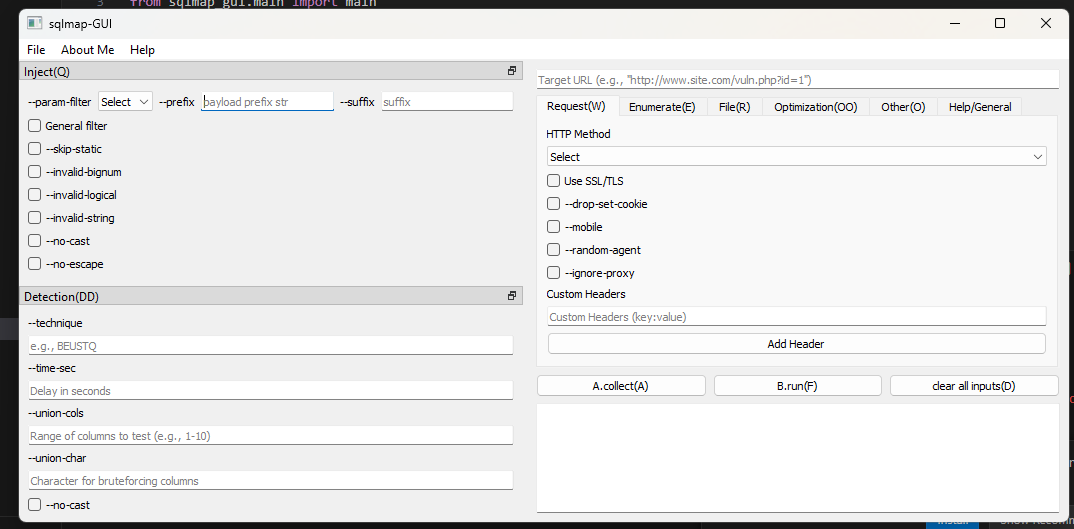
sqlmap-gui is a Python-based graphical user interface (GUI) for interacting with the powerful sqlmap penetration testing tool. This GUI simplifies the use of sqlmap, enabling users to execute SQL injection tests and analyze vulnerabilities without requiring extensive command-line experience.



Features
- User-Friendly Interface: Simplified navigation for sqlmap functionalities.
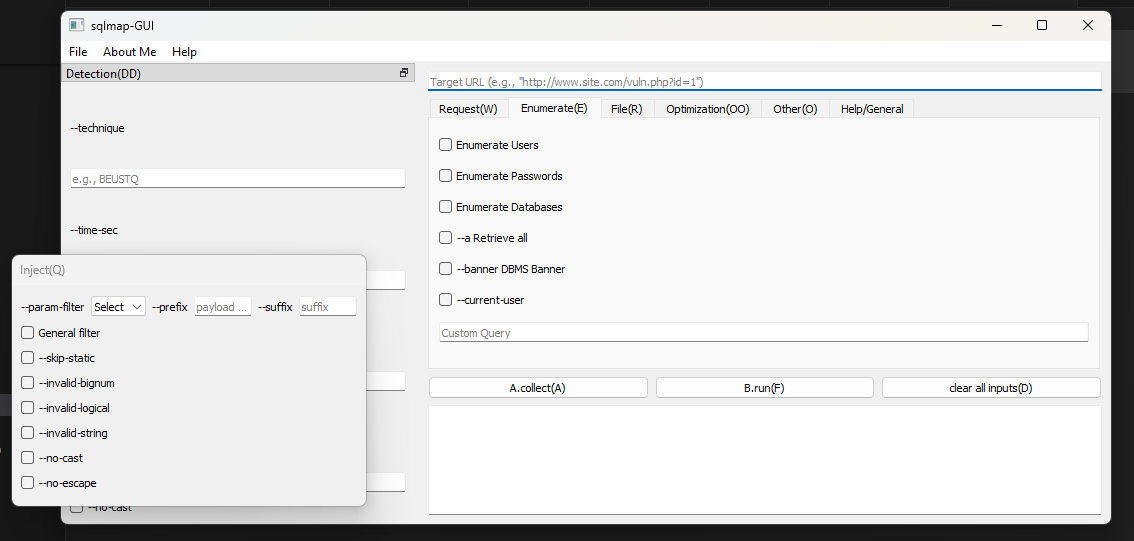
- Comprehensive Options: Access to all popular sqlmap commands with categorized tabs.
- Results Display: Real-time output display for executed sqlmap commands.
- Cross-Platform: Runs on Windows and
Linux(working). - Customizable: Easily add new features or extend the interface.
Screenshots
Installation
Follow these steps to set up the project locally:
Clone the Repository
git clone https://github.com/raselmandol/sqlmap-gui.git
cd sqlmap-gui
Create a Virtual Environment
python -m venv sqlmap_env
sqlmap_env\Scripts\activate    # Windows
Install Dependencies
pip install -r requirements.txt
Build
pip install -e .
Run the Application
python sqlmap_gui
Build Executable (Windows)
if you want to build an .exe:
Install PyInstaller:
pip install pyinstaller
Note: Already added in
requirements.txt. (If you want to ignore it, make sure to remove it fromrequirements.txt.)
Convert your PNG icon to ICO.
Run:
pyinstaller --name sqlmap-gui --onefile --windowed --icon=icon.ico sqlmap_gui/main.py
Builder Script (builder.bat)
Usage
Run the script with one of the following flags:
builder.bat --build
Builds the project using pip install -e .
builder.bat --run
Runs the main application using python sqlmap_gui.
builder.bat --exe
Builds a standalone executable using PyInstaller. Configuration parameters are loaded from config.txt.
Note: To use
--activate, run./builder.ps1 --activateinstead of./builder.bat --activate. The PowerShell script (builder.ps1) is more reliable and effective in PowerShell environments, which are commonly used as the default terminal in most IDEs (such as Visual Studio Code).
How to Use
- Launch the GUI (
python sqlmap_gui). - Navigate through the tabs to explore sqlmap commands:
- Injection Tests: Enter a target URL and customize sqlmap options.
- Advanced Options: Configure sqlmap payloads and settings.
- Execute the command and view results in the output console.
Example
Here is a sample workflow for detecting vulnerabilities on a target website:
- Enter the target URL:
http://example.com/page?id=1. - Select detection options like:
- Technique:
--technique=T - DBMS:
--dbms=mysql
- Technique:
- Click
Runto execute sqlmap. - View results in the output console.
More
To get a list of basic options and switches use:
-h
To get a list of all options and switches use:
-hh
To get an overview of sqlmap capabilities, a list of supported features, and a description of all options and switches, along with examples, you are advised to consult the user's manual. Use extra/optional command input option to use those extra options and switches. You can find Custom Query option in Enumerate tab.
Requirements
- Python 3.8+
- PyQt5
- sqlmap source
Contribution
Contributions are welcome! To contribute:
-
Fork this repository.
-
Create a new branch:
git checkout -b feature-name
-
Commit your changes:
git commit -m "Add new feature"
-
Push to your branch:
git push origin feature-name
-
Open a pull request.
License
This project is licensed under the MIT License, sqlmap license.
To-Do
- Enhance error handling.
- AI Assistant Panel
- Option Recommender (Auto-Suggest Best SQLMap Flags)
- Auto Tamper Script Selector (Based on Response Patterns)
- Vulnerability Summary Generator
- Builder.bat script
- Option to load Sqlmap source/folder selection
- Improve documentation with more examples.
- More tabs/ more options
- JSON import, export
- History Tab
- Optimization tab
- Burp proxy
- sqlmap web
- Clean terminal/editor
- GitHub pages with documentation
1 maintainer

Metadata
1 maintainer
Release files for sqlmap-gui 1.1.0
For a detailed explanation of source distributions (sdists) and built distributions (wheels), please see the package formats documentation.
Source distribution (sdist)
| File | Size | Uploaded | Provenance | |
|---|---|---|---|---|
| sqlmap_gui-1.1.0.tar.gz | 30.5 kB | Without provenance | Details |
Built distribution (wheel)
| File | Interpreter | ABI | Platform | Reset |
|---|---|---|---|---|
| sqlmap_gui-1.1.0-py3-none-any.whl | Python 3 | none | any | Details |
Total release size: 62.6 kB
Release files / sqlmap_gui-1.1.0.tar.gz
| Download URL | sqlmap_gui-1.1.0.tar.gz |
|---|---|
| Size | 30.5 kB |
| Tags | Source |
|
SHA-256 checksum How to use checksums |
f7d10e7a4fd0fb6560ff944a2948109bc256a3b5c154a0213da44c92495006c7
|
|
BLAKE2b-256 checksum How to use checksums |
c37b8e9ffcaafc833fbabfb38565cc16c9c17f7a6784de539c02b4eabe494ca0
|
| Upload date | |
|
Uploaded using Trusted Publishing? What is trusted publishing? |
No |
| Uploaded via |
twine/6.2.0 CPython/3.13.3
|
Release files / sqlmap_gui-1.1.0-py3-none-any.whl
| Download URL | sqlmap_gui-1.1.0-py3-none-any.whl |
|---|---|
| Size | 32.1 kB |
| Tags | Python 3 |
|
SHA-256 checksum How to use checksums |
078f9cf9cea17e685a6e57f06bee49477e55940e4c13ca666455fff11377a6ad
|
|
BLAKE2b-256 checksum How to use checksums |
b64eb7f9d837531885337693e1be236811db9a8871a0c7425d62b13b69f88926
|
| Upload date | |
|
Uploaded using Trusted Publishing? What is trusted publishing? |
No |
| Uploaded via |
twine/6.2.0 CPython/3.13.3
|
Security for sqlmap-gui 1.1.0
Provenance
Provenance describes where a file came from. On PyPI, provenance is shared via attestations, which provide a verifiable record of the build or publishing details. View details, limitations and caveats.
No provenance found
None of the files in this release were uploaded with provenance metadata.
A note on package security
PyPI is a repository for distributing packages, not a service for auditing them. While third-party security researchers and our staff do their best to detect and remove malicious packages, PyPI cannot guarantee the quality, security or suitability of any given package.
To learn more about protecting yourself from malicious actors, visit our package security documentation.













